
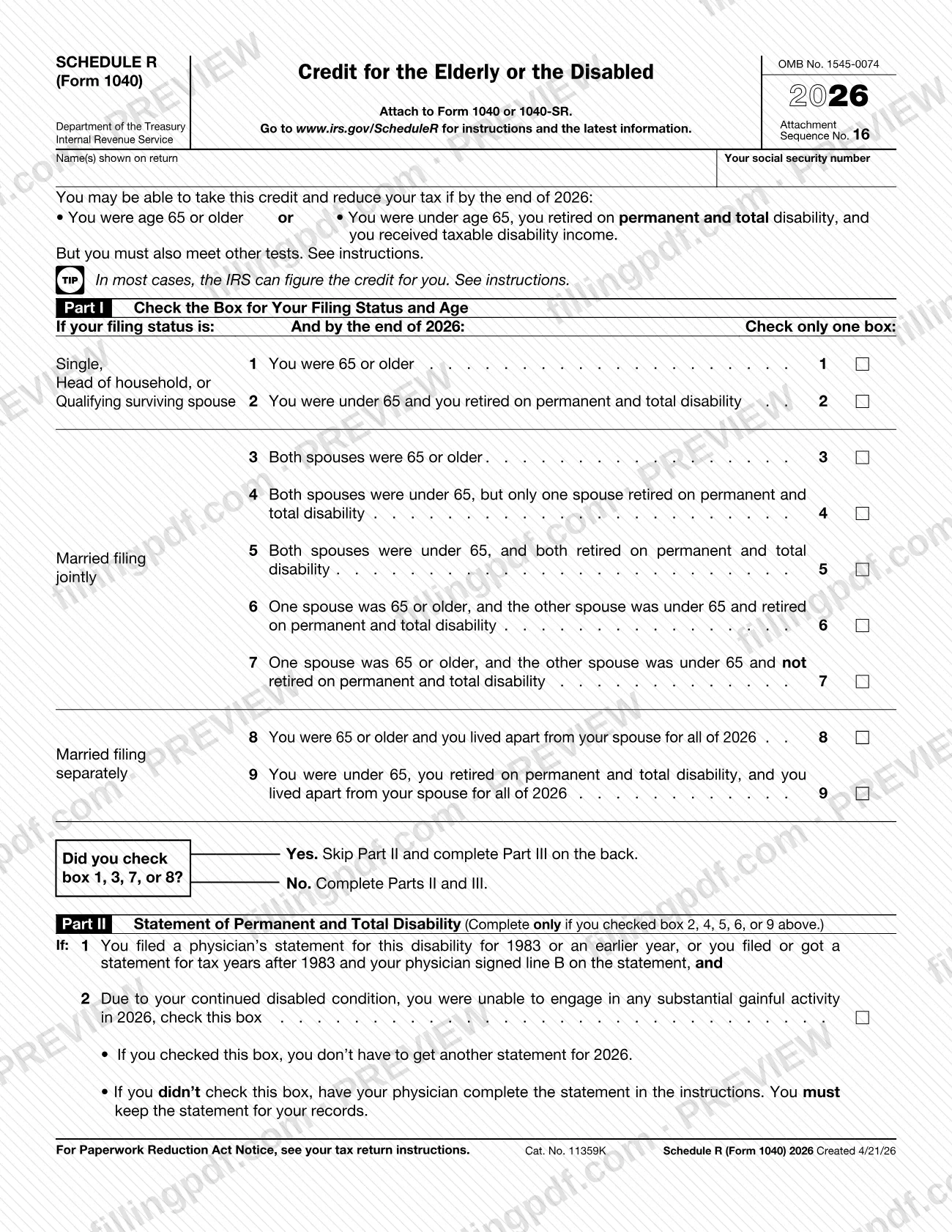
Schedule R (Form 1040), Credit for the Elderly or the Disabled, is the Internal Revenue Service (IRS) schedule that figures a tax credit for people who were 65 or older at the end of 2025, or who were under 65, retired on permanent and total disability and received taxable disability income. You attach it to Form 1040 or Form 1040-SR. On this page you can fill out the schedule online on FillingPDF and download or print the completed PDF; the form and its instructions are published by the IRS at www.irs.gov/ScheduleR.
Last updated
What is Schedule R (Form 1040)?
Schedule R (Form 1040), Credit for the Elderly or the Disabled, is the IRS schedule used to figure the credit for the elderly or the disabled for tax year 2025. It is attached to Form 1040 or Form 1040-SR, and the result carries to Schedule 3 (Form 1040), line 6d.
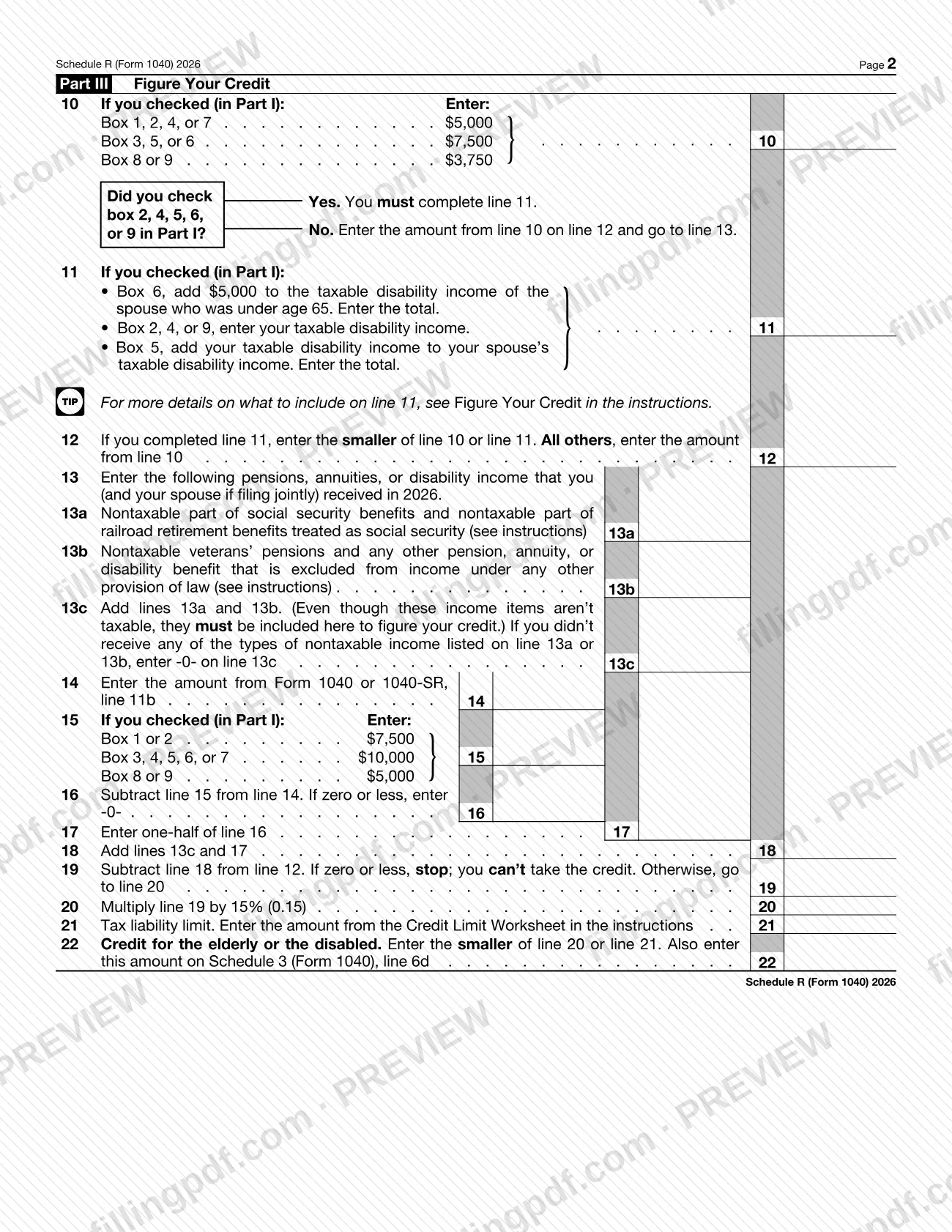
The schedule has three parts. Part I asks you to check one box that combines your filing status and age or disability status. Part II is a statement of permanent and total disability, completed only if you checked box 2, 4, 5, 6 or 9. Part III, lines 10 through 22, works from an initial amount based on your filing status down to the credit, reducing it for nontaxable pensions, annuities and disability income and for adjusted gross income above a set level. Line 22 is the smaller of the amount figured on line 20 and the tax liability limit on line 21.
The form is issued under OMB No. 1545-0074 (Attachment Sequence No. 16). The IRS discontinued Pub. 524, Credit for the Elderly or the Disabled, after its 2023 revision and moved the information into the Instructions for Schedule R. In most cases the IRS can figure the credit for you; the instructions explain which lines to complete if you choose that option.
Who needs to file Schedule R (Form 1040)?
You use Schedule R (Form 1040) if you want to claim the credit for the elderly or the disabled and you are a qualified individual: a U.S. citizen or resident alien (or someone who elects to be treated as a resident alien) who either:
- was age 65 or older at the end of 2025; or
- was under 65, retired on permanent and total disability, received taxable disability income for 2025 and had not reached mandatory retirement age on January 1, 2025.
Your income must also be under the limits in Table 1 of the instructions: both your adjusted gross income (Form 1040 or 1040-SR, line 11a) and your nontaxable social security and other nontaxable pensions, annuities or disability income.
Filing status matters. Married persons generally must file jointly to take the credit. If you file separately, you can claim it only if you lived apart from your spouse at all times during 2025. Certain head of household filers qualify even if the spouse lived with them during the first 6 months of the year.
Exclusions: you can claim the credit only if you file Form 1040 or 1040-SR, not Form 1040-NR. Nonresident aliens generally cannot take it, except under the joint-return or dual-status elections described in the instructions.
When to file Schedule R (Form 1040)
Schedule R (Form 1040) has no due date of its own: you complete it whenever you file a 2025 Form 1040 or Form 1040-SR on which you claim the credit for the elderly or the disabled, and attach it to that return. Age and disability tests are measured at the end of 2025, and the income figures are those for the 2025 tax year. If you are under 65 and need a physician's statement for Part II, have it completed before you finish the schedule; you keep it with your records. For the filing deadline and any extension of the return itself, see the instructions for Form 1040 or 1040-SR.
Documents you need
- Physician's statement of permanent and total disability: needed only if you checked box 2, 4, 5, 6 or 9 in Part I and have no qualifying statement from an earlier year. Keep it for your records; do not file it with the return.
- A separate physician's statement for each spouse if you file jointly and checked box 5 in Part I.
- An earlier physician's statement (for 1983 or an earlier year, or later years with the physician's signature on line B): if you have one, you check the Part II box instead of getting a new statement.
- VA Form 21-0172, signed by a person authorized by the VA: may be used instead of the physician's statement if the Department of Veterans Affairs certifies that you are permanently and totally disabled.
- Credit Limit Worksheet from the instructions: complete it to find the amount for line 21 and keep it for your records.
How to fill out Schedule R (Form 1040)
Enter your name and Social Security number
At the top, enter the name(s) shown on your return and your social security number, as they appear on Form 1040 or 1040-SR.
Check one box in Part I
Find your filing status and your age or disability situation at the end of 2025, and check only one of boxes 1 through 9. The form tells you to skip Part II and go to Part III if you checked box 1, 3, 7 or 8.
Complete Part II if it applies
If you checked box 2, 4, 5, 6 or 9, check the Part II box only if you already filed or got a qualifying physician's statement and were unable to engage in substantial gainful activity in 2025. Otherwise have your physician complete the statement in the instructions and keep it. For boxes 4, 5 or 6, write the spouse's first name above the box on line 2.
Enter your initial amount on line 10
Use the table printed on line 10 to find the amount for the box you checked in Part I.
Figure taxable disability income on line 11
Complete line 11 only if you checked box 2, 4, 5, 6 or 9. Follow the line's instructions for your box: your own income, your spouse's, or both, as the form directs. On line 12, enter the smaller of line 10 or line 11; if you skipped line 11, copy line 10.
Report nontaxable income on lines 13a to 13c
Line 13a: nontaxable social security and railroad retirement benefits treated as social security. Line 13b: nontaxable veterans' pensions and other excluded pensions, annuities or disability benefits. Line 13c: add them, or enter -0- if you had none.
Account for excess adjusted gross income
Line 14: the amount from Form 1040 or 1040-SR, line 11a. Line 15: the amount for your Part I box. Line 16: subtract line 15 from line 14, entering -0- if zero or less. Line 17: one-half of line 16.
Compute lines 18 to 20
Line 18: add lines 13c and 17. Line 19: subtract line 18 from line 12; if zero or less, stop, you cannot take the credit. Line 20: multiply line 19 by the percentage printed on the line.
Apply the tax liability limit
Complete the Credit Limit Worksheet in the instructions and enter its result on line 21. If the worksheet result is zero or less, you cannot take the credit.
Enter the credit on line 22
Enter the smaller of line 20 or line 21 on line 22, and also enter it on Schedule 3 (Form 1040), line 6d.
Review and download the completed PDF
Check that you ticked only one Part I box and that your name and SSN match your return. Download or print the completed PDF from FillingPDF and attach it to Form 1040 or 1040-SR.
How to submit Schedule R (Form 1040)
Schedule R (Form 1040) is submitted as an attachment to Form 1040 or Form 1040-SR; it has no separate address, portal or appointment of its own.
- With your return: attach the completed schedule to your Form 1040 or 1040-SR and send the package the way you file the return.
- Physician's statement: do not send it with the return. The instructions say you do not have to file it but must keep it for your records.
- If you want the IRS to figure the credit: check the box in Part I, complete Part II and lines 11 and 13 of Part III if they apply to you, write "CFE" on the line next to the box on Schedule 3 (Form 1040), line 6d, and attach Schedule R to your return.
Instructions and the latest information are at www.irs.gov/ScheduleR. FillingPDF lets you fill out and download the PDF; submission follows the channels above.
Common mistakes to avoid
- Checking more than one box in Part I; the form says to check only one.
- Completing Part II after checking box 1, 3, 7 or 8; Part II is only for boxes 2, 4, 5, 6 or 9.
- Leaving out the nontaxable part of social security or railroad retirement benefits on line 13a; even though not taxable, they must be included to figure the credit.
- Claiming the credit on a return filed on Form 1040-NR; the instructions allow it only with Form 1040 or 1040-SR.
- Filing as married filing separately after living with your spouse at any time in 2025, which bars the credit unless you file jointly instead.
- Not writing the spouse's first name above the box on line 2 in Part II when you checked box 4, 5 or 6.
- Continuing past line 19 when it is zero or less; the form says to stop, because you cannot take the credit.
- Forgetting to enter the line 22 amount on Schedule 3 (Form 1040), line 6d.
- Attaching the physician's statement to the return when the instructions say to keep it for your records.
- Using Pub. 524 as a current guide; it was discontinued after the 2023 revision and the 2025 instructions replace it.
Frequently asked questions
What is Schedule R (Form 1040)?
Schedule R (Form 1040), Credit for the Elderly or the Disabled, is the IRS schedule that figures the credit of that name. You attach it to Form 1040 or 1040-SR, and the credit from line 22 is entered on Schedule 3 (Form 1040), line 6d.
Who can take the credit for the elderly or the disabled?
A U.S. citizen or resident alien who was 65 or older at the end of 2025, or who was under 65, retired on permanent and total disability and received taxable disability income. Income limits in Table 1 of the instructions also apply, and you must file Form 1040 or 1040-SR.
Can the IRS figure the credit for me?
Yes, in most cases. Check the box in Part I, complete Part II and lines 11 and 13 of Part III if they apply, write "CFE" next to the box on Schedule 3 (Form 1040), line 6d, and attach Schedule R to your return.
Do I have to send a physician's statement with Schedule R?
No. If you checked box 2, 4, 5, 6 or 9 and have no qualifying earlier statement, your physician completes the statement in the instructions, but you only keep it for your records. If you already have one, check the Part II box.
Can I take the credit if I am married filing separately?
Only if you lived apart from your spouse at all times during 2025; box 8 or 9 applies. If you lived with your spouse at any time in 2025, you cannot take it unless you file jointly instead.
Where does the Schedule R credit go on my return?
Enter the line 22 amount on Schedule 3 (Form 1040), line 6d. Line 22 is the smaller of line 20 and the tax liability limit from line 21, which comes from the Credit Limit Worksheet in the instructions.
Where is Publication 524?
The IRS discontinued Pub. 524, Credit for the Elderly or the Disabled; the last revision was for 2023. Its pertinent information is now in the Instructions for Schedule R, and prior revisions remain at IRS.gov/Pub524.
Can I fill out Schedule R (Form 1040) online?
Yes. You can fill out the PDF online on FillingPDF and download or print it. FillingPDF is an independent service and does not file anything with the IRS; you attach the schedule to your Form 1040 or 1040-SR.
Ready to fill out Schedule R (Form 1040)?
Fill out Schedule R (Form 1040) now