
Schedule R (Form 706), Generation-Skipping Transfer Tax, is the Internal Revenue Service (IRS) schedule that you attach to Form 706 to reconcile the decedent's generation-skipping transfer (GST) exemption and to figure GST tax on direct skips. It is used with the estate tax return, and it is also where a special QTIP election under section 2652(a)(3) is made. On this page you can fill out Schedule R (Form 706) online on FillingPDF and download or print the completed PDF. The form and its instructions are published by the IRS at www.irs.gov/Form706.
Last updated
What is Schedule R (Form 706)?
Schedule R (Form 706), Generation-Skipping Transfer Tax, is the IRS schedule attached to Form 706 that reconciles the decedent's generation-skipping transfer (GST) exemption, lets the estate make the special QTIP election, and computes GST tax on direct skips.
The form states that the GST tax is imposed on taxable transfers of interests in property located outside the United States as well as property located inside the United States. The schedule has three parts:
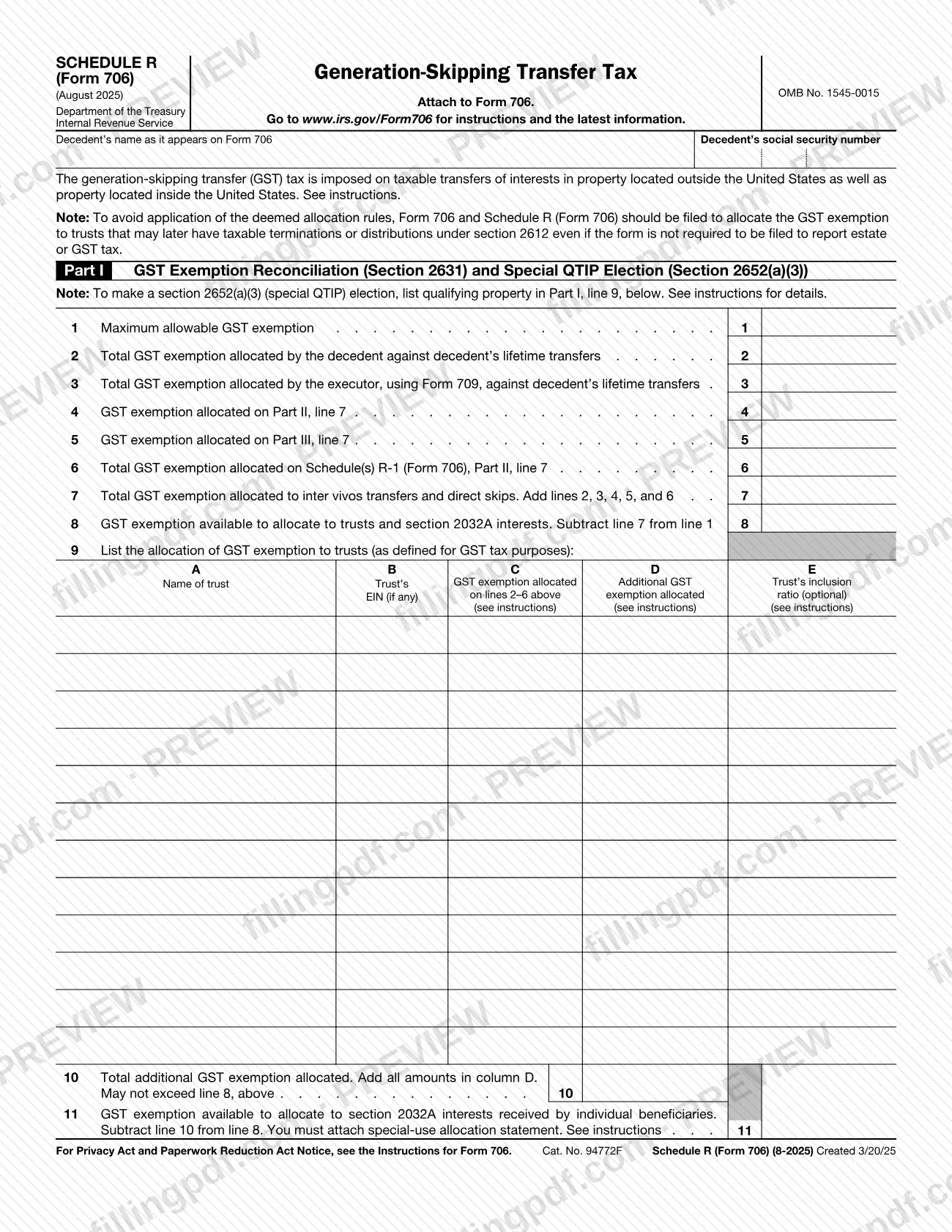
- Part I, GST Exemption Reconciliation (Section 2631) and Special QTIP Election (Section 2652(a)(3)): starts from the maximum allowable GST exemption, subtracts the exemption already allocated, and lists the exemption allocated to trusts. To make the special QTIP election, you list the qualifying property on Part I, line 9.
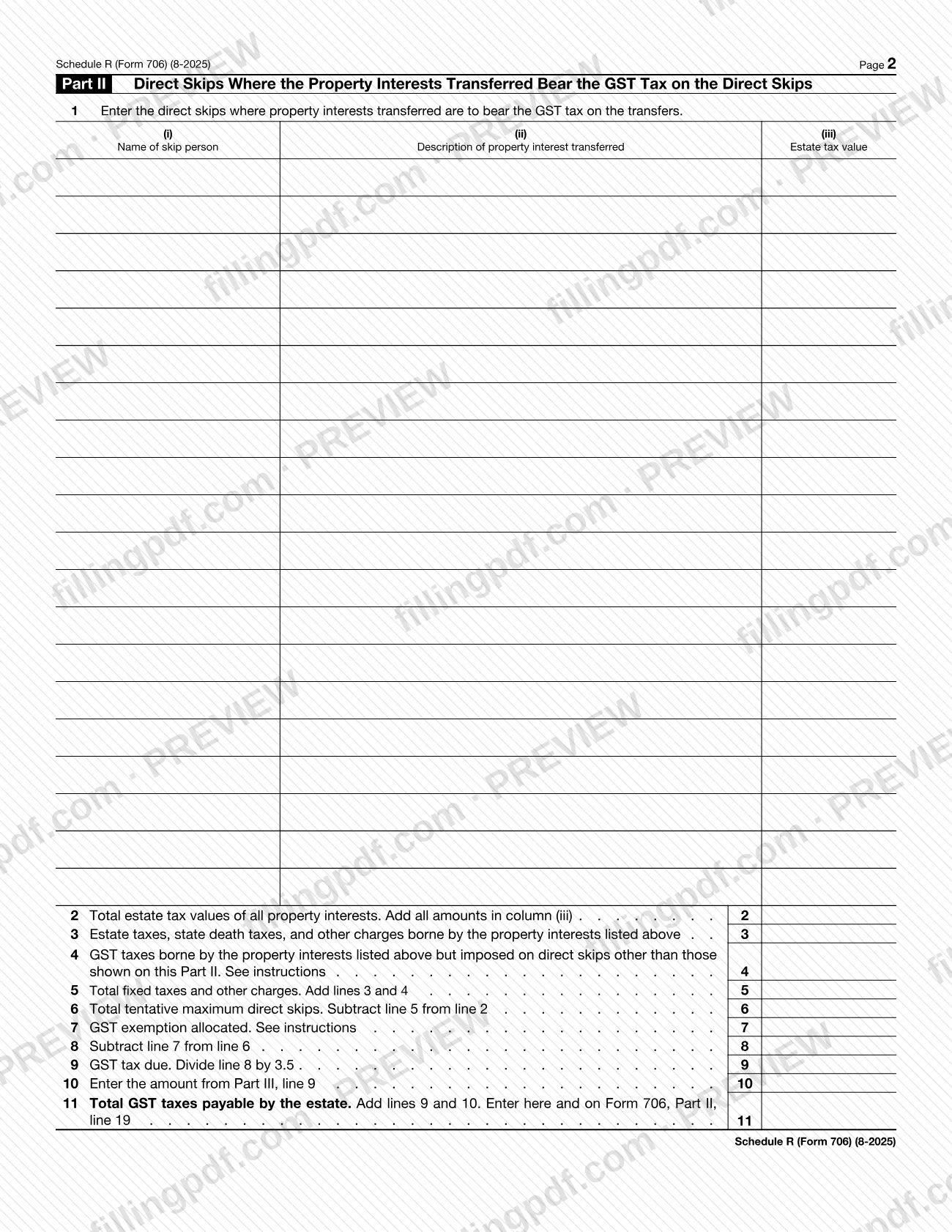
- Part II, Direct Skips Where the Property Interests Transferred Bear the GST Tax on the Direct Skips: computes the GST tax due and the total GST taxes payable by the estate, which go to Form 706, Part II, line 19.
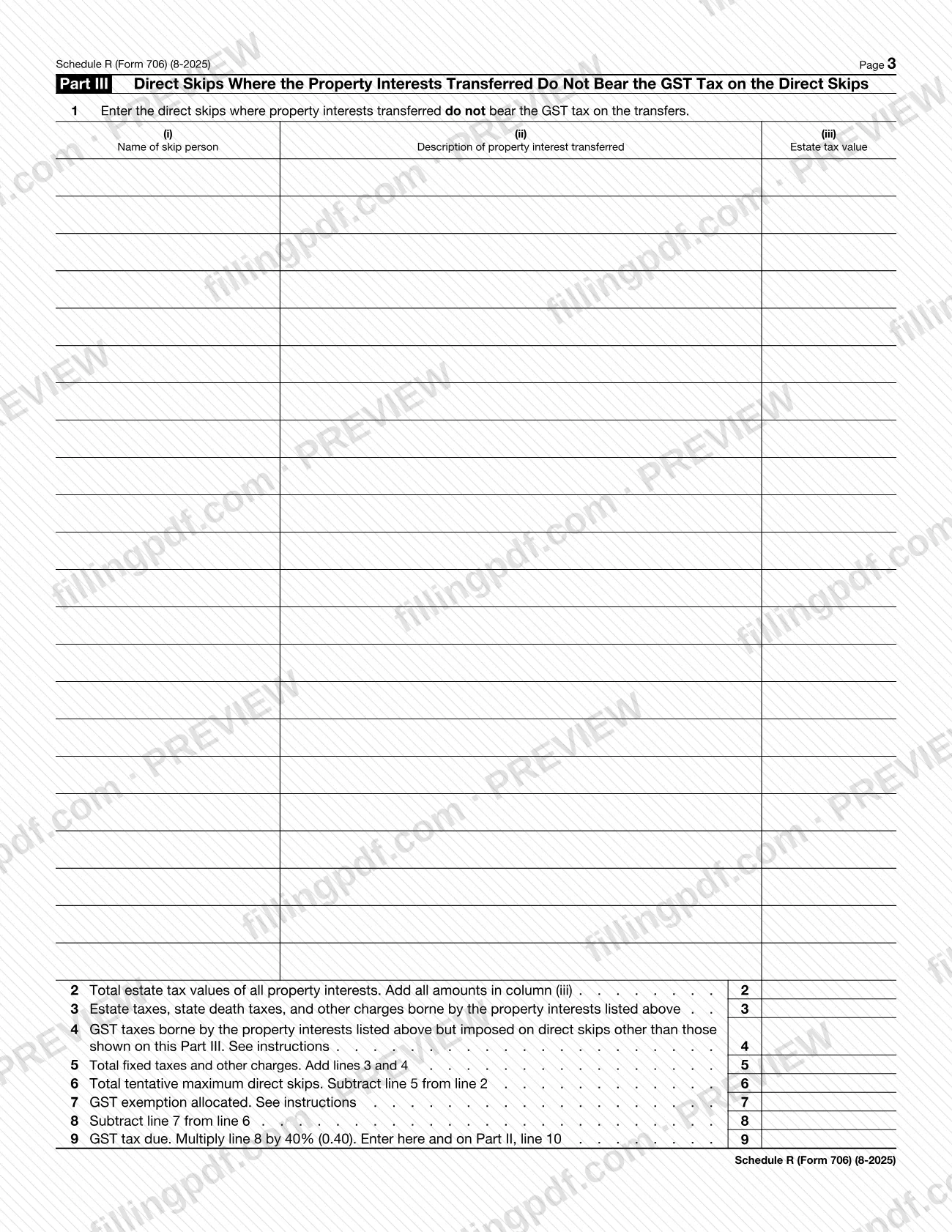
- Part III, Direct Skips Where the Property Interests Transferred Do Not Bear the GST Tax on the Direct Skips: computes GST tax at 40% (0.40) and carries it to Part II, line 10.
Schedule R (Form 706) is not the same document as Schedule R-1 (Form 706): line 6 of this schedule totals the GST exemption allocated on Schedule(s) R-1, Part II, line 7. The form carries OMB No. 1545-0015 and is not filed on its own.
Who needs to file Schedule R (Form 706)?
Schedule R (Form 706) is completed by the person preparing Form 706 for a decedent's estate when the return has generation-skipping transfer (GST) matters to report. The form is built for these situations:
- The estate allocates GST exemption to trusts, or reconciles the exemption the decedent and the executor already allocated to lifetime transfers (Part I, lines 1 to 11).
- The estate wants to make a special QTIP election under section 2652(a)(3), by listing the qualifying property on Part I, line 9.
- The estate reports direct skips, whether the property interests transferred bear the GST tax (Part II) or do not bear it (Part III).
The note printed on the form adds a case that is not about tax owed: to avoid application of the deemed allocation rules, Form 706 and Schedule R should be filed to allocate the GST exemption to trusts that may later have taxable terminations or distributions under section 2612, even if the form is not required to be filed to report estate or GST tax. The form names the decedent and the decedent's Social Security number at the top, and it has no signature block of its own. See the Instructions for Form 706 for eligibility questions.
When to file Schedule R (Form 706)
Schedule R (Form 706) is filed whenever Form 706 is filed, because the form says to attach it to Form 706. It has no separate due date printed on it, so it travels with the return and follows the Form 706 deadline. Check the Instructions for Form 706 at www.irs.gov/Form706 for that deadline.
The form also gives a reason to file in a case where no estate or GST tax is reported: to avoid application of the deemed allocation rules, Form 706 and Schedule R should be filed to allocate the GST exemption to trusts that may later have taxable terminations or distributions under section 2612, even if the form is not required to be filed to report estate or GST tax.
Documents you need
- Special-use allocation statement: the form says you must attach it with Part I, line 11 (GST exemption available to allocate to section 2032A interests received by individual beneficiaries); see the Instructions for Form 706 for its contents.
How to fill out Schedule R (Form 706)
Enter the decedent's name and SSN
At the top, write the decedent's name as it appears on Form 706 and the decedent's Social Security number.
Enter the GST exemption available
Part I, line 1: the maximum allowable GST exemption. Line 2: the total GST exemption the decedent allocated against lifetime transfers. Line 3: the total the executor allocated using Form 709.
Complete the Part II and III parts first
Part I, line 4 takes the GST exemption allocated on Part II, line 7, and line 5 takes the amount from Part III, line 7. Line 6 is the total allocated on Schedule(s) R-1 (Form 706), Part II, line 7.
Total the exemption on lines 7 and 8
Line 7: add lines 2, 3, 4, 5, and 6. Line 8: subtract line 7 from line 1 to find the exemption available for trusts and section 2032A interests.
List allocations to trusts on line 9
For each trust, enter the name and EIN (if any) in columns A and B, the exemption allocated on lines 2 to 6 in column C, the additional exemption allocated in column D and, optionally, the inclusion ratio in column E. List qualifying property here to make the special QTIP election.
Complete lines 10 and 11
Line 10: add all column D amounts; it may not exceed line 8. Line 11: subtract line 10 from line 8, and attach the special-use allocation statement.
List direct skips in Part II
On Part II, line 1, enter each skip person, a description of the property interest transferred and its estate tax value for interests that bear the GST tax. Line 2 totals column (iii).
Figure Part II lines 3 to 8
Enter estate taxes, state death taxes and other charges on line 3 and other GST taxes borne on line 4. Line 5 adds lines 3 and 4, line 6 subtracts line 5 from line 2, line 7 is the GST exemption allocated, and line 8 subtracts line 7 from line 6.
Compute the Part II GST tax
Line 9: divide line 8 by 3.5. Line 10: enter the amount from Part III, line 9. Line 11: add lines 9 and 10 and enter the total on Form 706, Part II, line 19.
List direct skips in Part III
On Part III, line 1, enter skip persons, descriptions and estate tax values for interests that do not bear the GST tax. Then complete lines 2 to 6 the same way as Part II: total, charges, other GST taxes, fixed taxes and tentative maximum direct skips.
Finish Part III lines 7 to 9
Line 7: GST exemption allocated. Line 8: subtract line 7 from line 6. Line 9: multiply line 8 by 40% (0.40) and enter the result here and on Part II, line 10.
Review and download the completed PDF
Check that the totals carry correctly between the parts and to Form 706, then download or print the completed PDF from FillingPDF and attach it to Form 706.
How to submit Schedule R (Form 706)
Schedule R (Form 706) is not submitted on its own: you attach it to Form 706 and send the two together through the channels that apply to Form 706. The schedule prints no mailing address, portal or appointment rule of its own.
- Attach to Form 706: include the completed schedule with the return, as the heading "Attach to Form 706" directs.
- Carry the totals over: the total GST taxes payable by the estate on Part II, line 11 are entered on Form 706, Part II, line 19.
- Find the instructions: the form directs you to www.irs.gov/Form706 for instructions and the latest information, including where to send the return.
Keep the supporting statements together with the package. Line 11 of Part I requires a special-use allocation statement to be attached.
FillingPDF lets you fill out and download the PDF; submission follows the IRS channels that apply to Form 706.
Common mistakes to avoid
- Filing Schedule R without attaching it to Form 706; the form states it is to be attached to Form 706.
- Entering more on Part I, line 10 than the amount on line 8; the form says the total additional GST exemption allocated may not exceed line 8.
- Leaving out the special-use allocation statement that the form requires you to attach with Part I, line 11.
- Listing direct skips in the wrong part: Part II is for property interests that bear the GST tax on the direct skips, and Part III is for those that do not.
- Dividing by 3.5 on Part III, line 9, or multiplying by 40% on Part II, line 9; Part II divides line 8 by 3.5 and Part III multiplies line 8 by 40% (0.40).
- Not carrying Part III, line 9 to Part II, line 10, or the Part II, line 11 total to Form 706, Part II, line 19.
- Making a special QTIP election without listing the qualifying property on Part I, line 9.
- Assuming Schedule R is unnecessary because no estate or GST tax is reported; the form's note says to file it to allocate GST exemption to trusts that may later have taxable terminations or distributions under section 2612.
Frequently asked questions
What is Schedule R (Form 706)?
Schedule R (Form 706), Generation-Skipping Transfer Tax, is the IRS schedule attached to Form 706 to reconcile the GST exemption, make the special QTIP election under section 2652(a)(3), and compute GST tax on direct skips.
Is Schedule R (Form 706) filed on its own?
No. The form says to attach it to Form 706, so it is submitted with the return. It prints no separate address or due date; the IRS instructions at www.irs.gov/Form706 cover filing details.
How do I make the special QTIP election on Schedule R?
List the qualifying property in Part I, line 9. The form notes that to make a section 2652(a)(3) (special QTIP) election you list qualifying property there, and it refers you to the instructions for details.
What is the difference between Part II and Part III of Schedule R?
Part II covers direct skips where the property interests transferred bear the GST tax on the skips; Part III covers direct skips where they do not. Part III's tax, 40% of line 8, carries to Part II, line 10.
Where does the GST tax from Schedule R go on Form 706?
Part II, line 11, the total GST taxes payable by the estate, is entered on Form 706, Part II, line 19. That total is Part II, line 9 plus the Part III amount carried to Part II, line 10.
Do I need to file Schedule R if no estate tax is due?
Possibly. The form's note says Form 706 and Schedule R should be filed to allocate GST exemption to trusts that may later have taxable terminations or distributions under section 2612, even if the form is not required to report estate or GST tax.
Does GST tax apply to property outside the United States?
Yes. The form states the GST tax is imposed on taxable transfers of interests in property located outside the United States as well as property located inside the United States; see the instructions for details.
Can I fill out Schedule R (Form 706) online?
Yes. You can fill out the PDF online on FillingPDF and download or print it. FillingPDF is an independent service and does not file the schedule with the IRS; you submit it with Form 706.
Ready to fill out Schedule R (Form 706)?
Fill out Schedule R (Form 706) now