
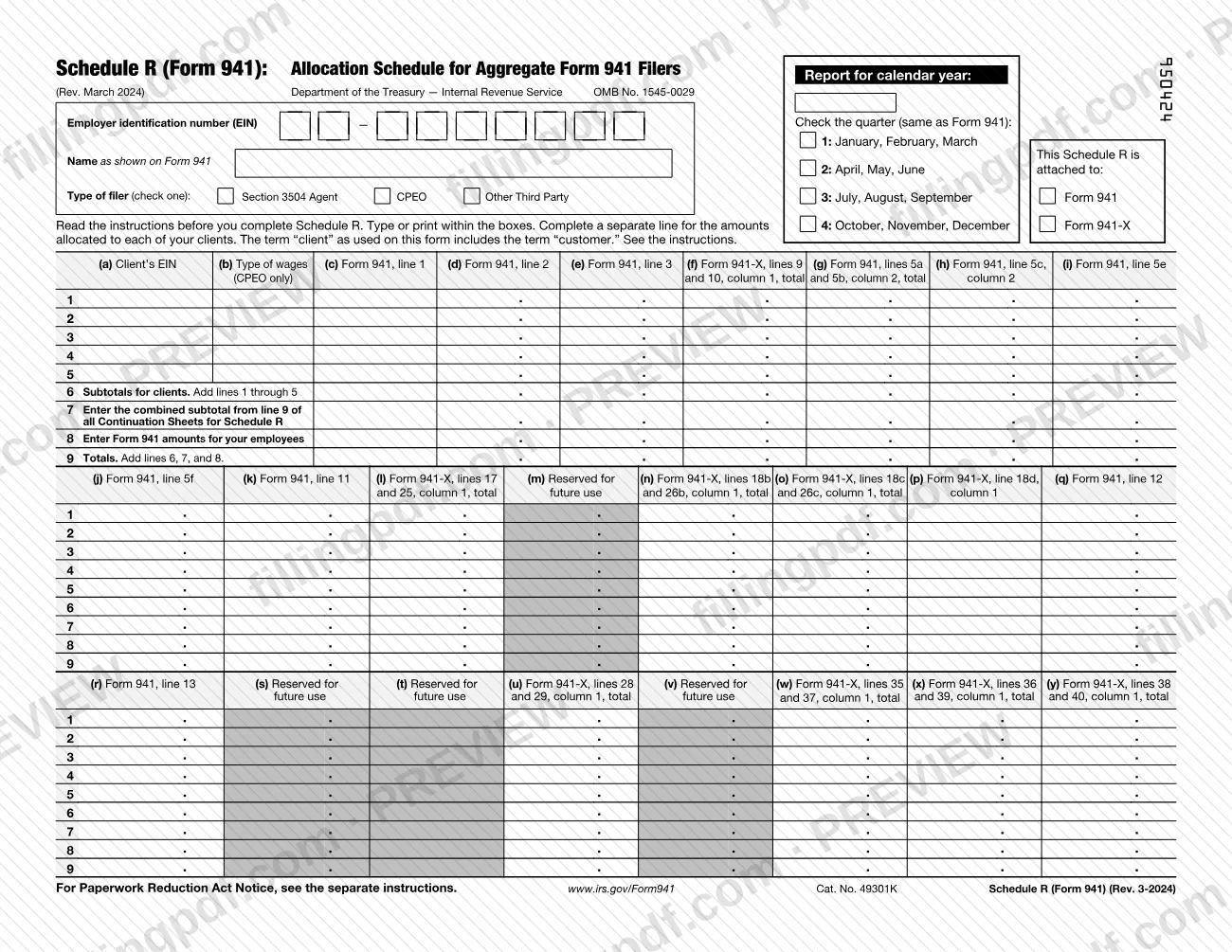
Schedule R (Form 941), Allocation Schedule for Aggregate Form 941 Filers, is the Internal Revenue Service (IRS) schedule that breaks the totals of an aggregate Form 941 (or Form 941-X) down by client. It is completed by IRS-approved section 3504 agents and certified professional employer organizations (CPEOs), and by other third-party payers in the cases the instructions describe. On this page you can fill out the form online on FillingPDF and download or print the completed PDF; the form and its instructions are published by the IRS at www.irs.gov/Form941.
Last updated
What is Schedule R (Form 941)?
Schedule R (Form 941), Allocation Schedule for Aggregate Form 941 Filers, is the IRS schedule that agents, certified professional employer organizations (CPEOs) and certain other third-party payers attach to an aggregate Form 941 or Form 941-X to allocate the aggregate amounts to each client.
The IRS instructions say to use it to allocate certain aggregate information reported on Form 941 or 941-X to each client. For this purpose a "client" is an employer or payer identified on Form 2678, Employer/Payer Appointment of Agent; a customer under a contract that meets section 7705(e)(2); a client under a service agreement described in Regulations section 31.3504-2(b)(2) with a CPEO or a non-certified professional employer organization (PEO); or a third party paying qualified sick leave wages as an agent for the employer under Regulations section 32.1(e)(3). The term "client" includes "customer."
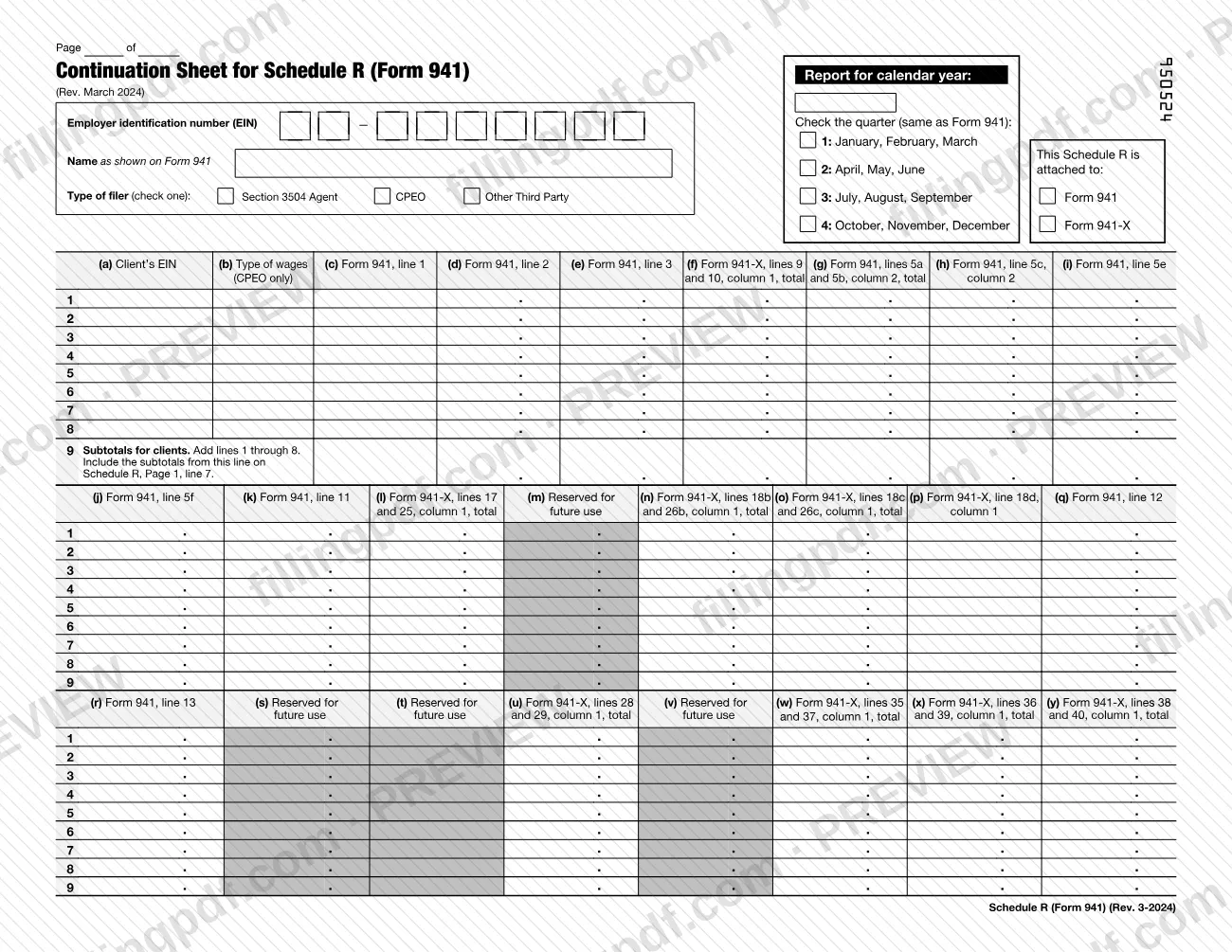
Each client gets its own line, identified by the client's EIN in column (a). Columns (c) through (y) carry the matching amounts from Form 941 or Form 941-X, and lines 6 through 9 produce subtotals and totals that must match the aggregate return. If you have more than five clients, you complete Continuation Sheets for Schedule R, which are part of the same PDF.
The March 2024 revision adds a checkbox showing whether the schedule is attached to Form 941 or Form 941-X. Columns (f), (l), (n), (o), (p), (u), (w), (x) and (y) are used only with Form 941-X.
Who needs to file Schedule R (Form 941)?
Agents approved by the IRS under section 3504 and CPEOs must complete Schedule R each time they file an aggregate Form 941. An agent's Form 2678 must already have been filed and approved by the IRS before Schedule R is filed.
Other third-party payers that file aggregate Forms 941, such as non-certified PEOs, must complete and file Schedule R if they have clients claiming the qualified small business payroll tax credit for increasing research activities. They list client-by-client amounts only for those clients. Amounts for their other clients are consolidated on page 1, line 8.
Schedule R must also be completed if any clients are claiming credits on Form 941-X.
Employers that file their own Form 941 for their own employees, and are not aggregate filers, are outside the scope of the instructions, which address aggregate Form 941 filers only. If you have more than five clients, use as many Continuation Sheets as necessary.
When to file Schedule R (Form 941)
Aggregate Form 941 filers file Schedule R with the aggregate Form 941 every quarter. The schedule has no due date of its own: it travels with the Form 941 or Form 941-X it is attached to, and the quarter you check on Schedule R must match the quarter on that return.
Revision matters. The March 2024 revision should generally be used for quarters beginning after December 31, 2023, and the IRS expects it also to be used for the second, third and fourth quarters of 2024, and possibly longer. Do not use an earlier revision for any calendar quarter beginning after December 31, 2023. A prior revision may be needed with a Form 941-X for an earlier quarter; prior revisions are listed at IRS.gov/Form941 under "All Form 941 Revisions."
Documents you need
- Form 941 or Form 941-X, the aggregate return to which Schedule R is attached; the checkbox near the top shows which one.
- Continuation Sheets for Schedule R (Form 941), only if you have more than five clients; line 9 of each sheet feeds page 1, line 7.
- A separate Form 8974 for each client claiming the qualified small business payroll tax credit for increasing research activities (column (k)).
- Form 2678, Employer/Payer Appointment of Agent, approved by the IRS before filing Schedule R, only if you file as an agent under section 3504.
How to fill out Schedule R (Form 941)
Enter EIN, name and calendar year
At the top, enter your employer identification number (EIN), the name exactly as shown on Form 941 or 941-X, and the calendar year of the return the schedule is attached to.
Check the quarter and form box
Check the quarter (1 through 4) that matches the attached return, and check whether Schedule R is attached to Form 941 or Form 941-X.
Select your type of filer
Check one Type of filer box: Section 3504 Agent, CPEO, or Other Third Party (for example, a non-certified PEO).
List each client's EIN
In column (a), enter the client's EIN, one client per line, lines 1 through 5. If you have more than five clients, use Continuation Sheets for the rest.
Enter wage type codes (CPEOs only)
In column (b), CPEOs enter A, B, C or D to show the type of wages paid for the client. Use a separate line for each code if a client has more than one type.
Enter employees, wages and withholding
Column (c) is the number of employees (Form 941, line 1), column (d) wages, tips and other compensation (line 2), and column (e) federal income tax withheld (line 3), each allocated to that client.
Enter social security and Medicare amounts
Complete columns (g), (h) and (i) from Form 941, lines 5a and 5b, 5c and 5e, and column (j) from line 5f. Column (k) holds the research credit from line 11.
Enter taxes, deposits and credits
Column (q) is total taxes after adjustments and nonrefundable credits (line 12), and column (r) is total deposits for the quarter (line 13), each allocated to the client.
Complete Form 941-X columns if needed
Only when attached to Form 941-X, complete columns (f), (l), (n), (o), (p), (u), (w), (x) and (y) from the Form 941-X lines each column names. Leave columns marked Reserved for future use blank.
Total clients, sheets and employees
Line 6 is the subtotal of lines 1 through 5. Line 7 is the combined line 9 subtotal of all Continuation Sheets. On line 8, enter Form 941 amounts for your employees, consolidating any clients not listed individually.
Check that line 9 matches Form 941
Line 9 adds lines 6, 7 and 8 for each column. The totals must match the aggregate Form 941; correct any difference before filing. Enter amounts without commas.
Review and download the completed PDF
Check the EIN, name, quarter and client lines, then download or print the completed PDF from FillingPDF and attach it, with any Continuation Sheets, to your aggregate return.
How to submit Schedule R (Form 941)
Schedule R is submitted as an attachment to your aggregate Form 941 (or Form 941-X), either on paper or electronically.
- Attach it to the return. Attach Schedule R, including any Continuation Sheets, to your aggregate Form 941. The schedule prints no address of its own.
- Agents and non-certified PEOs: may file Form 941 and Schedule R electronically or by paper submission.
- CPEOs: must generally file Form 941 and Schedule R electronically. The instructions refer to Rev. Proc. 2023-18, 2023-13 I.R.B. 605, for the electronic filing requirement.
- Form 8974: attach a separate Form 8974 for each client claiming the qualified small business payroll tax credit for increasing research activities (column (k)).
The instructions say the IRS expects to make Form 941-X filing available through Modernized e-File (MeF) beginning sometime in 2024; check IRS.gov for availability. For filing details, see the Instructions for Form 941 and IRS.gov/Form941. FillingPDF lets you fill out and download the PDF; submission follows the IRS channels above.
Common mistakes to avoid
- Using an earlier revision of Schedule R for a quarter beginning after December 31, 2023; the instructions say not to.
- Entering an EIN, name or quarter that differs from the attached Form 941 or 941-X; they must match exactly.
- Entering commas in amounts over 999.99; the instructions say not to use them.
- Filing line 9 totals that do not match the aggregate Form 941; the instructions say any mismatch is an error to correct before filing.
- Filling in columns (f), (l), (n), (o), (p), (u), (w), (x) or (y) on a schedule attached to Form 941; they are used only with Form 941-X.
- Using a code other than A, B, C or D in column (b), or using one line for a client with more than one type of wages; each type needs its own line. Column (b) is for CPEOs only.
- Forgetting to carry the Continuation Sheet subtotals (line 9 of each sheet) to page 1, line 7.
- Listing every client separately as a non-certified PEO instead of consolidating clients not claiming the research credit on line 8.
- Omitting a separate Form 8974 for each client claiming the research activities credit.
Frequently asked questions
What is Schedule R (Form 941)?
Schedule R (Form 941), Allocation Schedule for Aggregate Form 941 Filers, is the IRS schedule used to allocate aggregate Form 941 or 941-X amounts to each client. It is attached to the aggregate return and lists one client per line by EIN.
Who has to file Schedule R with Form 941?
Section 3504 agents approved by the IRS and CPEOs must complete it each time they file an aggregate Form 941. Other third-party payers, such as non-certified PEOs, must file it if clients claim the qualified small business payroll tax credit for increasing research activities, or if any clients claim credits on Form 941-X.
How often do I file Schedule R?
Every quarter, with your aggregate Form 941. The schedule has no separate due date; it is attached to the Form 941 or Form 941-X, and the quarter you check must match that return.
What if I have more than five clients?
Complete as many Continuation Sheets for Schedule R as necessary. Enter the subtotal for each sheet on its line 9, then add those subtotals on page 1, line 7. Attach the Continuation Sheets to the schedule and to your aggregate Form 941.
What do the codes in column (b) mean?
Column (b) is for CPEOs only and accepts four codes: A for wages paid under section 3511(a), B for section 3511(c), C for other wages paid as a payor under a service agreement under Regulations section 31.3504-2(b)(2), and D for wages paid as an agent under Regulations section 31.3504-1.
Which Schedule R revision should I use?
Use the March 2024 revision for quarters beginning after December 31, 2023. Do not use an earlier revision for those quarters. A prior revision may be needed with Form 941-X for an earlier quarter, and the IRS lists them at IRS.gov/Form941.
Can CPEOs file Schedule R on paper?
CPEOs must generally file Form 941 and Schedule R electronically; the instructions cite Rev. Proc. 2023-18. Agents and non-certified PEOs may file Form 941 and Schedule R electronically or by paper submission.
Can I fill out Schedule R (Form 941) online on FillingPDF?
Yes. You can fill out the PDF online on FillingPDF and download or print it. FillingPDF is an independent service and does not file the schedule with the IRS; you submit it with your aggregate Form 941 through the IRS channels.
Ready to fill out Schedule R (Form 941)?
Fill out Schedule R (Form 941) now