
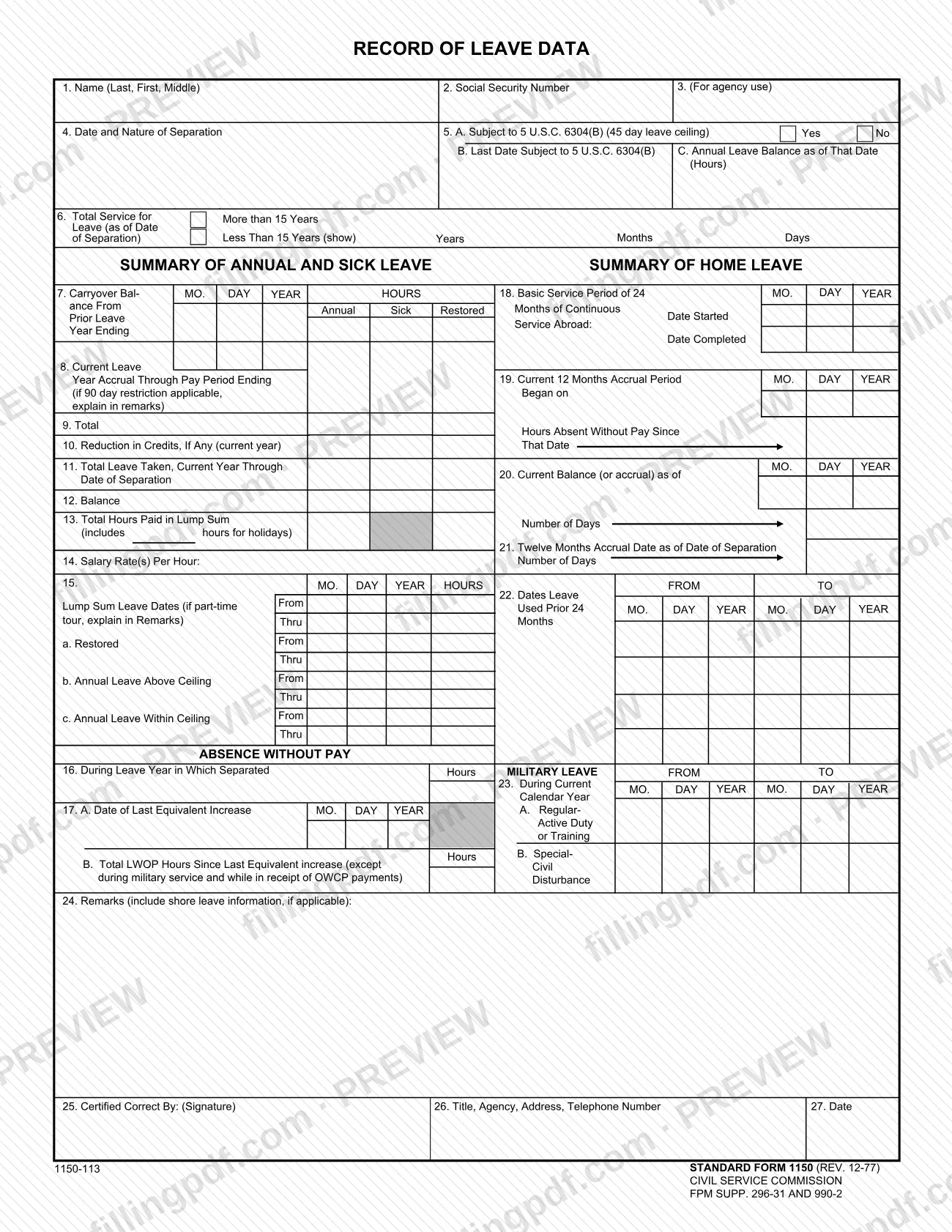
SF1150 is Standard Form 1150, Record of Leave Data, a leave summary form that the U.S. General Services Administration (GSA) posts as a PDF. It collects the date and nature of separation, annual and sick leave balances, lump-sum leave, absence without pay, home leave and military leave data, and ends with a certification by the person who prepared it. On this page you can fill out the form online on FillingPDF and download or print the completed PDF; the original PDF is published by GSA.
Last updated
What is SF 1150?
Standard Form 1150, Record of Leave Data, is a federal form that gathers one person's leave figures in a single record: annual and sick leave, lump-sum leave, absence without pay, home leave and military leave, together with the date and nature of separation.
The form is organized in blocks. Lines 1 to 6 identify the person and the separation, and ask whether the 45-day leave ceiling under 5 U.S.C. 6304(B) applies. Lines 7 to 13 are the Summary of Annual and Sick Leave: carryover balance, current leave year accrual, reductions in credits, leave taken, the balance and hours paid in a lump sum. Line 14 gives the salary rate or rates per hour, and line 15 lists the lump-sum leave dates. Lines 16 and 17 cover absence without pay. Lines 18 to 22 are the Summary of Home Leave. Line 23 records military leave. Line 24 is for remarks, and lines 25 to 27 carry the certification.
The printed footer identifies it as STANDARD FORM 1150 (REV. 12-77), form number 1150-113, with the Civil Service Commission and FPM Supp. 296-31 and 990-2 named as its origin. GSA hosts the PDF on its website. The form is a record of leave data: it does not apply for leave and does not itself pay out any leave.
Who needs to file SF 1150?
The form is placed with people who have to document a person's leave balances at separation from service. Its lines ask for the individual's name and Social Security number, the date and nature of separation, years of service, leave balances and a certifying signature, so it is used by whoever prepares or reviews that leave record.
- The person certifying the record signs line 25 and gives a title, agency, address and telephone number on line 26.
- Home leave lines 18 to 22 apply only when there is a basic service period of 24 months of continuous service abroad, so they stay blank for records without it.
- Military leave on line 23 applies to leave during the current calendar year.
The form does not say who is required to complete it, and it names no exclusions or representatives. Questions about whether it applies to a particular separation go to the agency that keeps the leave record.
When to file SF 1150
The form is tied to a separation from service. Line 4 asks for the date and nature of separation, line 6 asks for total service as of the date of separation, line 11 totals leave taken through the date of separation, and line 21 gives the twelve months accrual as of the date of separation. The record is therefore prepared when the separation occurs or the data is needed for it.
No due date is printed on the form. Line 8 runs through a pay period ending date, and line 5B asks for the last date the 45-day leave ceiling applied, so gather those dates and balances before you begin.
How to fill out SF 1150
Identify the person on lines 1 to 3
Enter the name as Last, First, Middle on line 1 and the Social Security number on line 2. Line 3 is marked for agency use.
Enter separation and ceiling details
Line 4: date and nature of separation. Line 5A: check Yes or No for the 45-day leave ceiling under 5 U.S.C. 6304(B); if Yes, give the last date on line 5B and the annual leave balance in hours as of that date on line 5C.
Record total service on line 6
Mark More than 15 Years or Less Than 15 Years as of the date of separation. For less than 15 years, show the years, months and days.
Complete the annual and sick leave summary
Line 7: carryover balance from the prior year ending, annual and sick, plus any restored leave date. Lines 8 to 12: current leave year accrual through the pay period ending date, total, reduction in credits, total leave taken through the date of separation, and the balance.
Enter lump-sum and salary data
Line 13: total hours paid in a lump sum, including hours for holidays. Line 14: salary rate or rates per hour. Line 15: lump-sum leave dates and hours for restored leave, annual leave above ceiling and annual leave within ceiling.
Report absence without pay
Line 16: hours during the leave year in which separated, with the dates. Line 17A: date of the last equivalent increase. Line 17B: total LWOP hours since then, except during military service and while in receipt of OWCP payments.
Fill the home leave summary if it applies
Line 18: start and completion dates of the basic service period of 24 months of continuous service abroad. Lines 19 to 22: current 12 months accrual period start date, current balance or accrual in days, twelve months accrual in days as of the date of separation, and the dates leave was used in the prior 24 months.
Record military leave
Line 23: for the current calendar year, enter hours and from and to dates for A, Regular-Active Duty or Training, and B, Special-except Civil Disturbance.
Add remarks on line 24
Explain any 90 day restriction on line 8 and any part-time tour on line 15, and include shore leave information if applicable.
Certify and sign lines 25 to 27
Sign on line 25, then enter your title, agency, address and telephone number on line 26 and the date on line 27.
Review and download the completed PDF
Check names, dates and hours against the leave records, then download or print the completed PDF from FillingPDF and deliver it as the agency directs.
How to submit SF 1150
The form prints no mailing address, portal or appointment rule, so it names no channel of its own. Its only destination-related entries are the certification block: the signature on line 25, the title, agency, address and telephone number of the certifier on line 26, and the date on line 27.
Complete and sign the form, then deliver it the way the agency that requested the record directs. FillingPDF lets you fill out and download the PDF; submission follows the agency's channels.
Common mistakes to avoid
- Leaving lines 25 to 27 incomplete: the form is closed by a signature, the certifier's title, agency, address and telephone number, and a date.
- Skipping the Yes or No answer in line 5A on the 45-day leave ceiling under 5 U.S.C. 6304(B), then leaving 5B and 5C blank when the ceiling applied.
- Not explaining in Remarks (line 24) when the 90 day restriction applies to the current leave year accrual on line 8.
- Not explaining a part-time tour in Remarks when entering lump-sum leave dates on line 15.
- Counting hours of absence without pay during military service or while in receipt of OWCP payments in the line 17B total, which excludes them.
- Leaving out holiday hours on line 13, which the form says are included in the hours paid in a lump sum.
- Omitting years, months and days on line 6 when total service is less than 15 years.
- Leaving out shore leave information in Remarks when it applies.
Frequently asked questions
What is SF1150?
SF1150 is Standard Form 1150, Record of Leave Data. It records a person's annual and sick leave summary, lump-sum leave, absence without pay, home leave and military leave, along with the date and nature of separation, and ends with a signed certification.
Can I fill out SF 1150 online?
Yes. You can fill out the PDF online on FillingPDF and download or print it. FillingPDF is an independent service and does not file the form or send it to any agency; you deliver it as the agency that asked for the record directs.
What does line 5 of SF 1150 ask?
Line 5A asks whether the person is subject to 5 U.S.C. 6304(B), the 45 day leave ceiling, with Yes and No boxes. Line 5B gives the last date subject to it and line 5C the annual leave balance in hours as of that date.
What goes in the Remarks section of SF 1150?
Line 24 is for remarks. The form tells you to explain there if the 90 day restriction applies to the line 8 accrual, and if a part-time tour affects the line 15 lump-sum leave dates. It also asks for shore leave information, if applicable.
Which absence without pay hours go on line 17B?
Line 17B is the total LWOP hours since the last equivalent increase date given on line 17A. The form excludes LWOP during military service and while in receipt of OWCP payments, so leave those hours out of the total.
Who signs SF 1150?
The person certifying the record signs line 25, Certified Correct By. Line 26 then asks for that person's title, agency, address and telephone number, and line 27 for the date. The form does not say who must hold that role.
Where do I send SF 1150?
The form prints no address, portal or other channel. It shows only the certifier's address on line 26, so deliver the completed form the way the agency requesting the leave record directs.
What revision of SF 1150 is this?
The printed footer reads STANDARD FORM 1150 (REV. 12-77), form number 1150-113. The Civil Service Commission and FPM Supp. 296-31 and 990-2 are also printed there.
Ready to fill out SF 1150?
Fill out SF 1150 now