
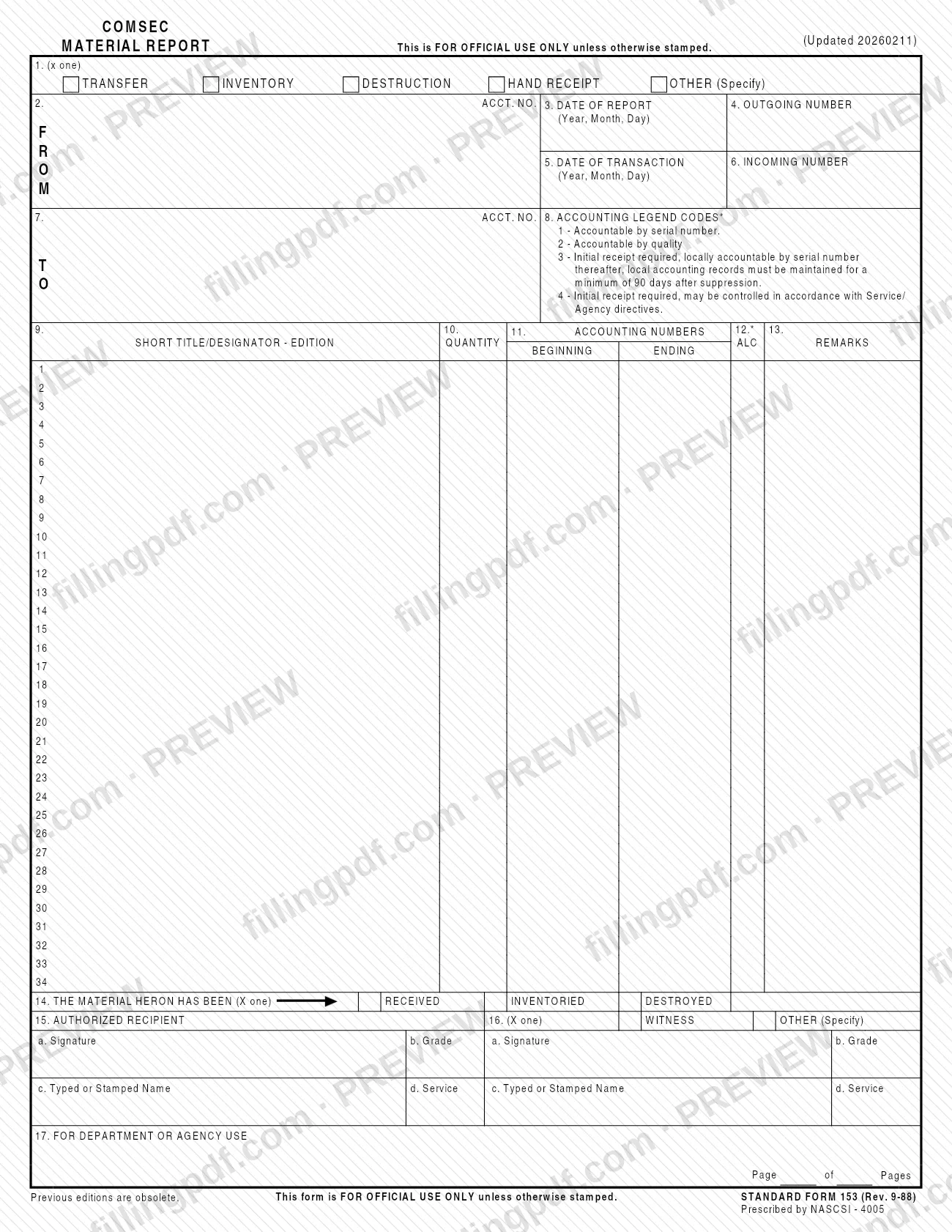
SF 153 is Standard Form 153, the COMSEC Material Report, listed by the U.S. General Services Administration (GSA) and printed as revision 9-88. It records one transaction involving COMSEC material: a transfer, an inventory, a destruction, a hand receipt or another action you specify. On FillingPDF you can fill out the form online and download or print the completed PDF. The form is marked FOR OFFICIAL USE ONLY unless otherwise stamped, and GSA publishes the original PDF at the link on this page.
Last updated
What is SF 153?
SF 153, COMSEC Material Report, is a Standard Form that lists COMSEC material by short title and edition, quantity and accounting numbers, and records whether that material was transferred, inventoried, destroyed or handed over on a hand receipt.
The form is printed as STANDARD FORM 153 (Rev. 9-88) and states that previous editions are obsolete. The PDF carries the note "Updated 20260211", and the GSA forms page lists the current revision date as 09/1988. The form says it is prescribed by NASCSI - 4005; the GSA page gives the authority as NACSI - 4005.
The report has three working areas:
- A header with the type of report (line 1), the sending account and report data (lines 2 to 6) and the receiving account with its accounting legend codes (lines 7 and 8).
- A table of up to 34 numbered entries, with columns for short title/designator and edition (9), quantity (10), beginning and ending accounting numbers (11), ALC (12) and remarks (13).
- A closing block in which the material is certified as received, inventoried or destroyed (line 14), followed by the authorized recipient (line 15) and a witness or other person (line 16), and a space for department or agency use (line 17).
The form is marked FOR OFFICIAL USE ONLY unless otherwise stamped.
Who needs to file SF 153?
SF 153 is for the people and accounts that handle COMSEC material and need a written report of a transaction involving it. The form is built around two accounts: the sending account in the FROM block and the receiving account in the TO block, each with an account number (lines 2 and 7).
Two roles sign the report. The authorized recipient (line 15) signs to certify the material was received, inventoried or destroyed, as checked on line 14. A witness, or another person you specify, signs on line 16. Each signer gives a signature, grade, typed or stamped name and service.
The form states that it is FOR OFFICIAL USE ONLY unless otherwise stamped, so handle a completed copy accordingly. The form and the GSA page do not say who must use it or set eligibility rules; follow the COMSEC accounting directives that apply to your department or agency. Line 17 is reserved for department or agency use, which suggests local procedures may add requirements beyond the printed form.
When to file SF 153
Complete SF 153 when a transaction occurs that fits one of the report types on line 1: a transfer, an inventory, a destruction or a hand receipt, or another action you describe on the OTHER (Specify) line. Line 3 records the date of the report and line 5 the date of the transaction, both in year, month, day order, so the two dates can differ.
The form prints no filing deadline, renewal cycle or validity period. Any timing rule comes from your department or agency directives. One timing statement is printed on the form: under accounting legend code 3, local accounting records must be maintained for a minimum of 90 days after suppression.
How to fill out SF 153
Mark the type of report
On line 1, mark one X: TRANSFER, INVENTORY, DESTRUCTION, HAND RECEIPT or OTHER (Specify). If you choose Other, write the action in the space provided.
Enter the sending account data
In the FROM block, enter the account number on line 2, the date of the report on line 3 and the outgoing number on line 4. Write dates as year, month, day.
Enter the transaction date and incoming number
On line 5, enter the date of the transaction in year, month, day order. On line 6, enter the incoming number.
Enter the receiving account
In the TO block, enter the receiving account number on line 7. Check the accounting legend codes printed at line 8 (1 to 4) that apply to the material.
List the material
In the numbered table, write the short title/designator and edition in column 9 and the quantity in column 10 for each item. The form provides entries 1 through 34.
Add accounting numbers and ALC
In column 11, enter the beginning and ending accounting numbers. In column 12 (ALC), enter the accounting legend code for each entry, using the codes printed at line 8.
Add remarks
Use column 13 for remarks on an entry. Enter the page number and total pages in the Page of Pages space.
Certify the action
On line 14, mark one X to show the material has been RECEIVED, INVENTORIED or DESTROYED.
Complete the authorized recipient block
On line 15, the authorized recipient provides a signature (a), grade (b), typed or stamped name (c) and service (d).
Complete the witness block
On line 16, mark WITNESS or OTHER (Specify), then provide the signer's signature, grade, typed or stamped name and service.
Review and download the PDF
Check that line 17 is left for department or agency use unless your agency instructs otherwise, and that every entry matches your records. Download or print the completed PDF from FillingPDF and handle it as FOR OFFICIAL USE ONLY unless stamped otherwise.
How to submit SF 153
The form prints no mailing address, portal or appointment process, so SF 153 is delivered through whatever channel your department or agency directs. The form identifies the parties by account number (lines 2 and 7) and tracks the transaction with an outgoing number (line 4) and an incoming number (line 6). Line 17 is left for department or agency use, and the page count is entered in the Page of Pages space.
Because the form is marked FOR OFFICIAL USE ONLY unless otherwise stamped, check how your agency wants completed copies sent and stored. GSA publishes the blank PDF at https://www.gsa.gov/system/files/2026-02/SF153-88a.pdf. FillingPDF lets you fill out and download the PDF; submission follows the channels your agency sets.
Common mistakes to avoid
- Leaving line 1 without an X, or checking more than one box; the form says to mark one type: Transfer, Inventory, Destruction, Hand Receipt or Other.
- Writing dates in a different order; lines 3 and 5 are printed as Year, Month, Day.
- Confusing the report date (line 3) with the transaction date (line 5).
- Using accounting legend codes other than 1, 2, 3 or 4 as defined at line 8, or misreading code 3 as needing no local records; those records must be kept at least 90 days after suppression.
- Skipping the Page of Pages entry when a report runs to more than one page.
- Checking Received, Inventoried or Destroyed on line 14 without a matching signature block completed on line 15.
- Omitting the witness or other signer on line 16 when the transaction requires one.
- Using an earlier edition; the form states that previous editions are obsolete.
Frequently asked questions
What is SF 153 used for?
SF 153 is the COMSEC Material Report. It records a transfer, inventory, destruction or hand receipt of COMSEC material, or another action you specify on line 1, listing each item by short title, edition, quantity and accounting numbers.
Can I fill out SF 153 online?
Yes. You can fill out the SF 153 PDF online on FillingPDF and download or print it. FillingPDF is an independent service and does not submit the report; delivery follows your department or agency's own channels.
What revision of SF 153 is current?
The form is printed as STANDARD FORM 153 (Rev. 9-88), and the GSA forms page lists 09/1988 as the current revision date. The PDF also carries the note "Updated 20260211". The form states that previous editions are obsolete.
What do the accounting legend codes on SF 153 mean?
Line 8 lists four codes: 1, accountable by serial number; 2, accountable by quantity; 3, initial receipt required and locally accountable by serial number; 4, initial receipt required and controllable under Service or Agency directives. Code 3 requires local records for at least 90 days after suppression.
Who signs SF 153?
The authorized recipient signs on line 15 and a witness, or another person you specify, signs on line 16. Each gives a signature, grade, typed or stamped name and service. The form does not say who may sign for someone else.
How many items fit on one SF 153?
The table has 34 numbered entries on the form. The form also has a Page of Pages space, so a report that needs more room can be numbered across pages.
Is SF 153 confidential?
The form is marked FOR OFFICIAL USE ONLY unless otherwise stamped. Treat a completed report accordingly and follow your agency's handling rules, which the form itself does not set out.
Where do I send a completed SF 153?
The form prints no address or portal. Send it as your department or agency directs, using the account numbers, outgoing number and incoming number on the form to identify the transaction.
Ready to fill out SF 153?
Fill out SF 153 now