
The SF182, officially Standard Form 182, Authorization, Agreement and Certification of Training, is the U.S. Office of Personnel Management (OPM) form that agencies use to document the approval and completion of employee training. One form carries the trainee's details, the course data, the costs and billing instructions, the chain of approvals and the final certification. On this page you can fill out the SF 182 online on FillingPDF and download or print the completed PDF. The official PDF is published by OPM, and your Agency Training Office sets how it is routed.
Last updated
What is SF 182?
SF 182, Authorization, Agreement and Certification of Training, is the U.S. Office of Personnel Management (OPM) standard form that records a federal employee's training request, the approvals it needs, the course data and costs, and the agency's certification that the training was completed and evaluated.
The form has six sections:
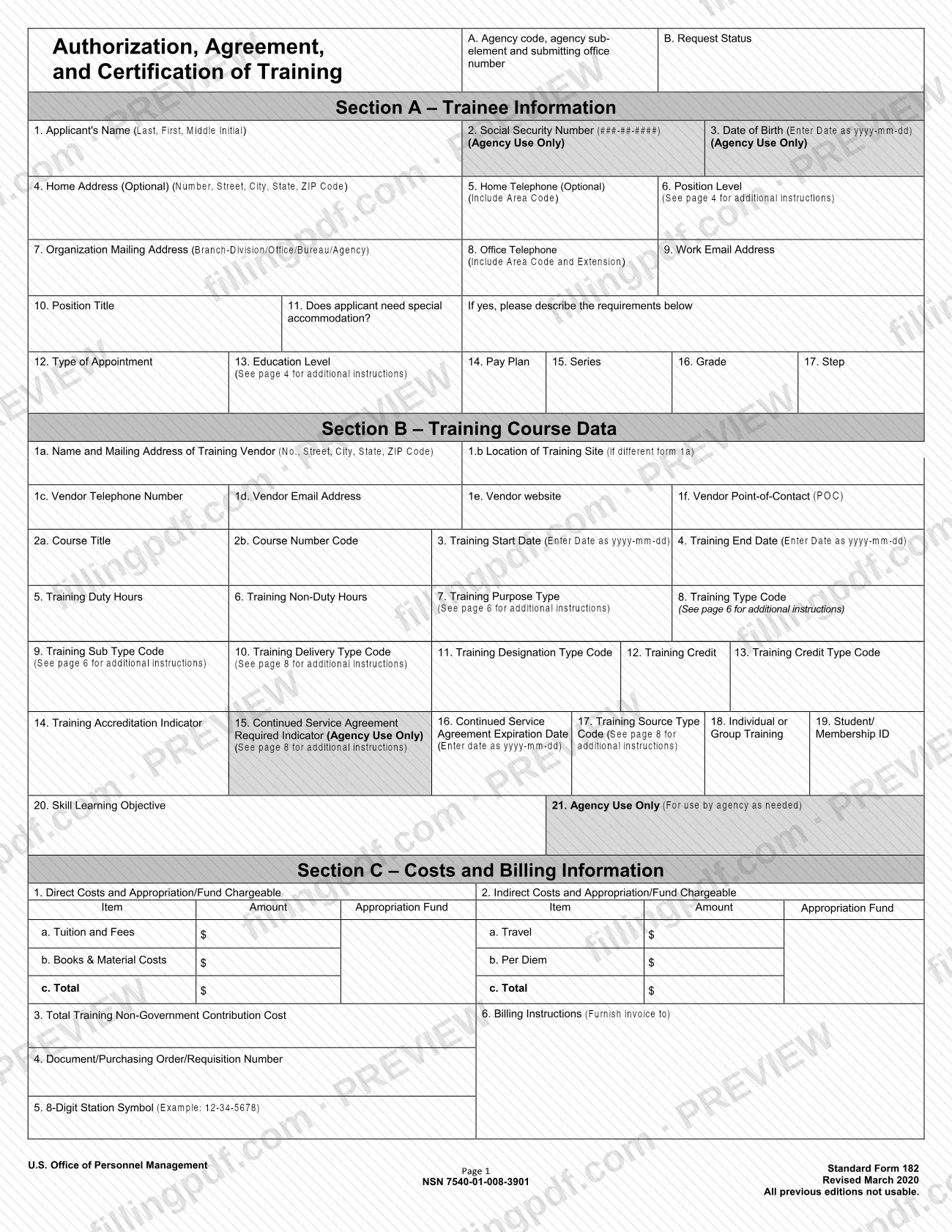
- Section A – Trainee Information: the employee's name, contact details, position level, appointment type, education level, pay plan, series, grade and step.
- Section B – Training Course Data: the vendor, course title, dates, hours and the coded fields for purpose, type, sub type, delivery, designation, credit and source.
- Section C – Costs and Billing Information: direct and indirect costs, the purchase order number, the station symbol and where the invoice goes.
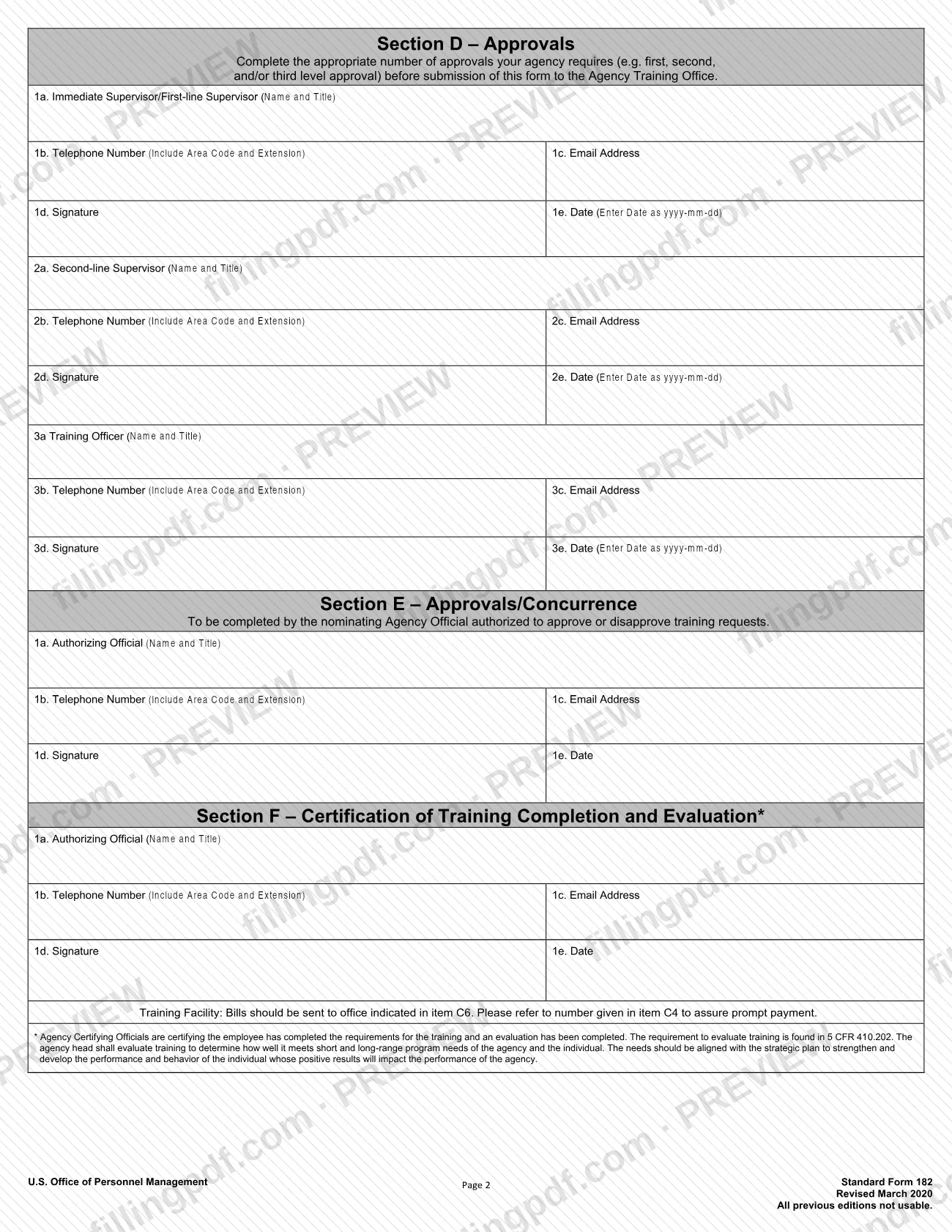
- Section D – Approvals: first-line supervisor, second-line supervisor and training officer.
- Section E – Approvals/Concurrence: the agency official authorized to approve or disapprove the request.
- Section F – Certification of Training Completion and Evaluation: the certifying official confirms the employee completed the training requirements and an evaluation was done.
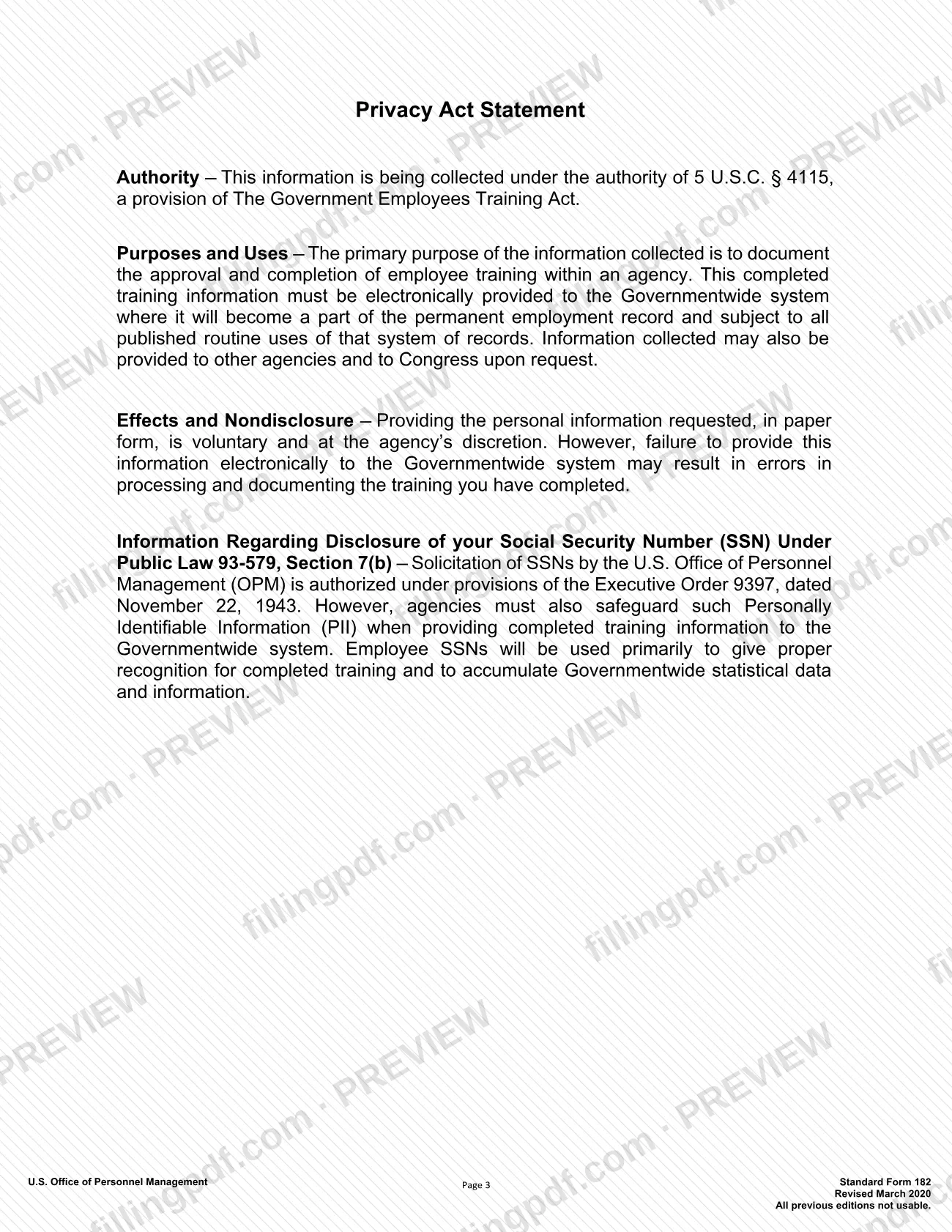
The Privacy Act statement on the form says it is collected under 5 U.S.C. § 4115, part of the Government Employees Training Act, to document approval and completion of employee training. The evaluation requirement cited on the form is 5 CFR 410.202. The form is marked Revised March 2020, and earlier editions are not usable.
Who needs to file SF 182?
The SF 182 is completed for an employee whose agency requires a documented training request. The trainee fills in Section A and the course details, and the people who approve the request sign the later sections.
- Trainee: enters personal and position information in Section A and, with the vendor's help, the course data in Section B.
- Supervisors and training officer: sign Section D. The form says to complete the number of approvals your agency requires (first, second and/or third level) before the form goes to the Agency Training Office.
- Authorizing official: the nominating agency official who approves or disapproves the request signs Section E.
- Certifying official: completes Section F to certify that the training requirements and an evaluation are done.
- Agency Training Office: receives the approved form and reports the data electronically.
The OPM instructions require all questions in Sections A–E to be answered. Some items are marked Agency Use Only, so the trainee should leave them to the agency. The form names no group that is excluded.
When to file SF 182
The SF 182 is submitted to the Agency Training Office once the approvals your agency requires in Section D have been collected. Section E records the authorizing official's decision on the request. Section F, the certification of completion and evaluation, applies once the training has been taken. The OPM instructions add that an agency should submit electronic data only for completed training events whose mandatory data elements have all been recorded. The form prints no calendar deadline, so ask your Agency Training Office how far ahead of the course start date it wants the request.
How to fill out SF 182
Enter agency code and request status
At the top, enter the agency code, agency subelement and submitting office number in box A, and use the Select one list in box B for the request status.
Identify the trainee
In Section A, enter the applicant's name (Last, First, Middle Initial) in item 1, the Social Security number as ###-##-#### in item 2 and the date of birth as yyyy-mm-dd in item 3. Home address (item 4) and home telephone (item 5) are marked optional.
Add work and position details
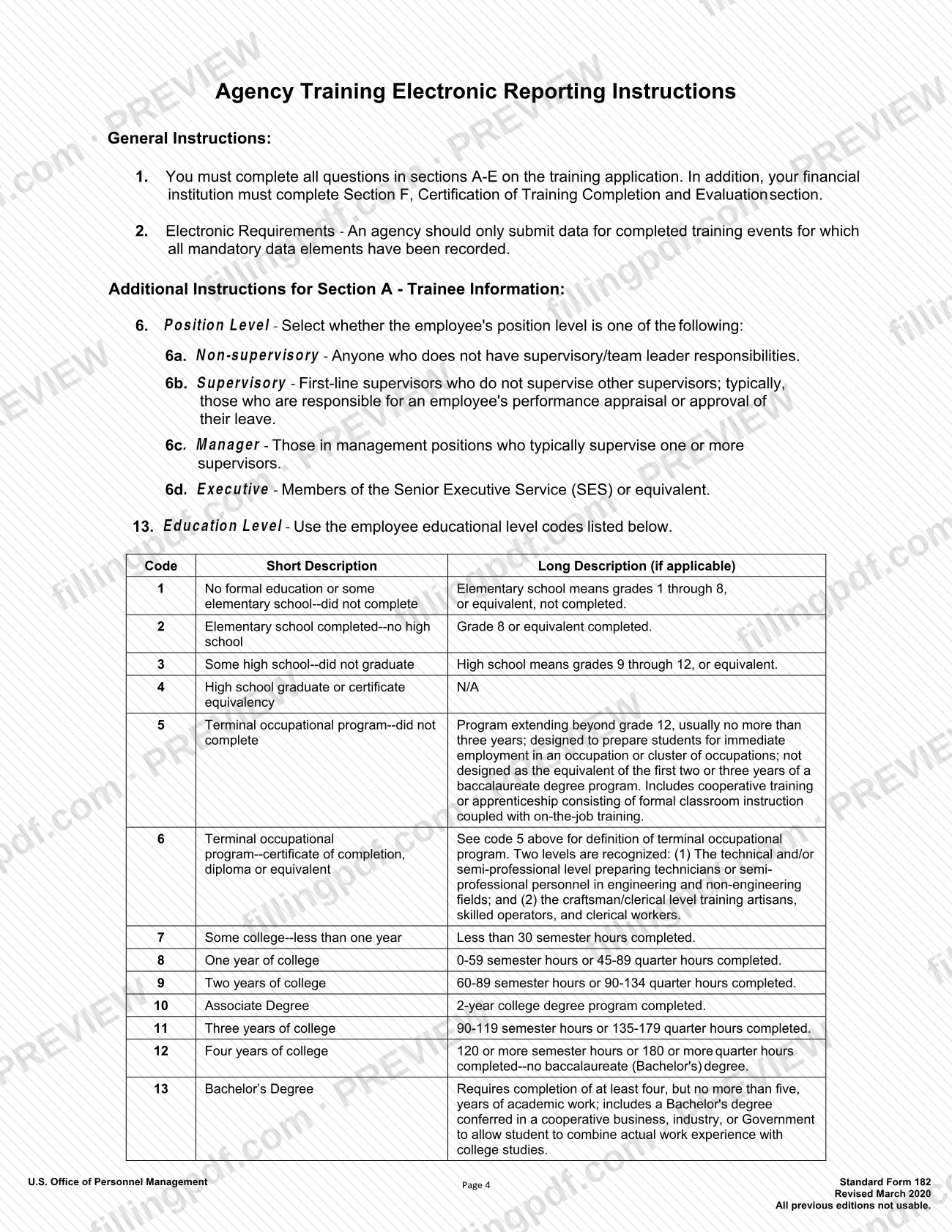
Enter the organization mailing address (item 7), office telephone with area code and extension (item 8), work email (item 9) and position title (item 10). For item 6, select Non-supervisory, Supervisory, Manager or Executive using the definitions on page 4.
Answer accommodation and grade items
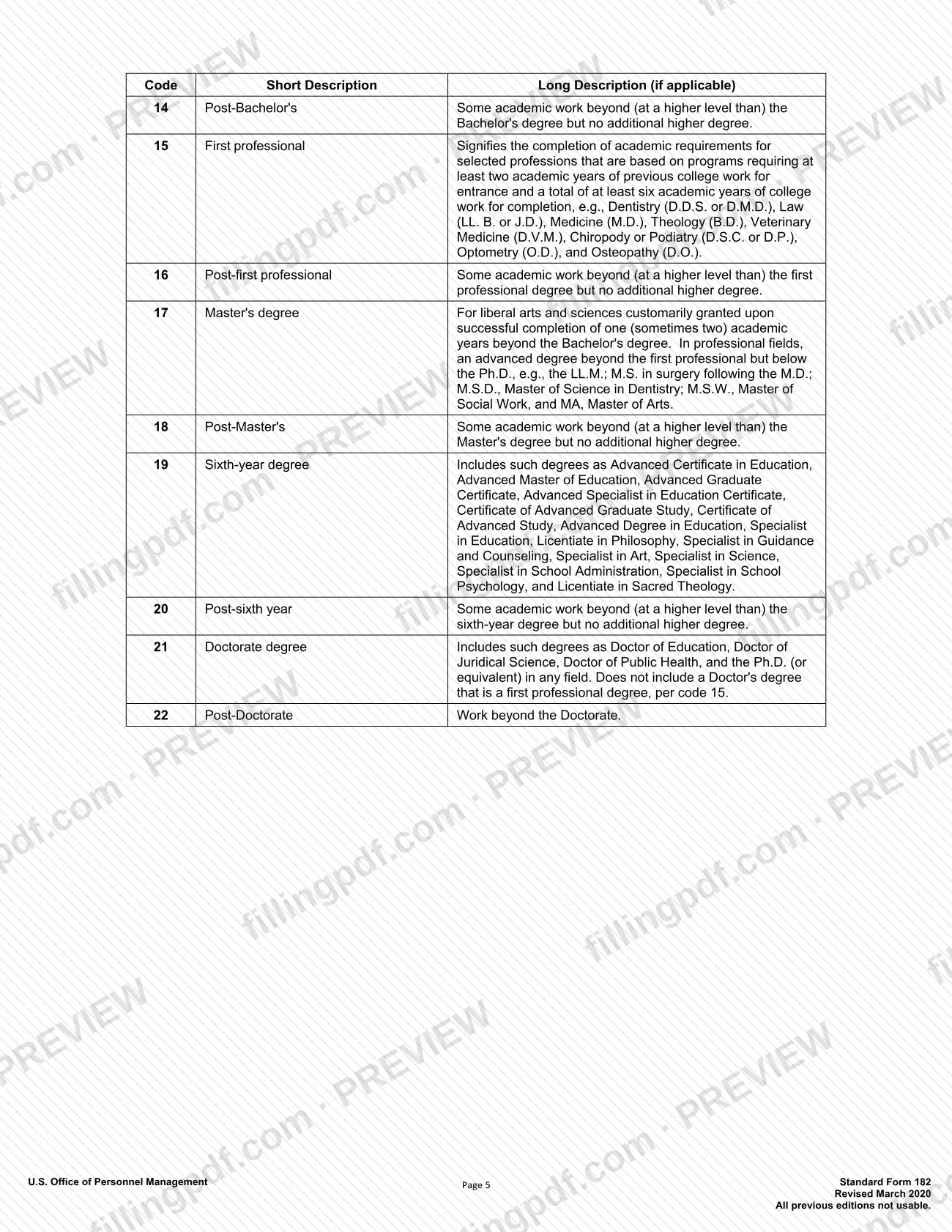
Item 11 asks whether the applicant needs special accommodation; if yes, describe the requirements. Complete type of appointment (12), education level using the codes 1 to 22 on page 4 (13), pay plan (14), series (15), grade (16) and step (17).
Enter the training vendor
In Section B, give the vendor's name and mailing address (1a), the training site if different (1b), telephone (1c), email (1d), website (1e) and point of contact (1f).
Describe the course
Enter the course title (2a), course number code (2b), start date (3) and end date (4) as yyyy-mm-dd, then duty hours (5) and non-duty hours (6).
Select purpose and type codes
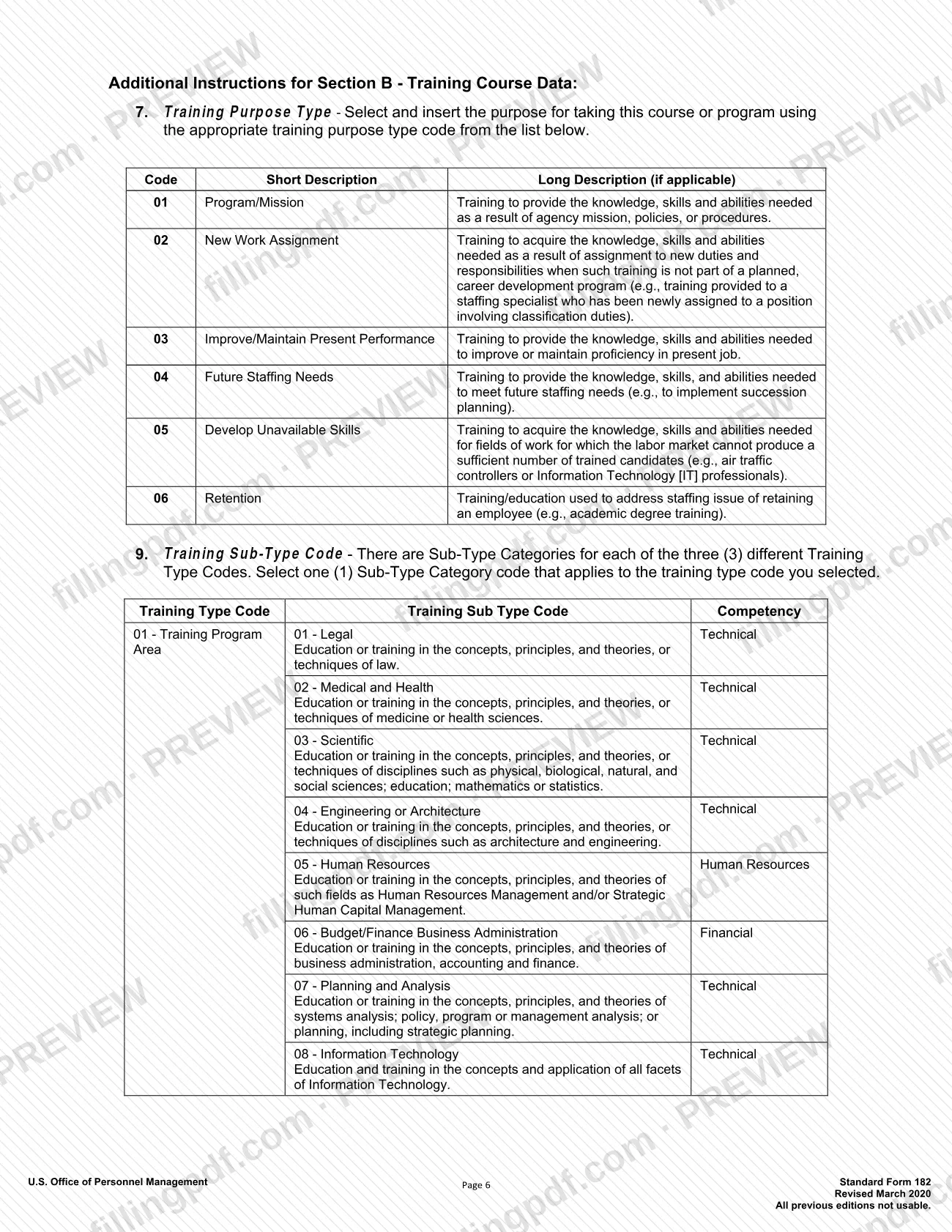
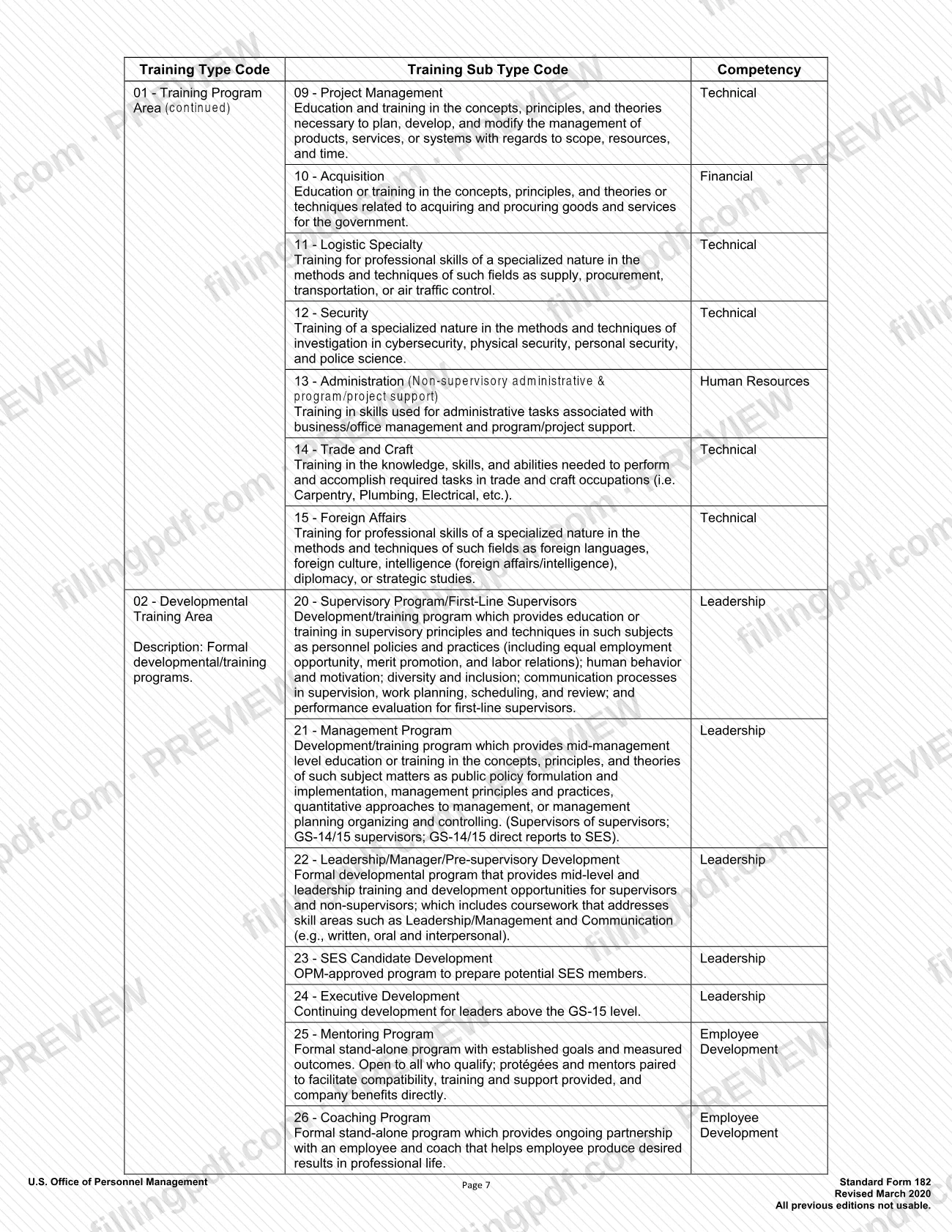
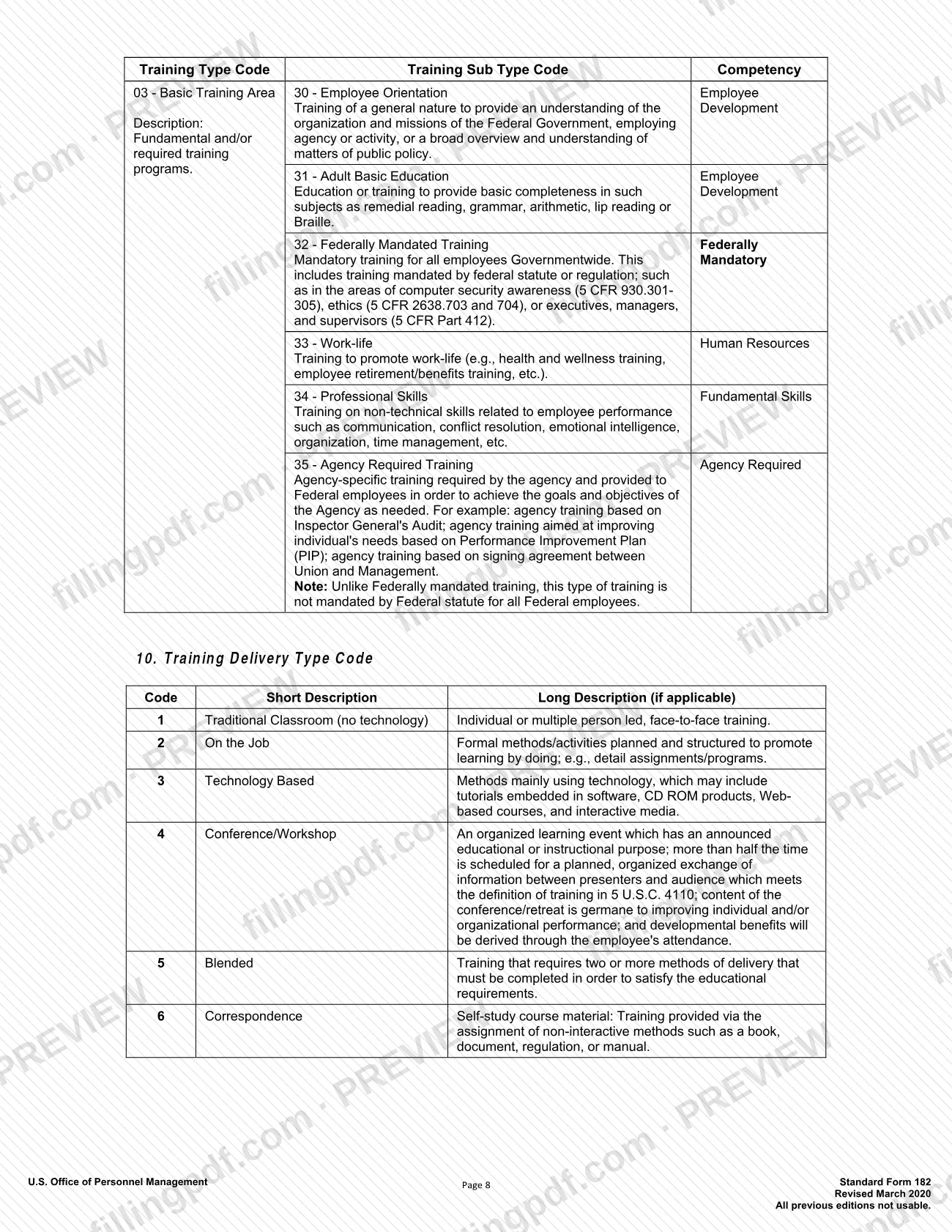
Choose the Training Purpose Type (7) using codes 01 to 06, the Training Type Code (8) and one Training Sub Type Code (9) that belongs to that type. The tables are on pages 6 to 8.
Complete delivery, credit and source
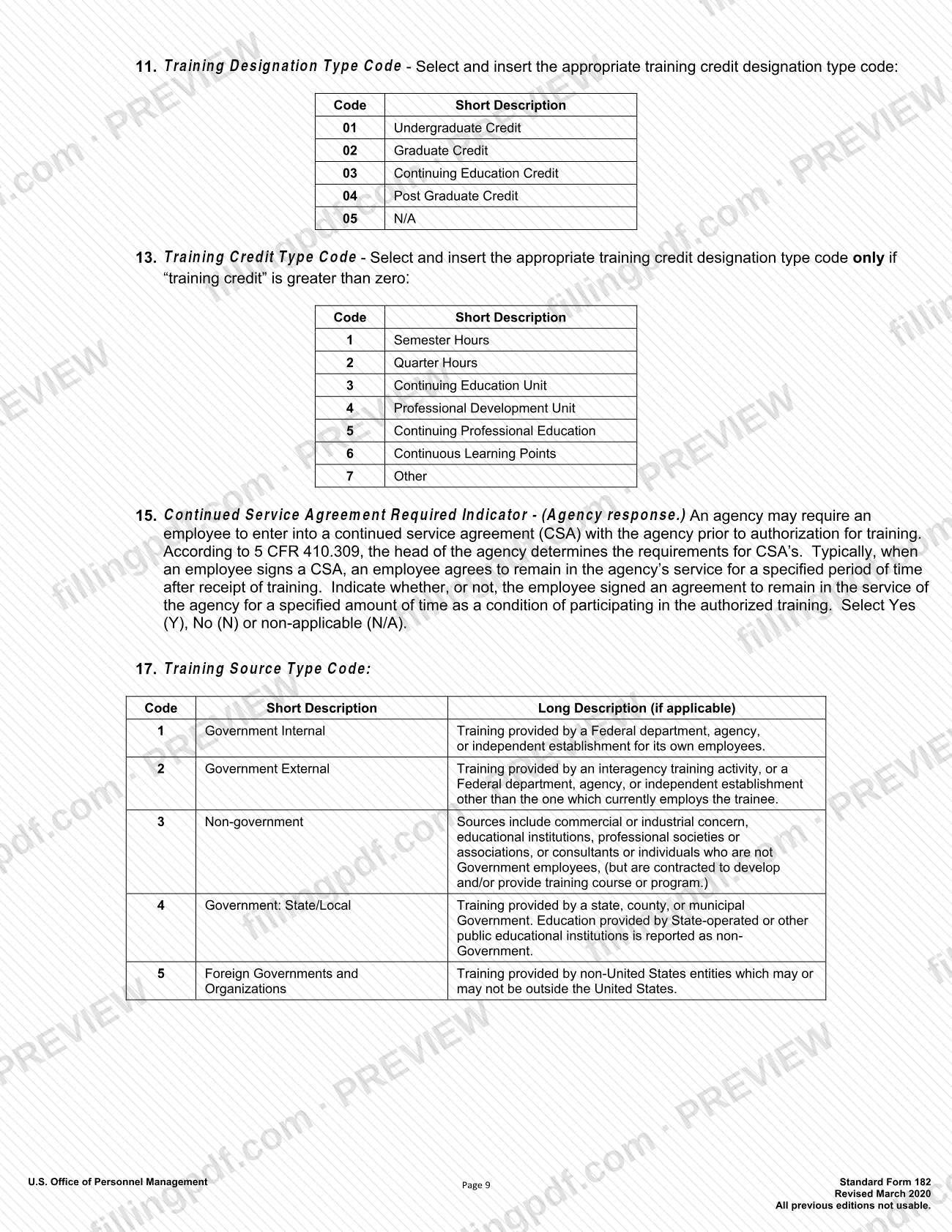
Select the delivery type (10, codes 1 to 6) and designation type (11, codes 01 to 05). Enter training credit (12), a credit type code (13) only if the credit is above zero, and the training source type (17, codes 1 to 5).
Finish the remaining course items
Answer item 14 (Training Accreditation Indicator), item 16 (continued service agreement expiration date, if any), item 18 (individual or group training), item 19 (student/membership ID) and item 20 (skill learning objective). Item 15 and item 21 are for the agency.
Fill in costs and billing
In Section C, enter tuition and fees and books and material costs under direct costs, and travel and per diem under indirect costs, with the appropriation or fund for each. Add the non-government contribution (3), the document or purchase order number (4), the 8-digit station symbol (5) and the invoice recipient (6).
Collect approvals and certification
Section D asks for the supervisor, second-line supervisor and training officer, each with name and title, telephone, email, signature and date (yyyy-mm-dd), as many as your agency requires. Section E is for the authorizing official, and Section F for the certifying official after completion.
Review and download the completed PDF
Check that every required item is filled, dates use yyyy-mm-dd and the codes match the page 4 to 9 tables. Then download or print the completed PDF from FillingPDF and route it for signatures.
How to submit SF 182
The SF 182 goes to your Agency Training Office; the form prints no mailing address, portal or appointment process of its own.
- Internal routing: collect the signatures your agency requires in Section D, then Section E, and send the form to the Agency Training Office, as Section D directs.
- Billing: the note at the bottom of page 2 tells the training facility to send bills to the office in item C6 and to quote the number in item C4 so payment is prompt. Enter both before the form goes to the vendor.
- Electronic reporting: the Privacy Act statement says completed training information must be provided electronically to the Governmentwide system. The agency does this, and the instructions say it should do so only for completed training events with all mandatory data elements recorded.
Ask your Agency Training Office whether it wants paper or electronic copies and how many approval levels apply. FillingPDF lets you fill out and download the PDF; submission follows the channels above.
Common mistakes to avoid
- Leaving questions blank in Sections A–E; the OPM instructions say all of them must be completed.
- Sending the form to the Agency Training Office before the approvals your agency requires in Section D are signed.
- Entering dates in another format; the form asks for yyyy-mm-dd, and the Social Security number as ###-##-####.
- Filling in items marked Agency Use Only, such as item 21 in Section B, or item 15 (Continued Service Agreement Required Indicator), which is an agency response.
- Choosing a Training Sub Type Code that does not belong to the Training Type Code selected; each type has its own sub-type list.
- Entering a Training Credit Type Code (item 13) when the training credit in item 12 is zero; the instructions say to use it only if credit is greater than zero.
- Omitting the document or purchase order number (C4) or the billing office (C6), which the vendor needs to route and pay the invoice.
- Using an edition older than Revised March 2020; the form states that all previous editions are not usable.
Frequently asked questions
What is the SF182 form used for?
The SF182 is OPM's Authorization, Agreement and Certification of Training. Agencies use it to document a federal employee's training request, the approvals, the course data and costs, and the certification that the training was completed and evaluated.
Can I fill out SF 182 online?
Yes. You can fill out the fillable PDF online on FillingPDF and download or print it. FillingPDF is an independent service: it does not submit the form, and your agency receives it only through its own training office channels.
Who signs the SF 182?
Section D is signed by the first-line supervisor, second-line supervisor and training officer, as many levels as your agency requires. The authorizing official signs Section E, and the certifying official signs Section F once the training is complete.
Where do I send the completed SF 182?
Send it to your Agency Training Office after the required approvals are signed. The form prints no address or portal. Bills from the training facility go to the office in item C6, quoting the number in item C4.
Which education level code do I enter on the SF 182?
Item 13 uses codes 1 to 22 listed on page 4, for example 4 for high school graduate or equivalent, 13 for Bachelor's Degree, 17 for Master's degree and 21 for Doctorate degree. Pick the one matching the employee's highest completed level.
When do I enter a Training Credit Type Code?
Only when the training credit in item 12 is greater than zero. The codes are 1 Semester Hours, 2 Quarter Hours, 3 Continuing Education Unit, 4 Professional Development Unit, 5 Continuing Professional Education, 6 Continuous Learning Points and 7 Other.
Is giving my Social Security number on SF 182 mandatory?
The Privacy Act statement says providing personal information on the paper form is voluntary and at the agency's discretion. It also says failing to provide it electronically to the Governmentwide system may cause processing errors. Ask your Agency Training Office.
What is the difference between Section E and Section F?
Section E is the approval or concurrence of the nominating agency official who approves or disapproves the training request. Section F is completed afterwards by a certifying official, who confirms the employee completed the training and an evaluation was done.
Ready to fill out SF 182?
Fill out SF 182 now