
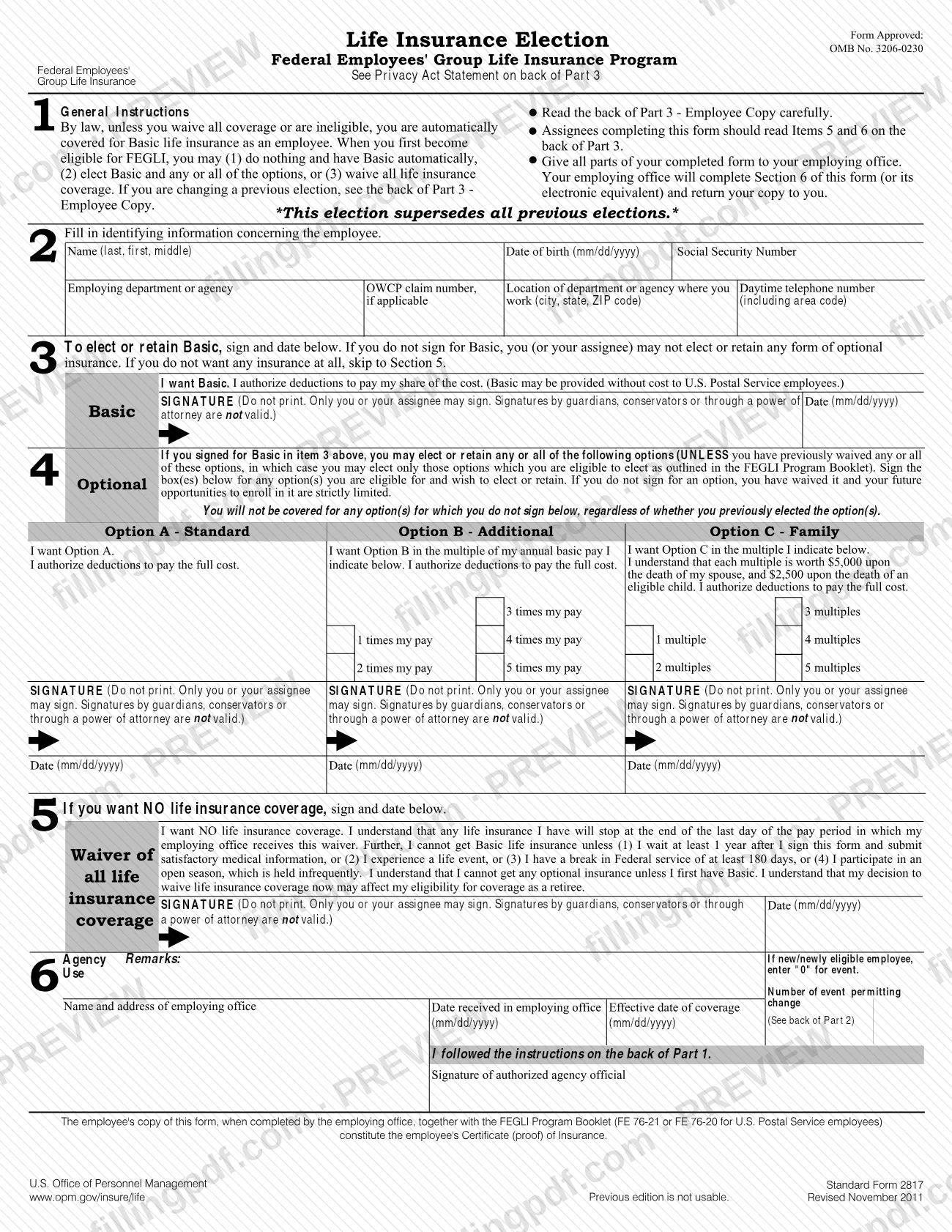
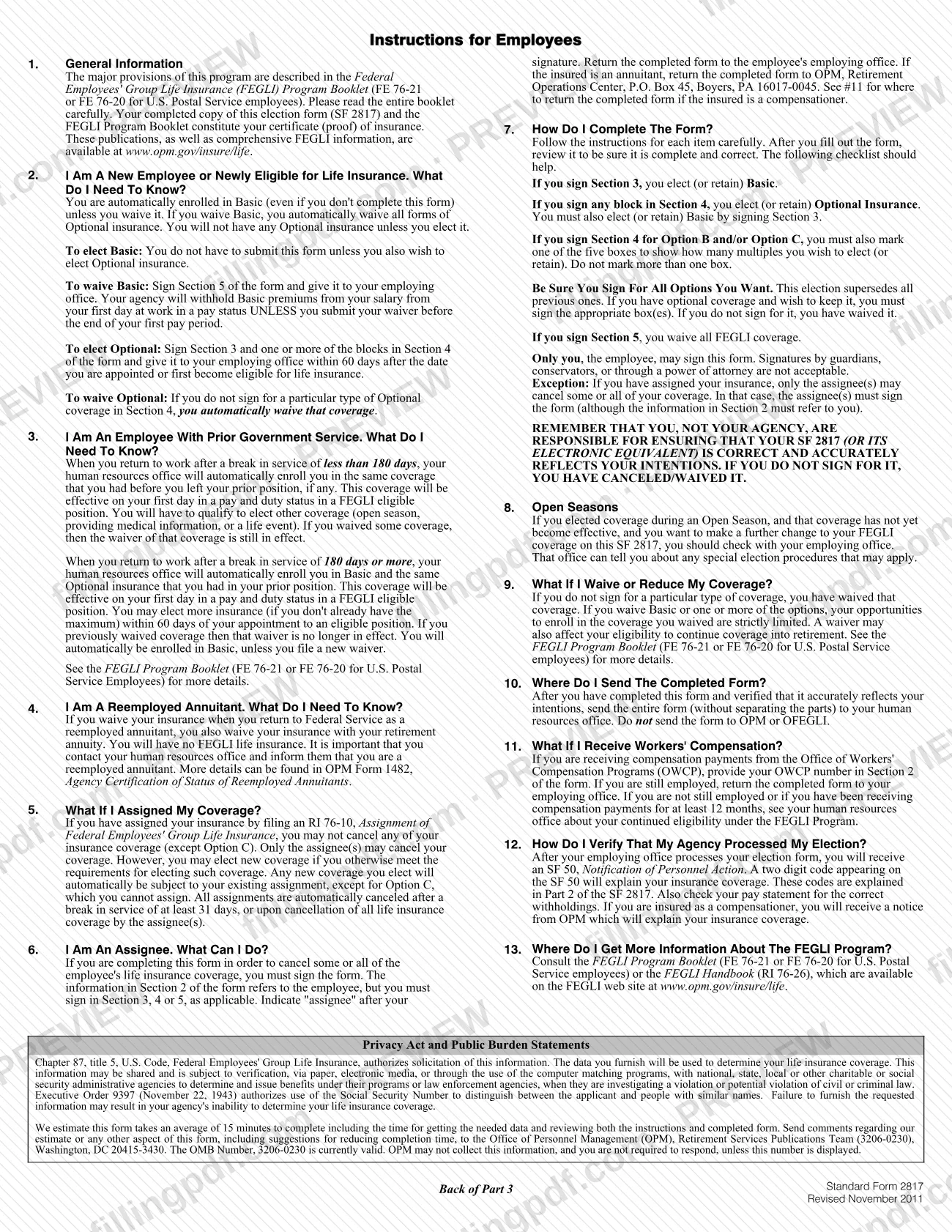
SF 2817, the Life Insurance Election, is the U.S. Office of Personnel Management (OPM) Standard Form that federal employees use to elect, change or waive coverage under the Federal Employees' Group Life Insurance (FEGLI) Program. Employees who want optional insurance or no insurance, and employees who are changing an earlier election, complete it and give all parts to their employing office. On FillingPDF you can fill out the form online and download or print the completed PDF; the PDF is also published at gsa.gov, and the election takes effect only through your employing office.
Last updated
What is SF 2817?
SF 2817, Life Insurance Election, is the Standard Form of the U.S. Office of Personnel Management (OPM) on which a federal employee elects, retains, changes or waives Basic and optional life insurance under the Federal Employees' Group Life Insurance (FEGLI) Program.
By law, unless you waive all coverage or are ineligible, you are automatically covered for Basic life insurance as an employee. The form lets you also elect Option A (Standard), Option B (Additional, in multiples of annual basic pay) and Option C (Family, in multiples), or sign the waiver of all life insurance coverage. The election on the form supersedes all previous elections, so an option you do not sign for is waived.
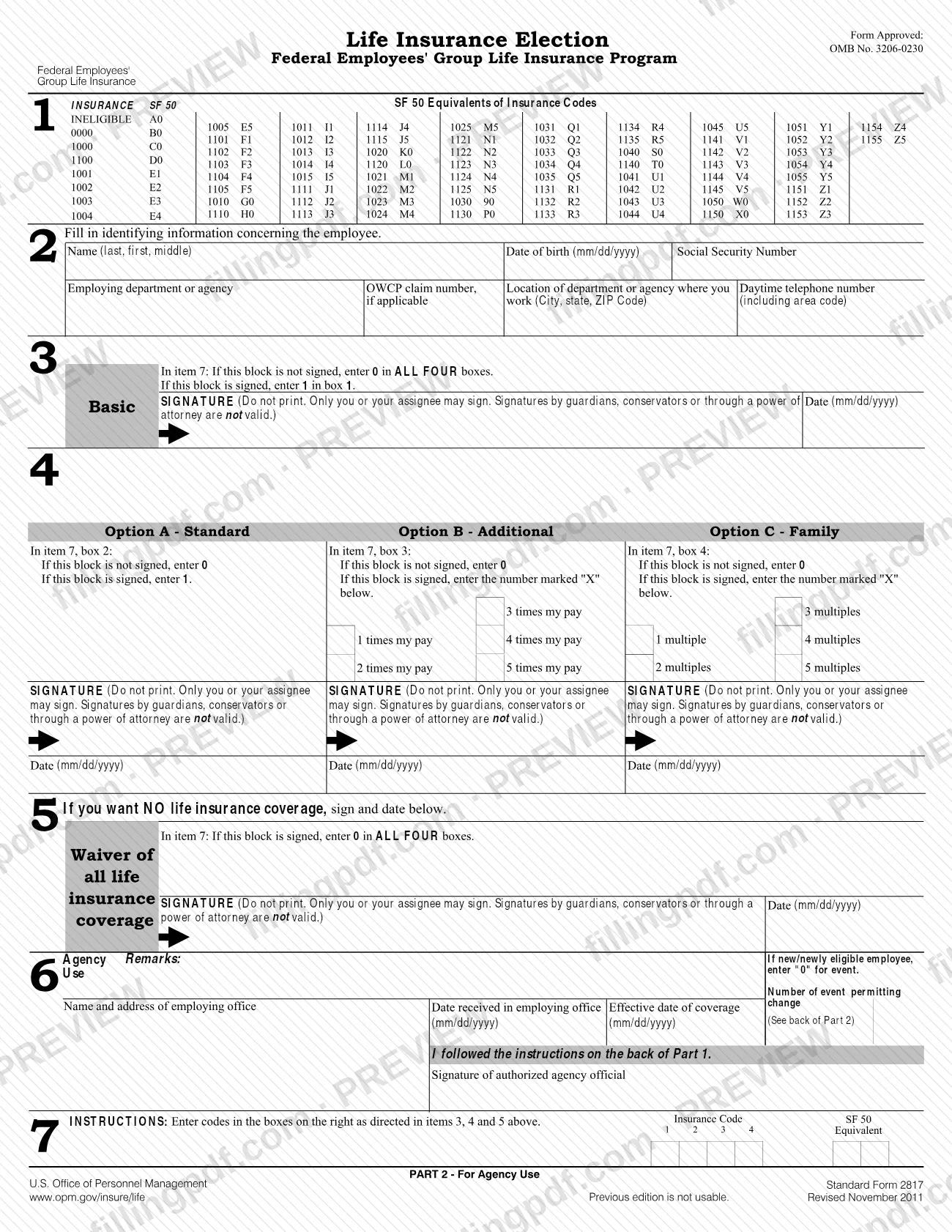
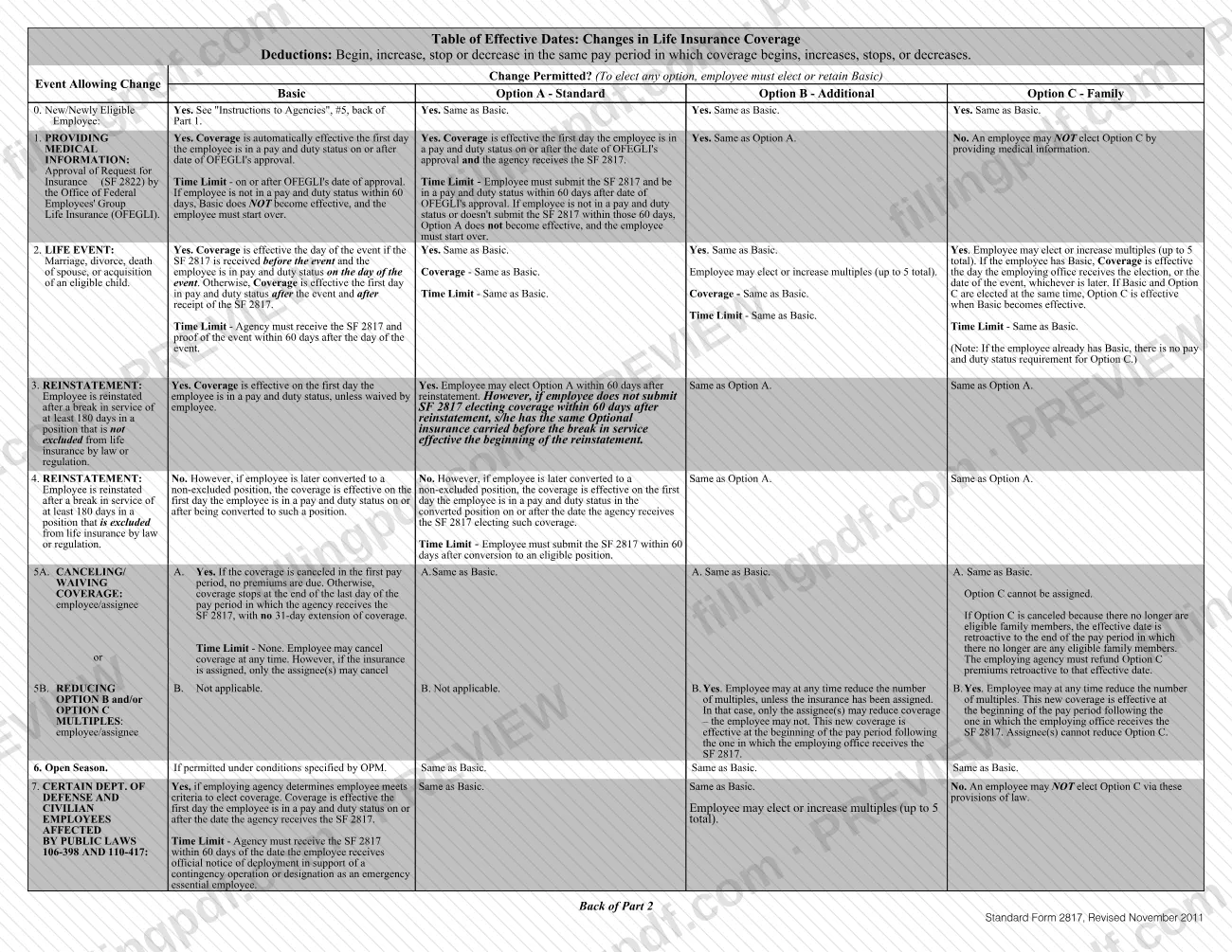
The form has three parts: Part 1 is filed in the Official Personnel Folder, Part 2 is for agency use (the payroll codes and the Table of Effective Dates are on it), and Part 3 is the Employee Copy. Once your employing office completes Section 6, your copy and the FEGLI Program Booklet (FE 76-21, or FE 76-20 for U.S. Postal Service employees) together are your certificate (proof) of insurance.
The form carries OMB No. 3206-0230. It is not the Request for Insurance, SF 2822, which an employee submits to provide medical information, and it is not the RI 76-10 assignment of coverage. The instructions say a previous edition of the SF 2817 is not usable.
Who needs to file SF 2817?
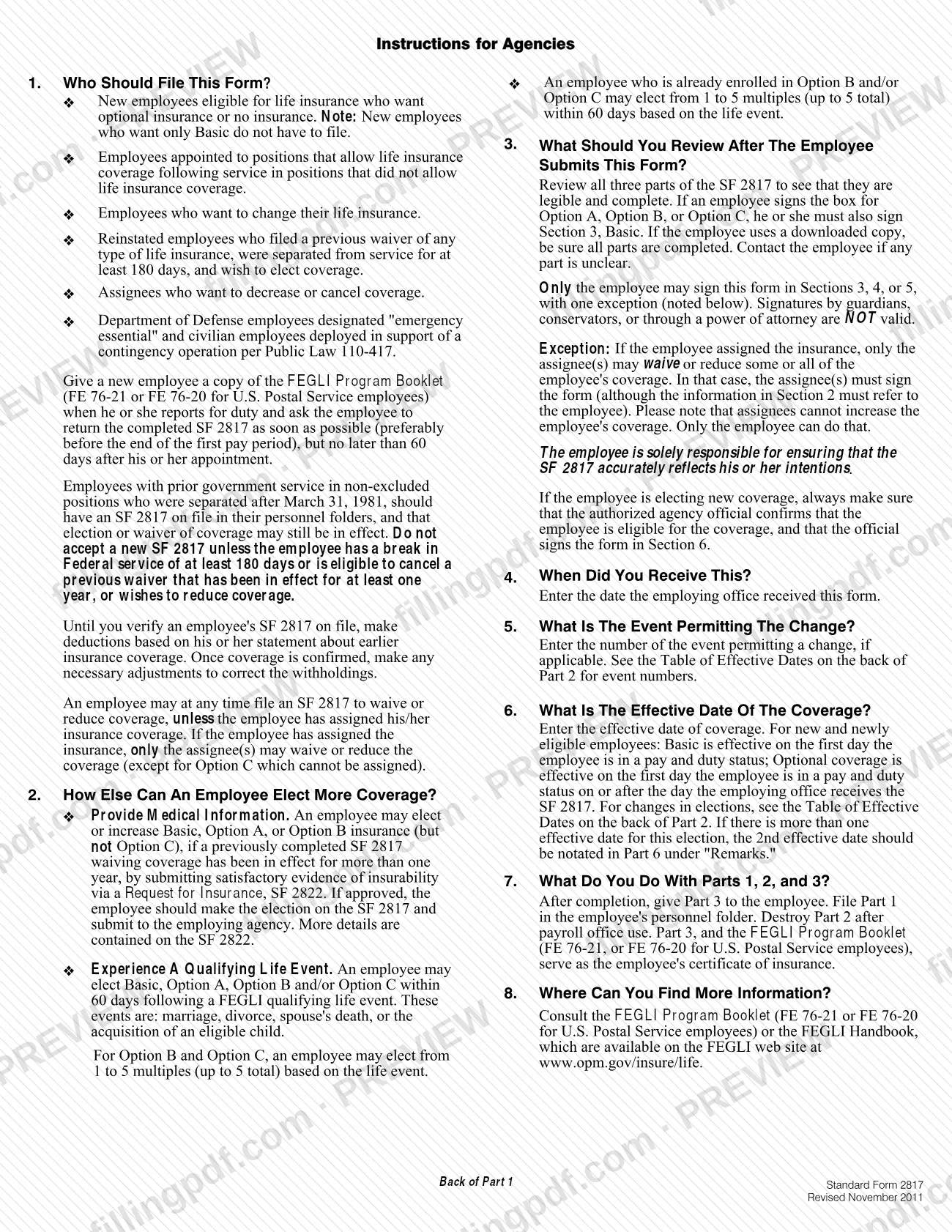
Employees file SF 2817 in these situations, according to the instructions for agencies:
- New employees eligible for life insurance who want optional insurance or no insurance. New employees who want only Basic do not have to file.
- Employees appointed to positions that allow life insurance after service in positions that did not.
- Employees who want to change their life insurance.
- Reinstated employees who filed a previous waiver of any type of life insurance, were separated for at least 180 days, and wish to elect coverage.
- Assignees who want to decrease or cancel coverage.
- Department of Defense employees designated "emergency essential" and civilian employees deployed in support of a contingency operation under Public Law 110-417.
Only the employee may sign Sections 3, 4 or 5. Signatures by guardians, conservators or through a power of attorney are not valid. The one exception: if the employee assigned the insurance, only the assignee(s) may waive or reduce coverage, and they sign the form while Section 2 still describes the employee. Assignees cannot increase coverage, and Option C cannot be assigned.
If you are a reemployed annuitant, waiving insurance on return to Federal service also waives your insurance with your retirement annuity.
When to file SF 2817
New and newly eligible employees should return the form as soon as possible, preferably before the end of the first pay period, and no later than 60 days after appointment. To elect optional insurance, give the signed form to your employing office within 60 days after you are appointed or first become eligible.
Other triggering events carry their own limits:
- Qualifying life event (marriage, divorce, spouse's death or acquisition of an eligible child): the agency must receive the SF 2817 and proof of the event within 60 days after the event.
- Reinstatement: a reinstated employee may elect Option A within 60 days after reinstatement.
- After SF 2822 approval: submit the SF 2817 and be in a pay and duty status within 60 days after OFEGLI's approval, or start over.
- Waiving or reducing coverage: there is no time limit, unless the insurance is assigned.
To waive Basic without premiums being withheld, submit the waiver before the end of your first pay period.
Documents you need
- Proof of the qualifying life event (marriage, divorce, spouse's death or acquisition of an eligible child), only when you elect coverage because of that event; the agency must receive it with the SF 2817 within 60 days after the event.
- Approval of a Request for Insurance, SF 2822, by OFEGLI, only when you are electing or increasing Basic, Option A or Option B after a waiver in effect for more than one year by providing medical information.
How to fill out SF 2817
Read the Employee Copy instructions
Read the Instructions for Employees on the back of Part 3 before you start. Assignees should read items 5 and 6 there.
Enter your identifying information
In Section 2, enter your name (last, first, middle), date of birth (mm/dd/yyyy), Social Security Number, employing department or agency, OWCP claim number if applicable, work location (city, state, ZIP code) and daytime telephone number with area code. An assignee still enters the employee's information here.
Sign for Basic in Section 3
To elect or retain Basic, sign and date (mm/dd/yyyy) in the Basic box, authorizing deductions for your share of the cost. Without this signature you or your assignee cannot elect or retain any optional insurance.
Elect Option A if wanted
In Section 4, sign and date the Option A - Standard box to authorize deductions for the full cost. If you do not sign, you have waived it.
Choose Option B multiples
To elect Option B - Additional, mark one box from 1 to 5 times your annual basic pay, then sign and date. Mark only one box.
Choose Option C multiples
To elect Option C - Family, mark one box from 1 to 5 multiples, then sign and date. The form shows the death benefit worth of each multiple for a spouse and for an eligible child.
Complete the waiver only if needed
Sign and date Section 5 only if you want no life insurance coverage. Read the consequences printed there first, including the limits on getting Basic again and the effect on retiree coverage.
Leave Section 6 to your employer
Section 6, Agency Use, is completed by your employing office: remarks, event number, office name and address, date received, effective date of coverage change and the official's signature.
Review, sign and download the PDF
Check the form against the Section 7 checklist on the back of Part 3: every option you want must be signed and Basic must be signed with any option. Download or print the completed PDF from FillingPDF and give all parts to your employing office.
How to submit SF 2817
You submit SF 2817 to your employing office. The instructions say to send the entire form, without separating the parts, to your human resources office, and not to send it to OPM or OFEGLI.
- Employees: give all parts of the completed form to your employing office. That office completes Section 6 (or its electronic equivalent) and returns your copy, Part 3, to you.
- Annuitants: if the insured is an annuitant, return the completed form to OPM, Retirement Operations Center, P.O. Box 45, Boyers, PA 16017-0045.
- Workers' compensation: if you receive payments from the Office of Workers' Compensation Programs (OWCP), enter your OWCP number in Section 2. If you are still employed, return the form to your employing office; if you are not, or have received payments for at least 12 months, see your human resources office about continued eligibility.
Premiums are deducted from pay; the form does not state amounts, so ask your agency. After processing you receive an SF 50, Notification of Personnel Action, whose two-digit code explains your coverage; also check your pay statement for the correct withholdings. FillingPDF lets you fill out and download the PDF; submission follows the channels above.
Common mistakes to avoid
- Signing for Option A, Option B or Option C without also signing Section 3 for Basic; the instructions say an option signature requires the Basic signature.
- Not signing for an option you already have and want to keep; the election supersedes all previous ones and an unsigned option is waived.
- Marking more than one multiples box for Option B or Option C; the instructions say not to mark more than one box.
- Printing your name in a signature box; the form says "Do not print."
- Having a guardian, conservator or agent under a power of attorney sign; those signatures are not valid.
- Sending the form to OPM or OFEGLI, or separating the parts, instead of giving the entire form to your human resources office.
- Using the form as an assignee to increase the employee's coverage; only the employee can do that, and assignees cannot reduce Option C.
- Submitting the form after the 60-day limit for a life event, reinstatement or SF 2822 approval.
- Using a previous edition of the form; the printed notice says it is not usable.
Frequently asked questions
What is SF 2817 used for?
SF 2817 is the OPM Life Insurance Election form for the Federal Employees' Group Life Insurance (FEGLI) Program. You use it to elect or retain Basic, Option A, Option B or Option C, to change an earlier election, or to waive all life insurance coverage.
Do new employees have to file SF 2817?
Not always. New employees who want only Basic do not have to file, because Basic is automatic unless waived. You file if you want optional insurance, no insurance at all, or a change to your coverage.
What is the deadline to submit SF 2817 as a new employee?
Return it as soon as possible, preferably before the end of your first pay period, and no later than 60 days after your appointment. To elect optional insurance, your employing office must receive it within 60 days of appointment or first eligibility.
Where do I send SF 2817?
Send the entire form, without separating the parts, to your employing agency's human resources office. Do not send it to OPM or OFEGLI. Annuitants return it to OPM, Retirement Operations Center, P.O. Box 45, Boyers, PA 16017-0045.
Can someone sign SF 2817 for me with a power of attorney?
No. Only the employee may sign Sections 3, 4 or 5, and signatures by guardians, conservators or through a power of attorney are not valid. The exception is an assignee, who may sign to waive or reduce coverage you assigned.
How do I cancel my FEGLI life insurance with SF 2817?
Sign and date Section 5 to waive all coverage. There is no time limit for canceling, but if the insurance is assigned, only the assignee may cancel. Coverage stops at the end of the last day of the pay period in which your employing office receives the form.
How can I tell my SF 2817 election was processed?
After your employing office processes the form you receive an SF 50, Notification of Personnel Action, with a two-digit code explaining your insurance coverage. Also check your pay statement for the correct withholdings.
Can I fill out SF 2817 online on FillingPDF?
Yes. You can fill out the PDF online on FillingPDF and download or print it. FillingPDF is an independent service and does not submit the form; you give all parts to your employing office.
Ready to fill out SF 2817?
Fill out SF 2817 now