
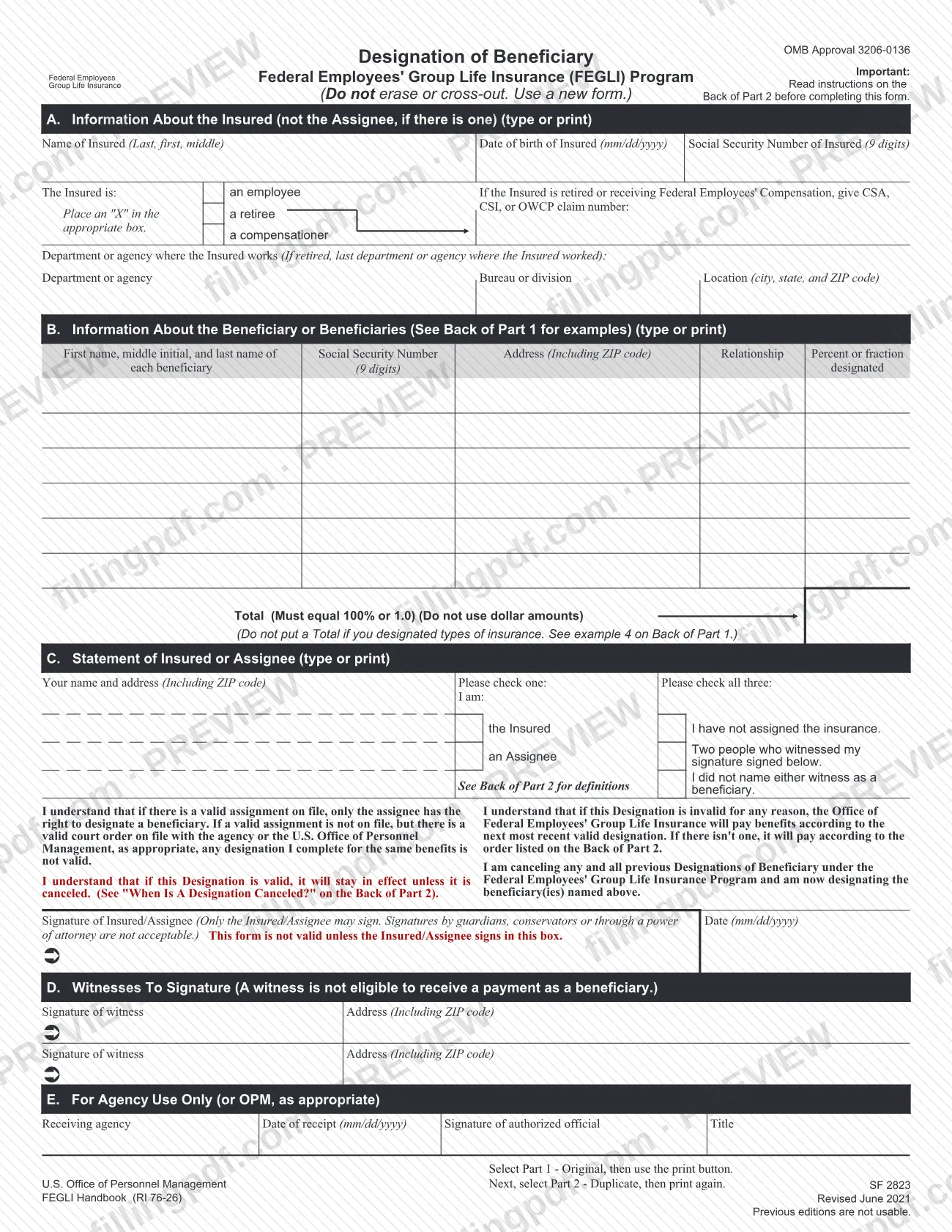
SF 2823, Designation of Beneficiary, Federal Employees' Group Life Insurance Program, is the U.S. Office of Personnel Management (OPM) form on which an insured employee, annuitant or compensationer names who receives Federal Employees' Group Life Insurance (FEGLI) benefits after death. An assignee who owns the coverage uses the same form. On FillingPDF you can fill out the form online and download or print the completed PDF. OPM publishes the official PDF, and the completed form counts only if the employing agency or OPM receives it before the Insured's death.
Last updated
What is SF 2823?
SF 2823, Designation of Beneficiary, Federal Employees' Group Life Insurance Program, is the OPM form that the Insured, or an assignee who owns the coverage, signs to name the beneficiary or beneficiaries of FEGLI life insurance benefits.
The "Insured" is the insured employee, annuitant or compensationer. The form has five parts: A, information about the Insured; B, the beneficiaries, with Social Security number, address, relationship and the percent or fraction each receives; C, the statement of the Insured or Assignee with the signature; D, two witnesses; and E, for agency use only (or OPM, as appropriate). It is printed in two parts, Part 1 - Original and Part 2 - Duplicate, and the instructions are on the back of the pages.
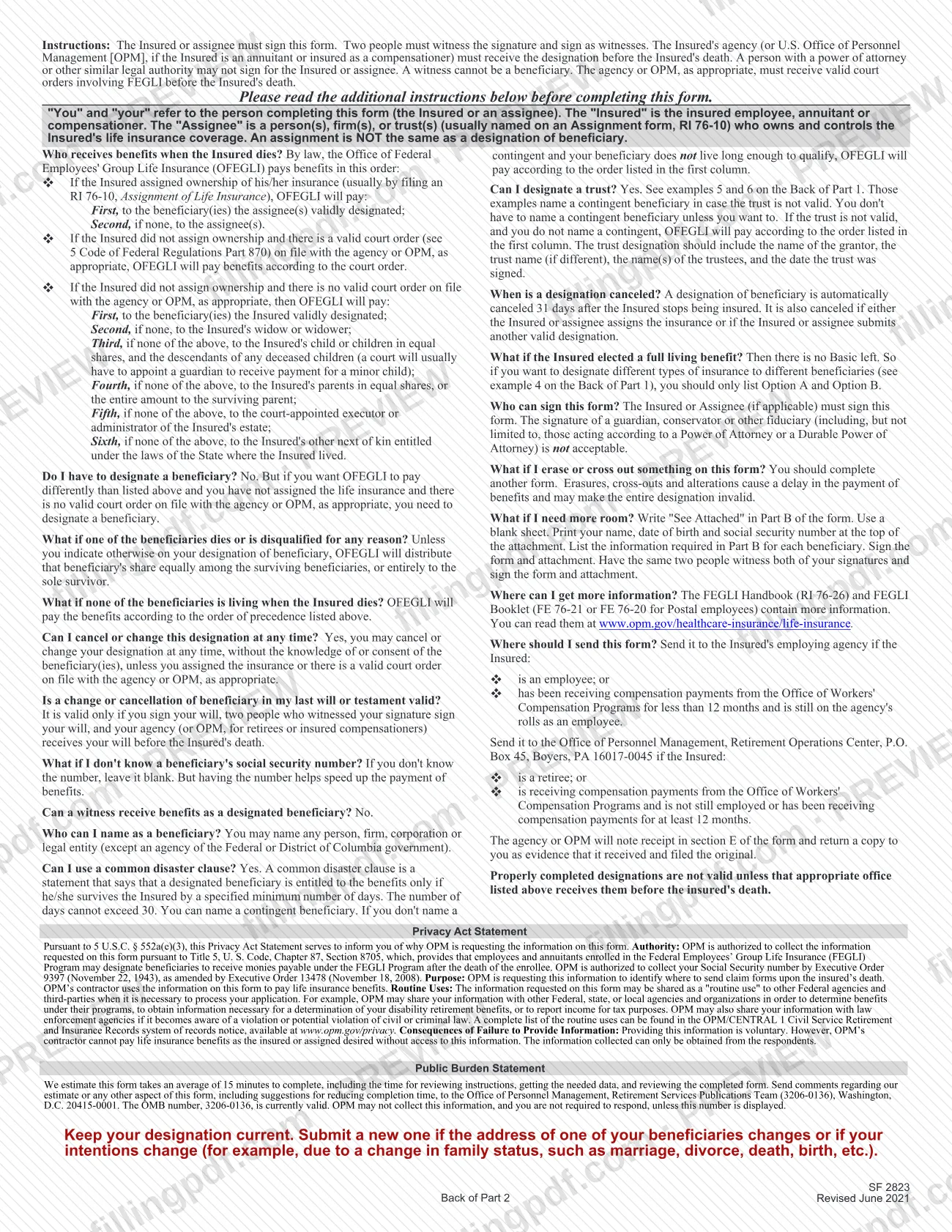
Naming a beneficiary is optional. Without a valid designation, a valid court order or an assignment, the Office of Federal Employees' Group Life Insurance (OFEGLI) pays benefits in the order set by law: the widow or widower, then children, then parents, then the court-appointed executor or administrator, then other next of kin under state law.
A designation is different from an assignment. An assignment, usually made on Form RI 76-10, Assignment of Life Insurance, transfers ownership and control of the coverage. The form states that previous editions are not usable. Further detail is in the FEGLI Handbook (RI 76-26) and the FEGLI Booklet (FE 76-21, or FE 76-20 for Postal employees).
Who needs to file SF 2823?
The main users are insured federal employees, annuitants (retirees) and compensationers who want FEGLI benefits paid to someone other than the persons the law lists by default. The form says you do not have to designate a beneficiary, but you need to if you want OFEGLI to pay differently and you have not assigned the coverage and no valid court order is on file.
- The Insured: signs Section C unless the insurance has been assigned.
- An assignee: if a valid assignment is on file, only the assignee has the right to designate a beneficiary.
- Beneficiaries you may name: any person, firm, corporation or legal entity, except an agency of the Federal or District of Columbia government. A trust may be named.
Limits stated on the form:
- Only the Insured or assignee may sign. A guardian, conservator, other fiduciary or anyone acting under a power of attorney or durable power of attorney may not sign.
- Two people must witness the signature, and a witness cannot be a beneficiary.
- If a valid court order involving FEGLI is on file with the agency or OPM, a designation for the same benefits is not valid.
- Option C - Family cannot be designated.
When to file SF 2823
Complete SF 2823 when you want to name, change or cancel who receives your FEGLI benefits. The agency (or OPM, for annuitants and compensationers) must receive the designation before the Insured's death, or it is not valid.
Keep it current: the form says to submit a new one if a beneficiary's address changes or your intentions change, for example after marriage, divorce, death or birth. A valid designation stays in effect until canceled. It is canceled automatically 31 days after the Insured stops being insured, and also when the Insured or assignee assigns the insurance or submits another valid designation.
You can cancel or change a designation at any time without the beneficiary's knowledge or consent, unless you assigned the insurance or a valid court order is on file. The form sets no other deadline.
Documents you need
- A blank sheet, only if you need more room than Section B allows: write "See Attached" in Part B, put your name, date of birth and Social Security number at the top, and sign it with the same two witnesses as the form.
How to fill out SF 2823
Choose Part 1 or Part 2 to print
Read the instructions on the back of Part 2 first. The form says to select Part 1 - Original, print it, then select Part 2 - Duplicate and print again.
Enter the Insured's identifying details
In Section A, type or print the Insured's name (last, first, middle), date of birth in mm/dd/yyyy format and 9-digit Social Security number. Complete this section for the Insured, not for the assignee.
Mark the Insured's status
Place an "X" in the box for employee, retiree or compensationer. For a retiree or someone receiving Federal Employees' Compensation, give the CSA, CSI or OWCP claim number.
Give the department or agency
Enter the department or agency, bureau or division, and location (city, state and ZIP code) where the Insured works. If the Insured is retired, give the last agency where the Insured worked.
List each beneficiary in Section B
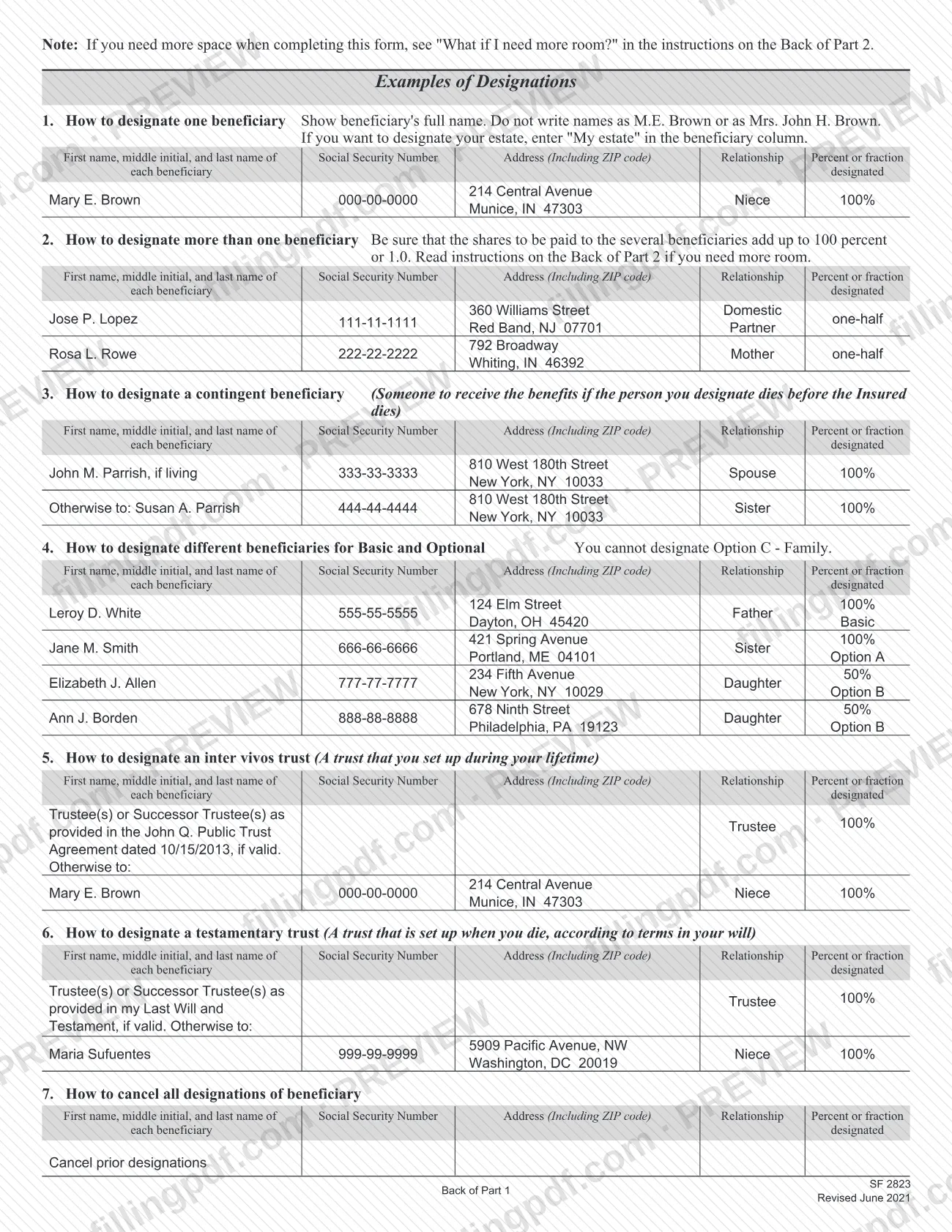
Enter each beneficiary's first name, middle initial and last name in full, with address including ZIP code and relationship. Enter the 9-digit Social Security number if you know it; if not, leave it blank. To designate your estate, write "My estate".
Assign the shares
In the Percent or fraction column, show each share as a percentage or a fraction, never dollar amounts. The shares must total 100% or 1.0; do not enter a Total if you designated by type of insurance.
Handle special designations
For a contingent beneficiary, a trust, different beneficiaries for Basic and Optional insurance, or cancellation of all designations, follow examples 3 to 7 on the Back of Part 1. If you need more room, write "See Attached" in Part B and use a signed attachment.
Complete the Section C statement
Enter your name and address, check whether you are the Insured or an Assignee, and check all three boxes: you have not assigned the insurance, two people witnessed your signature, and you did not name either witness as a beneficiary.
Sign and date the form
Sign in the box and enter the date in mm/dd/yyyy format. Only the Insured or assignee may sign; a guardian, conservator or person acting under a power of attorney may not.
Add the two witnesses in Section D
Two people who watched you sign each sign and give their addresses with ZIP code. Neither witness may be named as a beneficiary.
Leave Section E blank
Section E is for agency use only, or OPM, as appropriate. The receiving office completes it and returns a copy to you.
Review and download the completed PDF
Check names, shares and signatures, avoiding any erasure or cross-out. Download or print the completed PDF from FillingPDF, then send it as described under How to submit.
How to submit SF 2823
Send the signed original to the Insured's employing agency or to OPM, depending on the Insured's status. The form names no other channel.
- Employing agency: use this if the Insured is an employee, or has received Office of Workers' Compensation Programs (OWCP) payments for less than 12 months and is still on the agency's rolls as an employee.
- OPM: use this if the Insured is a retiree, or receives OWCP compensation and is no longer employed or has received it for at least 12 months. Mail to: Office of Personnel Management, Retirement Operations Center, P.O. Box 45, Boyers, PA 16017-0045.
The agency or OPM notes receipt in Section E and returns a copy to you as evidence that it received and filed the original. A designation is not valid unless the appropriate office receives it before the Insured's death.
If you attach a continuation sheet, send it with the form. FillingPDF lets you fill out and download the PDF; submission follows the channels above.
Common mistakes to avoid
- Having a guardian, conservator or someone with a power of attorney sign for the Insured or assignee; the form is not valid unless the Insured or assignee signs in the signature box.
- Naming a witness as a beneficiary. A witness cannot receive benefits as a designated beneficiary.
- Erasing or crossing out an entry. The instructions say to complete a new form, because alterations delay payment and may make the whole designation invalid.
- Entering dollar amounts in Section B, or shares that do not add up to 100% or 1.0.
- Writing initials or titles such as "M.E. Brown" or "Mrs. John H. Brown" instead of the beneficiary's full name.
- Trying to designate Option C - Family, which cannot be designated.
- Putting a Total on Section B when you designated different beneficiaries by type of insurance; the form says not to.
- Sending a retiree's form to the former agency, or an employee's form to OPM, instead of the office the instructions assign.
- Using a continuation sheet without signing it or without the same two witnesses who signed the form.
- Using a previous edition of the form; the form states that previous editions are not usable.
Frequently asked questions
What is SF 2823 used for?
SF 2823 is the OPM form for designating who receives your Federal Employees' Group Life Insurance (FEGLI) benefits after your death. It is signed by the Insured, or by an assignee who owns the coverage, and it cancels all previous designations when it is valid.
Do I have to designate a beneficiary on SF 2823?
No. If you do not, OFEGLI pays by the order set in the instructions: widow or widower, children, parents, court-appointed executor or administrator, then other next of kin. You need a designation only if you want a different payment and have not assigned the insurance.
Can someone with power of attorney sign SF 2823 for me?
No. Only the Insured or assignee may sign. Signatures by guardians, conservators or others acting under a power of attorney or durable power of attorney are not acceptable, and the form is not valid unless the Insured or assignee signs in the box.
Where do I send the completed SF 2823?
Send it to the Insured's employing agency if the Insured is an employee, or has received OWCP compensation for less than 12 months and is still on the rolls. Retirees and others send it to OPM, Retirement Operations Center, P.O. Box 45, Boyers, PA 16017-0045.
How do I name more beneficiaries than the form has room for?
Write "See Attached" in Part B and use a blank sheet. Put your name, date of birth and Social Security number at the top, list the Part B information for each beneficiary, and sign. The same two witnesses must sign the form and the attachment.
How do I cancel or change a beneficiary designation?
Submit a new valid designation, or use the form to cancel all designations by writing "Cancel prior designations" in Section B (example 7). You may do this at any time without the beneficiary's consent, unless you assigned the insurance or a valid court order is on file.
Can I name a trust as beneficiary on SF 2823?
Yes. Examples 5 and 6 show an inter vivos trust and a testamentary trust. The entry should include the grantor, the trust name if different, the trustees and the date the trust was signed. Naming a contingent beneficiary in case the trust is invalid is optional.
Can I fill out SF 2823 online?
Yes, you can fill out the PDF online on FillingPDF and download or print it. FillingPDF is independent and does not file the form: you still sign it with two witnesses and send it to your agency or OPM.
Ready to fill out SF 2823?
Fill out SF 2823 now