
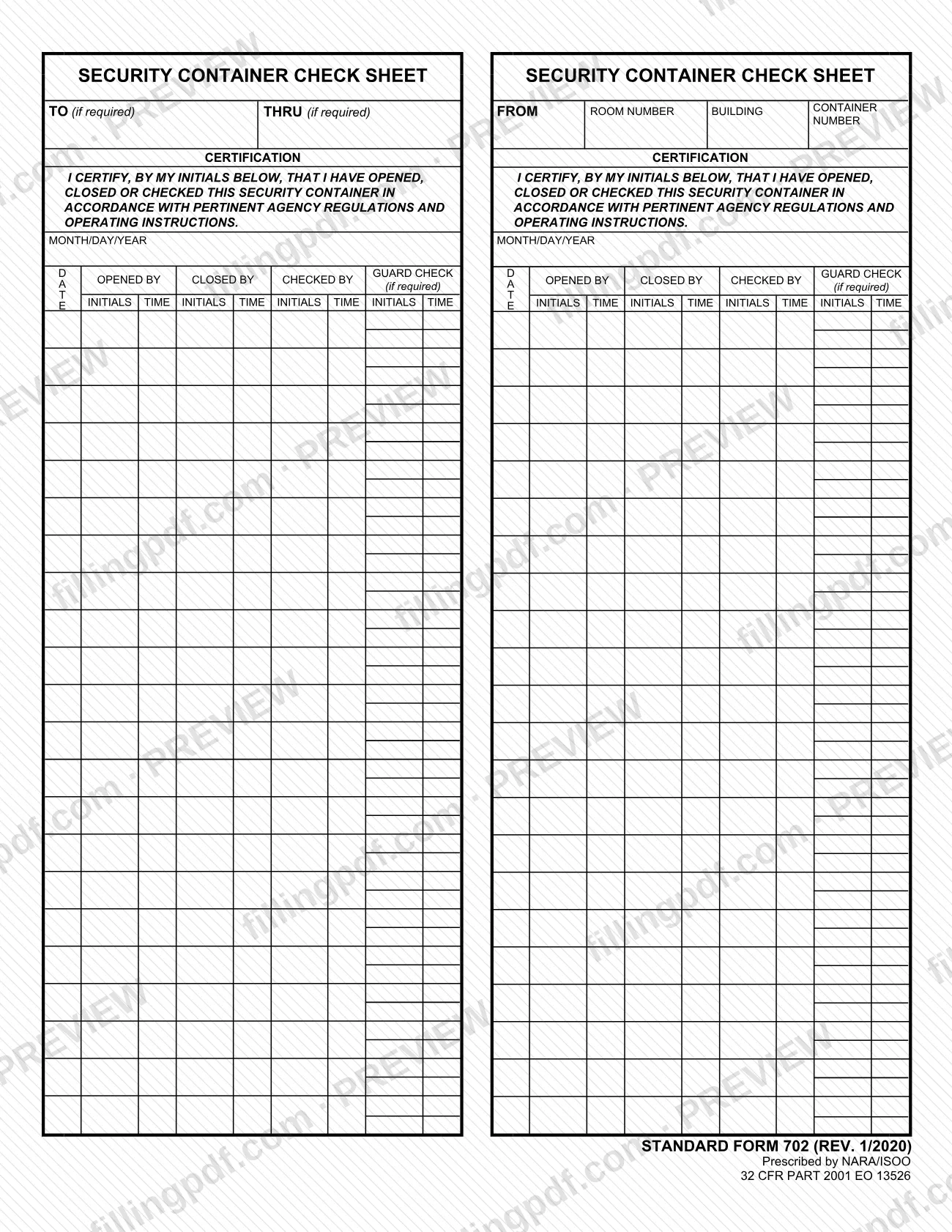
SF 702 is the Security Container Check Sheet, a Standard Form (REV. 1/2020) prescribed by NARA/ISOO and published by the U.S. General Services Administration (GSA). People who open, close or check a security container use it to certify each action by initials and time. On this page you can fill out the form online on FillingPDF and download or print the completed PDF; the original PDF is published by GSA.
Last updated
What is SF 702?
SF 702, the Security Container Check Sheet, is a Standard Form on which each opening, closing or checking of a security container is recorded by initials and time, under a certification tied to agency regulations and operating instructions.
The top of the form identifies the container: TO (if required), THRU (if required), FROM, ROOM NUMBER, BUILDING and CONTAINER NUMBER. Below it, the certification reads that, by my initials below, I have opened, closed or checked this security container in accordance with pertinent agency regulations and operating instructions.
The body is a log organized by date (MONTH/DAY/YEAR). For each date there are columns for OPENED BY, CLOSED BY, CHECKED BY and a GUARD CHECK (if required), and each column has a place for initials and a place for the time.
The printed legend identifies the form as STANDARD FORM 702 (REV. 1/2020), prescribed by NARA/ISOO under 32 CFR Part 2001 and EO 13526. GSA publishes the PDF on its forms page for the Security Container Check Sheet. The form itself is the record: it prints no instructions for what a container may hold or how it must be secured, and refers those matters to pertinent agency regulations and operating instructions.
Who needs to file SF 702?
The form is completed by the people who open, close or check a security container, because the certification on it is made by each person's own initials. Where the form says GUARD CHECK (if required), a guard check column is filled in only when your agency requires one.
The header fields TO (if required) and THRU (if required) are used only when they are required. The FROM, ROOM NUMBER, BUILDING and CONTAINER NUMBER fields identify the office and the container the sheet belongs to.
The form does not say who is authorized to open or check a particular container, who may sign for someone else, or which containers need a sheet. It ties the certification to pertinent agency regulations and operating instructions, so your agency's rules decide those questions.
When to file SF 702
You complete SF 702 each time you open, close or check the security container it covers: the certification states that you have done one of those actions, and the form records the date and the time of each. The form prints no due date, filing window or renewal period of its own. Entries are made under MONTH/DAY/YEAR, one dated row per day of use, and a guard check is added only where it is required. For when a sheet must be started or replaced, follow your agency's regulations and operating instructions.
How to fill out SF 702
Enter the TO line if required
In TO (if required), enter the recipient only where your agency requires it; otherwise leave it as the form allows.
Enter the THRU line if required
In THRU (if required), enter the intermediate office only when it is required.
Enter the FROM line
In FROM, identify the office or person responsible for the container.
Enter room and building
In ROOM NUMBER and BUILDING, write the location where the security container is kept.
Enter the container number
In CONTAINER NUMBER, write the number that identifies the container this sheet covers.
Enter the date
In the MONTH/DAY/YEAR column, enter the date of the opening, closing or check on the row you are using.
Record who opened the container
Under OPENED BY, enter your INITIALS and the TIME you opened it. Your initials certify that you did so in accordance with pertinent agency regulations and operating instructions.
Record who closed the container
Under CLOSED BY, enter your INITIALS and the TIME you closed it.
Record any check
Under CHECKED BY, enter the INITIALS and TIME of the person who checked the container.
Add the guard check if required
Under GUARD CHECK (if required), enter the guard's INITIALS and TIME only where your agency requires a guard check.
Review and download the completed PDF
Check that each entry has a date, initials and time, and that the container identification is complete. Download or print the completed PDF from FillingPDF and handle it under your agency's procedures.
How to submit SF 702
SF 702 prints no mailing address, portal, office or appointment rule, so it names no submission channel. It is a check sheet whose certification refers to pertinent agency regulations and operating instructions, and your agency's security rules decide where the completed sheet is kept or sent.
The PDF is published by GSA at https://www.gsa.gov/system/files/SF702-20_0.pdf. FillingPDF lets you fill out and download the PDF; any handling of the completed sheet follows your agency's own procedures.
Common mistakes to avoid
- Initialing the certification without having opened, closed or checked the container; the initials certify that you did one of those actions.
- Leaving the TIME box blank beside your initials; each Opened By, Closed By, Checked By and Guard Check entry has its own time.
- Skipping the MONTH/DAY/YEAR entry for the row you are using, so the initials cannot be tied to a date.
- Leaving CONTAINER NUMBER, ROOM NUMBER or BUILDING empty, so the sheet does not identify the container it covers.
- Ignoring the GUARD CHECK column when your agency requires it; the form marks it (if required).
- Filling in TO or THRU when your agency does not require them; both are marked (if required).
- Recording a check in the Opened By or Closed By column instead of the Checked By column.
Frequently asked questions
What is SF 702?
SF 702 is the Security Container Check Sheet, a Standard Form (REV. 1/2020) on which people record, by initials and time, when they opened, closed or checked a security container. It is prescribed by NARA/ISOO and published by GSA.
What does initialing the SF 702 certify?
Your initials certify that you opened, closed or checked the security container in accordance with pertinent agency regulations and operating instructions. For that reason, initial only for actions you personally carried out.
What is the GUARD CHECK column on SF 702?
GUARD CHECK is a column with initials and time boxes that the form marks (if required). Complete it only where your agency requires a guard check of the container; otherwise it is not part of the entry.
What information goes at the top of SF 702?
The header has TO (if required), THRU (if required), FROM, ROOM NUMBER, BUILDING and CONTAINER NUMBER. The last four identify who is responsible for the container and where it is; TO and THRU are used only when required.
Can I fill out SF 702 online?
Yes. You can fill out the SF 702 PDF online on FillingPDF and download or print it. FillingPDF is an independent service and does not send or keep the sheet for any agency; your agency's procedures govern its handling.
Where do I send a completed SF 702?
The form prints no address or submission channel. It is a check sheet tied to pertinent agency regulations and operating instructions, so your agency's security rules decide where the completed sheet is kept.
Which revision of SF 702 is this?
The form prints STANDARD FORM 702 (REV. 1/2020), prescribed by NARA/ISOO under 32 CFR Part 2001 and EO 13526. The PDF is the one GSA publishes at gsa.gov.
Ready to fill out SF 702?
Fill out SF 702 now