

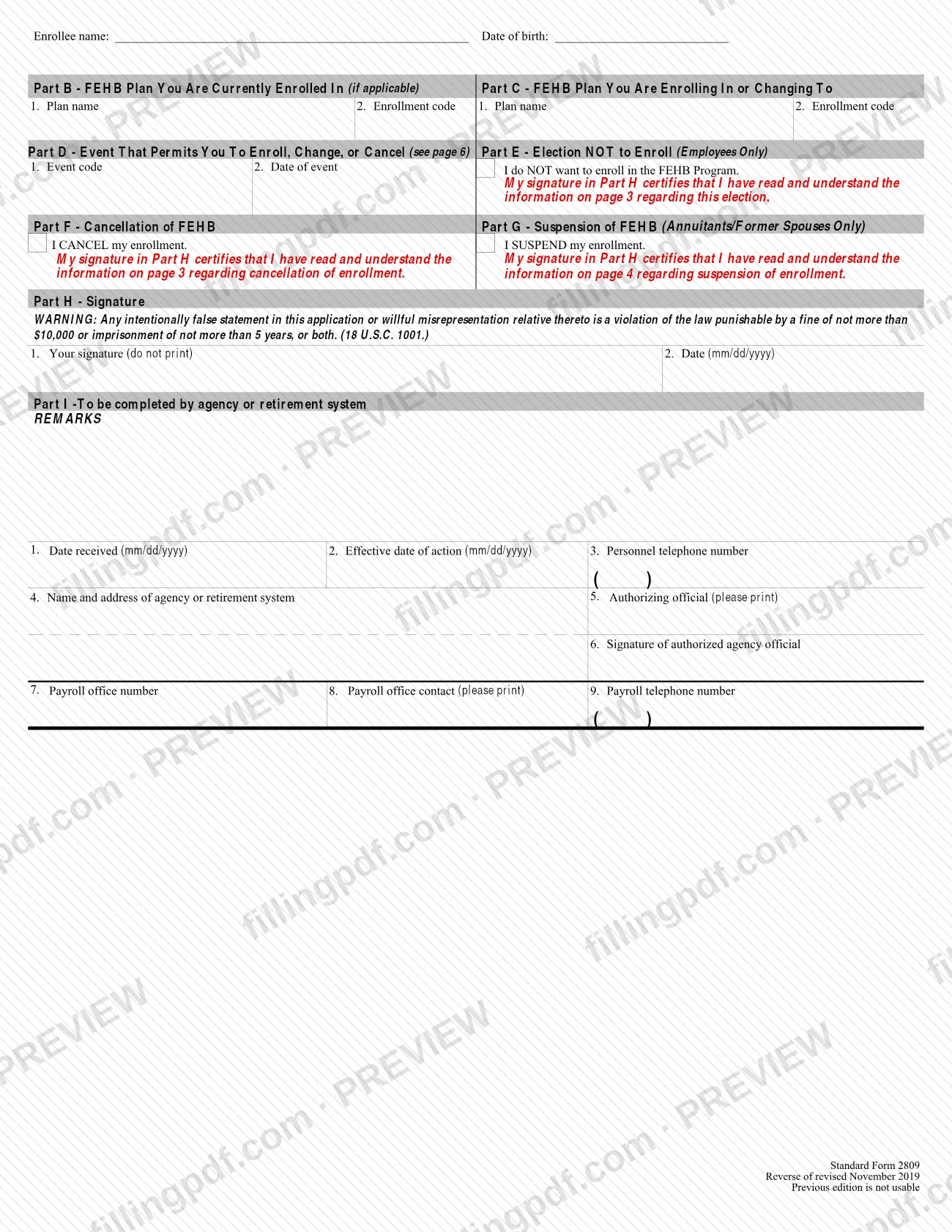
SF2809, the Health Benefits Election Form, is the Office of Personnel Management (OPM) standard form for enrolling in, changing, cancelling or suspending coverage in the Federal Employees Health Benefits (FEHB) Program. Employees, annuitants outside CSRS and FERS, former spouses under the Spouse Equity law and people eligible for Temporary Continuation of Coverage (TCC) use it; CSRS and FERS annuitants use a different form. On FillingPDF you can fill out the form online and download or print the completed PDF. OPM publishes the official PDF, and the completed form goes to your employing office or retirement system.
Last updated
What is SF 2809?
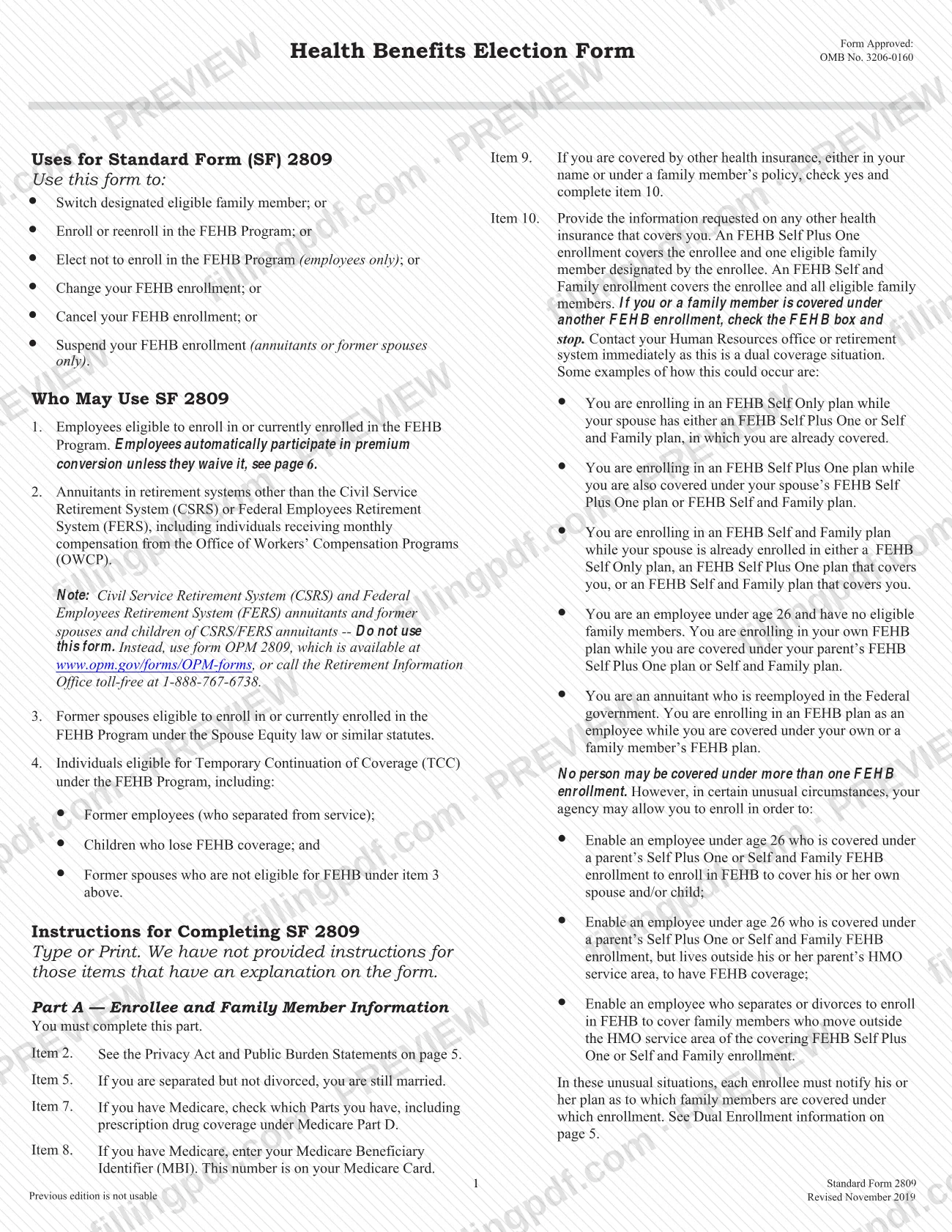
SF 2809, the Health Benefits Election Form, is the Office of Personnel Management (OPM) standard form that employees, annuitants, former spouses and TCC enrollees use to enroll in, change, cancel or suspend enrollment in the Federal Employees Health Benefits (FEHB) Program.
Completing it records which plan and enrollment code you elect, who is covered, and the event that lets you make the election. An FEHB Self Plus One enrollment covers you and one eligible family member you designate; a Self and Family enrollment covers you and all eligible family members.
The form has nine parts:
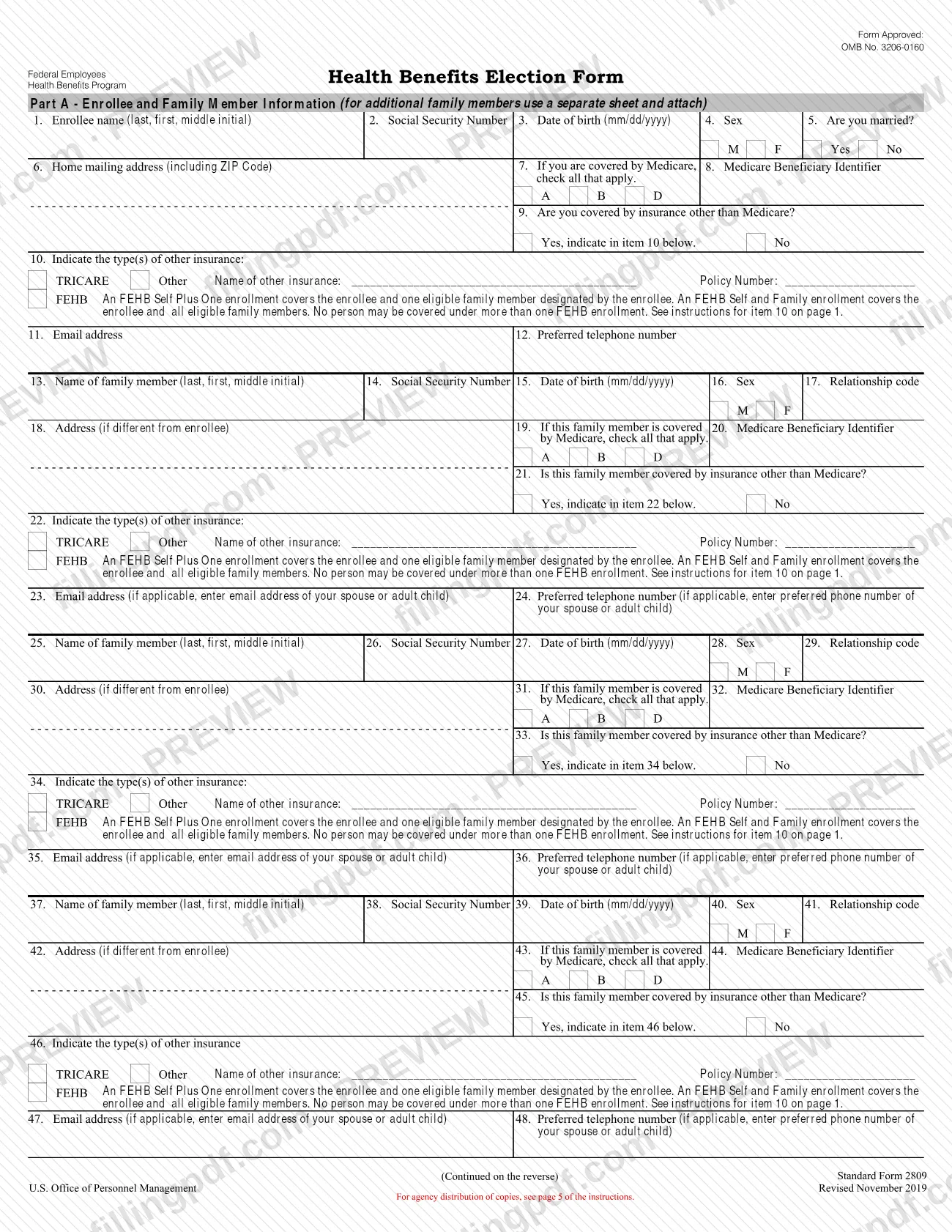
- Part A: enrollee and family member information.
- Part B: the plan you are currently enrolled in.
- Part C: the plan you are enrolling in or changing to.
- Part D: the event code and date that permit the election.
- Part E: election not to enroll (employees only).
- Part F: cancellation of FEHB.
- Part G: suspension of FEHB (annuitants and former spouses only).
- Part H: signature.
- Part I: agency or retirement system use.
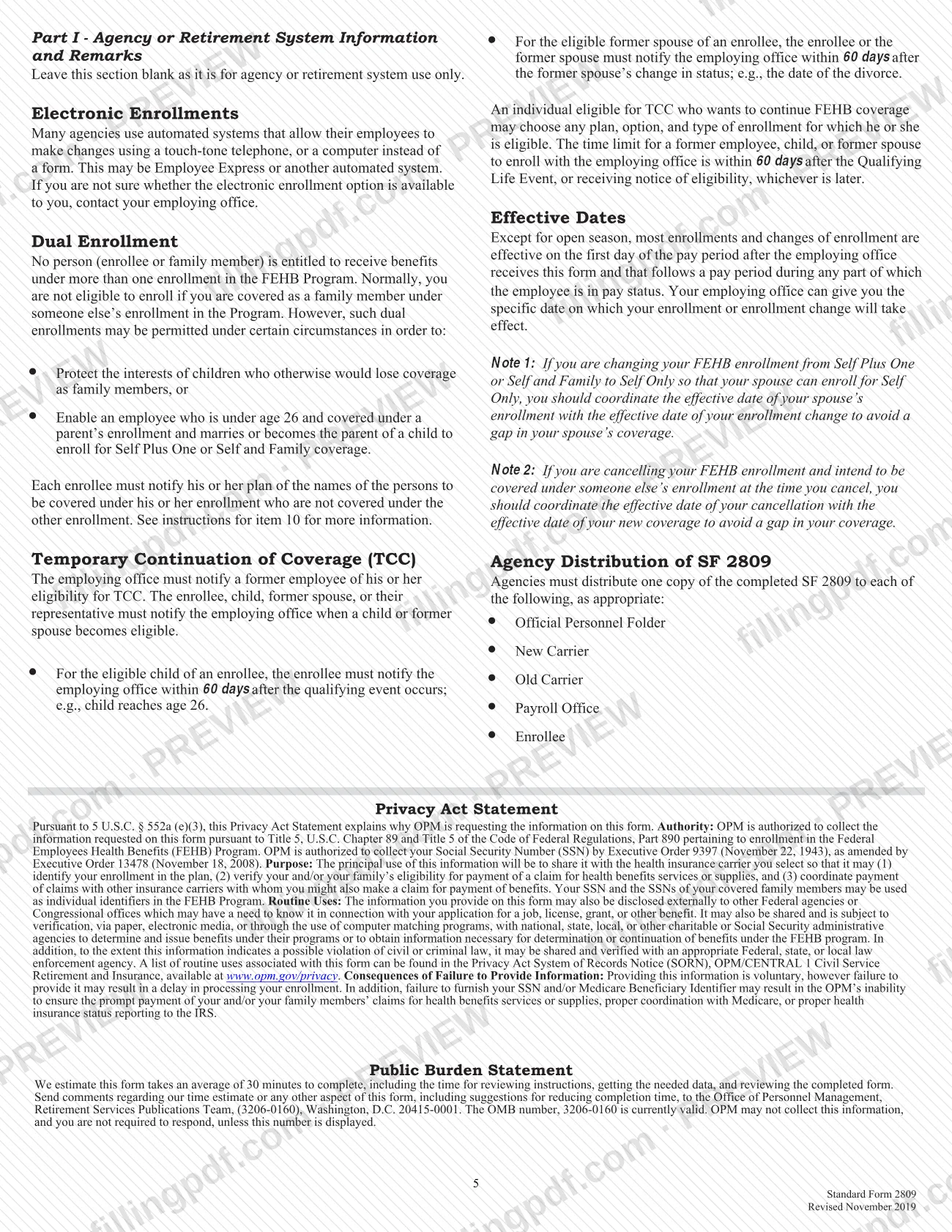
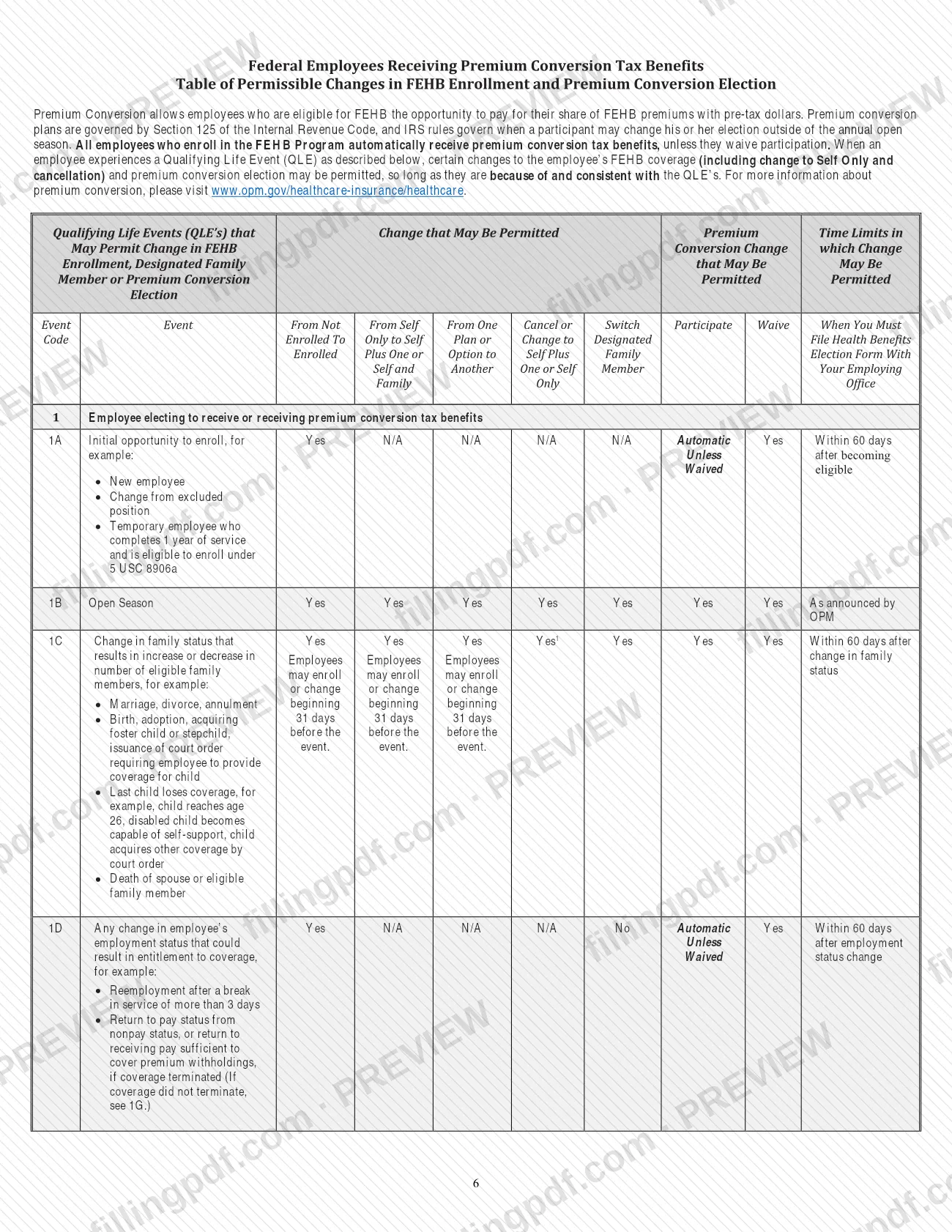
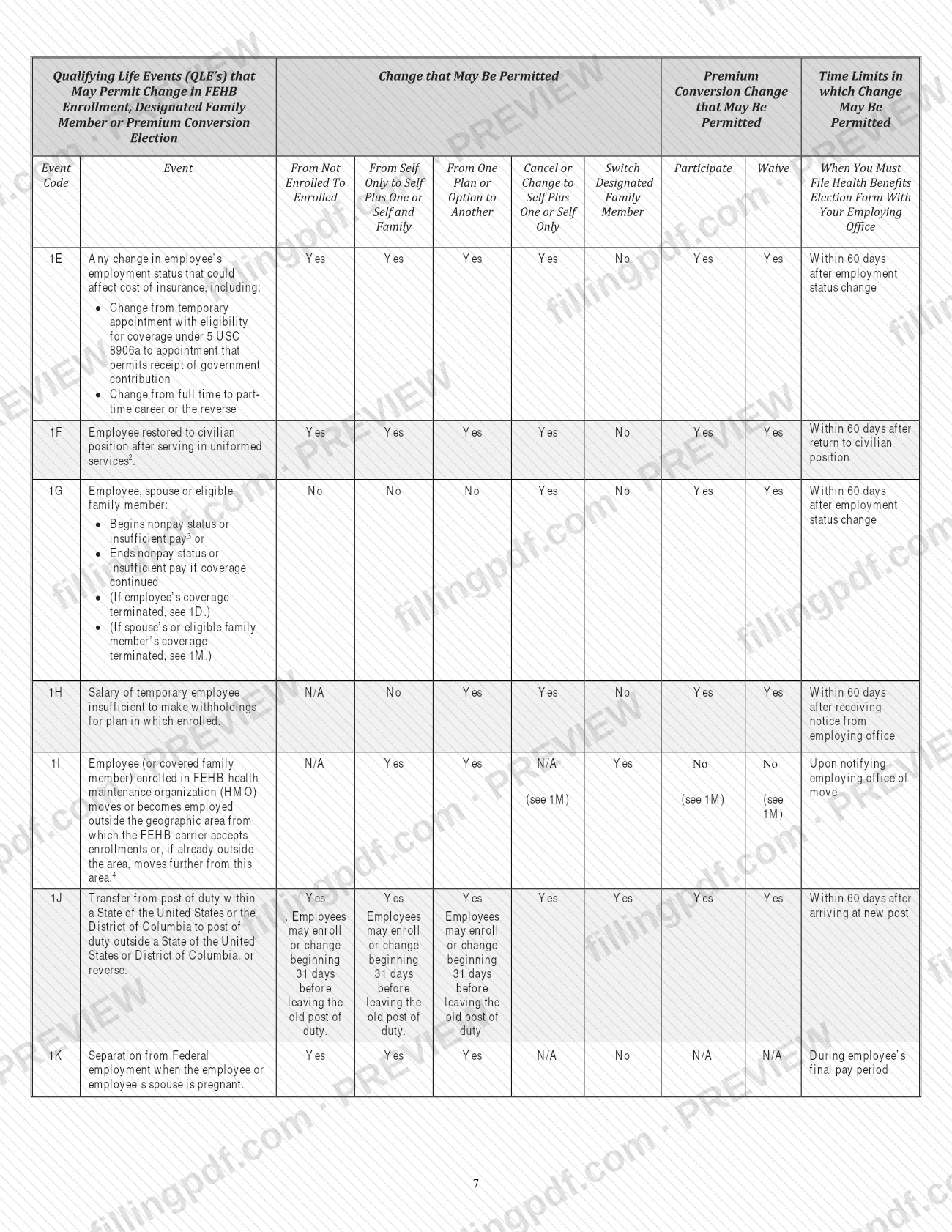
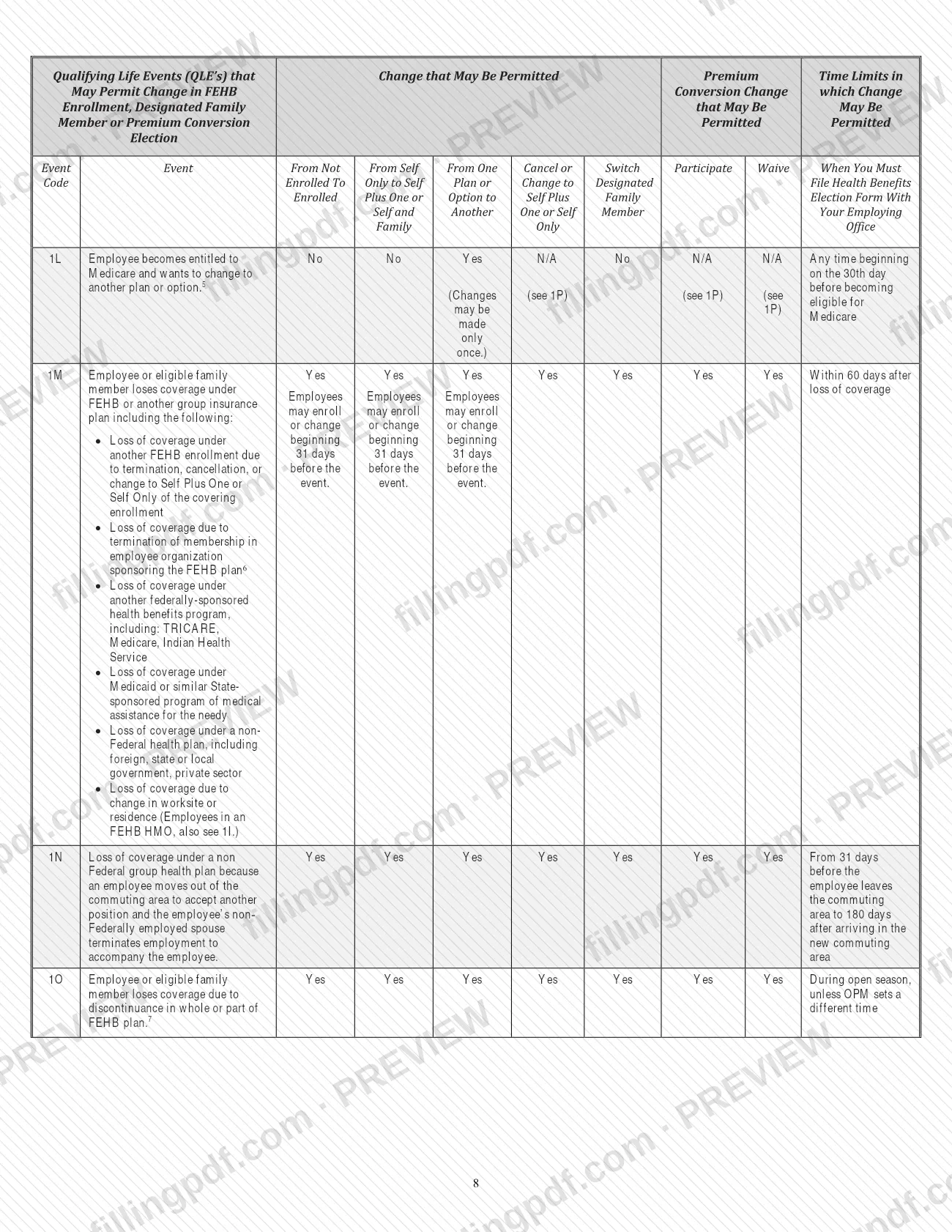
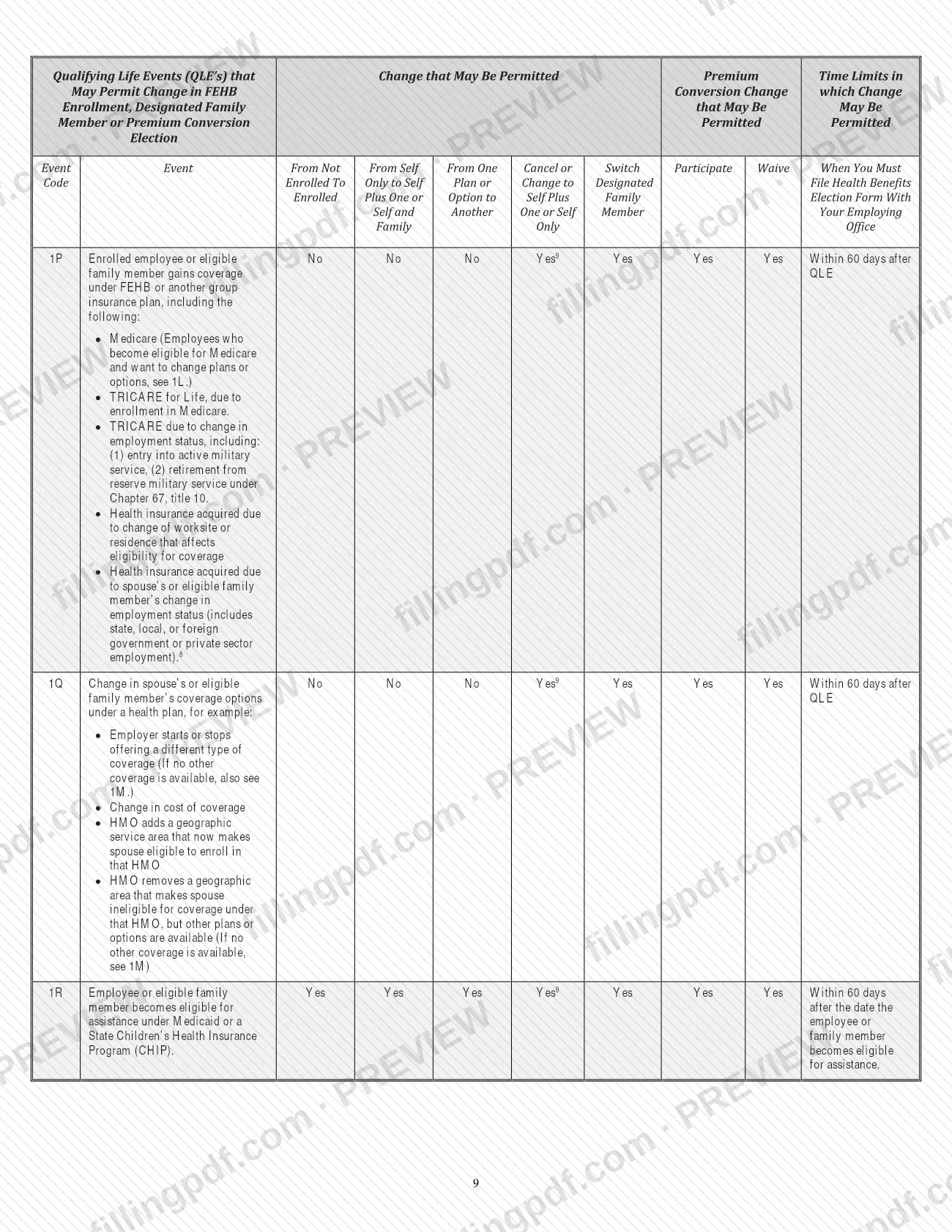
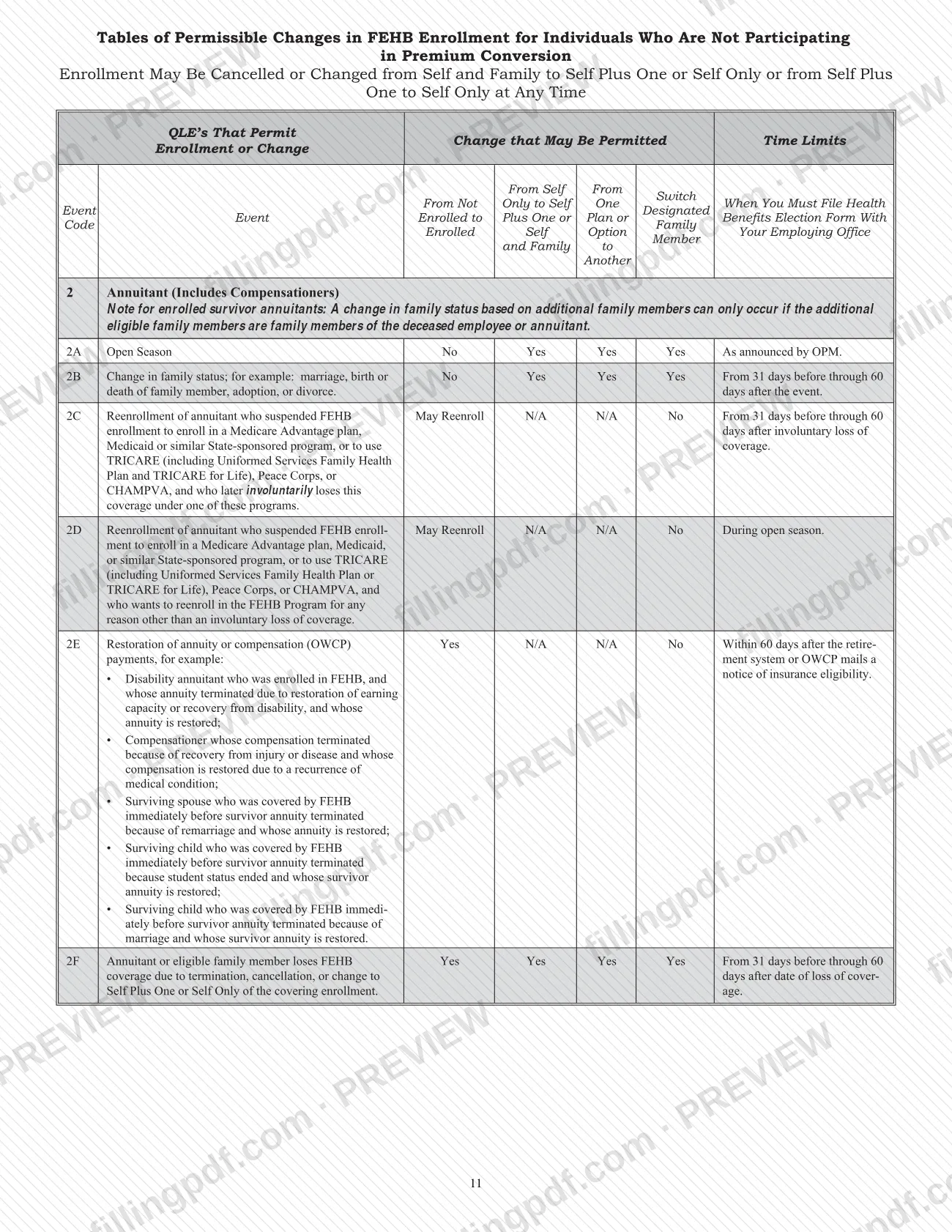
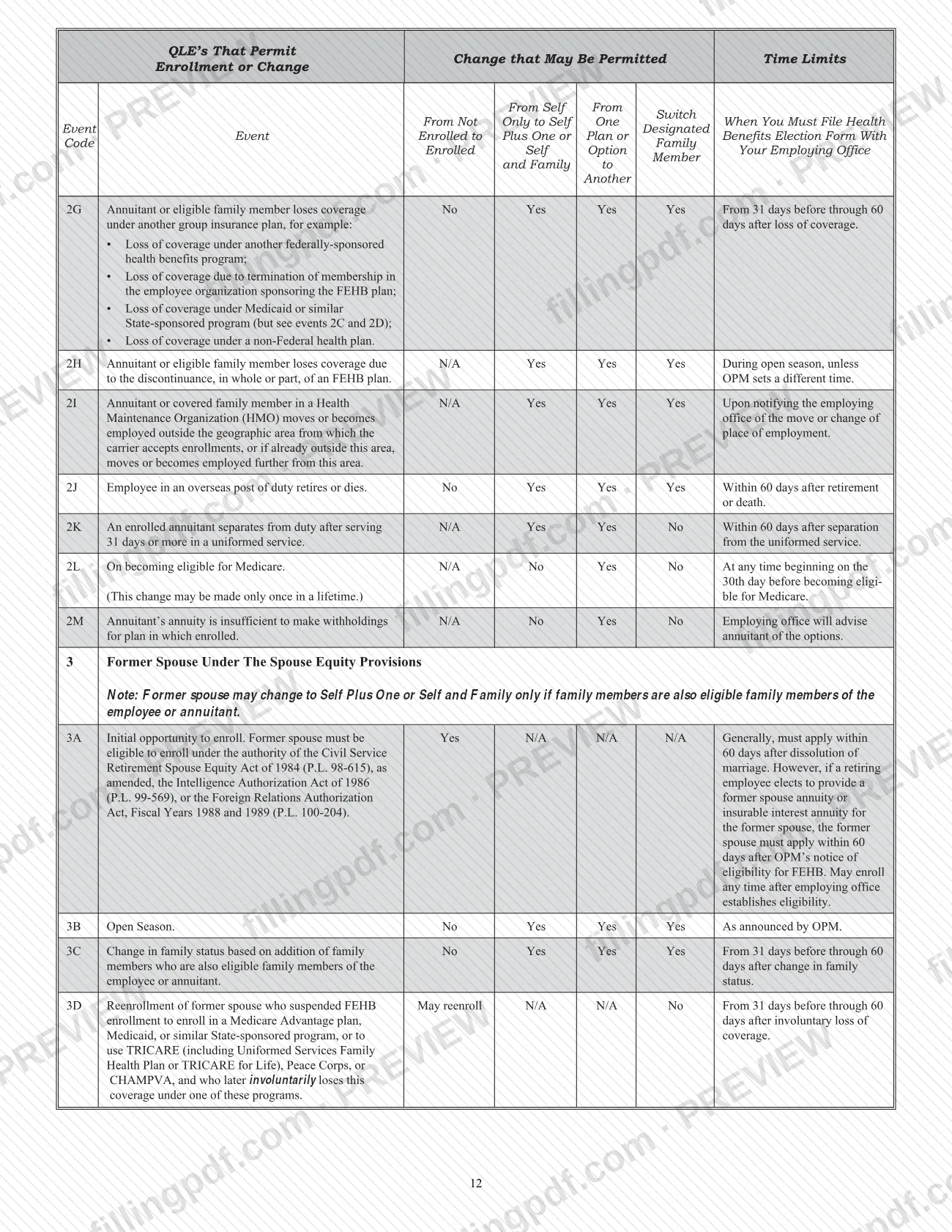
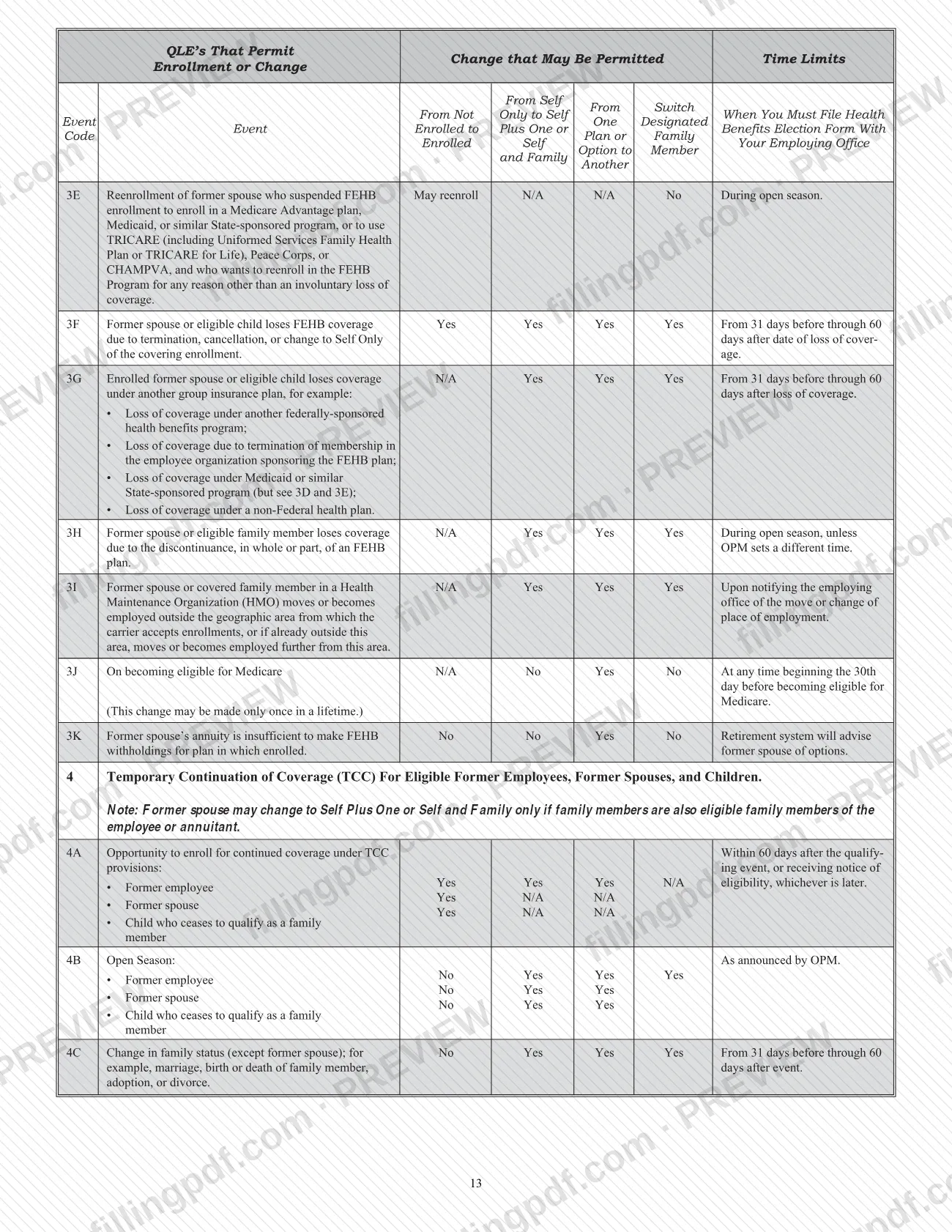
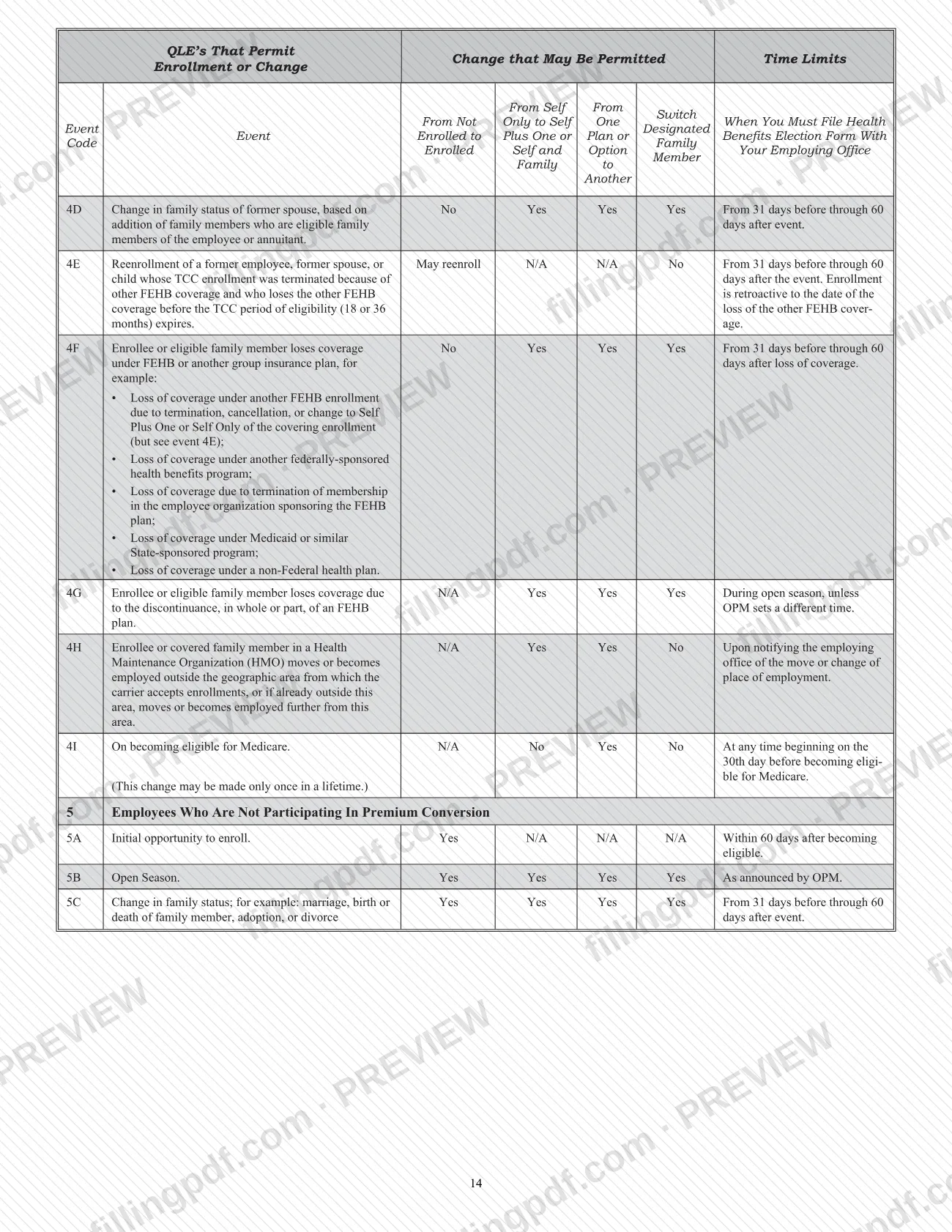
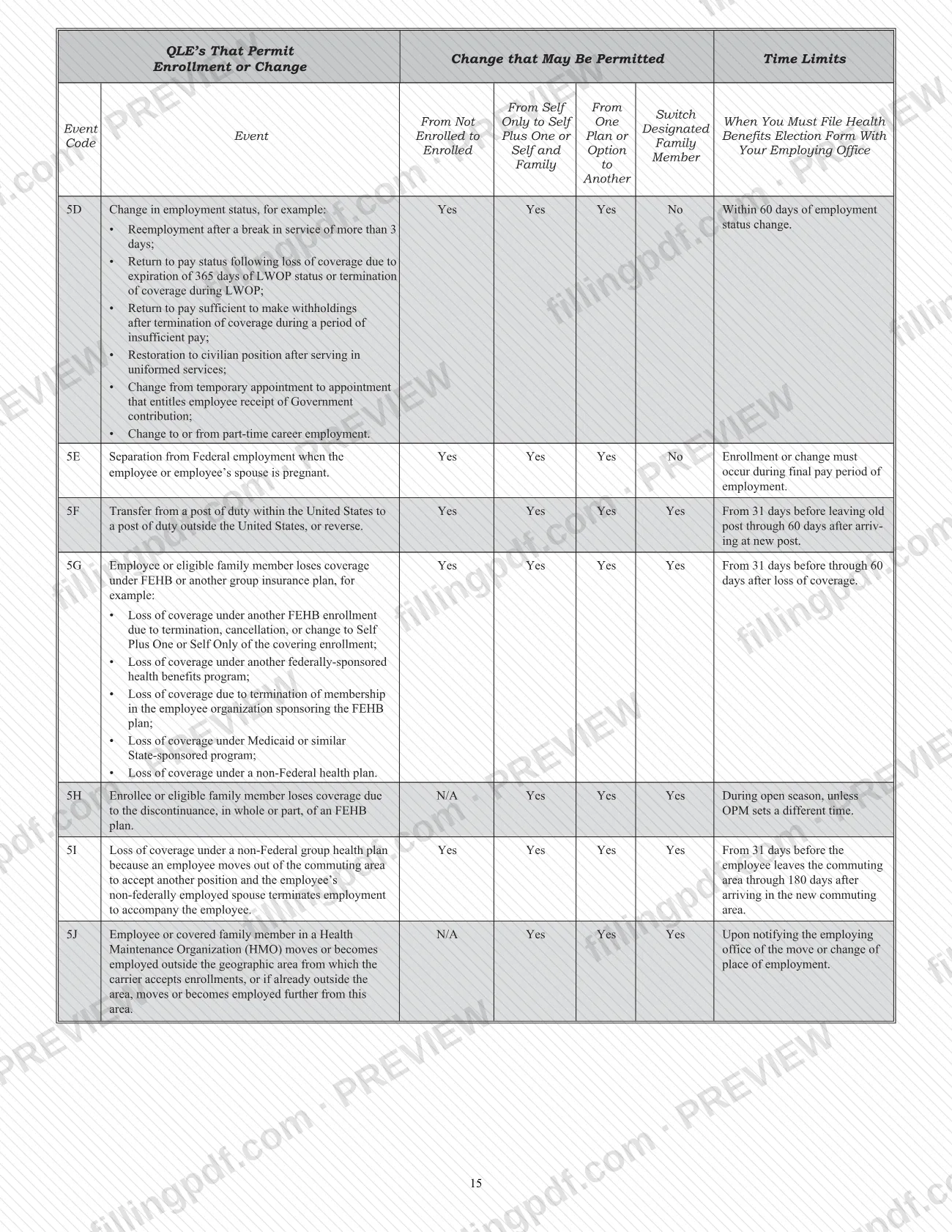
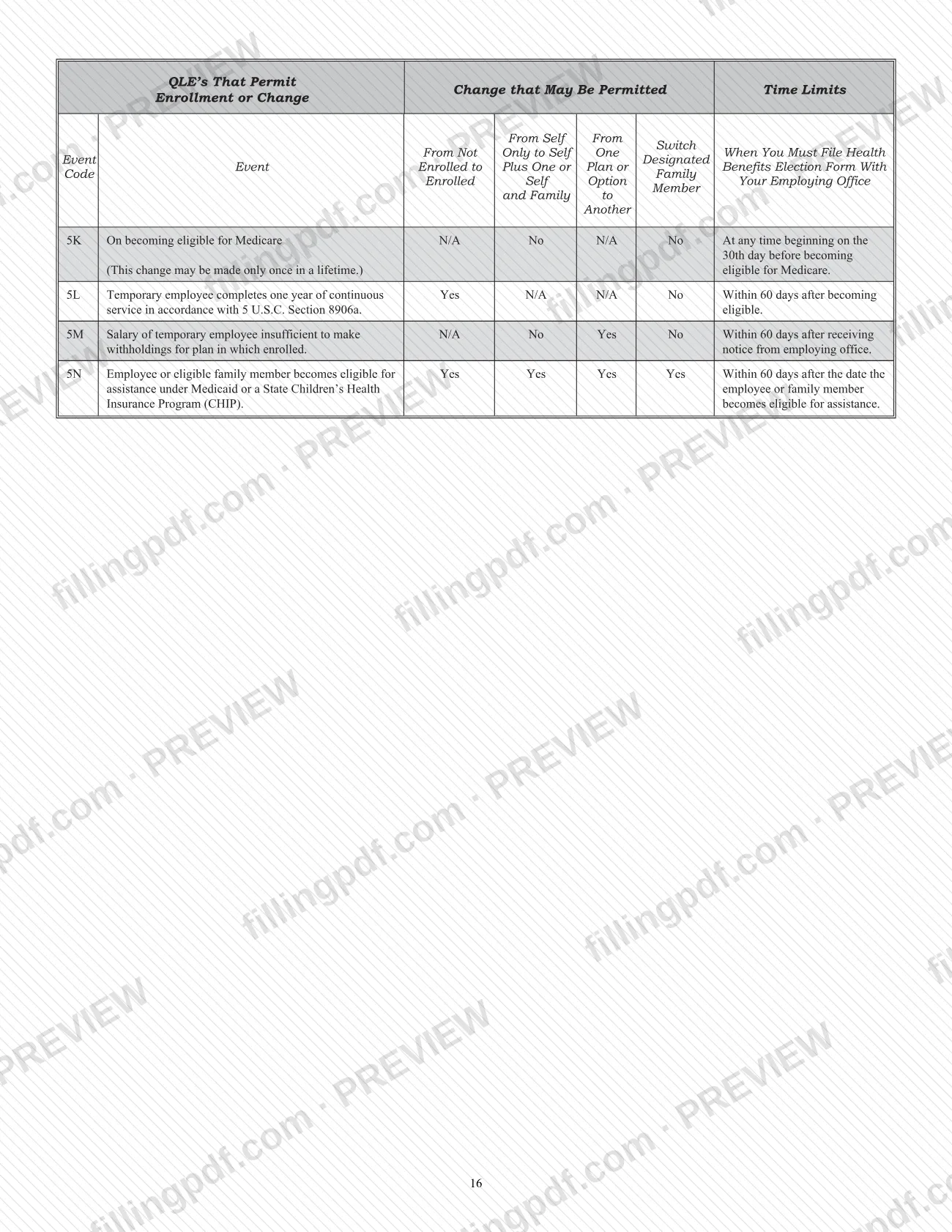
The OPM instructions bound with the form include the Tables of Permissible Changes in FEHB Enrollment, based on 5 CFR Parts 890 and 892, and notes on dual enrollment, TCC, effective dates and survivor benefits. The form carries OMB No. 3206-0160 and is marked Revised November 2019, with the note that the previous edition is not usable.
SF 2809 is not the form for CSRS or FERS annuitants: they use form OPM 2809, and for cancellation or suspension form RI 79-9, Health Benefits Cancellation/Suspension Confirmation.
Who needs to file SF 2809?
Use SF 2809 if you belong to one of these groups:
- Employees eligible to enroll in or currently enrolled in the FEHB Program. Employees automatically participate in premium conversion unless they waive it.
- Annuitants in retirement systems other than the Civil Service Retirement System (CSRS) or Federal Employees Retirement System (FERS), including people receiving monthly compensation from the Office of Workers' Compensation Programs (OWCP).
- Former spouses eligible to enroll in or enrolled in FEHB under the Spouse Equity law or similar statutes.
- Individuals eligible for Temporary Continuation of Coverage (TCC): former employees who separated from service, children who lose FEHB coverage, and former spouses not eligible under the Spouse Equity group.
Do not use this form if you are a CSRS or FERS annuitant, or a former spouse or child of a CSRS or FERS annuitant. Use form OPM 2809 instead, available at www.opm.gov/forms/OPM-forms, or call the Retirement Information Office toll-free at 1-888-767-6738. CSRS and FERS annuitants who cancel or suspend use form RI 79-9.
Part E (election not to enroll) is for employees only, and Part G (suspension) is for annuitants and former spouses only.
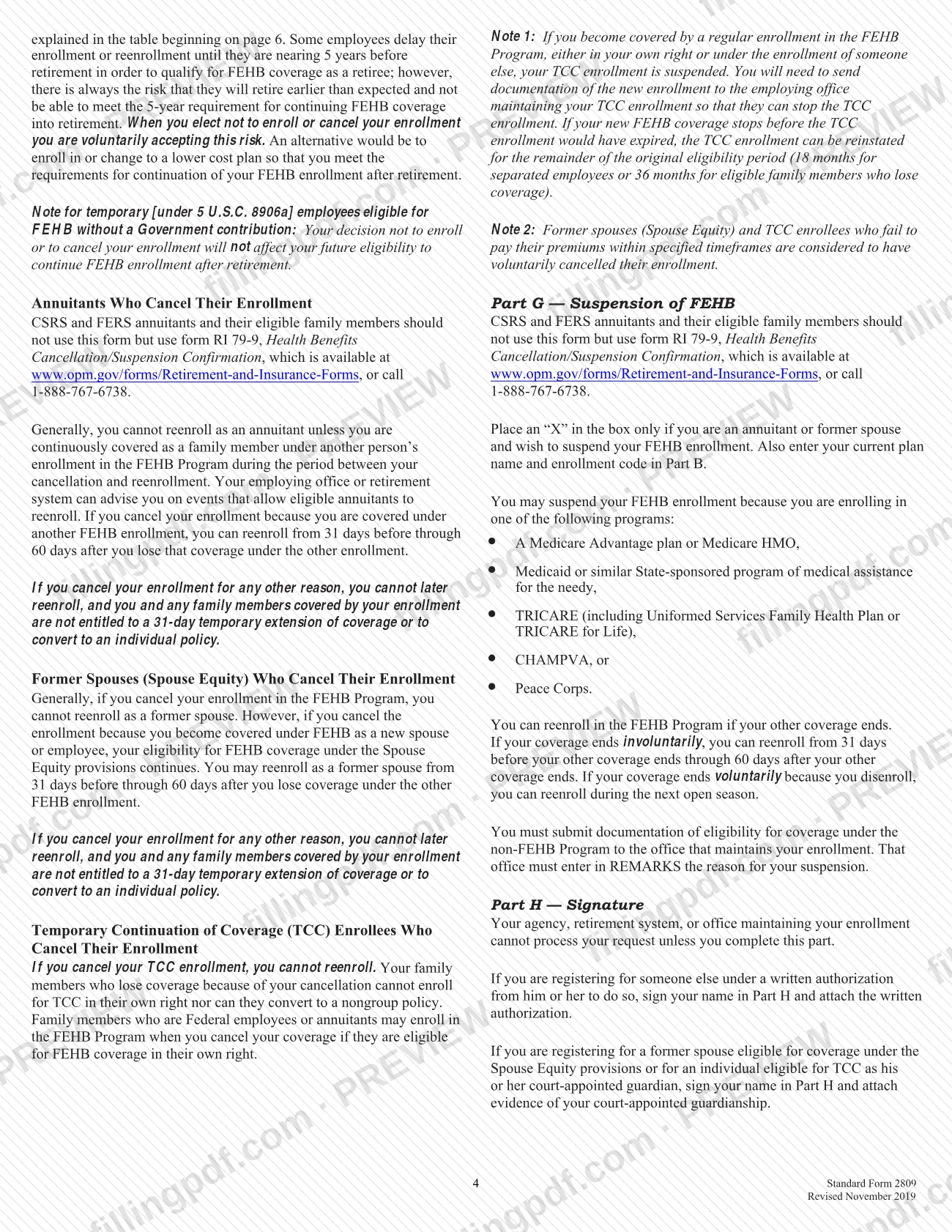
Someone else may sign for you in Part H under a written authorization from you, which must be attached. A court-appointed guardian may register a former spouse or a TCC-eligible individual by signing Part H and attaching evidence of the guardianship.
When to file SF 2809
File SF 2809 when an event lets you enroll, change or cancel, and within the time limit for that event. The Tables of Permissible Changes in the instructions give the event code and limit for each case.
- Employees in premium conversion: initial opportunity to enroll (event 1A), within 60 days after becoming eligible; open season (1B), as announced by OPM; change in family status (1C), within 60 days after the change, and you may enroll or change beginning 31 days before the event.
- Annuitants and former spouses: most family-status and coverage-loss events, from 31 days before through 60 days after the event; open season as announced by OPM. A former spouse generally must apply within 60 days after the marriage is dissolved.
- TCC: within 60 days after the qualifying event or receiving notice of eligibility, whichever is later.
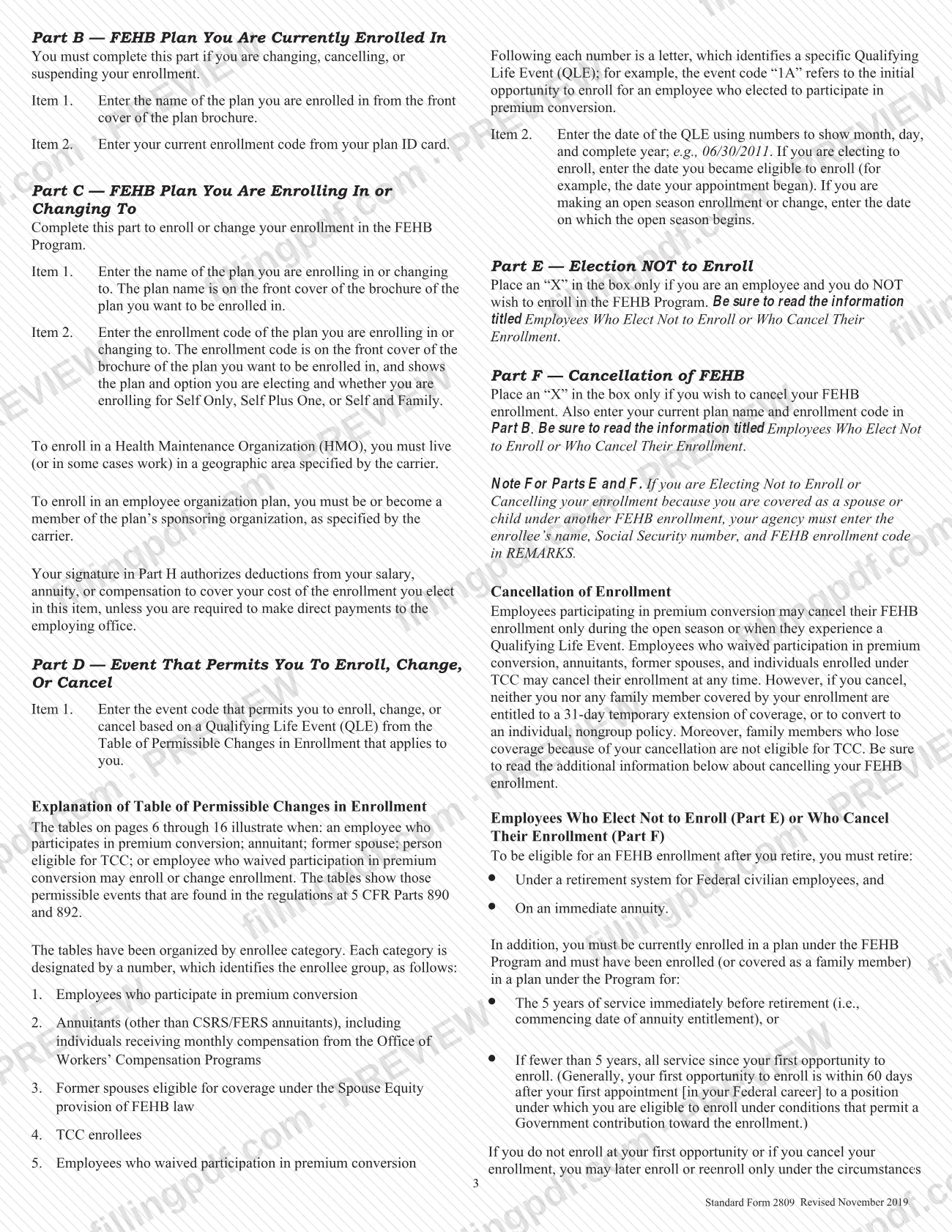
Employees in premium conversion may cancel only during open season or after a Qualifying Life Event. Employees who waived premium conversion, annuitants, former spouses and TCC enrollees may cancel at any time. Most changes take effect on the first day of the pay period after your employing office receives the form, as the instructions explain; your employing office can give you the exact date.
Documents you need
- A separate sheet listing additional family members, attached if you need more space than Part A provides.
- Written authorization from the enrollee, attached when you sign Part H to register for someone else.
- Evidence of court-appointed guardianship, attached when you sign Part H for a former spouse eligible under Spouse Equity or for an individual eligible for TCC.
- Documentation of eligibility for non-FEHB coverage (Medicare Advantage, Medicaid, TRICARE, CHAMPVA or Peace Corps), sent to the office that maintains your enrollment when you suspend under Part G.
- Medical certification of a mental or physical disability that existed before age 26, when you cover a disabled child age 26 or older; your employing office can tell you what is required.
How to fill out SF 2809
Confirm you may use SF 2809
Check the groups under Who May Use SF 2809. CSRS and FERS annuitants and their former spouses and children use form OPM 2809, and to cancel or suspend they use RI 79-9. Type or print, using only the current November 2019 edition.
Enter enrollee information
In Part A, enter your name (last, first, middle initial) in item 1, Social Security Number in item 2, date of birth as mm/dd/yyyy in item 3, sex in item 4 and marital status in item 5. Add your home mailing address with ZIP Code in item 6.
Report Medicare and other insurance
If you have Medicare, check A, B and/or D in item 7 and enter your Medicare Beneficiary Identifier in item 8. In item 9 check Yes or No; if Yes, complete item 10 with the type of insurance, its name and the policy number.
Add your contact details
Enter your email address in item 11 and your preferred telephone number in item 12.
List eligible family members
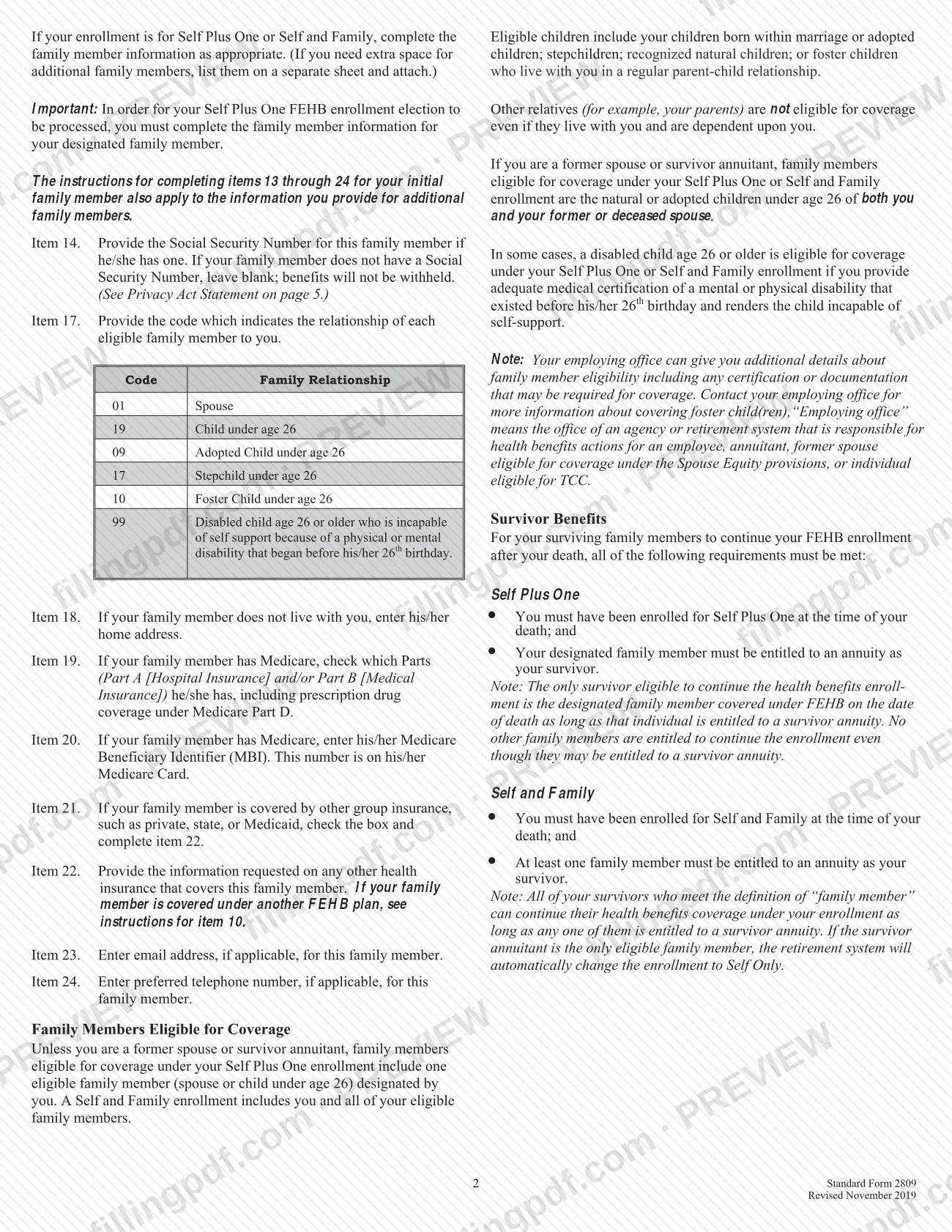
For Self Plus One or Self and Family, complete items 13 to 24 for the first family member, using the relationship code in item 17 (for example 01 Spouse or 19 Child under age 26). Use items 25 to 48 for further members, and a separate sheet beyond that.
Complete family member coverage details
For each family member give the address if different from yours (item 18), Medicare Parts and MBI (items 19 and 20), other insurance (items 21 and 22), and optional email and telephone (items 23 and 24). Leave the SSN blank if the person has none.
Identify your current plan
On page 2, enter your name and date of birth at the top. In Part B, give your current plan name (item 1) and enrollment code (item 2) from your plan ID card; complete this part if you change, cancel or suspend.
Enter the plan you are choosing
In Part C, enter the plan name (item 1) and enrollment code (item 2) from the front cover of the plan brochure. The code shows the option and whether the enrollment is Self Only, Self Plus One or Self and Family.
Give the qualifying event
In Part D, enter the event code from the Table of Permissible Changes (item 1) and the event date as mm/dd/yyyy (item 2). For an initial enrollment use the date you became eligible; for open season use the date it begins.
Mark Part E, F or G if applicable
Employees who do not want to enroll mark Part E. To cancel, mark Part F and fill in Part B. Annuitants and former spouses who suspend mark Part G and fill in Part B. Mark only one, and read the cancellation information first.
Sign, review and download
Sign Part H (do not print) and enter the date as mm/dd/yyyy. Leave Part I blank. Check every entry, then download or print the completed PDF from FillingPDF and give it to your employing office as described under How to submit.
How to submit SF 2809
You file SF 2809 with the office that maintains your enrollment, which is your employing office, agency or retirement system, or complete the election through your agency's electronic system where one is available.
- Employing office or retirement system: give the signed form to the office that maintains your enrollment. The Tables of Permissible Changes name your employing office as the place to file. The form prints no mailing address, so ask that office how it accepts the form.
- Electronic enrollment: many agencies let employees make changes by touch-tone telephone or computer, such as through Employee Express or another automated system, instead of using the form. If you are unsure whether this is available, contact your employing office.
- Attachments: add a separate sheet for extra family members; written authorization if you register for someone else; evidence of court-appointed guardianship if you act as guardian. For a suspension, send documentation of your non-FEHB coverage to the office that maintains your enrollment.
Leave Part I blank, because the agency or retirement system completes it. Agencies distribute copies of the completed form to the Official Personnel Folder, the new and old carriers, the payroll office and the enrollee. FillingPDF lets you fill out and download the PDF; submission follows the channels above.
Common mistakes to avoid
- Using SF 2809 as a CSRS or FERS annuitant, or as a former spouse or child of one; those groups use form OPM 2809, or RI 79-9 to cancel or suspend.
- Electing Self Plus One without completing the family member information for the designated family member; the instructions say the election cannot be processed without it.
- Leaving Part B blank when changing, cancelling or suspending; the current plan name and enrollment code are required for those actions.
- Printing your name in Part H instead of signing; the form says "do not print," and the agency cannot process the request without this part.
- Writing in Part I, which is for agency or retirement system use only.
- Checking item 9 or 21 "Yes" without completing item 10 or 22, or checking FEHB there without contacting your Human Resources office or retirement system about dual coverage.
- Marking Part E when you are not an employee, or Part G when you are not an annuitant or former spouse.
- Entering an event date in the wrong format; use month, day and complete year, such as 06/30/2011, and for open season enter the date open season begins.
- Answering item 5 "No" when you are separated but not divorced; the instructions say you are still married.
- Cancelling without knowing that you and covered family members lose the 31-day extension of coverage and the option to convert to an individual policy.
Frequently asked questions
What is SF2809 used for?
SF2809 is the OPM Health Benefits Election Form. You use it to enroll or reenroll in the FEHB Program, change or cancel your enrollment, switch your designated family member, suspend coverage (annuitants and former spouses only) or, as an employee, elect not to enroll.
Can CSRS or FERS annuitants use SF 2809?
No. CSRS and FERS annuitants, and former spouses and children of CSRS or FERS annuitants, use form OPM 2809 instead. To cancel or suspend they use form RI 79-9. The OPM Retirement Information Office can help at 1-888-767-6738.
How long do I have to submit SF 2809 after a life event?
It depends on the event. Employees generally have 60 days after a family-status change, and may act from 31 days before it. Annuitants and former spouses usually act from 31 days before through 60 days after the event. Check your event code in the Tables of Permissible Changes.
Where do I send the Health Benefits Election Form?
File it with your employing office, agency or retirement system, whichever maintains your enrollment. The form prints no mailing address. Many agencies also accept changes through an automated system such as Employee Express, so ask your employing office which applies to you.
Can I fill out SF 2809 online?
You can fill out the PDF online on FillingPDF and download or print it. FillingPDF is an independent service and does not file the form with OPM or your agency; you submit it through your employing office or its electronic enrollment system.
Can I cancel my FEHB enrollment at any time?
Not always. Employees in premium conversion may cancel only during open season or after a Qualifying Life Event. Employees who waived premium conversion, annuitants, former spouses and TCC enrollees may cancel at any time, but cancelling ends the 31-day extension and conversion rights.
Does my family member need a Social Security Number on the form?
Enter the Social Security Number in item 14 if the family member has one. If the person has none, leave it blank; the instructions say benefits will not be withheld. Failure to provide information may delay processing of your enrollment.
Who can sign SF 2809 for someone else?
A person with the enrollee's written authorization may sign Part H and must attach that authorization. A court-appointed guardian may sign for a former spouse eligible under Spouse Equity or for a TCC-eligible individual and must attach evidence of the guardianship.
Ready to fill out SF 2809?
Fill out SF 2809 now