
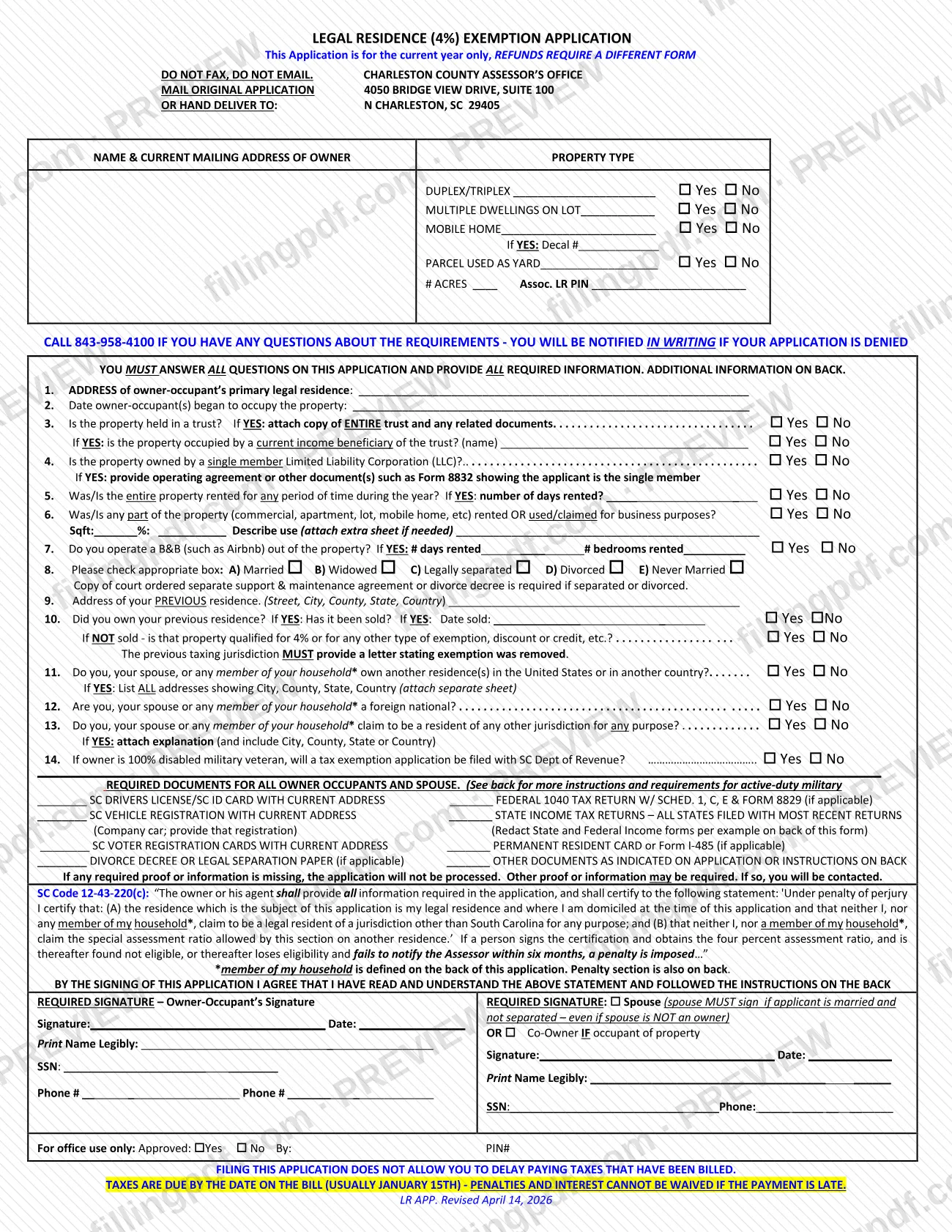
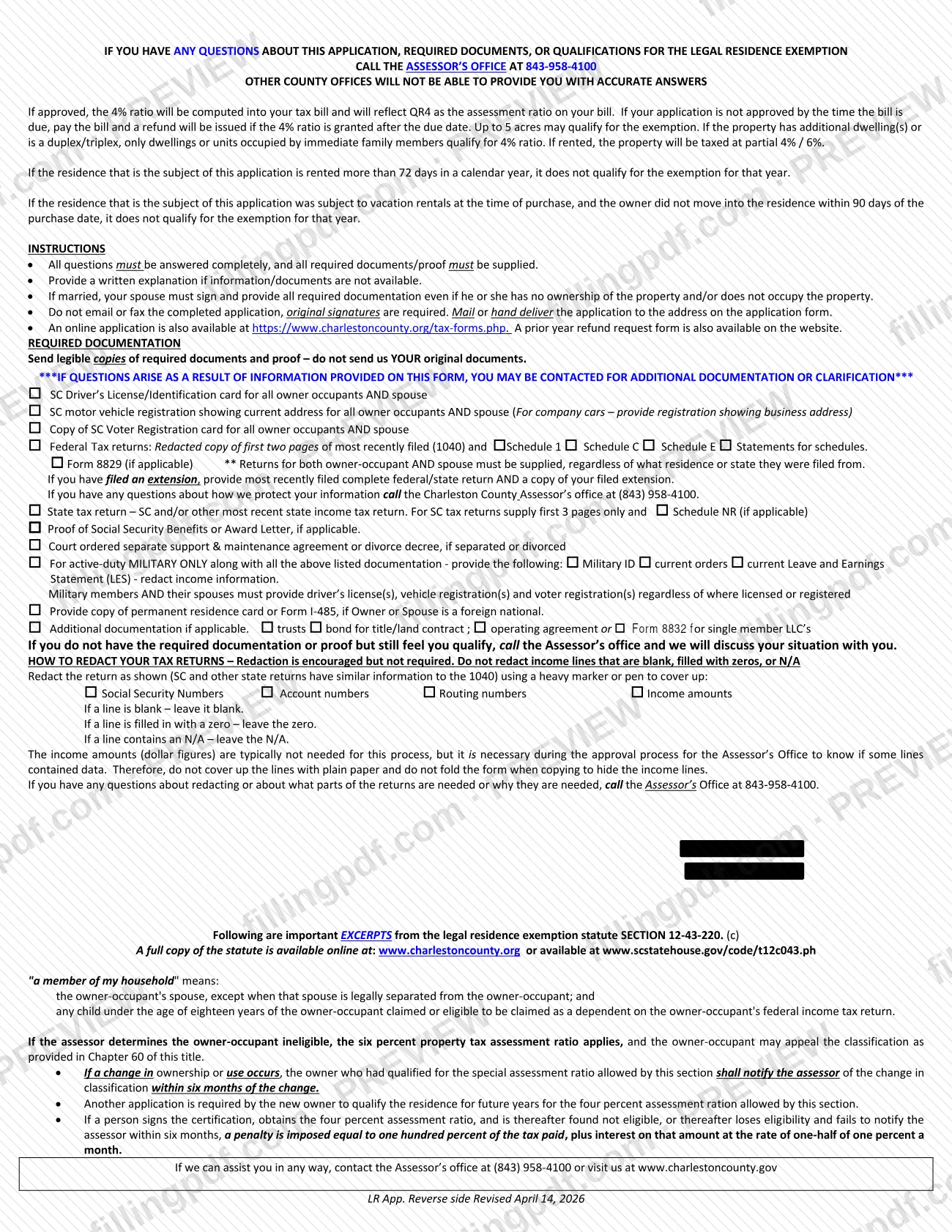
The Legal Residence (4%) Exemption Application is the form the Charleston County Assessor's Office uses to decide whether an owner-occupied home gets the 4% assessment ratio instead of the 6% ratio. It is one of the Charleston County property tax forms, and it applies to the current year only. On this page you can fill out the form online on FillingPDF and download or print the completed PDF; the county requires an original signature, so the application is mailed or hand delivered to the Assessor's Office.
Last updated
What is 4% Legal Residence Exemption – Charleston County, SC?
The Legal Residence (4%) Exemption Application is the Charleston County Assessor's Office form on which an owner-occupant certifies that a property is their primary legal residence and asks for the 4% assessment ratio on it under SC Code 12-43-220(c).
If the application is approved, the 4% ratio is built into the tax bill, which then shows QR4 as the assessment ratio. If the assessor finds the owner-occupant ineligible, the six percent ratio applies, and the owner may appeal the classification as provided in Chapter 60 of Title 12. The county notifies you in writing if the application is denied.
The form is for the current year only. The form states that refunds for earlier years require a different form, and the county's website offers a prior-year refund request form.
The application collects the owner's name and mailing address, the property type (duplex/triplex, multiple dwellings on the lot, mobile home with decal number, parcel used as a yard), and 14 numbered questions about occupancy, trusts, LLC ownership, rental or business use, marital status, previous and other residences, foreign nationals in the household, residency claims elsewhere, and disabled military veterans. It ends with a certification under penalty of perjury and signature blocks for the owner-occupant and a spouse or co-owner.
The back of the form carries the instructions, the document requirements, the definition of "member of my household" and excerpts of the statute.
Who needs to file 4% Legal Residence Exemption – Charleston County, SC?
Owners who live in the property as their primary legal residence and want the 4% assessment ratio on it use this application. The form says it is for the current year only.
Points the form makes about who is covered:
- Spouses. If you are married and not separated, your spouse must sign and provide all required documentation, even if the spouse does not own or occupy the property. A co-owner signs too if that co-owner occupies the property.
- Acreage. Up to 5 acres may qualify for the exemption.
- Duplexes, triplexes and extra dwellings. Only dwellings or units occupied by immediate family members qualify for the 4% ratio.
- Rented property. If the property is rented, it is taxed at a partial 4% / 6%. A residence rented more than 72 days in a calendar year does not qualify for that year.
- Former vacation rentals. A residence that was subject to vacation rentals when purchased does not qualify for that year if the owner did not move in within 90 days of the purchase date.
- New owners. A new owner must file another application to qualify the residence for future years.
- Active-duty military. The form lists additional documents for active-duty military members.
Do not use this form to ask for a refund of a prior year; that requires a different form.
When to file 4% Legal Residence Exemption – Charleston County, SC
The form is for the current year only, and it does not set a separate filing deadline of its own. It warns that filing does not let you delay paying taxes already billed: taxes are due by the date on the bill (usually January 15th), and penalties and interest cannot be waived if payment is late. If your application is not approved by the time the bill is due, pay the bill; a refund will be issued if the 4% ratio is granted after the due date.
File a new application when ownership changes, because a new owner must apply to qualify the residence for future years. If a change in ownership or use occurs, the owner who had qualified must notify the assessor within six months of the change. Missing that notice after obtaining the 4% ratio can lead to a penalty plus interest, as described on the back of the form. For questions about timing, call the Assessor's Office at 843-958-4100.
Documents you need
- SC driver's license or SC ID card with current address, for all owner-occupants and the spouse.
- SC vehicle registration showing current address, for all owner-occupants and the spouse; for a company car, the registration showing the business address.
- Copy of the SC voter registration card for all owner-occupants and the spouse.
- Federal tax return: redacted copy of the first two pages of the most recently filed Form 1040, plus Schedule 1, Schedule C, Schedule E and statements, and Form 8829 if applicable. Returns for both owner-occupant and spouse are required.
- If you filed an extension: the most recently filed complete federal and state return and a copy of the filed extension.
- State income tax returns, SC and/or other states, most recent. For SC returns, the first 3 pages only plus Schedule NR if applicable.
- Proof of Social Security benefits or an award letter, if applicable.
- Court-ordered separate support and maintenance agreement or divorce decree, if you are separated or divorced.
- Permanent resident card or Form I-485, if the owner or spouse is a foreign national.
- Active-duty military only: Military ID, current orders and current Leave and Earnings Statement (LES) with income information redacted, plus the license, registration and voter registration of the member and spouse.
- Trusts: a copy of the entire trust and any related documents, if the property is held in a trust.
- Single member LLC: the operating agreement or another document such as Form 8832 showing the applicant is the single member.
- Bond for title or land contract, if applicable.
- Letter from the previous taxing jurisdiction stating the exemption was removed, when the previous residence is owned and not sold.
- Separate sheet listing all addresses of other residences (question 11), or an explanation of residency claimed elsewhere (question 13), when you answer Yes.
How to fill out 4% Legal Residence Exemption – Charleston County, SC
Enter owner and property type details
Write the owner's name and current mailing address, then answer Yes or No for Duplex/Triplex, Multiple Dwellings on Lot, Mobile Home (with Decal # if Yes) and Parcel Used as Yard. If the parcel is a yard, enter # Acres and the Assoc. LR PIN.
Give the residence address and move-in date
Line 1: the address of the owner-occupant's primary legal residence. Line 2: the date the owner-occupant(s) began to occupy the property.
Answer the trust and LLC questions
Line 3: check Yes or No for a trust; if Yes, attach the entire trust and answer whether a current income beneficiary occupies the property. Line 4: check Yes or No for a single member LLC; if Yes, provide the operating agreement or Form 8832.
Report rental and business use
Line 5: answer whether the entire property was or is rented, and the number of days rented. Line 6: answer for any part rented or used for business, with square feet, percent and a description. Line 7: answer the B&B question, with days rented and bedrooms rented.
Mark your marital status
Line 8: check Married, Widowed, Legally separated, Divorced or Never Married. A separated or divorced applicant must include the court-ordered separate support and maintenance agreement or divorce decree.
Describe your previous residence
Line 9: the previous address with street, city, county, state and country. Line 10: say whether you owned it, whether it was sold and the date sold; if not sold, say whether it qualifies for 4% or another exemption, discount or credit. The previous jurisdiction must provide a letter stating the exemption was removed.
Answer the household questions
Lines 11 to 13: answer Yes or No about other residences, foreign nationals and residency claimed in another jurisdiction for you, your spouse or household members. Attach a separate sheet or explanation for any Yes. Household members are defined on the back of the form.
Answer the veteran question
Line 14: if the owner is a 100% disabled military veteran, check whether a tax exemption application will be filed with the SC Dept of Revenue.
Check off your required documents
Mark each document you are including in the required documents section, and gather the others the back of the form lists for your situation. Redact tax returns as the form's instructions show, if you choose to.
Sign, date and add contact details
The owner-occupant prints their name, signs, dates, and gives SSN and phone number. A spouse must sign if the applicant is married and not separated, or a co-owner who occupies the property signs in the second block.
Review, download and print the PDF
Check that every question is answered and every document is ready. Download or print the completed PDF from FillingPDF, sign it by hand and assemble the package described under How to submit.
How to submit 4% Legal Residence Exemption – Charleston County, SC
You can mail the original application, hand deliver it, or use the county's online application. Do not fax or email the completed form; the county requires original signatures.
- By mail or hand delivery: Charleston County Assessor's Office, 4050 Bridge View Drive, Suite 100, N Charleston, SC 29405.
- Online: the form's instructions say an online application is also available at https://www.charlestoncounty.org/tax-forms.php, where the prior-year refund request form is also listed.
- Questions: call the Assessor's Office at 843-958-4100. The form says other county offices cannot give accurate answers.
Send legible copies of your required documents and proof, not your original documents. If information or documents are not available, include a written explanation. If any required proof or information is missing, the application will not be processed, and you may be contacted for more. FillingPDF lets you fill out and download the PDF; submission follows the channels above.
Common mistakes to avoid
- Faxing or emailing the application; the form says not to, and original signatures are required.
- Leaving the spouse's signature and documents out when you are married and not separated, even if the spouse is not an owner.
- Leaving questions unanswered; the form says you must answer all questions, and missing proof means the application will not be processed.
- Sending your original documents instead of legible copies.
- Covering income lines on tax returns with plain paper or folding the copy; the county asks for heavy-marker redaction and wants blank, zero and N/A lines left as they are.
- Treating the application as a way to delay payment; taxes are due by the date on the bill, and late penalties and interest cannot be waived.
- Using this form to request a refund for a prior year, which needs a different form.
- Not attaching the entire trust, or the operating agreement or Form 8832 for a single member LLC, when questions 3 or 4 are answered Yes.
- Claiming the exemption on a home rented more than 72 days in the calendar year.
- Not notifying the assessor within six months after a change in ownership or use.
Frequently asked questions
What is the Charleston County 4% legal residence exemption?
It is the 4% assessment ratio, rather than the 6% ratio, applied to a home that the owner occupies as a primary legal residence. You request it with the Legal Residence (4%) Exemption Application filed with the Charleston County Assessor's Office. If approved, your bill shows QR4 as the assessment ratio.
Where do I send the Charleston County 4% application?
Mail the original or hand deliver it to the Charleston County Assessor's Office, 4050 Bridge View Drive, Suite 100, N Charleston, SC 29405. Do not fax or email it. An online application is also listed at https://www.charlestoncounty.org/tax-forms.php.
What documents do I need with the 4% legal residence application?
For the owner-occupant and spouse: SC driver's license or ID, SC vehicle registration, SC voter registration, and recent federal and state tax returns. Other documents apply to divorce, foreign nationals, trusts, LLCs and active-duty military. Send copies, not originals.
Does my spouse have to sign the application?
Yes, if you are married and not separated. The spouse must sign and provide all required documentation even when the spouse is not an owner and does not occupy the property. A co-owner who occupies the property signs in the same block.
Do I still have to pay my tax bill while the application is pending?
Yes. Filing does not delay payment. Taxes are due by the date on the bill, usually January 15th, and penalties and interest cannot be waived. If the 4% ratio is granted after the due date, a refund will be issued.
Can I qualify if I rent out my home?
Only in limited cases. A property that is rented is taxed at a partial 4% / 6%, and a residence rented more than 72 days in a calendar year does not qualify for the exemption that year. Question 7 of the form also asks about B&B or Airbnb use.
What happens if I sell the home or stop living there?
You must notify the assessor of the change within six months. A new owner must file a new application to qualify the home for future years. Failing to notify after obtaining the 4% ratio can bring a penalty plus interest, described on the back of the form.
Can I fill out the 4% legal residence application online on FillingPDF?
You can fill out the PDF online on FillingPDF and download or print it. FillingPDF is independent of Charleston County and does not file the application; you sign the printout and mail or hand deliver it to the Assessor's Office.
Ready to fill out 4% Legal Residence Exemption – Charleston County, SC?
Fill out 4% Legal Residence Exemption – Charleston County, SC now