
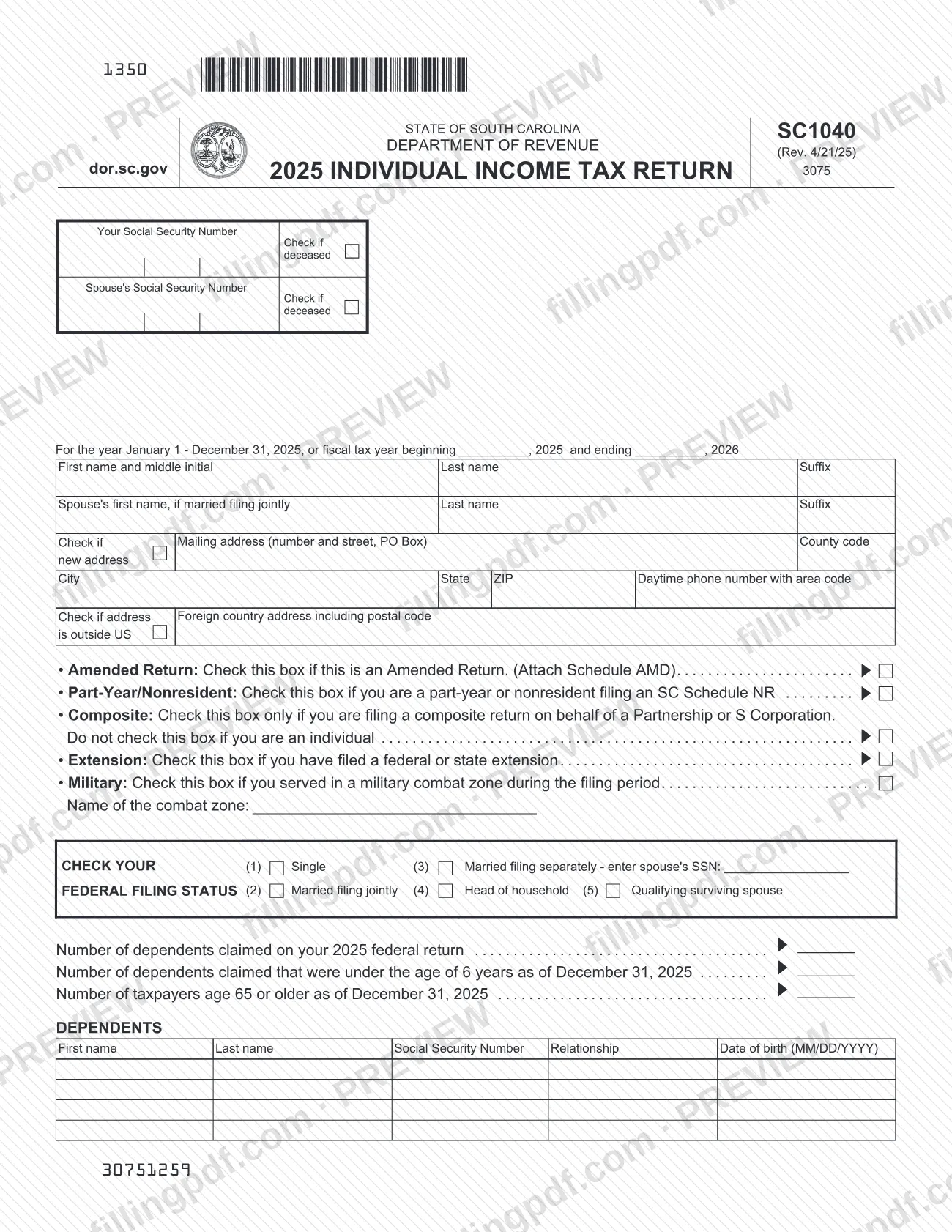
SC1040 is the 2025 Individual Income Tax Return issued by the South Carolina Department of Revenue (SCDOR). It starts from your federal taxable income, applies South Carolina additions, subtractions, credits and payments, and ends with a refund or a balance due. Residents, part-year residents and nonresidents all use it, with a Schedule NR for the last two groups. On this page you can fill out the form online on FillingPDF and download or print the completed PDF; the form itself and the agency's other forms are published at dor.sc.gov.
Last updated
What is SC1040?
Form SC1040, Individual Income Tax Return, is the South Carolina Department of Revenue (SCDOR) return on which an individual reports South Carolina income for tax year 2025, figures the tax, applies credits and payments, and arrives at a refund or a balance due.
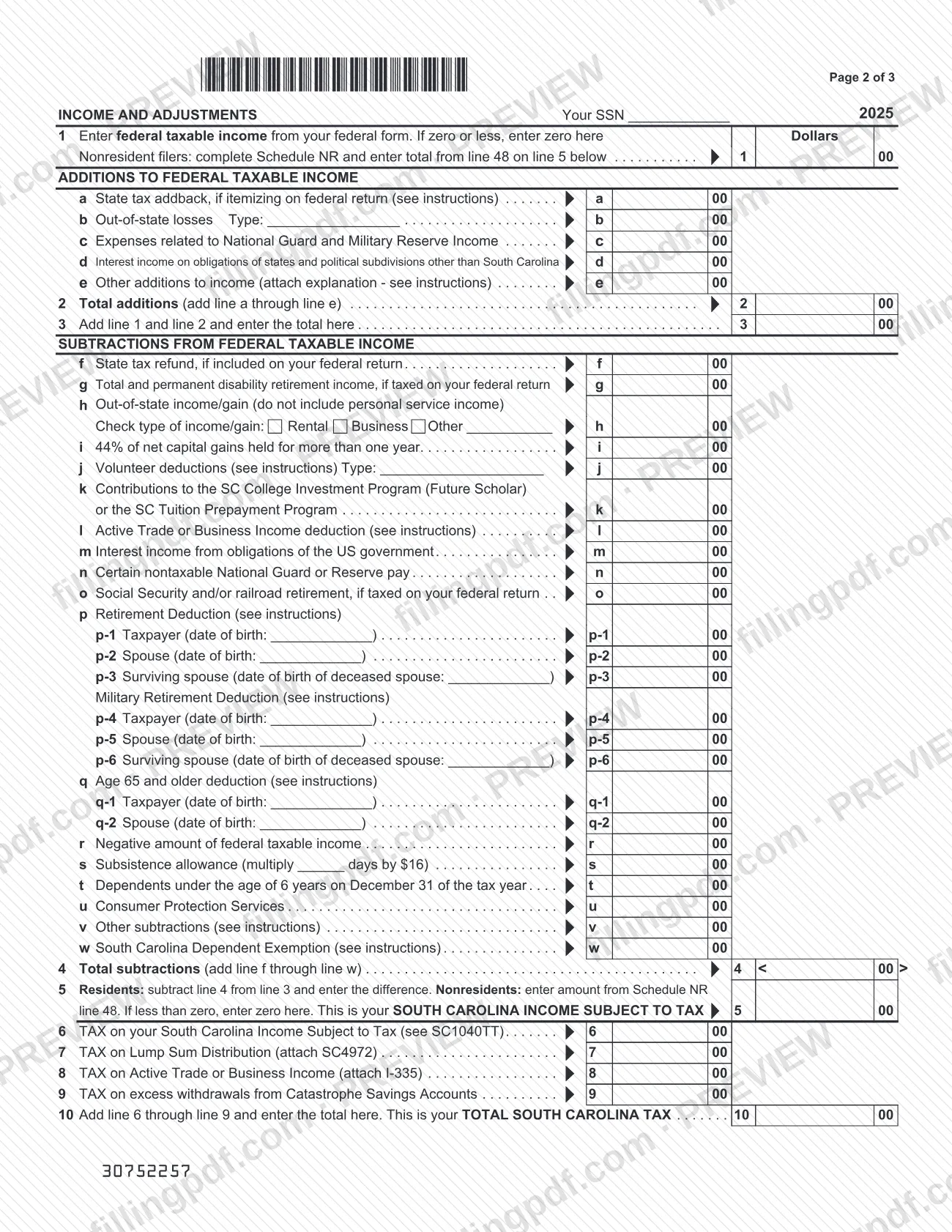
The return is built on your federal return. Line 1 takes your federal taxable income. Lines 1a to 1e add items South Carolina taxes differently, such as the state tax addback and interest on other states' obligations. Lines f to w subtract items such as the retirement deduction, the age 65 and older deduction, the South Carolina Dependent Exemption and 44% of net capital gains held for more than one year. Line 5 gives your South Carolina income subject to tax, and lines 6 to 10 produce your total South Carolina tax.
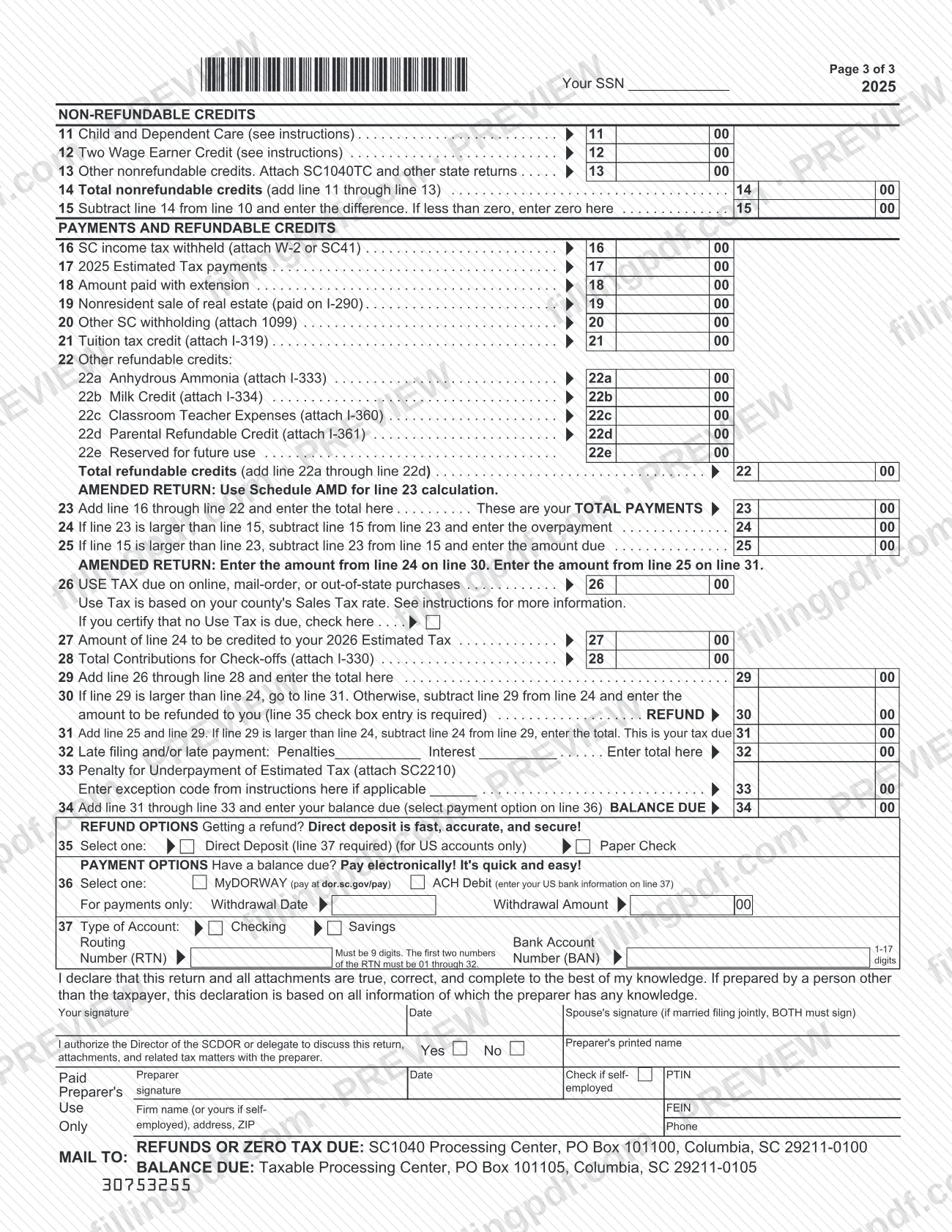
The return then runs through nonrefundable credits (lines 11 to 15), payments and refundable credits (lines 16 to 23), the overpayment or amount due (lines 24 and 25), use tax, check-off contributions, penalties and interest (lines 26 to 34), and the refund and payment options (lines 35 to 37).
Several situations use companion schedules named on the form: Schedule NR for part-year and nonresident filers, Schedule AMD for amended returns, SC4972 for tax on a lump sum distribution, I-335 for tax on Active Trade or Business Income, SC1040TC for other nonrefundable credits and SC2210 for the underpayment penalty. The tax table is in SC1040TT.
Who needs to file SC1040?
Individuals reporting South Carolina income for the year January 1 – December 31, 2025, or for a fiscal tax year beginning in 2025, use Form SC1040. Married couples filing jointly list both spouses, and both must sign.
The form has boxes for specific situations:
- Amended Return: check it if the return is amended, and attach Schedule AMD.
- Part-Year/Nonresident: check it if you are a part-year or nonresident filing an SC Schedule NR. Nonresidents enter the total from Schedule NR line 48 on line 5.
- Composite: check it only if you are filing a composite return on behalf of a Partnership or S Corporation. Individuals must not check it.
- Extension: check it if you filed a federal or state extension.
- Military: check it if you served in a military combat zone during the filing period, and name the combat zone.
Choose one federal filing status: Single, Married filing jointly, Married filing separately (enter your spouse's SSN), Head of household or Qualifying surviving spouse. The form also asks for dependents claimed on your 2025 federal return, dependents under age 6 and taxpayers age 65 or older as of December 31, 2025. A paid preparer may complete the return and sign in the preparer section.
When to file SC1040
The return covers the tax year January 1 – December 31, 2025, or a fiscal tax year beginning in 2025 and ending in 2026, so you complete it for that period. No due date is printed on the form itself; check the SCDOR at dor.sc.gov for current filing deadlines.
If you filed a federal or state extension, check the Extension box at the top and enter any amount paid with the extension on line 18. Late filing and late payment penalties and interest are entered on line 32, and an underpayment of estimated tax penalty goes on line 33 with SC2210 attached.
To correct a return already filed, check the Amended Return box and attach Schedule AMD, which is used for the line 23 calculation.
Documents you need
- W-2 or SC41: attach to support the South Carolina income tax withheld entered on line 16.
- Form 1099: attach to support other South Carolina withholding entered on line 20.
- Schedule NR: attach if you are a part-year or nonresident filer; its line 48 total goes on line 5.
- Schedule AMD: attach if you check the Amended Return box; it is used for the line 23 calculation.
- SC4972: attach if you enter tax on a lump sum distribution on line 7.
- Form I-335: attach if you enter tax on Active Trade or Business Income on line 8.
- SC1040TC and other state returns: attach with other nonrefundable credits on line 13.
- Forms for refundable credits, only for the credit claimed: I-319 (tuition tax credit, line 21), I-333 (anhydrous ammonia, 22a), I-334 (milk credit, 22b), I-360 (classroom teacher expenses, 22c), I-361 (parental refundable credit, 22d).
- I-290: nonresident sale of real estate paid on I-290 is entered on line 19.
- I-330: attach if you enter contributions for check-offs on line 28.
- SC2210: attach if you enter a penalty for underpayment of estimated tax on line 33.
- A written explanation, if you enter other additions to income on line 1e (see the instructions).
How to fill out SC1040
Enter taxpayer and address details
Enter your Social Security Number, your spouse's if filing jointly, names, mailing address, county code, city, state, ZIP and daytime phone number. Check the boxes for a deceased taxpayer, new address or an address outside the US where they apply, and give the tax year dates if you use a fiscal year.
Check the situation boxes
Check Amended Return, Part-Year/Nonresident, Composite (partnerships and S Corporations only), Extension or Military where they apply. For Military, name the combat zone.
Choose filing status and count dependents
Check one federal filing status, (1) through (5); for Married filing separately enter your spouse's SSN. Enter the number of dependents claimed on your 2025 federal return, those under age 6 on December 31, 2025, and taxpayers age 65 or older.
List your dependents
In the Dependents block enter each dependent's first and last name, Social Security Number, relationship and date of birth in MM/DD/YYYY format.
Enter federal taxable income on line 1
Enter federal taxable income from your federal form, or zero if it is zero or less. Nonresident filers complete Schedule NR and enter its line 48 total on line 5.
Add South Carolina additions
Complete lines 1a to 1e as they apply (state tax addback, out-of-state losses, National Guard and Reserve expenses, other states' interest, other additions with an explanation). Enter the total on line 2 and add lines 1 and 2 on line 3.
Enter subtractions on lines f to w
Complete the lines that apply, including the retirement and age 65 deductions, which ask for dates of birth, and the South Carolina Dependent Exemption on line w. Enter the total on line 4.
Figure income subject to tax and tax
Line 5: residents subtract line 4 from line 3, nonresidents enter Schedule NR line 48; if less than zero enter zero. Enter tax on line 6 (see SC1040TT), add lines 7 to 9 where applicable, and enter the total South Carolina tax on line 10.
Complete the nonrefundable credits
Enter Child and Dependent Care (line 11), Two Wage Earner Credit (line 12) and other nonrefundable credits with SC1040TC (line 13). Total them on line 14 and subtract from line 10 on line 15, entering zero if less than zero.
Enter payments and refundable credits
Complete lines 16 to 21 and the refundable credits on lines 22a to 22d, then enter the total on line 22. Add lines 16 through 22 on line 23; amended returns use Schedule AMD for this line.
Find the overpayment or amount due
If line 23 is larger than line 15, enter the overpayment on line 24; if line 15 is larger, enter the amount due on line 25. Then complete use tax (line 26, or check the box if none is due), the 2026 estimated tax credit (line 27) and check-off contributions (line 28), and total them on line 29.
Complete refund or balance due lines
Enter the refund on line 30 or the tax due on line 31, then penalties and interest on line 32 and the underpayment penalty on line 33. Add lines 31 to 33 for the balance due on line 34.
Select refund or payment options
Choose Direct Deposit or Paper Check on line 35 and MyDORWAY or ACH Debit on line 36. For direct deposit or ACH debit, complete line 37 with account type, 9-digit routing number and bank account number; for a payment add the withdrawal date and amount.
Review, sign and download the PDF
Sign and date the return; both spouses must sign a joint return, and a paid preparer completes the preparer block. Check each line against your attachments, then download or print the completed PDF from FillingPDF.
How to submit SC1040
Form SC1040 is mailed to one of two SCDOR processing centers, depending on whether you are owed a refund or owe tax. The SCDOR agency page also recommends completing forms online where its MyDORWAY service offers that option.
- Refunds or zero tax due: SC1040 Processing Center, PO Box 101100, Columbia, SC 29211-0100.
- Balance due: Taxable Processing Center, PO Box 101105, Columbia, SC 29211-0105.
Attach the documents that apply to your return, such as your W-2 or SC41 for South Carolina tax withheld and the schedules listed under required documents. If both spouses file jointly, both must sign.
To get a refund, make a selection on line 35: Direct Deposit (US accounts only, with line 37 completed) or Paper Check. To pay a balance due, make a selection on line 36: MyDORWAY (pay at dor.sc.gov/pay) or ACH Debit, with your US bank information on line 37. A fee-related question or the amount of any penalty should go to the SCDOR.
FillingPDF lets you fill out and download the PDF; submission follows the channels above.
Common mistakes to avoid
- Checking the Composite box as an individual; the form says to check it only for a composite return filed on behalf of a Partnership or S Corporation.
- Filing a joint return with only one signature; the form states BOTH spouses must sign.
- Choosing Direct Deposit on line 35 without completing line 37; the line 35 selection requires line 37.
- Entering a routing number that is not 9 digits or whose first two numbers are outside 01 through 32.
- Mailing a balance-due return to the refund address (PO Box 101100) instead of the Taxable Processing Center, PO Box 101105.
- Entering a negative number on line 1 instead of zero when federal taxable income is zero or less.
- As a nonresident, entering line 1 income on line 5 instead of the total from Schedule NR line 48.
- Filing an amended return without Schedule AMD, which is used for the line 23 calculation.
- Leaving out the W-2 or SC41 that supports the tax withheld on line 16.
Frequently asked questions
What is the SC1040 form?
The SC1040 is the South Carolina Department of Revenue's Individual Income Tax Return for tax year 2025. It starts from your federal taxable income, applies South Carolina additions and subtractions, and ends with your tax, credits and a refund or balance due.
Where do I mail the SC1040?
For refunds or zero tax due, mail it to SC1040 Processing Center, PO Box 101100, Columbia, SC 29211-0100. For a balance due, mail it to Taxable Processing Center, PO Box 101105, Columbia, SC 29211-0105. Use the address that matches your result.
How do I pay a balance due on the SC1040?
Select a payment option on line 36: MyDORWAY, where you pay at dor.sc.gov/pay, or ACH Debit, which uses the US bank information you enter on line 37. For ACH, also enter the withdrawal date and amount in the payment fields.
How do I get my SC1040 refund?
Select one option on line 35: Direct Deposit, for US accounts only and requiring line 37, or Paper Check. Your refund amount appears on line 30, after any amount credited to 2026 estimated tax or used for use tax and check-off contributions.
Can I fill out the SC1040 online?
You can fill out the SC1040 PDF online on FillingPDF and download or print it. The SCDOR does not receive it through this site, so you submit it by mail as described under How to submit. The SCDOR also notes that some forms can be completed in MyDORWAY.
What do I do if I am a nonresident or part-year resident?
Check the Part-Year/Nonresident box and complete an SC Schedule NR. Enter the total from Schedule NR line 48 on line 5 instead of subtracting line 4 from line 3, and attach the schedule to your return.
How do I file an amended SC1040?
Check the Amended Return box at the top and attach Schedule AMD, which is used for the line 23 calculation. On an amended return, enter the amount from line 24 on line 30 and the amount from line 25 on line 31.
Who must sign the SC1040?
You must sign and date it, and if you are married filing jointly both spouses must sign. A paid preparer also signs the preparer block, and the form lets you authorize the SCDOR Director or delegate to discuss the return with the preparer.
Ready to fill out SC1040?
Fill out SC1040 now