
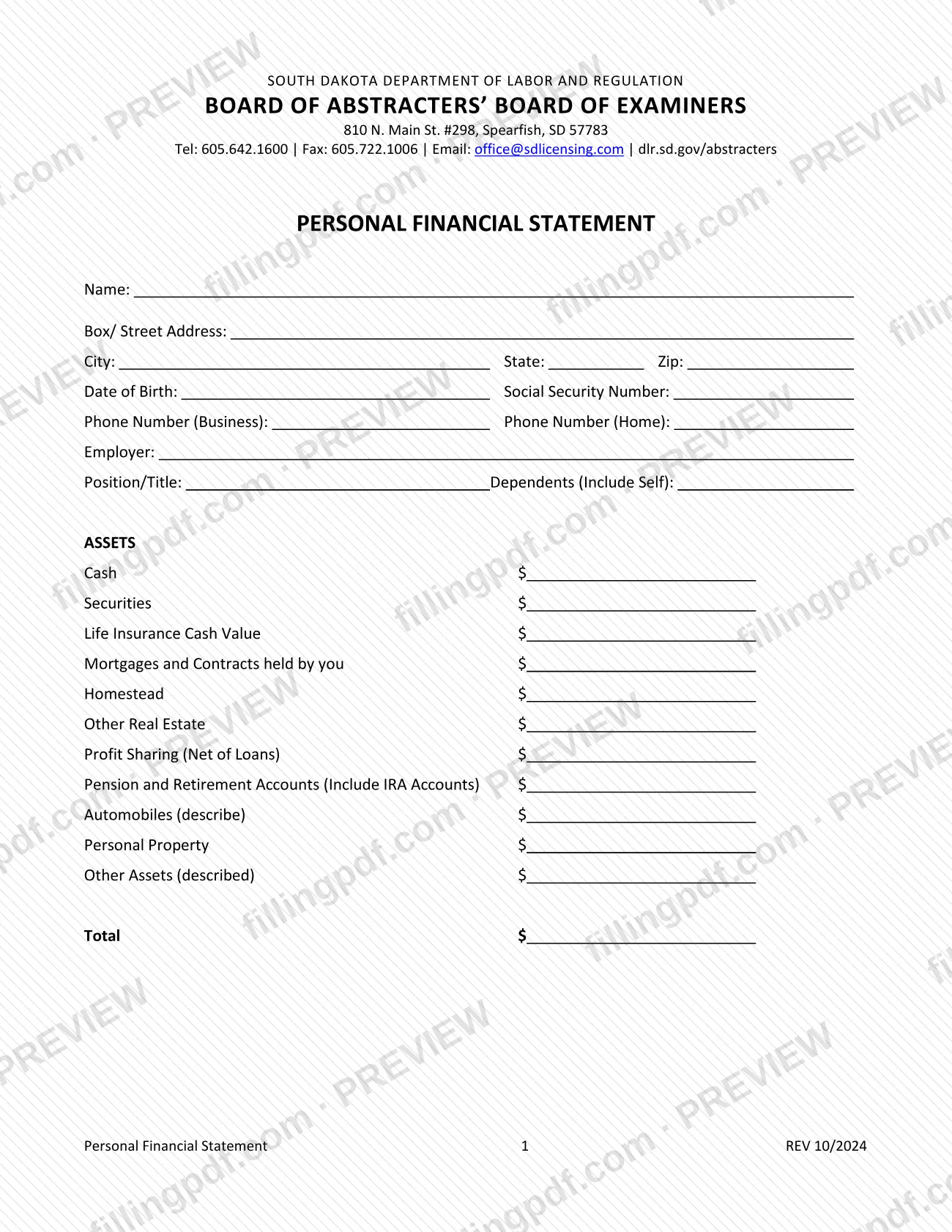
The Personal Financial Statement is a two-page form of the South Dakota Department of Labor and Regulation, published by the Board of Abstracters' Board of Examiners in Spearfish. A personal financial statement on this form lists your contact and employment details, your assets and your liabilities, and ends with a signed certification that the information is true and correct. On this page you can fill out the form online on FillingPDF and download or print the completed PDF. The board publishes the original PDF at dlr.sd.gov/abstracters.
Last updated
What is Personal Financial Statement – South Dakota?
The Personal Financial Statement is a South Dakota Department of Labor and Regulation form, issued under the Board of Abstracters' Board of Examiners, on which an individual lists personal details, assets and liabilities, and certifies the information is true and correct.
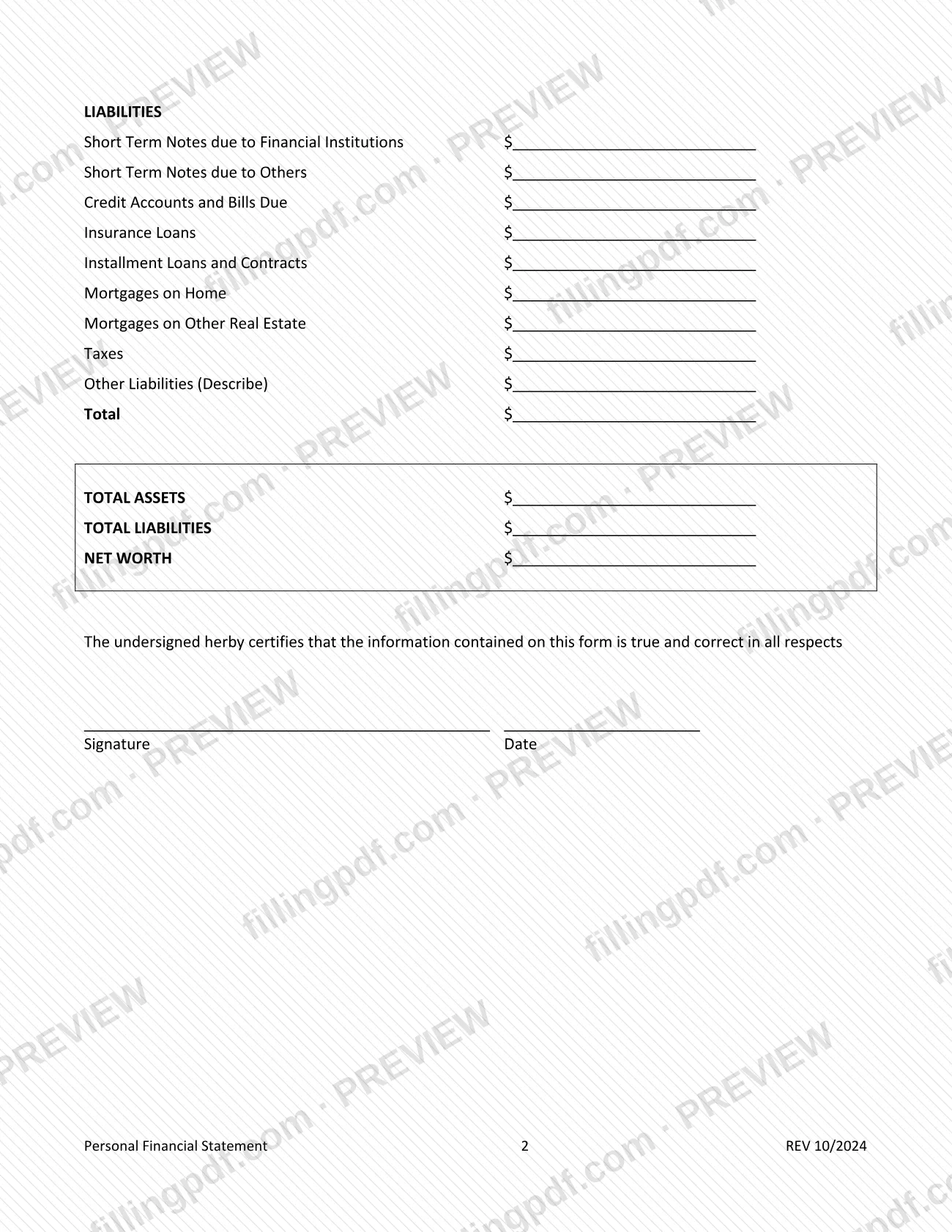
The form has two pages and carries the revision mark REV 10/2024. Page 1 collects identifying and employment details (name, address, date of birth, Social Security number, business and home phone numbers, employer, position or title, and the number of dependents including yourself) and then the ASSETS list, which ends in a total. Page 2 holds the LIABILITIES list with its own total, then three summary lines: TOTAL ASSETS, TOTAL LIABILITIES and NET WORTH.
The assets cover cash, securities, life insurance cash value, mortgages and contracts you hold, homestead, other real estate, profit sharing (net of loans), pension and retirement accounts (including IRA accounts), automobiles, personal property and other assets. The liabilities cover short-term notes, credit accounts and bills, insurance loans, installment loans and contracts, mortgages on your home and on other real estate, taxes and other liabilities.
The board lists its forms at dlr.sd.gov/abstracters, alongside applications such as the Application for Abstracter's Examination and Licensure. The Personal Financial Statement itself does not say which application, if any, it accompanies.
Who needs to file Personal Financial Statement – South Dakota?
The form is written for one individual reporting their own finances: it asks for your name, date of birth, Social Security number, employer, position or title, and dependents (including yourself), and it closes with your own signature and date.
It is published by the South Dakota Abstracters' Board of Examiners, the board whose forms page also offers the Application for Title Plant Certificate of Registration, the Application for Renewal of Title Plant Certificate of Registration and the Application for Abstracter's Examination and Licensure.
The form does not state which applicants or license holders must submit it, who may sign for someone else, or any exclusions. If you were asked to provide a personal financial statement and are unsure whether this form is the one required, confirm with the board at 605.642.1600 or [email protected] before you submit it.
How to fill out Personal Financial Statement – South Dakota
Enter your name and address
At the top of page 1, enter your Name, Box/Street Address, City, State and Zip.
Add date of birth and Social Security number
Enter your Date of Birth and your Social Security Number in the fields provided.
Provide phone and employment details
Enter Phone Number (Business) and Phone Number (Home), then your Employer and Position/Title.
Count your dependents
In Dependents (Include Self), enter the number of dependents and count yourself among them.
Enter cash, securities and insurance
Under ASSETS, fill in Cash, Securities, Life Insurance Cash Value and Mortgages and Contracts held by you.
Enter real estate and retirement assets
Enter Homestead, Other Real Estate, Profit Sharing (Net of Loans) and Pension and Retirement Accounts, including IRA accounts.
Describe vehicles and other assets
Enter Automobiles (describe), Personal Property and Other Assets (described), with the description each describe line requests. Then enter the assets Total.
List your liabilities
On page 2, fill in each LIABILITIES line: short-term notes due to financial institutions and to others, credit accounts and bills due, insurance loans, installment loans and contracts, mortgages on home and on other real estate, taxes, and Other Liabilities (Describe). Enter the liabilities Total.
Complete the summary lines
Enter TOTAL ASSETS, TOTAL LIABILITIES and NET WORTH at the bottom of page 2, carrying the section totals down.
Review, sign and download the PDF
Check that every amount and description is complete, then sign and date under the certification. Download or print the completed PDF from FillingPDF and send it as described under How to submit.
How to submit Personal Financial Statement – South Dakota
The board's forms page says forms are printed and mailed to the address in its Contact Us information; some forms can also be submitted electronically when that option appears at the bottom of the form. The printed text of the Personal Financial Statement shows no electronic option.
- By mail: the form's header gives the board's address as South Dakota Department of Labor and Regulation, Board of Abstracters' Board of Examiners, 810 N. Main St. #298, Spearfish, SD 57783.
- Questions: the header lists telephone 605.642.1600, fax 605.722.1006 and email [email protected]. Ask the board before sending the form through any channel other than mail.
Sign and date the form before you send it, and keep a copy for your records. The form names no fee and no attachments. The board publishes its forms at dlr.sd.gov/abstracters. FillingPDF lets you fill out and download the PDF; submission follows the channels above.
Common mistakes to avoid
- Leaving out yourself in the Dependents (Include Self) count; the form says to include yourself.
- Entering profit sharing before subtracting loans; the line is Profit Sharing (Net of Loans).
- Listing IRA accounts separately or leaving them out; the form places them on the Pension and Retirement Accounts (Include IRA Accounts) line.
- Leaving Automobiles (describe) or Other Assets (described) with only an amount and no description.
- Skipping the Other Liabilities (Describe) description when an amount is entered there.
- Submitting the form without the signature and date under the certification that the information is true and correct in all respects.
- Entering totals on TOTAL ASSETS, TOTAL LIABILITIES and NET WORTH that do not match the two section totals and the lines above them.
- Mailing the form to an address other than the board's Spearfish address printed in the form header.
Frequently asked questions
What is the Personal Financial Statement from the South Dakota abstracters board?
It is a two-page South Dakota Department of Labor and Regulation form, published by the Board of Abstracters' Board of Examiners, listing your personal details, assets, liabilities and net worth, signed with a certification that the information is true and correct.
Can I fill out the personal financial statement online?
Yes. You can fill out the PDF online on FillingPDF and download or print it. FillingPDF is an independent service and does not send the form to the board; you submit it through the board's channels.
Where do I mail the South Dakota personal financial statement?
The form header gives the board's address: 810 N. Main St. #298, Spearfish, SD 57783. The board's forms page says printed forms are mailed to the address in its Contact Us information. For other channels, call 605.642.1600.
Who has to submit this personal financial statement?
The form does not say who must submit it. It is published by the South Dakota Abstracters' Board of Examiners, so confirm the requirement with the board at 605.642.1600 or [email protected].
What do I include on the retirement line?
The form's line is Pension and Retirement Accounts (Include IRA Accounts), so IRA accounts belong on that line. Profit sharing has its own line and is entered net of loans.
Do I count myself as a dependent?
Yes. The field is labeled Dependents (Include Self), so the number you enter includes you.
Do I need to sign the personal financial statement?
Yes, the form ends with a certification that the information is true and correct in all respects, followed by a Signature line and a Date line. Sign and date it before you submit it.
Which version of the form is this?
The page footer marks the form as REV 10/2024. The board publishes it as a PDF at dlr.sd.gov/abstracters/forms/abs_personal_financial_statement.pdf.
Ready to fill out Personal Financial Statement – South Dakota?
Fill out Personal Financial Statement – South Dakota now