
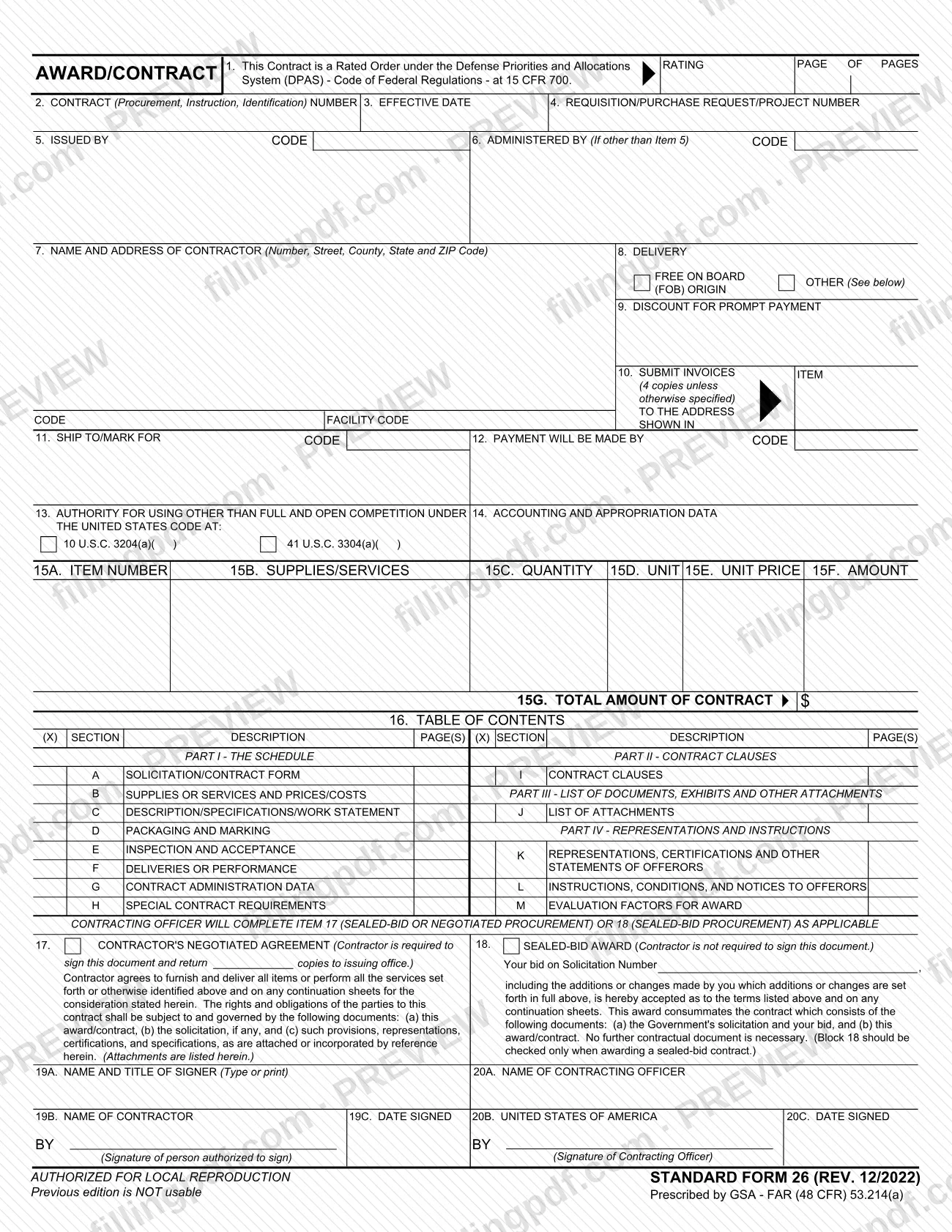
The sf26 is Standard Form 26, Award/Contract, the form the General Services Administration (GSA) prescribes under FAR (48 CFR) 53.214(a) to record a contract award. It identifies the contract, the issuing and administering offices, the contractor, delivery and payment terms, the supplies or services and the signatures of the parties. On this page you can fill out the form online on FillingPDF and download or print the completed PDF; the official PDF is published by GSA at gsa.gov.
Last updated
What is Standard Form 26?
Standard Form 26 (SF 26), Award/Contract, is the standard form prescribed by the General Services Administration (GSA) under FAR (48 CFR) 53.214(a) on which a contract award is recorded, with the parties, delivery and payment details, the supplies or services and the signatures.
The form opens with a statement in Item 1 that the contract is a Rated Order under the Defense Priorities and Allocations System (DPAS), 15 CFR 700, and a rating field. Items 2 through 4 give the contract number, the effective date and the requisition, purchase request or project number. Items 5 and 6 name the issuing office and, if different, the administering office. Item 7 names the contractor, and Items 8 through 12 cover delivery, prompt-payment discount, where to send invoices, where goods ship and who pays.
Item 13 cites the authority for using other than full and open competition (10 U.S.C. 3204(a) or 41 U.S.C. 3304(a)), and Item 14 carries accounting and appropriation data. Item 15 lists each line of supplies or services with quantity, unit, unit price and amount, and 15G gives the total amount of the contract.
Item 16 is a table of contents of the contract: Part I (Sections A to H), Part II (Section I), Part III (Section J) and Part IV (Sections K to M). The contracting officer then completes Item 17, a contractor's negotiated agreement, or Item 18, a sealed-bid award. Items 19 and 20 hold the contractor's and the contracting officer's signatures.
The edition printed on this version is REV. 12/2022; the form states that the previous edition is not usable and that it is authorized for local reproduction.
Who needs to file Standard Form 26?
The form is completed by the government side of a contract award: the contracting officer fills in the issuing office, contract terms and the award block, and signs in Item 20. The form says the contracting officer completes Item 17 (sealed-bid or negotiated procurement) or Item 18 (sealed-bid procurement), as applicable.
Contractors are involved in two ways:
- Negotiated procurement (Item 17): the contractor is required to sign the document and return copies to the issuing office. The signer's name and title, the contractor's name and the date signed go in Items 19A to 19C.
- Sealed-bid award (Item 18): the contractor is not required to sign. The block states that the bid on the named solicitation, with any additions or changes set forth in the form, is accepted, and that the award consummates the contract.
Block 18 should be checked only when awarding a sealed-bid contract. The form names no other eligibility conditions and does not describe who may sign on someone's behalf beyond the line for the person authorized to sign for the contractor.
When to file Standard Form 26
The SF 26 is completed at the point of contract award, and it has no separate due date printed on it. Item 3 records the effective date of the contract.
In a negotiated procurement, the contractor who signs Item 17 returns copies to the issuing office; the form prints no return deadline. In a sealed-bid award, Item 18 states that the award consummates the contract and that no further contractual document is necessary, and the contractor is not required to sign.
Invoices follow later: Item 10 directs the contractor to submit invoices, four copies unless otherwise specified, to the address shown in the item. Use the edition printed REV. 12/2022, because the form says the previous edition is not usable.
Documents you need
- Continuation sheets, when the contractor's agreement or the sealed-bid acceptance refers to additions or changes set forth on them; Items 17 and 18 refer to any continuation sheets.
- The solicitation, if any, which Item 17 lists with the award/contract as governing the agreement; for a sealed-bid award, Item 18 identifies the Government's solicitation and the contractor's bid.
- Attachments listed in Part III, Section J (List of Attachments), together with any provisions, representations, certifications and specifications attached or incorporated by reference.
How to fill out Standard Form 26
Enter rating and contract numbers
In Item 1, complete the rating and the page count if the contract is a Rated Order under DPAS. Then enter the contract number (Item 2), the effective date (Item 3) and the requisition, purchase request or project number (Item 4).
Identify issuing and administering offices
Item 5: the issuing office and its code. Item 6: the administering office and its code, only if it differs from Item 5.
Enter the contractor's details
Item 7: the contractor's name and address, including number, street, county, state and ZIP Code, and the facility code.
Set delivery and payment terms
Item 8: mark FOB origin or other. Item 9: discount for prompt payment. Item 10: the address for invoices, four copies unless otherwise specified. Item 11: ship to or mark for, with code. Item 12: who makes payment, with code.
Cite authority and accounting data
Item 13: if other than full and open competition applies, mark 10 U.S.C. 3204(a) or 41 U.S.C. 3304(a) and enter the paragraph. Item 14: accounting and appropriation data.
List supplies or services
In Item 15, enter for each line the item number (15A), supplies or services (15B), quantity (15C), unit (15D), unit price (15E) and amount (15F). Enter the total amount of the contract in 15G.
Mark the table of contents
In Item 16, put an X beside each section included, from Section A through Section M, and enter the page numbers for each.
Choose Item 17 or Item 18
Check Item 17 for a contractor's negotiated agreement. Check Item 18 only for a sealed-bid award, and enter the solicitation number there.
Complete the contractor's signature block
Items 19A to 19C: the signer's name and title, the contractor's name, the signature of the person authorized to sign, and the date signed. Required for Item 17; not required for Item 18.
Complete the contracting officer's block
Items 20A to 20C: the contracting officer's name, the signature for the United States of America, and the date signed.
Review and download the completed PDF
Check each item against the contract file, including the effective date, the totals and the section checkmarks. Download or print the completed PDF from FillingPDF and handle it as described under How to submit.
How to submit Standard Form 26
The SF 26 prints no mailing address, portal, e-mail address or appointment rule; it moves between the issuing office and the contractor as part of the award.
- Issuing office (Item 5): the government prepares the form and the contracting officer signs in Item 20.
- Negotiated agreement (Item 17): the contractor signs Items 19A to 19C and returns copies to the issuing office named in Item 5.
- Sealed-bid award (Item 18): the contractor is not required to sign this document.
- Invoices (Item 10): submit invoices, four copies unless otherwise specified, to the address shown in that item.
Attach continuation sheets if the terms are set forth on them, and list attachments as the form directs in Section J. FillingPDF lets you fill out and download the PDF; submission follows the channels above.
Common mistakes to avoid
- Checking Block 18 for a contract that is not a sealed-bid award; the form says Block 18 should be checked only when awarding a sealed-bid contract.
- Using an older edition of the form; the form states that the previous edition is not usable and prints REV. 12/2022.
- Leaving the contractor's signature, name and title (Items 19A to 19C) blank on a negotiated agreement, where the contractor is required to sign and return copies to the issuing office.
- Citing 10 U.S.C. 3204(a)( ) or 41 U.S.C. 3304(a)( ) in Item 13 without entering the paragraph in the parentheses.
- Filling in Item 6 with the same office as Item 5; the item applies only if the administering office is other than the issuing office.
- Forgetting the contracting officer's name, signature and date in Items 20A to 20C.
- Not specifying the number of invoice copies when it differs from the four copies printed in Item 10, or leaving the invoice address unclear.
- Leaving the total amount in Item 15G inconsistent with the amounts listed in Item 15F.
Frequently asked questions
What is the sf26 form?
The sf26 is Standard Form 26, Award/Contract, prescribed by the General Services Administration (GSA) under FAR (48 CFR) 53.214(a). It records a contract award: parties, effective date, delivery and payment terms, supplies or services, the total amount and the signatures.
Does the contractor have to sign Standard Form 26?
It depends on the award type. Under Item 17, a contractor's negotiated agreement, the contractor is required to sign and return copies to the issuing office. Under Item 18, a sealed-bid award, the contractor is not required to sign the document.
When do I check Block 18 on the SF 26?
Check Block 18 only when awarding a sealed-bid contract. The form states that block 18 should be checked only for that type of award; for a negotiated procurement, the contractor's negotiated agreement in Item 17 applies.
What does Item 1 mean on the SF 26?
Item 1 states that the contract is a Rated Order under the Defense Priorities and Allocations System (DPAS), 15 CFR 700, and provides a field for the rating and the page count. It is completed when the contract is a rated order.
Can I still use the previous edition of the SF 26?
No. The form printed REV. 12/2022 states that the previous edition is not usable. Use the current edition published by GSA at the official source URL.
Where do I send a completed SF 26?
The form names no address or portal. A contractor who signs Item 17 returns copies to the issuing office named in Item 5. Invoices go to the address shown in Item 10, four copies unless otherwise specified.
Can I fill out the SF 26 online?
Yes. You can fill out the PDF online on FillingPDF and download or print it. FillingPDF is an independent service that is not affiliated with GSA; it does not file, send or process the form, so you deliver it through the contract's own channels.
Ready to fill out Standard Form 26?
Fill out Standard Form 26 now