
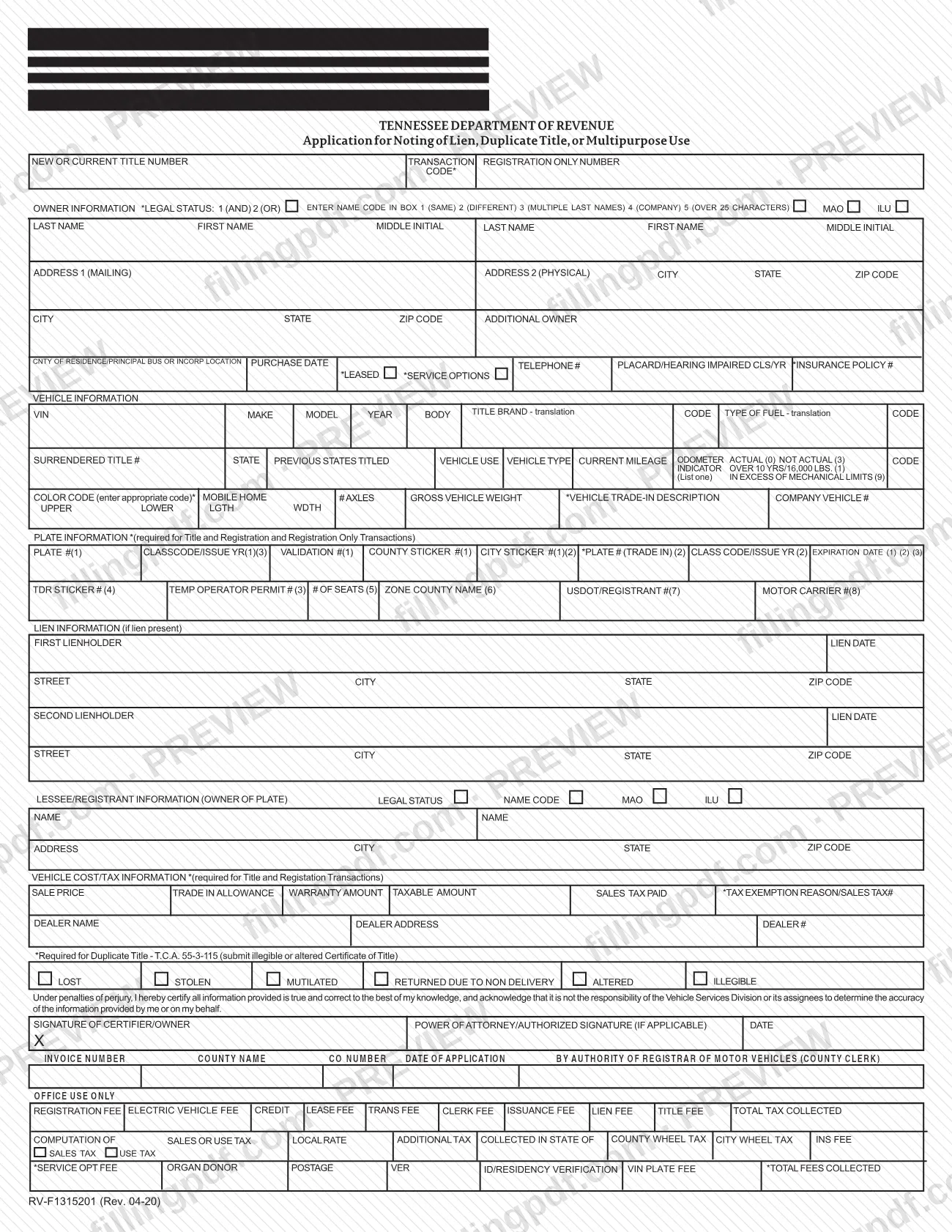
Form RV-F1315201, Application for Noting of Lien, Duplicate Title, or Multipurpose Use, is a Tennessee Department of Revenue application that a county clerk receives when a lien is to be noted on a vehicle title or a duplicate title is requested. It is posted among the Rutherford County Clerk's forms, so anyone searching for Rutherford County property tax forms should know it is a vehicle title form, not a property tax form. On this page you can fill out the form online on FillingPDF and download or print the completed PDF; the original PDF is published by Rutherford County Government at the official link.
Last updated
What is RV-F1315201?
Form RV-F1315201, Application for Noting of Lien, Duplicate Title, or Multipurpose Use, is the Tennessee Department of Revenue application used to have a lien noted on a Tennessee Certificate of Title or to request a duplicate title, submitted through the county clerk.
The county clerk acts here as Registrar of Motor Vehicles, and the form's office-use block is completed by the clerk, not by you. One sheet serves several transactions. Its sections cover owner information, vehicle information, plate information, lien information, lessee/registrant information, vehicle cost/tax information, and a "Required for Duplicate Title" section. The plate section is marked as required for Title and Registration and Registration Only transactions, and the cost/tax section for Title and Registration transactions.
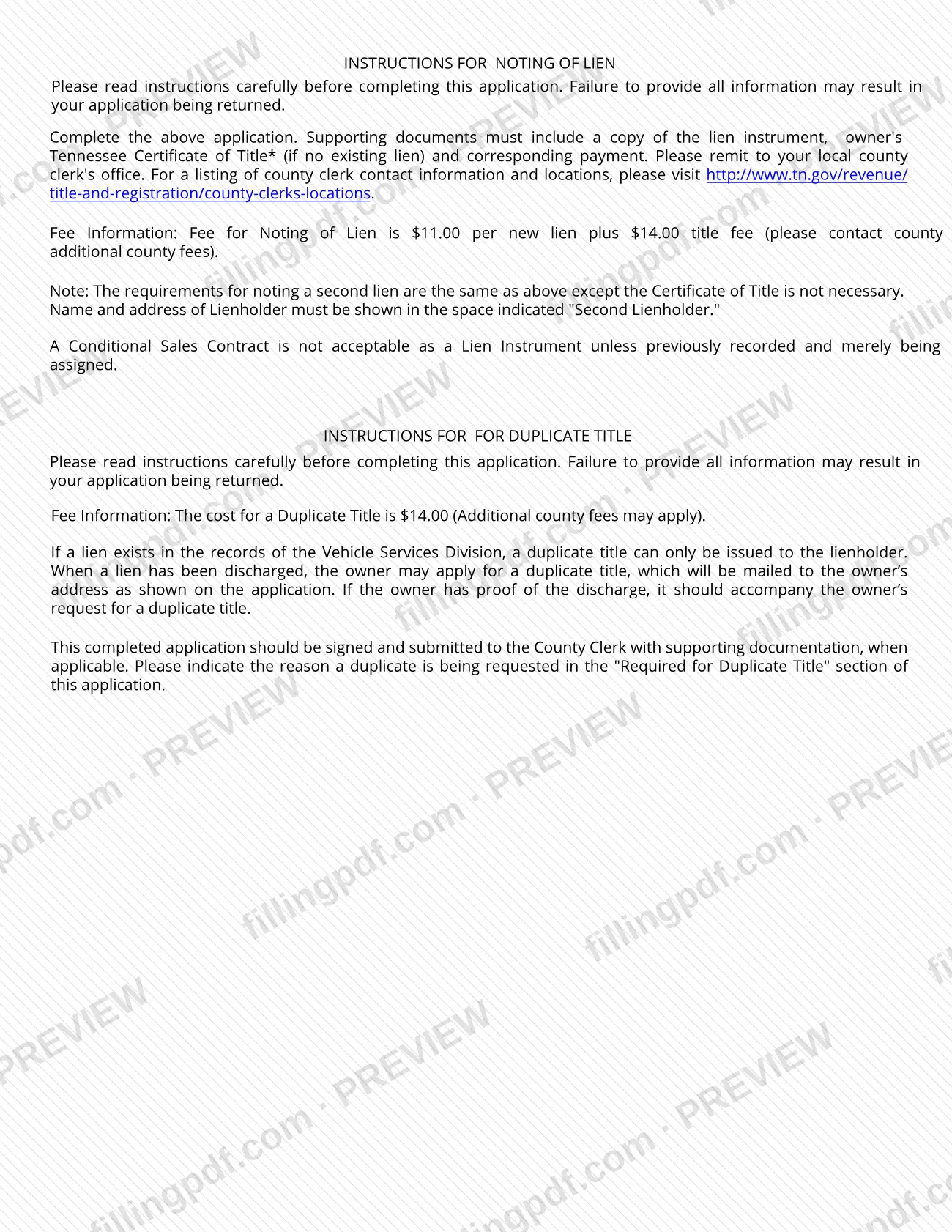
For a lien, the instructions print on the form say the application goes in with a copy of the lien instrument, the owner's Tennessee Certificate of Title (if there is no existing lien) and payment. A second lien follows the same steps, except that the Certificate of Title is not needed and the lienholder goes in the "Second Lienholder" space. A Conditional Sales Contract is not acceptable as a lien instrument unless it was previously recorded and is merely being assigned.
For a duplicate title, the reason is marked in the "Required for Duplicate Title" section, which cites T.C.A. 55-3-115.
Who needs to file RV-F1315201?
People who need a lien noted on a Tennessee Certificate of Title use this application. The owner is identified in the owner section and each lienholder in the lien section. A first lien is noted with the owner's Certificate of Title; a second lien needs no title.
The same form is used to request a duplicate title. The rules depend on the records:
- If a lien exists in the records of the Vehicle Services Division, a duplicate title can only be issued to the lienholder.
- Once a lien has been discharged, the owner may apply, and the duplicate is mailed to the owner's address shown on the application. Proof of the discharge should accompany the request if the owner has it.
The form has a signature line for the certifier/owner and a separate line for a power of attorney or other authorized signature "(if applicable)", so someone holding that authority may sign instead of the owner. Dealers are identified in the dealer block of the cost/tax section, which the form marks as required for Title and Registration transactions.
Do not use a Conditional Sales Contract as the lien instrument unless it was previously recorded and is merely being assigned.
When to file RV-F1315201
Submit the application when a lien needs to be noted on a Tennessee title or when a duplicate title is needed. The form prints no deadline of its own.
The instructions warn that failure to provide all information may result in the application being returned, so gather the lien instrument, the Certificate of Title (for a first lien with no existing lien) and payment before you go. For a duplicate title, mark the reason (lost, stolen, mutilated, returned due to non delivery, altered or illegible) when you sign, and include proof of a discharged lien if you have it.
Rutherford County Clerk offices are open 8AM to 4PM Monday through Thursday and 8AM to 5PM Friday (the Eagleville office keeps different hours; see How to submit).
Documents you need
- A copy of the lien instrument, required with an application to note a lien. A Conditional Sales Contract is not accepted unless it was previously recorded and is merely being assigned.
- The owner's Tennessee Certificate of Title, when noting a lien and no lien already exists. It is not needed for a second lien.
- Payment corresponding to the transaction, remitted to the county clerk with the application; ask the clerk for the amounts, since county fees may apply.
- For a duplicate title because the title is illegible or altered: the illegible or altered Certificate of Title, as the form's duplicate-title section directs.
- For a duplicate title after a lien was discharged: proof of the discharge, if the owner has it, to accompany the owner's request.
How to fill out RV-F1315201
Enter title and transaction numbers
At the top, enter the new or current title number, the transaction code (marked with an asterisk) and, for a registration-only transaction, the registration only number.
Complete the owner information
Enter the legal status code (1 for AND, 2 for OR) and the name code (1 same, 2 different, 3 multiple last names, 4 company, 5 over 25 characters), then last name, first name and middle initial. Add the mailing address (Address 1), the physical address (Address 2) and any additional owner.
Add county, purchase date and contact
Enter the county of residence or principal business or incorporation location, the purchase date and a telephone number. Complete the placard/hearing impaired, class/year and insurance policy fields where they apply.
Describe the vehicle
Enter the VIN, make, model, year, body, title brand code and type of fuel code. Add the surrendered title number and state, previous states titled, vehicle use and vehicle type where they apply.
Record mileage and vehicle details
Enter the current mileage and the odometer indicator: Actual (0), Not Actual (3), Over 10 yrs/16,000 lbs. (1) or In Excess of Mechanical Limits (9). Then enter the color code, axles and gross vehicle weight as they apply.
Fill in plate information if required
The plate section is marked required for Title and Registration and Registration Only transactions. Enter the plate number, class code/issue year, validation, sticker and expiration details that apply.
Enter the lien information
Under Lien Information (if lien present), enter the first lienholder's name, lien date, street, city, state and ZIP code. For a second lien, repeat this in the Second Lienholder block.
Complete lessee and cost sections if needed
Add the lessee/registrant (owner of plate) details when they differ from the owner. For Title and Registration transactions, complete the vehicle cost/tax section and the dealer name, address and number.
Mark the duplicate title reason
For a duplicate title, check one reason in the "Required for Duplicate Title" section: Lost, Stolen, Mutilated, Returned Due to Non Delivery, Altered or Illegible.
Sign and date the certification
The certifier/owner signs and dates the statement made under penalties of perjury. A power of attorney or other authorized signer uses the separate signature line, if applicable. Leave the OFFICE USE ONLY block for the clerk.
Review and download the completed PDF
Check that every needed section is complete, then download or print the PDF from FillingPDF. Assemble it with the lien instrument, title if required and payment, and submit as described under How to submit.
How to submit RV-F1315201
Submit the signed application with its supporting documents and payment to your local county clerk's office; the form names no other channel and no separate mailing address. For a duplicate title, the instructions say to sign it and submit it to the County Clerk with supporting documentation when applicable. A fee applies for noting a lien, along with a title fee, and county fees may be added; ask the county clerk for the current amounts.
Rutherford County Clerk offices listed on the county's clerk forms page:
- Blackman: 3906 Blaze Dr., Suite A, Murfreesboro, TN 37128. Phone (615) 898-7995.
- Murfreesboro: 319 N Maple St., Suite 121, Murfreesboro, TN 37130. Phone (615) 898-7800; fax (615) 898-7830.
- Smyrna: 205 I St., Smyrna, TN 37167. Phone (615) 459-9692; fax (615) 355-4118.
- Eagleville: Eagleville City Hall, 108 S. Main St, Eagleville, TN 37060. Phone (615) 849-0330. Open the first working day of each week, 8AM to 4PM.
The Blackman, Murfreesboro and Smyrna offices are open 8AM to 4PM Monday through Thursday and 8AM to 5PM Friday. Questions for the County Clerk's Office go to one of the main offices on days when the Eagleville office is not open. Clerks in other Tennessee counties are listed at http://www.tn.gov/revenue/title-and-registration/county-clerks-locations. FillingPDF lets you fill out and download the PDF; submission follows the channels above.
Common mistakes to avoid
- Offering a Conditional Sales Contract as the lien instrument when it was not previously recorded and is not merely being assigned.
- Leaving out the owner's Tennessee Certificate of Title on a first lien when no lien already exists.
- Putting a second lender in the first lienholder space instead of the "Second Lienholder" space.
- Applying as an owner for a duplicate title while a lien still exists in the Vehicle Services Division records; it can only be issued to the lienholder.
- Skipping the "Required for Duplicate Title" section instead of marking the reason the duplicate is requested.
- Omitting proof of a discharged lien when requesting a duplicate title and holding that proof.
- Leaving the application unsigned or without a date; the certification is made under penalties of perjury.
- Filling in the OFFICE USE ONLY block, which belongs to the county clerk.
- Submitting incomplete information, which the instructions say may lead to the application being returned.
Frequently asked questions
What is Form RV-F1315201 used for?
Form RV-F1315201, Application for Noting of Lien, Duplicate Title, or Multipurpose Use, is the Tennessee Department of Revenue application used to have a lien noted on a Tennessee Certificate of Title or to request a duplicate title. It is submitted through the county clerk.
Is this a Rutherford County property tax form?
No. Although it is posted on the Rutherford County Clerk's forms page, Form RV-F1315201 is a Tennessee Department of Revenue vehicle title application for noting a lien or requesting a duplicate title. It asks for a VIN and title details, not property tax information.
What do I submit with the application to note a lien?
Submit a copy of the lien instrument, the owner's Tennessee Certificate of Title (if there is no existing lien) and the corresponding payment, all to your local county clerk's office. Incomplete information may cause the application to be returned.
Do I need the title to note a second lien?
No. The requirements for a second lien are the same as for a first lien except the Certificate of Title is not necessary. Enter the second lender's name and address in the space marked "Second Lienholder."
Can a Conditional Sales Contract be my lien instrument?
Only in one case: the instructions say a Conditional Sales Contract is not acceptable as a lien instrument unless it was previously recorded and is merely being assigned.
Can I get a duplicate title if there is a lien on the vehicle?
Not as the owner. If a lien exists in the Vehicle Services Division records, the duplicate can only be issued to the lienholder. After the lien is discharged, the owner may apply, and the duplicate is mailed to the address on the application.
Where do I file the application in Rutherford County?
Take it to a Rutherford County Clerk office: Blackman (3906 Blaze Dr., Suite A), Murfreesboro (319 N Maple St., Suite 121), Smyrna (205 I St.) or Eagleville City Hall (108 S. Main St), which is open the first working day of each week. Phone numbers are on the county's clerk forms page.
Is there a fee to note a lien or get a duplicate title?
Yes. The instructions list a fee for each new lien plus a title fee, and a fee for a duplicate title, and say county fees may apply. Contact the county clerk for the current amounts and accepted payment.
Can I fill out Form RV-F1315201 online on FillingPDF?
Yes. You can fill out the fillable PDF online on FillingPDF and download or print it. FillingPDF is an independent service and does not file the form; you submit it to the county clerk with your documents and payment.
Ready to fill out RV-F1315201?
Fill out RV-F1315201 now