
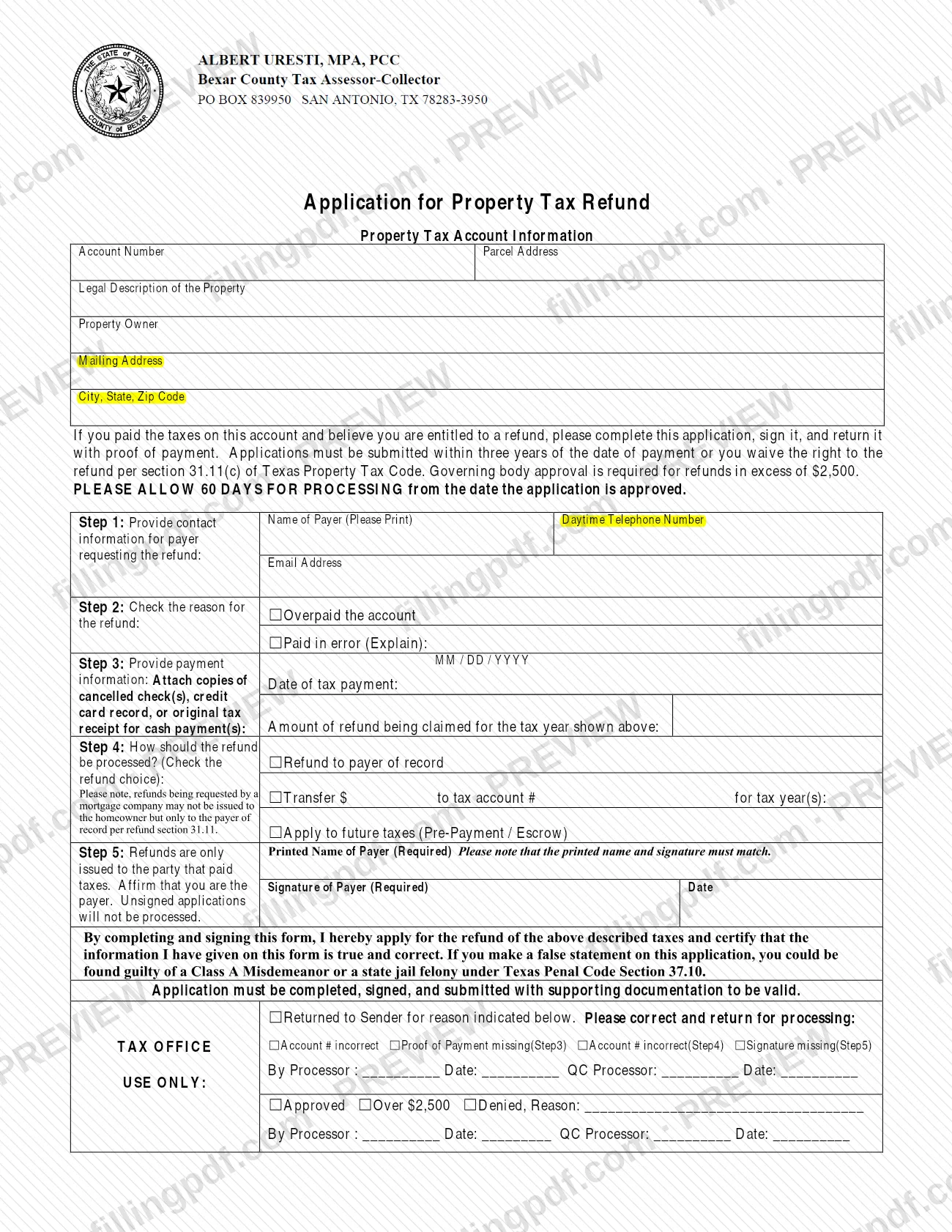
The Refund Application, printed on the form as Application for Property Tax Refund, is the Bexar County Tax Assessor-Collector's form for asking back property taxes that were overpaid or paid in error. It is one of the Bexar County property tax forms, and the payer must sign it and send it with proof of payment. On FillingPDF you can fill out the form online and download or print the completed PDF; the county publishes the original form at bexar.org.
Last updated
What is Refund Application – Bexar County, TX?
The Refund Application, printed as Application for Property Tax Refund, is the Bexar County Tax Assessor-Collector form for requesting a refund of property taxes paid on an account because it was overpaid or paid in error.
The form is issued by the Bexar County Tax Assessor-Collector, whose refund clerk is listed at the top of the page (phone (210) 335-2251, email [email protected]). It has five numbered steps after a block of property tax account information (account number, parcel address, legal description, property owner and mailing address):
- Step 1: contact information for the payer requesting the refund.
- Step 2: the reason for the refund, either Overpaid the account or Paid in error (Explain).
- Step 3: the date of the tax payment, the amount claimed for the tax year shown, and the proof of payment.
- Step 4: how the refund is processed: refund to the payer of record, transfer to another tax account, or apply to future taxes (pre-payment or escrow).
- Step 5: the payer's printed name, signature and date.
The form cites section 31.11(c) of the Texas Property Tax Code for its three-year limit and section 31.11 for the rule that a refund requested by a mortgage company may be issued only to the payer of record. A block marked Tax Office Use Only at the bottom is completed by the office: it records whether the application was approved, was over the limit that needs governing body approval, was denied, or was returned to the sender.
Who needs to file Refund Application – Bexar County, TX?
The payer of a Bexar County property tax account who believes they are entitled to a refund uses this form. The form says it is for someone who paid the taxes on the account and believes the account was overpaid or that the taxes were paid in error.
Conditions printed on the form:
- Refunds are issued only to the party that paid the taxes. The person who signs affirms that they are the payer, and the printed name and the signature must match.
- A refund requested by a mortgage company may not be issued to the homeowner; under section 31.11 it can be issued only to the payer of record.
- Refunds above the dollar limit printed on the form need approval from the governing body.
The form does not describe a representative or agent signing for the payer. For any question about who may apply, contact the refund clerk at (210) 335-2251 or [email protected].
When to file Refund Application – Bexar County, TX
Submit the application within three years of the date of payment. The form states that if you apply later, you waive the right to the refund under section 31.11(c) of the Texas Property Tax Code.
Use the date you entered in Step 3 as the starting point and count three years from it. The form asks for the date of the tax payment in MM / DD / YYYY format.
After approval, the form asks you to allow 60 days for processing, counted from the date the application is approved. An application that is incomplete, unsigned or missing supporting documentation is not valid and is returned to the sender to correct, so the clock only helps you if the first submission is complete.
Documents you need
- Copies of cancelled check(s) showing the tax payment, if you paid by check (Step 3).
- A credit card record of the payment, if you paid by credit card (Step 3).
- The original tax receipt, if you paid in cash (Step 3).
- An explanation in the space provided next to Paid in error (Explain), if you check that reason in Step 2.
How to fill out Refund Application – Bexar County, TX
Enter the property tax account details
In the Property Tax Account Information block, enter the Account Number, Parcel Address, Legal Description of the Property, Property Owner, Mailing Address, and City, State, Zip Code. Check the account number carefully, because an incorrect one gets the application returned.
Add the payer's contact information
In Step 1, print the Name of Payer, a Daytime Telephone Number and an Email Address for the person requesting the refund.
Check the reason for the refund
In Step 2, check Overpaid the account or Paid in error (Explain). If you choose the second option, write your explanation in the space provided.
Enter the payment date and amount
In Step 3, enter the date of tax payment in MM / DD / YYYY format and the amount of refund being claimed for the tax year shown above.
Attach proof of payment
Attach copies of cancelled check(s), a credit card record, or the original tax receipt for cash payment(s). Without proof of payment the application is returned.
Choose how to process the refund
In Step 4, check Refund to payer of record, Transfer $ to tax account # for tax year(s) (enter the amount, account number and tax years), or Apply to future taxes (Pre-Payment / Escrow).
Print your name and sign
In Step 5, enter your Printed Name of Payer, your Signature of Payer and the Date. Both are required and the name and signature must match; leave the Tax Office Use Only block empty.
Review and download the completed PDF
Check the account number, dates, amount and signature, then download or print the completed PDF from FillingPDF. Assemble it with the proof of payment and submit it through one of the channels described under How to submit.
How to submit Refund Application – Bexar County, TX
The form says to complete it, sign it and return it with proof of payment to the Bexar County Tax Assessor-Collector. It prints no delivery address, so confirm the channel with the refund clerk: phone (210) 335-2251, email [email protected].
The office's addresses on the Bexar County Tax Assessor-Collector forms page are:
- In person: Vista Verde Plaza Building, 233 N. Pecos La Trinidad, San Antonio, TX 78207. Hours: Monday-Friday, 8:00 am - 4:45 pm; Wednesdays, 8:00 am - 6:30 pm; closed on county holidays.
- By mail: P.O. Box 839950, San Antonio, TX 78283.
Send the signed application together with copies of cancelled checks, a credit card record or the original tax receipt for cash payments. The form states that an application must be completed, signed and submitted with supporting documentation to be valid, and that unsigned applications are not processed. FillingPDF lets you fill out and download the PDF; submission follows the channels above.
Common mistakes to avoid
- Applying more than three years after the date of payment; the form says you waive the right to the refund under section 31.11(c) of the Texas Property Tax Code.
- Leaving out proof of payment (Step 3); the office returns the application to the sender for that reason.
- Submitting the application unsigned; the form states unsigned applications will not be processed.
- Printing a name in Step 5 that differs from the signature; the form says the printed name and signature must match.
- Asking for a refund to be issued to the homeowner when a mortgage company paid; such refunds go only to the payer of record.
- Entering an incorrect account number in the account block or in the Step 4 transfer line; both are listed return reasons.
- Checking Paid in error without writing an explanation in the space provided.
- Filling in the Tax Office Use Only block at the bottom of the form.
Frequently asked questions
What is the Bexar County Refund Application used for?
It is the Bexar County Tax Assessor-Collector's form, printed as Application for Property Tax Refund, for asking back property taxes you paid on an account when the account was overpaid or the taxes were paid in error.
How do I get a Bexar County property tax refund?
Complete the Refund Application, sign it as the payer and return it to the Bexar County Tax Assessor-Collector with proof of payment. Contact the refund clerk at (210) 335-2251 or [email protected] to confirm how to deliver it.
How long do I have to ask for a property tax refund in Bexar County?
Three years from the date of payment. The form states that an application made after that waives the right to the refund under section 31.11(c) of the Texas Property Tax Code.
How long does a Bexar County property tax refund take?
The form asks you to allow 60 days for processing, counted from the date the application is approved. An incomplete or unsigned application is returned to the sender instead of being processed.
What proof of payment do I attach to the refund application?
Attach copies of cancelled check(s), a credit card record, or the original tax receipt if you paid in cash. The form lists this under Step 3 and treats missing proof of payment as a reason to return the application.
Can a refund go to the homeowner if a mortgage company paid the taxes?
Not necessarily. The form says a refund requested by a mortgage company may not be issued to the homeowner but only to the payer of record, per section 31.11. Refunds are issued only to the party that paid the taxes.
Can I apply the refund to another account or to future taxes?
Yes. In Step 4 you can choose a refund to the payer of record, a transfer of an amount to another tax account number for stated tax years, or Apply to future taxes (Pre-Payment / Escrow).
Can I fill out the Bexar County refund application online?
You can fill out the PDF online on FillingPDF and download or print it. FillingPDF is an independent service and does not file the application; you submit it to the Tax Assessor-Collector through the office's channels.
Ready to fill out Refund Application – Bexar County, TX?
Fill out Refund Application – Bexar County, TX now