
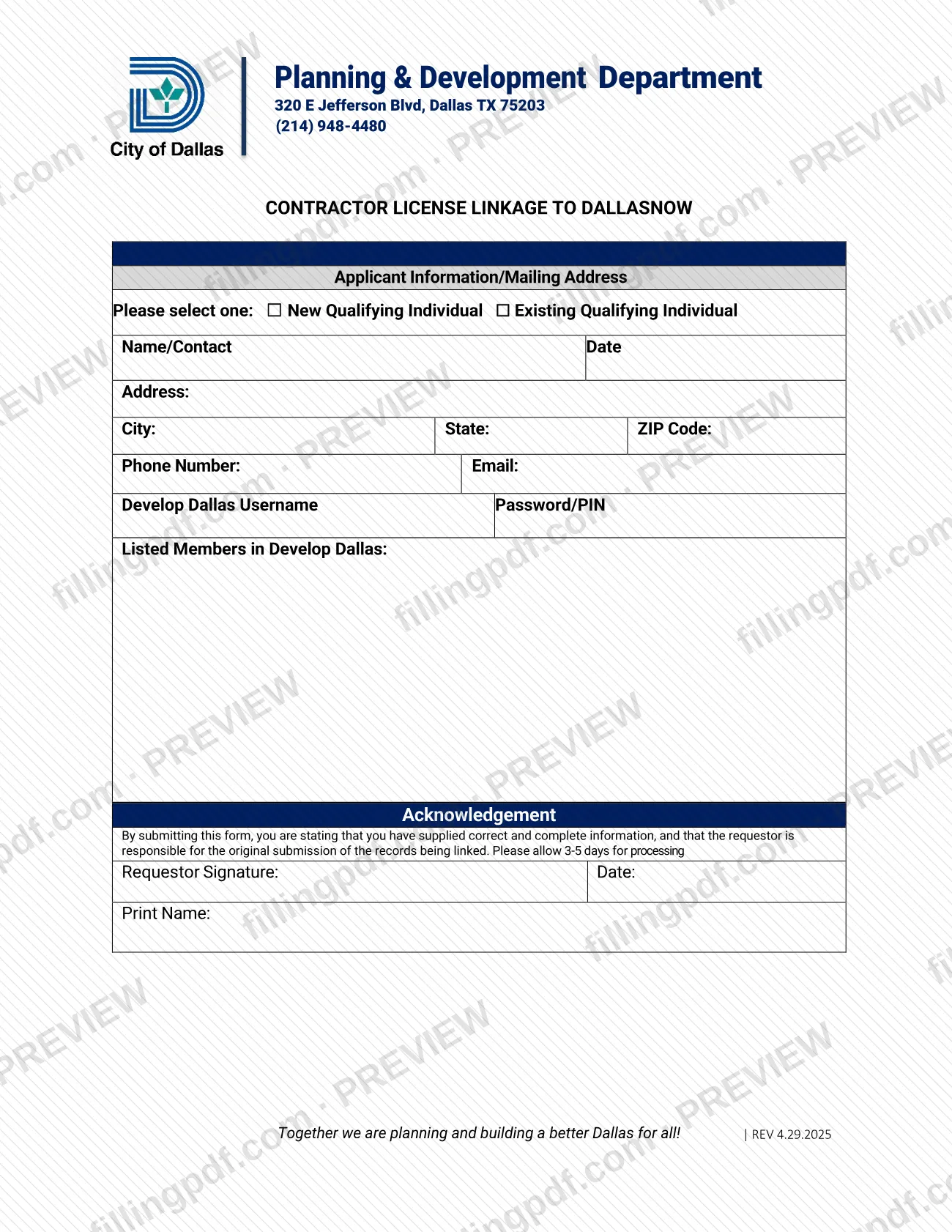
Contractor Account Integration is a City of Dallas form, printed with the heading Contractor License Linkage to DallasNow, that a Qualifying Individual uses to link a contractor license to DallasNow. It collects the requestor's contact details, Develop Dallas username and the members listed in Develop Dallas, and ends with a signed acknowledgement. On this page you can fill out the form online on FillingPDF and download or print the completed PDF; the original is published by the City of Dallas at the official link below.
Last updated
What is Contractor Account Integration – Dallas, TX?
Contractor Account Integration is a one-page City of Dallas form, printed under the heading Contractor License Linkage to DallasNow, that a Qualifying Individual completes to have a contractor license linked to the DallasNow system.
The City of Dallas Development Services Department is the issuing agency in the form data for this page; the form's own header reads Planning & Development Department, 320 E Jefferson Blvd, Dallas TX 75203, (214) 948-4480. The revision printed on the form is REV 4.29.2025.
The form has four parts:
- Applicant Information/Mailing Address, where you select New Qualifying Individual or Existing Qualifying Individual and give your name, address, phone number and email.
- The Develop Dallas account details: username, password/PIN and the listed members in Develop Dallas.
- An Acknowledgement, stating that you supplied correct and complete information and that the requestor is responsible for the original submission of the records being linked.
- The signature block: requestor signature, date and printed name.
The form states that processing takes 3-5 days.
Who needs to file Contractor Account Integration – Dallas, TX?
The form is for a Qualifying Individual who needs a contractor license linked to DallasNow. It asks you to say which kind of applicant you are, and you select one option:
- New Qualifying Individual
- Existing Qualifying Individual
The person who signs is the requestor. By signing, the requestor states that the information is correct and complete and accepts responsibility for the original submission of the records being linked. The form has a single signature block for the requestor and prints no separate line for a representative, so the requestor signs and prints his or her own name.
The form also assumes a Develop Dallas account: it asks for the Develop Dallas username and the members listed in Develop Dallas. The form does not define "Qualifying Individual"; contact the department at (214) 948-4480 if you are unsure whether the term describes you.
When to file Contractor Account Integration – Dallas, TX
Submit the form when you need a contractor license linked to DallasNow. The form prints no due date and no renewal cycle, so timing depends on when you need the link in place.
The form says to allow 3-5 days for processing. Build that time in before you need the linked account for any work in DallasNow.
How to fill out Contractor Account Integration – Dallas, TX
Select your applicant type
Under Applicant Information/Mailing Address, check New Qualifying Individual or Existing Qualifying Individual. The form asks you to select one.
Enter your name and date
Fill in the Name/Contact line and the Date beside it.
Enter your mailing address
Write your street address in Address, then your City, State and ZIP Code.
Add phone number and email
Enter your Phone Number and Email so the department can reach you about the linkage.
Enter your Develop Dallas details
Fill in the Develop Dallas Username and the Password/PIN line as the form requests.
List members in Develop Dallas
Under Listed Members in Develop Dallas, enter the members listed on your Develop Dallas account.
Read the Acknowledgement
Confirm that the information is correct and complete. By submitting the form, the requestor accepts responsibility for the original submission of the records being linked.
Sign, date and print your name
The requestor signs on Requestor Signature, adds the Date and writes the name in Print Name.
Review and download the completed PDF
Check every entry, then download or print the completed PDF from FillingPDF. Deliver it as described under How to submit and allow 3-5 days for processing.
How to submit Contractor Account Integration – Dallas, TX
The form prints no submission channel, portal or mailing instruction of its own. Its header gives the department's contact details: Planning & Development Department, 320 E Jefferson Blvd, Dallas TX 75203, telephone (214) 948-4480.
- Before you send it: complete every section, sign and date it, and print your name. The Acknowledgement makes the requestor responsible for the original submission of the records being linked.
- How to deliver it: call the department at (214) 948-4480 to confirm how it accepts the completed form.
- After you submit: the form says to allow 3-5 days for processing.
FillingPDF lets you fill out and download the PDF; submission follows the City of Dallas channels the department confirms.
Common mistakes to avoid
- Leaving unmarked whether you are a New Qualifying Individual or an Existing Qualifying Individual; the form asks you to select one.
- Submitting the form unsigned, or without the date and printed name beside the Requestor Signature.
- Omitting the Develop Dallas username or the Listed Members in Develop Dallas, which the form asks for in the Develop Dallas section.
- Giving incomplete or incorrect contact details; the Acknowledgement states that you supplied correct and complete information.
- Assuming the City handles the original records: the form makes the requestor responsible for the original submission of the records being linked.
- Expecting the link immediately instead of allowing the 3-5 days for processing that the form states.
- Treating the form as a permit application; it links a contractor license to DallasNow.
Frequently asked questions
What is the Contractor Account Integration form?
It is a City of Dallas form, headed Contractor License Linkage to DallasNow, used to link a Qualifying Individual's contractor license to DallasNow. It collects contact details, Develop Dallas account information and the requestor's signed acknowledgement.
Why does the PDF say Contractor License Linkage to DallasNow?
That is the heading printed on the form itself. The file published by the City of Dallas is named Contractor Account Integration, and both names refer to the same one-page form, revision REV 4.29.2025.
Is this form a Dallas permit application?
No. The form does not ask for permit details; it links a contractor license to DallasNow and asks for contact information, Develop Dallas account details and a signature. For permit questions, call the department at (214) 948-4480.
Who has to sign the Contractor Account Integration form?
The requestor signs, dates and prints his or her name. By signing, the requestor states that the information is correct and complete and accepts responsibility for the original submission of the records being linked.
How long does processing take?
The form says to allow 3-5 days for processing. It prints no other timeline and no status-check method, so call the department at (214) 948-4480 if you need an update after that time.
Where do I send the completed form?
The form prints no submission channel. Its header lists the Planning & Development Department, 320 E Jefferson Blvd, Dallas TX 75203, and (214) 948-4480; call that number to confirm how the department accepts the completed form.
Can I fill out the Contractor Account Integration form online?
You can fill out the PDF online on FillingPDF and download or print it. FillingPDF is an independent service, is not affiliated with the City of Dallas and does not submit the form; you deliver it through the City's channels.
Ready to fill out Contractor Account Integration – Dallas, TX?
Fill out Contractor Account Integration – Dallas, TX now