
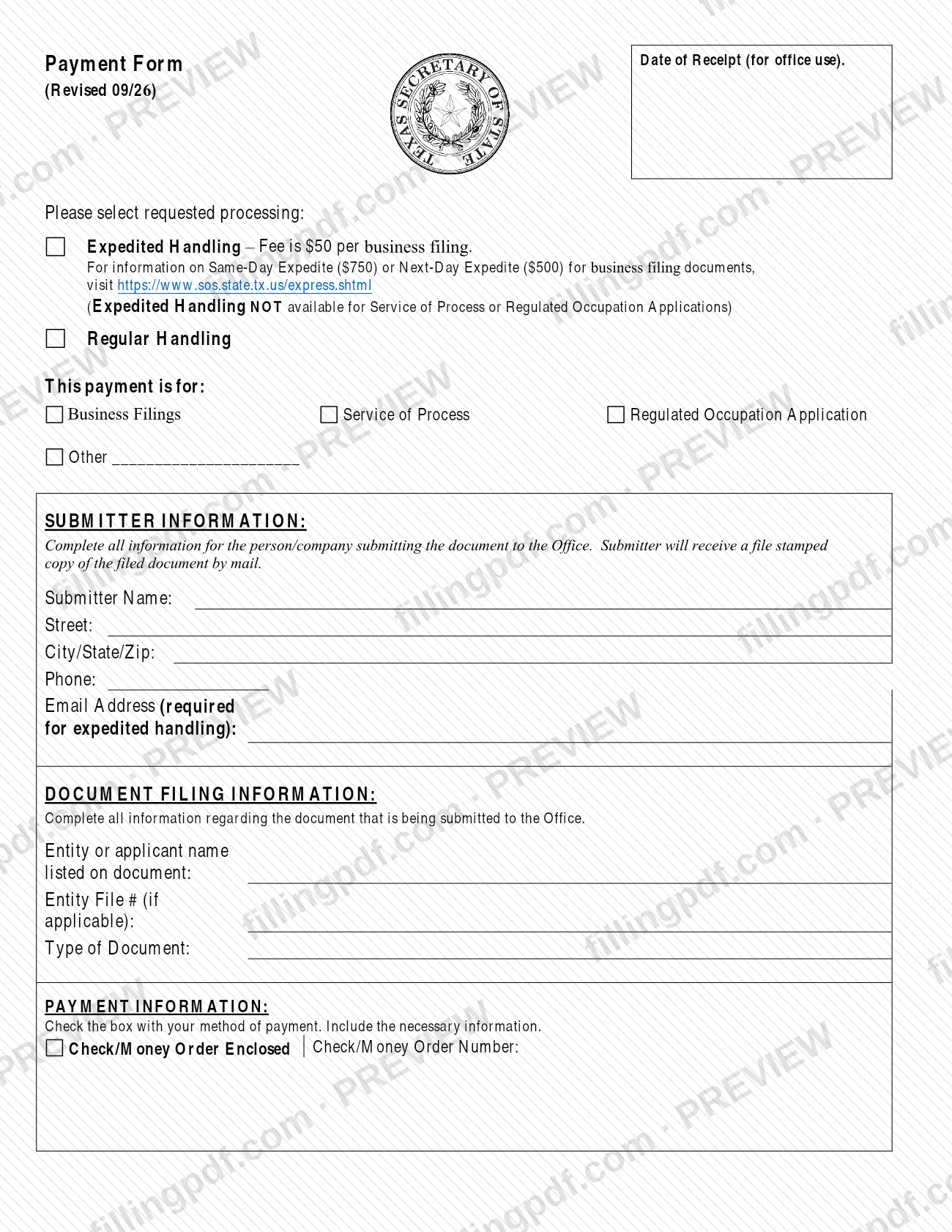
The Payment Form (Form 807) is the form the Texas Secretary of State uses to match a payment with the document you submit to the Office. On it you choose regular or expedited handling, say whether the payment is for a business filing, service of process or a regulated occupation application, identify the submitter and the document, and record how you are paying. On this page you can fill out the payment form online on FillingPDF and download or print the completed PDF; the form itself is published by the Texas Secretary of State.
Last updated
What is Form 807?
Form 807, Payment Form, is the Texas Secretary of State form that identifies the payment sent with a document filed with the Office. It records the processing you request, what the payment covers, who is submitting, which document is being filed and how you are paying.
The form is printed with the revision date 09/26 and has a "Date of Receipt" box marked for office use. It has four blocks:
- Requested processing: Expedited Handling or Regular Handling.
- This payment is for: Business Filings, Service of Process, Regulated Occupation Application, or Other with a line to write in.
- Submitter Information and Document Filing Information: who is submitting, the entity or applicant name listed on the document, the entity file number if applicable, and the type of document.
- Payment Information: the payment method, with a box for a check or money order and its number.
The Secretary of State lists Form 807 among its business and nonprofit forms, under "Reinstatement; Fee Schedule; Other Filing Aids", next to Form 806, Fee Schedule. Form 807 is not a filing in itself and carries no fee table: it travels with the document it pays for.
Who needs to file Form 807?
The main group is any person or company that submits a document to the Texas Secretary of State and pays for it with this form. The form asks the submitter to complete all information about themselves and about the document being submitted.
The payment can be for:
- a business filing;
- service of process;
- a regulated occupation application;
- something else, which you describe on the "Other" line.
Expedited Handling is a choice, not a requirement, and the form says it is not available for Service of Process or Regulated Occupation Applications. If you choose it, the submitter's email address is required. Same-Day and Next-Day Expedite options exist for business filing documents, and the form sends you to https://www.sos.state.tx.us/express.shtml for them.
The form is not needed when you file through SOSPortal: the agency's forms list tells filers not to attach the PDF form when submitting there. The form does not describe who may sign or submit on behalf of someone else.
When to file Form 807
Use Form 807 whenever you submit a document to the Texas Secretary of State together with a payment that the form covers. It has no due date of its own: it goes in with the document it pays for, so any deadline comes from that document.
The form asks you to choose the handling you want at the time you submit. Regular Handling is the standard option; Expedited Handling carries an additional fee per business filing, and the form points to the agency's express page for the Same-Day and Next-Day Expedite options for business filing documents. Expedited Handling is not available for Service of Process or Regulated Occupation Applications. The form sets no processing times.
Documents you need
- The document you are submitting to the Texas Secretary of State; Form 807 identifies it in the Document Filing Information block and travels with it.
- A check or money order, if you check Check/Money Order Enclosed; write its number on the form.
How to fill out Form 807
Select the requested processing
Check Expedited Handling or Regular Handling. Expedited Handling is not available for Service of Process or Regulated Occupation Applications.
Mark what the payment is for
Under This payment is for, check Business Filings, Service of Process or Regulated Occupation Application. For anything else, check Other and write the description on the line.
Enter the submitter's name and address
Under Submitter Information, enter the person or company submitting the document in Submitter Name, then Street and City/State/Zip. The submitter receives the file-stamped copy by mail.
Add phone and email
Enter the Phone number and the Email Address. The email address is required if you requested expedited handling.
Identify the document being filed
Under Document Filing Information, enter the entity or applicant name listed on the document, the Entity File # if one applies, and the Type of Document.
Choose the payment method
Under Payment Information, check Check/Money Order Enclosed and enter the Check/Money Order Number.
Review and download the completed PDF
Leave the Date of Receipt box blank, since it is for office use. Check each entry against the document you are filing, then download or print the completed PDF from FillingPDF and send it with your filing through the channels under How to submit.
How to submit Form 807
Form 807 goes to the Texas Secretary of State with the document it pays for, and the payment method is marked on the form itself. The form prints no mailing address, so confirm where to send your package with the instructions for the document you are filing.
- With a paper filing: complete the form, check Check/Money Order Enclosed and write the check or money order number. The submitter receives a file-stamped copy of the filed document by mail, so enter a complete street, city, state and ZIP code.
- Through SOSPortal: the agency's forms list says not to attach the PDF form when you submit through SOSPortal. Questions about business filings on SOSPortal go to [email protected].
- Expedited handling: enter an email address; the form requires it for expedited handling. Fees for the Same-Day and Next-Day options are explained at https://www.sos.state.tx.us/express.shtml, and the amounts are not on this form.
FillingPDF lets you fill out and download the PDF; submission follows the Texas Secretary of State's channels above.
Common mistakes to avoid
- Choosing Expedited Handling for Service of Process or a Regulated Occupation Application; the form says it is not available for them.
- Leaving the email address blank when requesting expedited handling; the form marks it as required for expedited handling.
- Checking Check/Money Order Enclosed without writing the check or money order number.
- Attaching the PDF form to a filing submitted through SOSPortal; the agency's forms list says not to.
- Leaving off the street, city, state or ZIP code of the submitter; the file-stamped copy is returned by mail.
- Not checking any box under "This payment is for", or using Other without writing what the payment covers.
- Writing a name in the entity or applicant line that differs from the name listed on the document being filed.
Frequently asked questions
What is the Texas Secretary of State payment form?
It is Form 807, Payment Form, which identifies the payment that goes with a document you submit to the Texas Secretary of State. It records the handling you request, what the payment is for, the submitter, the document and the payment method.
Can I fill out the payment form (Form 807) online?
Yes. You can fill out the PDF online on FillingPDF and download or print it. FillingPDF is an independent service and does not send the form or your payment to the Texas Secretary of State; you submit it through the agency's channels.
Is there an extra fee for expedited handling?
Yes. The form says Expedited Handling carries a fee per business filing, and Same-Day and Next-Day Expedite options for business filing documents have their own fees. The amounts are not on the form; see https://www.sos.state.tx.us/express.shtml.
Can I get expedited handling for service of process?
No. The form states that Expedited Handling is not available for Service of Process or Regulated Occupation Applications. Choose Regular Handling for those payments.
Do I have to give an email address on Form 807?
Only if you request expedited handling. The form marks the email address as required for expedited handling; for regular handling it is not marked as required, though the form still asks for name, street, city, state, ZIP and phone.
Do I attach Form 807 when filing through SOSPortal?
No. The Texas Secretary of State's forms list says not to attach the PDF form when submitting through SOSPortal. Form 807 is for filings that go to the Office with a payment, such as a check or money order.
What is the difference between Form 807 and Form 806?
Form 807 is the Payment Form that goes with your filing, while Form 806 is the separate Fee Schedule the Secretary of State lists beside it. Form 807 has no fee table, so use the agency for current fee information.
How will I receive the filed document?
By mail. The form says the submitter receives a file-stamped copy of the filed document by mail, so enter a complete mailing address in the Submitter Information block.
Ready to fill out Form 807?
Fill out Form 807 now