
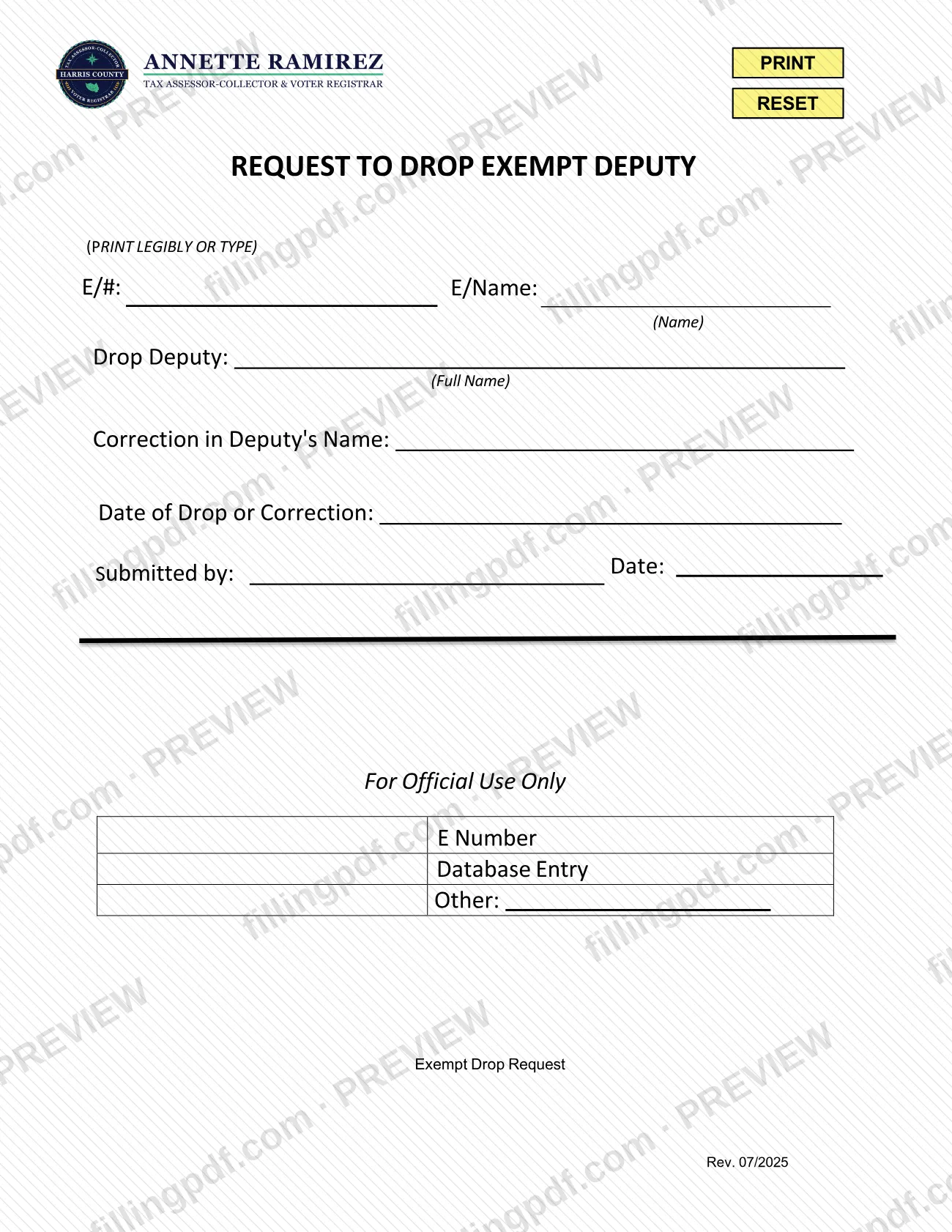
The Exempt Deputy Request is a form of the Harris County Tax Assessor-Collector, printed on the PDF as Request to Drop Exempt Deputy. It records either that an exempt deputy is being dropped or that a deputy's name is being corrected, and it is identified by the deputy's E number and name. The Harris County Tax Office lists it among its Vehicle Registration Forms, not among the Harris County property tax forms. On this page you can fill out the form online on FillingPDF and download or print the completed PDF; the official PDF is published by the agency at hctax.net.
Last updated
What is Exempt Deputy Request – Harris County, TX?
The Exempt Deputy Request, printed on the form as Request to Drop Exempt Deputy, is a Harris County Tax Assessor-Collector form used to drop an exempt deputy or to correct a deputy's name, identified by the deputy's E number and name.
The Harris County Tax Office forms page describes it as the "Exempt Deputy Drop/Correction Request" and lists it under Vehicle Registration Forms. The form asks for the E/# and E/Name, the full name of the deputy to drop, the corrected deputy's name when a correction is being made, the date of the drop or correction, and who submitted the request and when.
The lower part of the form is a block marked For Official Use Only. It shows items such as E Number, Database Entry, Other and Exempt Drop Request, and it is meant for the office rather than for the person completing the form.
The same forms page lists a separate Dealer Deputy Request, the "Dealer Deputy Drop/Correction Request". The two are different documents: this page covers the exempt deputy version, revision 07/2025.
Who needs to file Exempt Deputy Request – Harris County, TX?
The form is for whoever must drop an exempt deputy or correct an exempt deputy's name with the Harris County Tax Assessor-Collector. It identifies the exempt account by an E/# and E/Name, and it has a Submitted by line for the person making the request.
- Use it to drop an exempt deputy: enter the deputy's full name on the Drop Deputy line.
- Use it to correct a deputy's name: complete the Correction in Deputy's Name line.
Do not use it for dealer deputies. The agency lists a separate Dealer Deputy Request for those. The form does not say who is authorized to sign or submit it for an exempt account, so confirm that with the Tax Office if you are unsure.
When to file Exempt Deputy Request – Harris County, TX
Submit the request when an exempt deputy needs to be dropped or a deputy's name needs correcting. The form has a Date of Drop or Correction line, so decide the effective date before you complete it. No separate deadline or processing time is printed on the form or listed on the agency's forms page.
How to fill out Exempt Deputy Request – Harris County, TX
Print or type legibly
The form says to print legibly or type. Use the fillable PDF to type your entries, or print the form and write clearly.
Enter the E/# and E/Name
At the top, fill in the E/# and E/Name that identify the exempt account the request concerns.
Decide: drop or correction
Complete the Drop Deputy line to drop a deputy, or the Correction in Deputy's Name line to correct a name. Use the one that matches your request.
Write the deputy's full name
On the Drop Deputy line, enter the deputy's full name, as the label (Full Name) asks.
Enter the corrected name
If you are correcting a name, complete the Correction in Deputy's Name line as it asks, so the office can identify which deputy and which name.
Enter the date
On the Date of Drop or Correction line, enter the date the drop or correction takes effect.
Sign off as the submitter
Fill in the Submitted by name and the Date beside it. Leave the For Official Use Only block blank.
Review and download the PDF
Check the E/# and names for accuracy, then download or print the completed PDF from FillingPDF and deliver it as described under How to submit.
How to submit Exempt Deputy Request – Harris County, TX
The form prints no mailing address, portal, fax number or appointment rule, so it names no submission channel itself. The Harris County Tax Assessor-Collector publishes it on the Harris County Tax Office Forms page, https://www.hctax.net/About/Forms, where it appears as "Exempt Deputy Drop/Correction Request" in the Vehicle Registration Forms list. Contact the Tax Office through its website to confirm how it wants the completed request delivered.
Before you send it, check that the Submitted by and Date lines are filled in. Leave the For Official Use Only block for the office. FillingPDF lets you fill out and download the PDF; submission follows the agency's channels.
Common mistakes to avoid
- Handwriting the form illegibly; the form says to print legibly or type.
- Leaving out the E/# or E/Name at the top, which identify the exempt account the request concerns.
- Entering only part of the deputy's name on the Drop Deputy line, which asks for the full name.
- Leaving the Date of Drop or Correction blank.
- Skipping the Submitted by name and date at the bottom of the request.
- Filling in the For Official Use Only block, which is reserved for the office.
- Using this form for a dealer deputy; the agency lists a separate Dealer Deputy Request.
Frequently asked questions
What is the Exempt Deputy Request?
It is a Harris County Tax Assessor-Collector form, printed as Request to Drop Exempt Deputy, used to drop an exempt deputy or correct a deputy's name. The Tax Office forms page lists it as the Exempt Deputy Drop/Correction Request. The PDF is revision 07/2025.
Is the Exempt Deputy Request a Harris County property tax form?
No. The Harris County Tax Office forms page lists it under Vehicle Registration Forms, while the Harris County property tax forms, such as the tax certificate request, are in a separate Property Tax Forms section of the same page.
What information does the Exempt Deputy Request ask for?
It asks for the E/# and E/Name, the full name of the deputy to drop, the correction in the deputy's name, the date of the drop or correction, and the submitter's name and date. A block marked For Official Use Only is for the office.
Can I fill out the Exempt Deputy Request online?
Yes. You can fill out the PDF online on FillingPDF and download or print it. FillingPDF is an independent service and does not file the request; you deliver it to the Harris County Tax Assessor-Collector through the agency's own channels.
Where do I send the Exempt Deputy Request?
The form prints no address or portal. The Harris County Tax Assessor-Collector publishes it at https://www.hctax.net/About/Forms, so contact the Tax Office through its website to confirm where and how to deliver the completed request.
What is the difference between the Exempt Deputy Request and the Dealer Deputy Request?
They are separate forms. The Harris County Tax Office forms page lists an Exempt Deputy Drop/Correction Request and a Dealer Deputy Drop/Correction Request side by side. Use the exempt version only for an exempt deputy, identified by its E/# and E/Name.
Do I need to attach documents to the Exempt Deputy Request?
The form lists no attachments and asks only for the E/# and E/Name, the deputy's name, the date and the submitter. If the Tax Office needs anything more for your request, it will say so when you contact it.
Ready to fill out Exempt Deputy Request – Harris County, TX?
Fill out Exempt Deputy Request – Harris County, TX now