
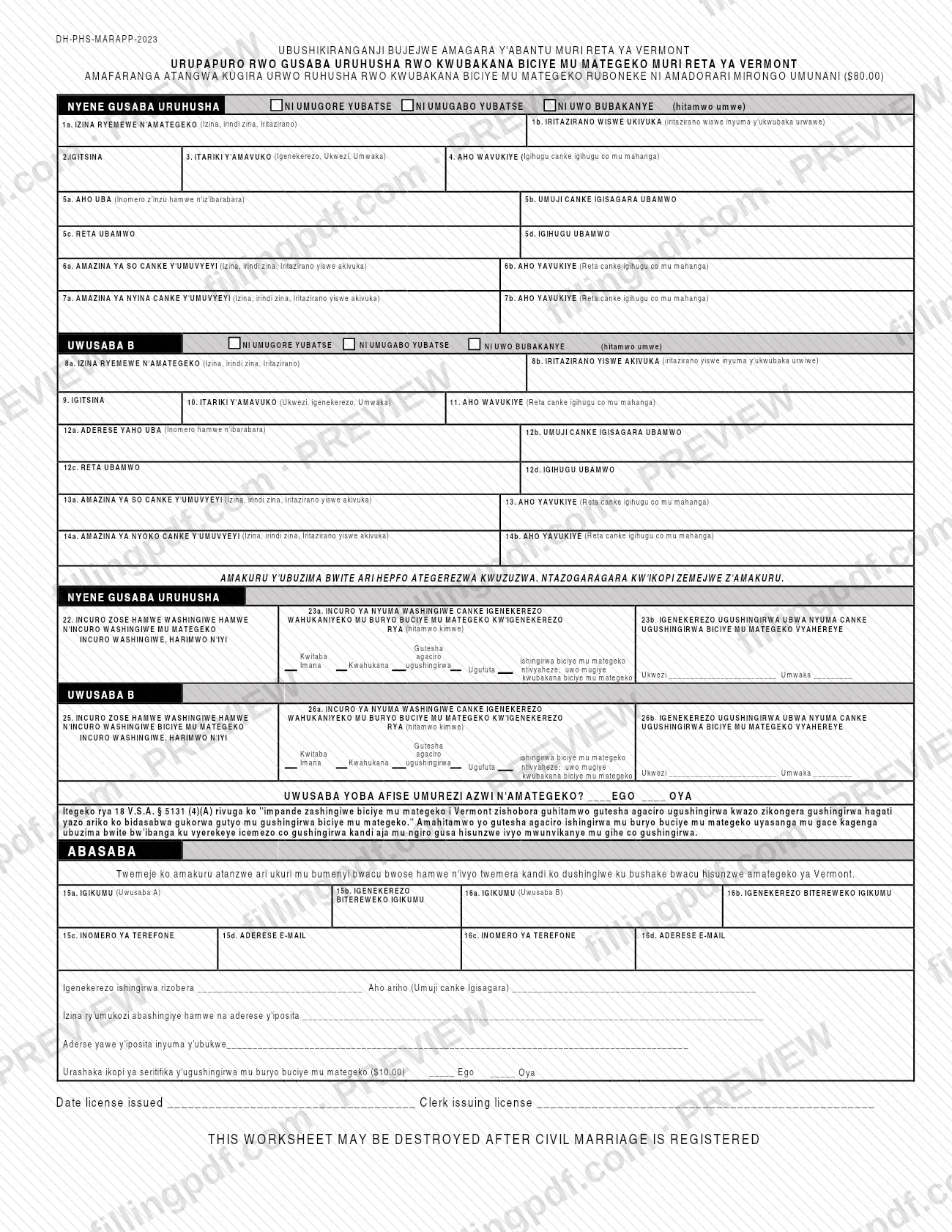
The Marriage License Application (Kirundi version), form DH-PHS-MARAPP-2023, is the Vermont Department of Health worksheet on which two people give the information for a Vermont civil marriage license. Its text is printed in Kirundi. Each applicant completes one side: name, sex, birth details, residence, parents and any prior marriages, followed by both signatures. On FillingPDF you can fill out the form online and download or print the completed PDF; the original PDF is published by the Vermont Department of Health at healthvermont.gov.
Last updated
What is DH-PHS-MARAPP-2023?
The Marriage License Application, form DH-PHS-MARAPP-2023, is the Vermont Department of Health worksheet on which two people provide the details needed for a Vermont civil marriage license: each applicant's name, sex, birth information, residence, parents and prior marriages.
The page is printed in Kirundi under the heading of the State of Vermont health department, with a few lines at the bottom in English. A license fee is printed at the top of the form. The form is built in two matching halves, one for each applicant, followed by a joint section:
- Applicant A: lines 1a to 7b (legal name, name at birth, sex, date and place of birth, residence, parents).
- Applicant B: lines 8a to 14b, with the same information.
- Prior marriages: lines 22, 23a and 23b for Applicant A, and lines 25, 26a and 26b for Applicant B.
- A Yes/No question about whether the applicant has a legally recognized guardian.
- A statement that the information is true and that the marriage is entered freely under Vermont law, with signatures, dates, telephone numbers and email addresses on lines 15a to 16d.
- The expected date and place of the marriage, the name and mailing address of the person performing it, your mailing address after the wedding, and a Yes/No question about a copy of the marriage certificate.
- A block for the date the license was issued and the clerk issuing it.
The form notes that this worksheet may be destroyed after the civil marriage is registered. It is not an order form for copies of existing marriage records; the Department of Health describes those routes on its page about ordering Vermont vital records.
Who needs to file DH-PHS-MARAPP-2023?
Two people who plan to enter a civil marriage in Vermont and need a marriage license complete this application together. The form has a side for each applicant, labeled Applicant A and Applicant B, and each applicant marks one of the three printed options at the top of their side (the labels read bride, groom or spouse in Kirundi).
- Applicants who have been married before complete the prior-marriage lines for their side: lines 22, 23a and 23b for Applicant A, lines 25, 26a and 26b for Applicant B.
- Each applicant answers the Yes/No question about having a legally recognized guardian.
- Both applicants affirm the statement above their signatures and sign for themselves; the form prints a signature and date line for each (15a and 15b, 16a and 16b) and names no one who may sign on their behalf.
Do not use this worksheet to order a copy of an existing marriage certificate. The Department of Health lists separate ways to order certified and noncertified copies of vital records on its order page.
When to file DH-PHS-MARAPP-2023
Complete the application before the civil marriage takes place. The form asks for the date and place where the marriage will happen and for the person who will perform it, so it is filled out ahead of the ceremony. No separate due date or validity period is printed on it.
The form also carries a block for the date the license was issued and the clerk issuing it, which is completed at issuance. A note at the bottom says the worksheet may be destroyed after the civil marriage is registered.
How to fill out DH-PHS-MARAPP-2023
Mark the applicant role
At the top of each side, choose one of the three printed options (bride, groom or spouse in the Kirundi labels). Applicant A uses the first side and Applicant B the second.
Enter Applicant A's identity details
Line 1a: legal name (first, middle, last). Line 1b: name at birth, as the form asks. Line 2: sex. Line 3: date of birth, in the order printed beside the line. Line 4: place of birth, state or foreign country.
Enter Applicant A's residence
Line 5a: street number and street name. Line 5b: town or city. Line 5c: state. Line 5d: country.
Enter Applicant A's parents
Lines 6a and 7a: the names of the two parents, including the name at birth, as printed. Lines 6b and 7b: where each parent was born (state or foreign country).
Enter Applicant B's identity details
Line 8a: legal name. Line 8b: name at birth. Line 9: sex. Line 10: date of birth, in the order printed beside that line, which differs from line 3. Line 11: place of birth.
Enter Applicant B's residence and parents
Lines 12a to 12d: street address, town or city, state and country. Lines 13a and 14a: the parents' names. Lines 13 and 14b: where each parent was born.
Report prior marriages for Applicant A
Line 22: the total number of times married, as the line asks. Lines 23a and 23b: for the most recent marriage, mark the printed option that applies and enter the month and year in the blanks.
Report prior marriages for Applicant B
Line 25: the total number of marriages. Lines 26a and 26b: the same questions for Applicant B's most recent marriage. Then answer the Yes/No question about a legally recognized guardian.
Sign and add contact details
Each applicant signs and dates on lines 15a and 15b (Applicant A) and 16a and 16b (Applicant B). Enter telephone numbers and email addresses on lines 15c, 15d, 16c and 16d.
Enter marriage and mailing details
Write the expected date and place (town or city) of the marriage, the name and mailing address of the person performing it, and your mailing address after the wedding. Mark Yes or No for a copy of the marriage certificate.
Review and download the completed PDF
Check that both sides, the prior-marriage lines and all signatures are complete. Download or print the completed PDF from FillingPDF, then continue as described under How to submit.
How to submit DH-PHS-MARAPP-2023
The form prints no mailing address, online portal or office hours. The only issuing detail on it is a block, printed in English, for the date the license was issued and the clerk issuing the license. A license fee is printed at the top of the form; its amount is shown there, and the form does not say how it is paid.
If you want a copy of the marriage certificate, the form has a Yes/No question for it, and a fee is printed beside that question. The Department of Health's page on ordering vital records describes the routes for copies once a marriage is on file:
- Town or City Clerk: certified and noncertified copies of marriage and civil union certificates on file in that office.
- Online: certified copies can be ordered and paid for by credit card.
- By mail: follow the instructions on the application you choose and mail it to the address printed on that application.
- Email: noncertified copies of marriage certificates from 2024 to present can be requested by email, with the type of event, the names and the date of the event.
FillingPDF lets you fill out and download the PDF; submission follows the agency's channels, not this site.
Common mistakes to avoid
- Leaving unmarked the option at the top of each side where the applicant must choose one of the three printed roles.
- Completing only Applicant A's side (lines 1a to 7b) and leaving Applicant B's side (lines 8a to 14b) blank; the form has matching sections for both people.
- Skipping the section under the personal-information notice, which the form says must be completed.
- Omitting the prior-marriage lines (22 to 23b or 25 to 26b) when an applicant has been married before, or leaving the month and year blanks empty.
- Following the same date order on every line; the date parts are printed in a different order beside line 3 and line 10, so read each label.
- Submitting without both signatures and dates on lines 15a, 15b, 16a and 16b.
- Using the form to order a certificate copy; the Department of Health handles copy orders through the Town or City Clerk, online or by mail.
Frequently asked questions
What is the Vermont Marriage License Application?
It is the Vermont Department of Health worksheet, form DH-PHS-MARAPP-2023, on which two people give their names, birth details, residence, parents and prior marriages for a Vermont civil marriage license. This PDF is printed in Kirundi.
Is this marriage license application in English?
The text is printed in Kirundi, including the headings and line labels. Only a few lines are in English, such as the block for the date the license was issued and the clerk issuing it, and the note that the worksheet may be destroyed after the marriage is registered.
Can I fill out the marriage license application online?
Yes. You can fill out the PDF online on FillingPDF and download or print it. FillingPDF is an independent service and does not file the application or issue the license; you follow the agency's own channels.
Do both people have to sign the application?
The form prints a signature and date line for each applicant, 15a and 15b for Applicant A and 16a and 16b for Applicant B, under a statement that the information is true and the marriage is entered freely. It names no one who may sign for an applicant.
What do I enter if I was married before?
Complete your side's prior-marriage lines: 22, 23a and 23b for Applicant A, or 25, 26a and 26b for Applicant B. Give the total number of marriages, mark the printed option for how the last marriage ended, and write the month and year.
Is there a fee for the marriage license?
Yes. A license fee is printed at the top of the form, and a separate fee is printed beside the question about a marriage certificate copy. The amounts are on the form itself; the form does not state how the fee is paid.
How do I get a copy of a Vermont marriage certificate?
The Department of Health says the fastest and cheapest route is the Town or City Clerk, where the certificate is on file. Certified copies can also be ordered online or by mail, and noncertified copies of 2024-to-present marriages can be requested by email.
Ready to fill out DH-PHS-MARAPP-2023?
Fill out DH-PHS-MARAPP-2023 now