
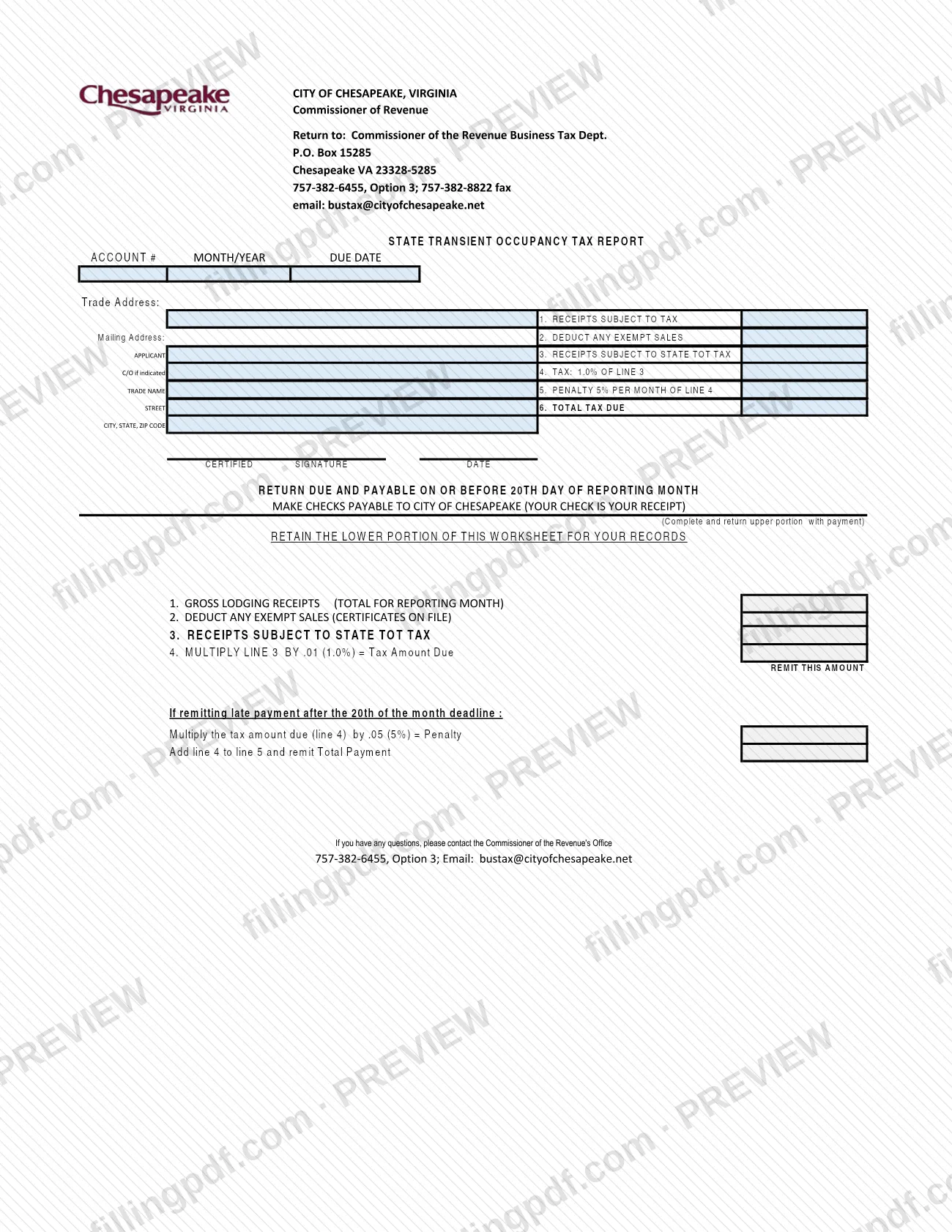
The State Transient Occupancy Tax Report is the return that lodging businesses in the City of Chesapeake, Virginia, use to report a month of lodging receipts and the state transient occupancy tax (TOT) due on them. It is issued by the Chesapeake Commissioner of the Revenue, Business Tax Department, and the city lists it among forms for existing businesses. On FillingPDF you can fill out the form online and download or print the completed PDF; the city receives it, with payment, only through the channels described below.
Last updated
What is State Transient Occupancy Tax Report – Chesapeake, VA?
The State Transient Occupancy Tax Report is the City of Chesapeake, Virginia, form on which a business reports its gross lodging receipts for one reporting month, subtracts exempt sales and works out the state transient occupancy tax (TOT) it owes the city.
The Commissioner of the Revenue, Business Tax Department, issues the form. Its upper portion is the return: it carries the account number, the month and year, the due date, the trade address, the mailing address and the trade name, followed by six lines: receipts subject to tax, exempt sales, receipts subject to state TOT tax, the tax, the penalty and the total tax due. A certified signature and date close the return.
The lower portion is a worksheet that you keep for your records. It starts from gross lodging receipts for the reporting month, deducts any exempt sales for which certificates are on file, and applies the percentage printed on the form to the result. It also shows how to figure the penalty when payment is made after the 20th of the month.
The form is for the state TOT report only. A business that is opening is directed by the city to the Opening/Operating a Business - Tax and Licensing page, not to this report. The form prints no form number or revision date.
Who needs to file State Transient Occupancy Tax Report – Chesapeake, VA?
Existing businesses in the City of Chesapeake that collect lodging receipts subject to the state transient occupancy tax report them on this form for each reporting month. The city's Business Tax Forms page states that its forms are for existing businesses only.
- Businesses with taxable lodging receipts: complete lines 1 through 6 for the month shown in the MONTH/YEAR box.
- Businesses with exempt sales: deduct them on line 2. The worksheet says exempt sales are those for which certificates are on file.
- Businesses paying after the 20th: also complete line 5, the penalty.
Do not use this report to open a new business. The city tells new businesses to visit Opening/Operating a Business - Tax and Licensing and fill out the required forms there.
The form has a single signature block, "CERTIFIED SIGNATURE" and date. It does not describe who else may sign for the business.
When to file State Transient Occupancy Tax Report – Chesapeake, VA
The return is due and payable on or before the 20th day of the reporting month, as printed on the form. The due date box at the top also shows the date for the period you are reporting.
The worksheet separately addresses late payment: if you remit after the 20th of the month deadline, you figure a penalty from the tax amount on line 4 and add it to the tax for the total payment. The form prints the penalty percentage on line 5 and in the worksheet.
The form is completed for each reporting month, using that month's total lodging receipts. The city's page asks that the form be completed, printed and signed before it is sent.
Documents you need
- A check payable to CITY OF CHESAPEAKE, sent with the upper portion of the report; the form says your check is your receipt.
- Exemption certificates for any exempt sales deducted on line 2: the worksheet refers to certificates on file, so keep them on file with your records.
How to fill out State Transient Occupancy Tax Report – Chesapeake, VA
Enter account and period details
In the upper portion, fill in the ACCOUNT # and the MONTH/YEAR you are reporting, and check the DUE DATE box. The due date is the 20th day of the reporting month.
Confirm business and mailing information
Enter or check the trade address, the applicant, the trade name, and the mailing address (street, city, state, ZIP code). Add the C/O name if one is indicated.
Find gross lodging receipts
On the worksheet, enter line 1, the GROSS LODGING RECEIPTS, as the total for the reporting month. Carry that figure to line 1, RECEIPTS SUBJECT TO TAX, of the return.
Deduct exempt sales
On line 2, DEDUCT ANY EXEMPT SALES, enter sales for which exemption certificates are on file. Enter none if you have no certificates.
Figure receipts subject to state TOT
On line 3, enter the result of line 1 minus line 2: the receipts subject to state TOT tax.
Compute the tax on line 4
Multiply line 3 by the percentage printed on line 4 and on the worksheet. The form says to multiply line 3 by .01 for the tax amount due, which is the amount to remit.
Add the penalty if payment is late
If you remit after the 20th, multiply line 4 by the penalty factor printed on the worksheet and enter it on line 5. If you pay on time, leave line 5 empty.
Enter the total tax due
On line 6, TOTAL TAX DUE, add line 4 and line 5 and write the total you are remitting.
Sign and date the return
Sign and date the CERTIFIED SIGNATURE and DATE block. The city requires the form to be signed before it is sent.
Review, download and keep the worksheet
Check each line against your lodging receipts and certificates. Download or print the completed PDF from FillingPDF, send the upper portion with your check as described under How to submit, and retain the lower worksheet portion.
How to submit State Transient Occupancy Tax Report – Chesapeake, VA
You can send the completed, signed report to the Commissioner of the Revenue's Office by mail, fax or email. The city's Business Tax Forms page says the form must be completed, printed and signed first; a signed copy can then be scanned and sent as an email attachment, faxed or mailed.
- By mail: Commissioner of the Revenue, Business Tax Dept., P.O. Box 15285, Chesapeake VA 23328-5285.
- By fax: 757-382-8822.
- By email: [email protected], as a scanned attachment.
Return the upper portion with payment. Make checks payable to CITY OF CHESAPEAKE; the form says your check is your receipt. Keep the lower worksheet portion for your records. For questions, call 757-382-6455, Option 3, as printed on the form, or the Business Tax Section at 757-382-6738. The city does not print an amount on the form for you to look up; use the worksheet to compute it. FillingPDF lets you fill out and download the PDF; submission follows the channels above.
Common mistakes to avoid
- Sending the report unsigned or without printing it first; the city says business tax forms must be completed, printed and signed before they are remitted.
- Paying after the 20th without completing line 5, the penalty, and adding it to the tax for the total on line 6.
- Deducting exempt sales on line 2 when no exemption certificates are on file for them.
- Returning the whole page instead of the upper portion with payment, or discarding the lower worksheet portion that the form says to retain.
- Making the check payable to someone other than CITY OF CHESAPEAKE.
- Reporting lodging receipts for more than one reporting month on a single return; the worksheet starts from the total for the reporting month.
- Using this report to start a new business; the city directs new businesses to the Opening/Operating a Business - Tax and Licensing page.
Frequently asked questions
What is the Chesapeake State Transient Occupancy Tax Report?
It is the City of Chesapeake, VA return on which a lodging business reports its receipts for one month, deducts exempt sales and computes the state transient occupancy tax due. It is issued by the Commissioner of the Revenue, Business Tax Department, and goes with payment.
Is this form the same as Chesapeake property tax?
No. This report covers lodging receipts and the state transient occupancy tax for a reporting month, not property tax. The form takes gross lodging receipts, subtracts exempt sales and computes the tax on the remainder.
When is the State Transient Occupancy Tax Report due?
On or before the 20th day of the reporting month, as printed on the form. If you remit after the 20th, the worksheet tells you to figure a penalty from line 4 and add it for the total payment.
Where do I mail the State Transient Occupancy Tax Report?
Mail it to Commissioner of the Revenue, Business Tax Dept., P.O. Box 15285, Chesapeake VA 23328-5285, with your check. The city also accepts a signed copy by fax at 757-382-8822 or as a scanned attachment emailed to [email protected].
Who do I make the check payable to?
Make checks payable to CITY OF CHESAPEAKE. The form states that your check is your receipt. Send the upper portion of the report with the payment and keep the lower worksheet for your records.
Can I fill out the Chesapeake transient occupancy tax report online?
You can fill out the PDF online on FillingPDF and download or print it. The city still requires the form to be printed and signed, and FillingPDF does not file it: you mail, fax or email it to the Commissioner of the Revenue.
Do I need exemption certificates for line 2?
The worksheet says exempt sales deducted on line 2 are those with certificates on file. Keep the certificates with your records; the form does not say to attach them to the return.
Who can I call with questions about this report?
The form lists the Commissioner of the Revenue's Office at 757-382-6455, Option 3, and [email protected]. The city's Business Tax Forms page gives the Business Tax Section at 757-382-6738, with alternates 757-382-6739 and 757-382-6740.
Ready to fill out State Transient Occupancy Tax Report – Chesapeake, VA?
Fill out State Transient Occupancy Tax Report – Chesapeake, VA now