
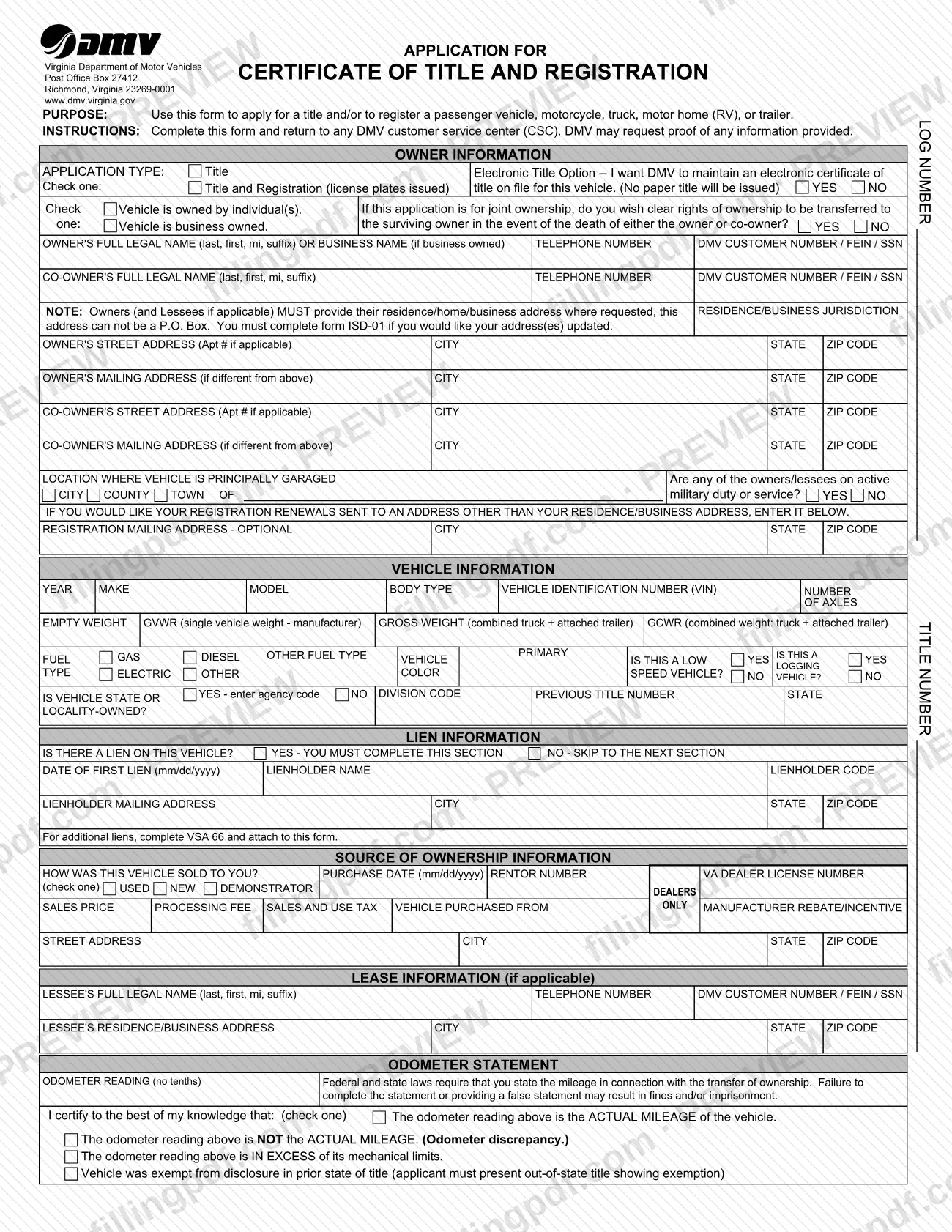
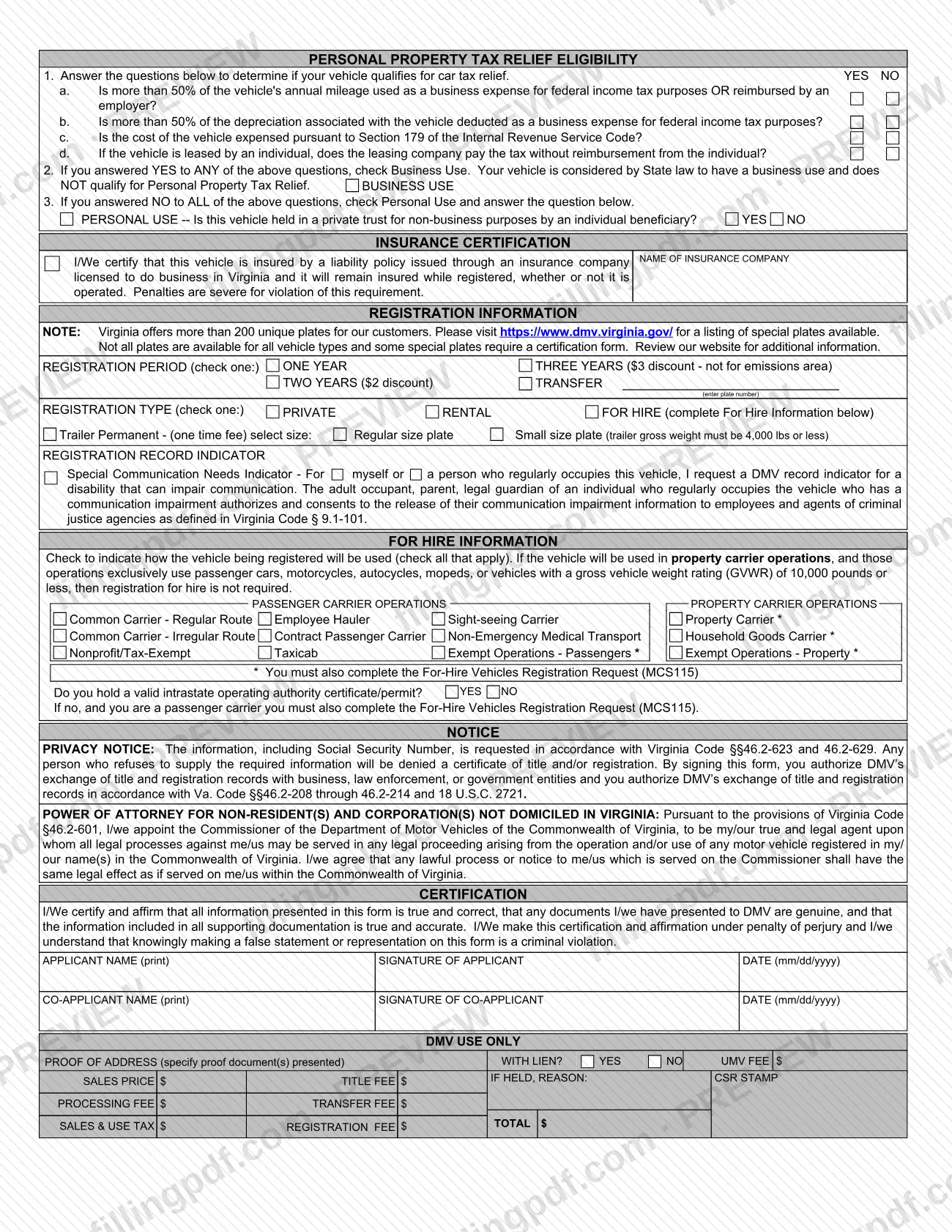
VSA 17A is the Virginia Department of Motor Vehicles (DMV) application for a certificate of title and registration. It is used to apply for a title and/or to register a passenger vehicle, motorcycle, truck, motor home (RV) or trailer. The form collects owner, vehicle, lien, purchase, odometer, insurance and registration details in one two-page document. On FillingPDF you can fill out the form online and download or print the completed PDF; the DMV publishes the original at dmv.virginia.gov.
Last updated
What is VSA 17A?
Form VSA 17A, Application for Certificate of Title and Registration, is the Virginia Department of Motor Vehicles (DMV) form used to apply for a title and/or to register a passenger vehicle, motorcycle, truck, motor home (RV) or trailer.
The form is two pages. It opens with the application type (Title, or Title and Registration with license plates issued) and an Electronic Title Option, under which DMV keeps an electronic certificate of title and issues no paper title. Further sections cover owner and co-owner information, vehicle information, lien information, the source of ownership, lease information, the odometer statement, personal property tax relief eligibility, an insurance certification, registration information (period, type, plate transfer, special plates) and for-hire information.
The form also carries a privacy notice, a power of attorney for non-residents and corporations not domiciled in Virginia, and a certification made under penalty of perjury, followed by applicant and co-applicant signature lines. A "DMV USE ONLY" block at the end records proof of address, fees and tax; the applicant does not complete it.
Related DMV forms named on VSA 17A are ISD-01 (address updates), VSA 66 (additional liens) and the For-Hire Vehicles Registration Request (MCS115).
Who needs to file VSA 17A?
Owners who are applying for a Virginia title and/or registration for a passenger vehicle, motorcycle, truck, motor home (RV) or trailer use VSA 17A. The form covers vehicles owned by individuals and business-owned vehicles, and it has separate lines for a co-owner and for a lessee when the vehicle is leased.
- Joint owners: the form asks whether clear rights of ownership pass to the surviving owner if either the owner or co-owner dies. It also has signature lines for an applicant and a co-applicant.
- Vehicles with a lien: the lienholder section must be completed when there is a lien; VSA 66 is added for additional liens.
- Non-residents and corporations not domiciled in Virginia: the form includes a power of attorney under Virginia Code §46.2-601 appointing the DMV Commissioner as agent for legal process arising from the vehicle's use.
- For-hire operators: the For Hire Information section applies to vehicles used in passenger or property carrier operations. Registration for hire is not required if property carrier operations exclusively use passenger cars, motorcycles, autocycles, mopeds or vehicles with a GVWR of 10,000 pounds or less.
If you only need to change your address on DMV records, the form points you to ISD-01 instead.
When to file VSA 17A
Use VSA 17A when you apply for a title and/or register a vehicle with the Virginia DMV. No separate due date is printed on the form. The odometer statement is tied to the transfer of ownership: the form says federal and state laws require you to state the mileage in connection with that transfer. If you buy or receive a vehicle and need it titled or registered, complete the form for that application. For any time limit that applies to your situation, ask the DMV, since the form sets none.
Documents you need
- Proof of any information you provide, when DMV requests it; the form says DMV may ask for proof of any information given.
- Proof of address documents, which DMV records in the DMV-use block; the residence/business address cannot be a P.O. Box.
- Form ISD-01, if you want your address or addresses updated on DMV records.
- Form VSA 66, if there are additional liens beyond the one lien the form has room for.
- For-Hire Vehicles Registration Request (MCS115), if you check a category marked with an asterisk, or if you are a passenger carrier without a valid intrastate operating authority certificate/permit.
- Out-of-state title showing the exemption, only if the vehicle was exempt from odometer disclosure in its prior state of title.
- Plate number, only if you check TRANSFER under the registration period to move an existing plate.
How to fill out VSA 17A
Select application type and ownership
Under Owner Information, check one application type: Title, or Title and Registration (license plates issued). Check whether the vehicle is owned by individual(s) or is business owned, and answer the Electronic Title Option YES or NO.
Answer the joint ownership question
If the application is for joint ownership, check YES or NO on whether clear rights of ownership transfer to the surviving owner when either the owner or co-owner dies.
Enter owner and co-owner details
Write the owner's full legal name (last, first, mi, suffix) or business name, telephone number and DMV customer number, FEIN or SSN. Repeat for the co-owner if there is one, and enter the residence/business jurisdiction.
Provide addresses and garaging location
Enter street addresses without a P.O. Box, plus mailing addresses if different. Give the city, county or town where the vehicle is principally garaged, answer the active military duty question, and add the optional registration mailing address.
Describe the vehicle
Enter year, make, model, body type, VIN, number of axles and the weights (empty weight, GVWR, gross weight, GCWR). Add fuel type, color, the low speed vehicle, logging and state or locality-owned answers, and any previous title number and state.
Complete the lien information
Answer whether there is a lien. If YES, enter the date of first lien (mm/dd/yyyy), lienholder name, code and mailing address; for additional liens, complete VSA 66 and attach it.
Record the source of ownership
Check how the vehicle was sold to you (used, new, demonstrator), and enter the purchase date (mm/dd/yyyy), sales price, processing fee, sales and use tax, and any manufacturer rebate/incentive. Add the dealer license number or seller's address as the form asks.
Add lease information if applicable
For a leased vehicle, enter the lessee's full legal name, telephone number, DMV customer number/FEIN/SSN and residence or business address.
Make the odometer statement
Enter the odometer reading with no tenths and check one certification: actual mileage, not the actual mileage, in excess of mechanical limits, or exempt from disclosure in the prior state of title.
Answer personal property tax relief questions
Answer questions 1a to 1d. If any answer is YES, check Business Use; if all are NO, check Personal Use and answer the private trust question.
Enter insurance and registration choices
Name the insurance company in the insurance certification. Check the registration period, enter the transfer plate number if used, choose the registration type, and indicate any trailer permanent plate size or communication needs indicator.
Complete For Hire Information if it applies
Check all uses that apply, answer whether you hold a valid intrastate operating authority certificate/permit, and complete the MCS115 where the form requires it.
Review, sign and download the PDF
Print the applicant name, sign and date (mm/dd/yyyy), and add the co-applicant if any. Leave the DMV USE ONLY block blank, then download or print the completed PDF from FillingPDF and take it to a DMV customer service center.
How to submit VSA 17A
The form's instructions give one channel: complete it and return it to any DMV customer service center (CSC). DMV may request proof of any information you provide, so bring supporting documents.
- In person: take the completed form to any DMV customer service center. The form names no other channel.
- Package: add VSA 66 if there is more than one lien, and the MCS115 if you check a starred for-hire category. For an exemption from odometer disclosure, present the out-of-state title showing the exemption.
- Fees and tax: the DMV-use block lists the fees and the sales and use tax DMV calculates. The form does not print amounts to pay; ask DMV for current figures.
The form header gives the DMV mailing address as Virginia Department of Motor Vehicles, Post Office Box 27412, Richmond, Virginia 23269-0001, and the website www.dmv.virginia.gov. FillingPDF lets you fill out and download the PDF; submission follows the DMV channels above.
Common mistakes to avoid
- Entering a P.O. Box as the owner's or co-owner's residence/business address; the form says it cannot be a P.O. Box (use the optional mailing lines for that).
- Skipping the lien section when there is a lien; the form says you must complete it if the answer is YES.
- Listing more than one lien on VSA 17A without attaching VSA 66 for the additional liens.
- Leaving the odometer statement incomplete or giving a false reading; the form warns of fines and/or imprisonment.
- Checking Personal Use after answering YES to any of the business-use questions on personal property tax relief.
- Checking an asterisked for-hire category without also completing the For-Hire Vehicles Registration Request (MCS115).
- Selecting the small-size permanent trailer plate when the trailer gross weight is above 4,000 lbs.
- Choosing a multi-year registration discount for the three-year option in an emissions area; the form says it does not apply there.
- Submitting the form unsigned, or without the co-applicant's signature when there is a co-applicant.
Frequently asked questions
What is VSA 17A?
VSA 17A is the Virginia DMV's Application for Certificate of Title and Registration. You use it to apply for a title and/or to register a passenger vehicle, motorcycle, truck, motor home (RV) or trailer. The current revision printed on the form is 07/01/2024.
Where do I turn in the VSA 17A form?
The form says to complete it and return it to any DMV customer service center (CSC). DMV may request proof of any information you provide, so bring supporting documents. The form names no other submission channel.
Can I fill out VSA 17A online?
Yes. You can fill out the VSA 17A PDF online on FillingPDF and download or print it. FillingPDF is an independent service and does not file the form for you; you take the completed form to the DMV through its own channels.
Can I use a P.O. Box as my address on VSA 17A?
Not for your residence or business address. The form says owners and lessees must give a residence, home or business address that cannot be a P.O. Box. A separate mailing address and an optional registration mailing address are provided for mail.
What do I do if my vehicle has more than one lien?
Complete the lien section for the first lien, then complete form VSA 66 for additional liens and attach it to VSA 17A. The form says this directly under the lienholder information.
Do I need another form for for-hire vehicles?
Sometimes. If you check a for-hire category marked with an asterisk, you must also complete the For-Hire Vehicles Registration Request (MCS115). Passenger carriers without a valid intrastate operating authority certificate/permit must complete it too.
What does the Electronic Title Option mean?
If you answer YES, you ask DMV to maintain an electronic certificate of title on file for the vehicle, and no paper title is issued. The option appears in the Owner Information section of the form.
Who qualifies for personal property tax relief on VSA 17A?
The form's questions decide it. If you answer YES to any of questions 1a to 1d (business mileage or reimbursement, business depreciation, Section 179 expensing, or a lessor paying the tax), the vehicle has business use and does not qualify. If all are NO, check Personal Use.
How do I update my address with DMV?
VSA 17A directs you to complete form ISD-01 if you want your address or addresses updated. The title and registration application does not update your address records on its own.
Ready to fill out VSA 17A?
Fill out VSA 17A now