
VSA 66 is the Virginia DMV application for a lien transfer or a supplemental lien on a vehicle. You check one application type, describe the owner, the vehicle and the current lien, and then complete the section for the transfer or for the added lien. On this page you can fill out the form online on FillingPDF and download or print the completed PDF. The Virginia DMV publishes the original form at its website, and it is submitted to the DMV, not through this page.
Last updated
What is VSA 66?
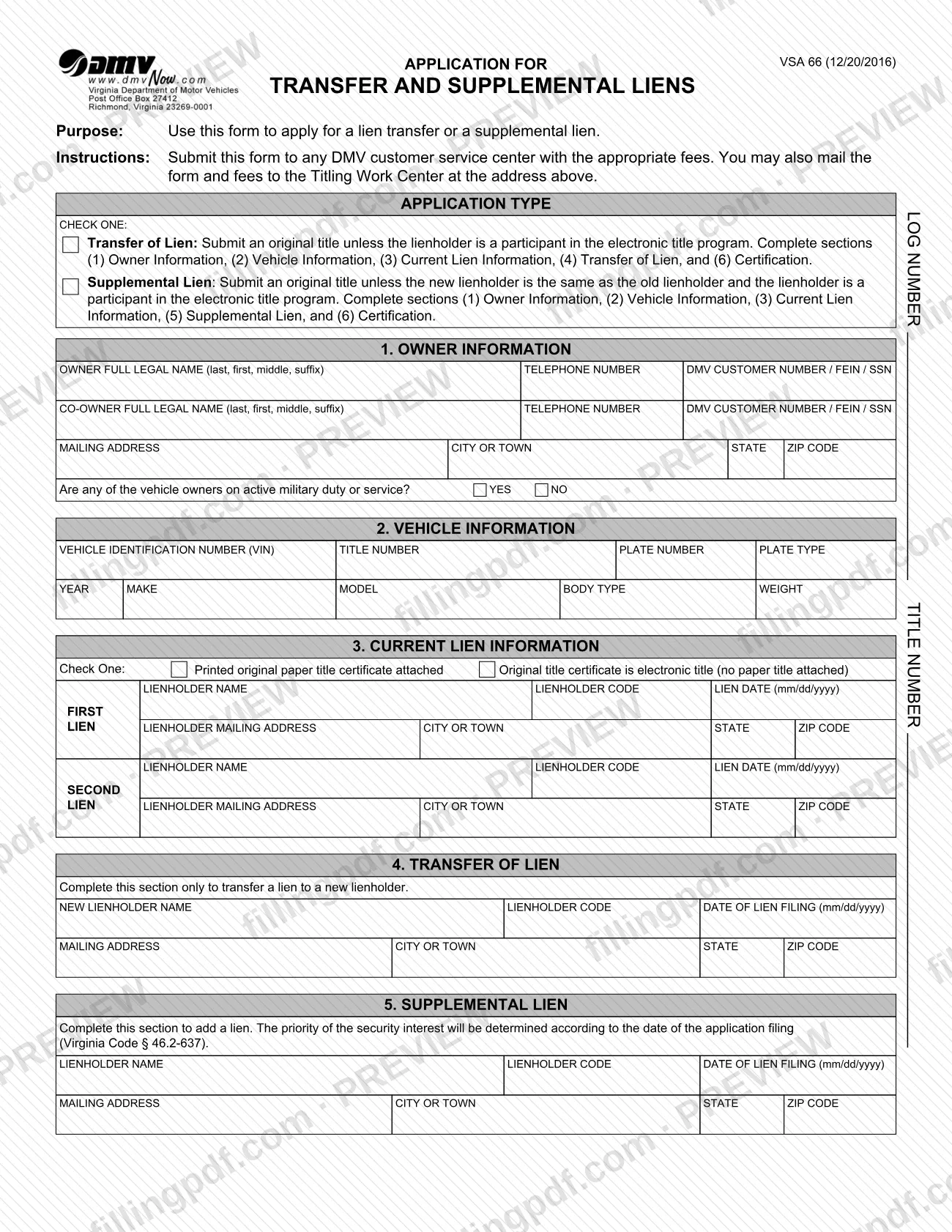
Form VSA 66, Application for Transfer and Supplemental Liens, is the Virginia DMV form used to apply for a lien transfer to a new lienholder or to add a supplemental lien on a vehicle.
The form has one choice at the top: Transfer of Lien or Supplemental Lien. Each choice tells you which numbered sections to complete. A transfer uses sections 1 (Owner Information), 2 (Vehicle Information), 3 (Current Lien Information), 4 (Transfer of Lien) and 6 (Certification). A supplemental lien uses sections 1, 2, 3, 5 (Supplemental Lien) and 6.
Section 3 records up to two current liens, each with the lienholder name, lienholder code, lien date and mailing address. Section 4 names the new lienholder for a transfer. Section 5 names the lienholder being added; the form states that the priority of the security interest is determined by the date of the application filing (Virginia Code § 46.2-637).
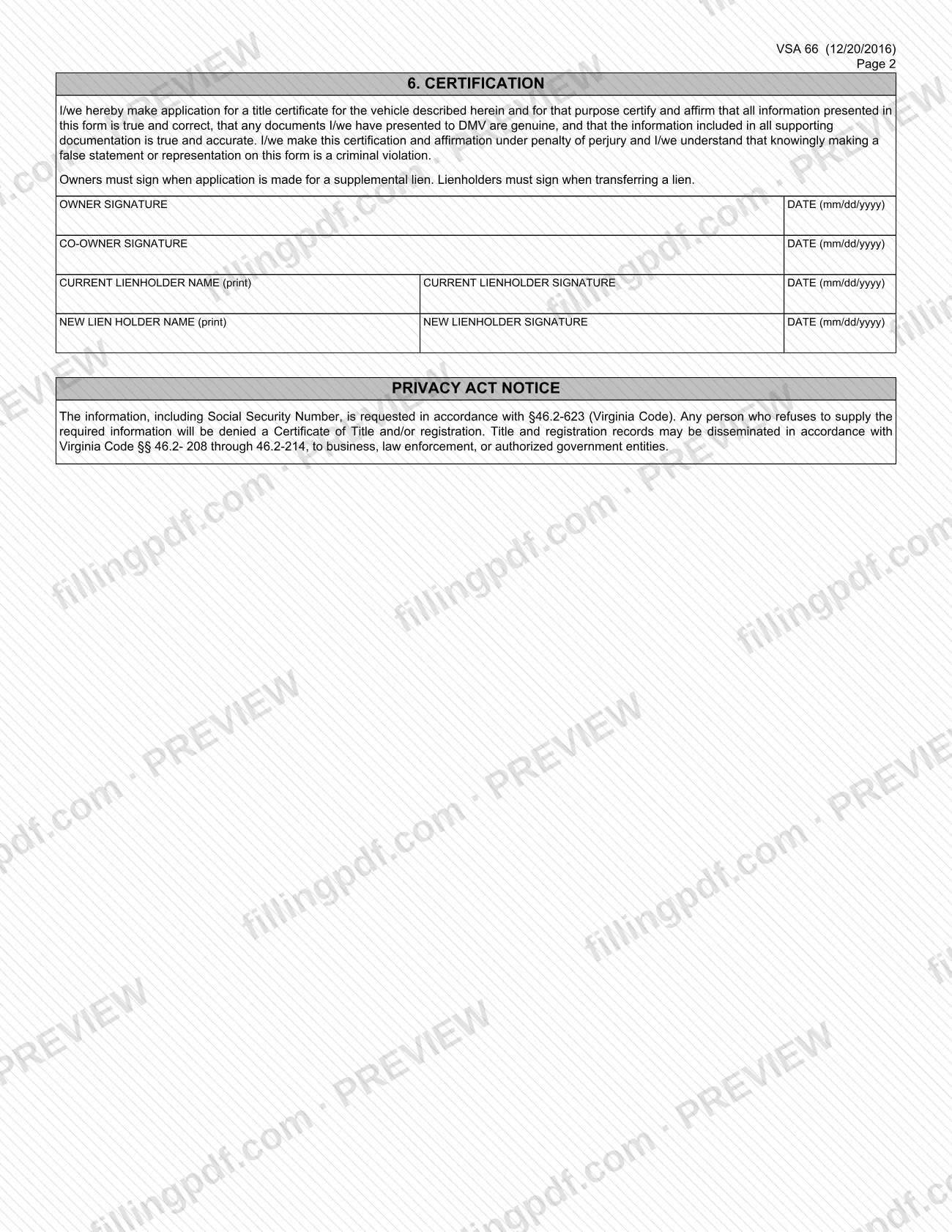
The certification in section 6 is made under penalty of perjury. The form states that knowingly making a false statement on it is a criminal violation. Under the Privacy Act notice, the information, including a Social Security number, is requested under § 46.2-623 of the Virginia Code, and a person who refuses to supply it will be denied a Certificate of Title and/or registration.
Who needs to file VSA 66?
Vehicle owners and lienholders in Virginia use Form VSA 66 when a lien on a vehicle is moving to a new lienholder or another lien is being added.
- Transfer of Lien: use it to transfer a lien to a new lienholder. Section 4 is completed only for this purpose, and the current lienholder and the new lienholder sign.
- Supplemental Lien: use it to add a lien. The owner signs, and a co-owner signs if there is one.
The form asks for the owner's full legal name and, if applicable, a co-owner's. It also asks whether any vehicle owner is on active military duty or service. The form gives no rule for who may sign on someone else's behalf, so ask the Virginia DMV if another person will sign for you.
The form is for liens only. It is not a general title or registration application.
When to file VSA 66
Submit Form VSA 66 when a lien on a vehicle is to be transferred to a new lienholder or a supplemental lien is to be added. The form prints no filing deadline. For a supplemental lien, timing matters: the form states that the priority of the security interest is determined according to the date of the application filing (Virginia Code § 46.2-637). Have the signatures ready before you submit, because lienholders must sign when a lien is transferred and owners must sign when a supplemental lien is applied for.
Documents you need
- Original title, for a transfer of lien, unless the lienholder is a participant in the electronic title program.
- Original title, for a supplemental lien, unless the new lienholder is the same as the old lienholder and that lienholder is a participant in the electronic title program.
How to fill out VSA 66
Check the application type
Under Application Type, check one: Transfer of Lien or Supplemental Lien. Your choice decides which sections you complete.
Enter owner information
In section 1, give the owner's full legal name (last, first, middle, suffix), telephone number and DMV customer number, FEIN or SSN. Add the co-owner if there is one, the mailing address, and answer the active military duty question YES or NO.
Describe the vehicle
In section 2, enter the VIN, title number, plate number, plate type, year, make, model, body type and weight.
Record the current lien
In section 3, check whether a printed original paper title is attached or the title is electronic. Enter the first lien's lienholder name, code, lien date (mm/dd/yyyy) and address, and a second lien if there is one.
Complete the transfer section
For a transfer only, section 4 asks for the new lienholder's name, code, date of lien filing (mm/dd/yyyy) and mailing address.
Complete the supplemental lien section
To add a lien, section 5 asks for the lienholder's name, code, date of lien filing (mm/dd/yyyy) and mailing address.
Collect the required signatures
In section 6, owners sign and date (mm/dd/yyyy) for a supplemental lien. For a transfer, the current lienholder and the new lienholder print their names, then sign and date.
Review and download the PDF
Check the sections for your application type, the signatures and the title requirement. Download or print the completed PDF from FillingPDF and submit it as described under How to submit.
How to submit VSA 66
You can submit Form VSA 66 in person or by mail, with the appropriate fees.
- In person: take the completed form to any DMV customer service center, with the appropriate fees.
- By mail: mail the form and fees to the Titling Work Center at the address printed at the top of the form.
Include the original title unless an exception applies. For a transfer, the exception is a lienholder that participates in the electronic title program. For a supplemental lien, the exception is a new lienholder that is the same as the old lienholder and participates in the electronic title program. A fee applies; the form does not state the amount, so ask the Virginia DMV for the current fees.
FillingPDF lets you fill out and download the PDF; submission follows the channels above.
Common mistakes to avoid
- Checking one application type but completing the wrong sections: a transfer uses sections 4 and 6, a supplemental lien uses sections 5 and 6, and both use 1, 2 and 3.
- Completing section 4 when you are only adding a lien; it is to be completed only to transfer a lien to a new lienholder.
- Omitting the original title when no electronic title exception applies.
- Marking the wrong box in section 3 about whether a printed paper title is attached or the title is electronic.
- Missing lienholder signatures on a transfer, or owner signatures on a supplemental lien.
- Leaving out the lienholder code or the lien date in mm/dd/yyyy format in the lien sections.
- Mailing the form without the appropriate fees, which the instructions say go with it.
- Entering information that is not true and correct, since section 6 is certified under penalty of perjury.
Frequently asked questions
What is the VSA 66 form?
VSA 66 is the Virginia DMV's Application for Transfer and Supplemental Liens. You use it to transfer a lien to a new lienholder or to add a supplemental lien to a vehicle.
Which sections of VSA 66 do I complete?
For a transfer of lien, complete sections 1, 2, 3, 4 and 6. For a supplemental lien, complete sections 1, 2, 3, 5 and 6. Section 4 is only for transfers to a new lienholder.
Do I have to submit the original title with VSA 66?
Usually yes. For a transfer, no original title is needed if the lienholder participates in the electronic title program. For a supplemental lien, the exception applies only if the new lienholder is the same as the old one and participates in that program.
Who signs Form VSA 66?
Owners must sign when applying for a supplemental lien. Lienholders must sign when transferring a lien: the current lienholder and the new lienholder each print a name, sign and date it. A co-owner has a signature line too.
Where do I submit VSA 66?
Take it to any DMV customer service center with the appropriate fees, or mail the form and fees to the Titling Work Center at the address printed on the form.
Is there a fee to file VSA 66?
Yes, the form says to submit it with the appropriate fees. It does not state the amount, so contact the Virginia DMV for current fees before you go or mail it.
Does filing date matter for a supplemental lien?
Yes. The form states that the priority of the security interest is determined according to the date of the application filing, citing Virginia Code § 46.2-637.
Can I fill out VSA 66 online?
You can fill out the PDF online on FillingPDF and download or print it. FillingPDF does not file anything with the Virginia DMV; you submit the form through the DMV's channels.
Ready to fill out VSA 66?
Fill out VSA 66 now