
VSA 67 is the Virginia Department of Motor Vehicles (DMV) application for a replacement title certificate or a substitute title certificate for a vehicle. Owners use it when the most recent title is lost, mutilated or illegible, or when information on the issued title changes, such as a name, an address, a lienholder or the VIN. On this page you can fill out the form online on FillingPDF and download or print the completed PDF; the form itself is published by the Virginia DMV at dmv.virginia.gov.
Last updated
What is VSA 67?
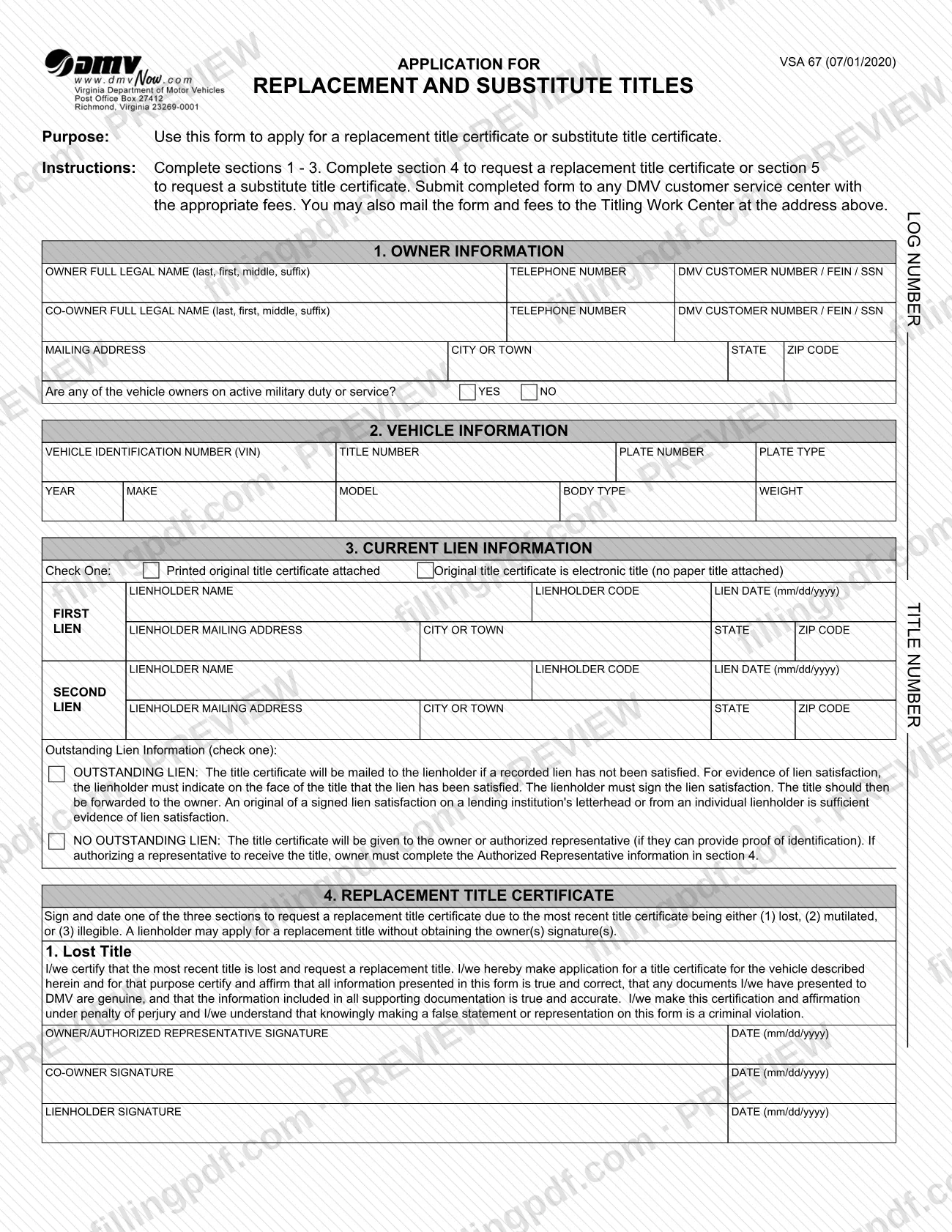
Form VSA 67, Application for a Replacement or Substitute Title (printed on the form as Application for Replacement and Substitute Titles) is the Virginia DMV form used to apply for a replacement title certificate or a substitute title certificate for a vehicle.
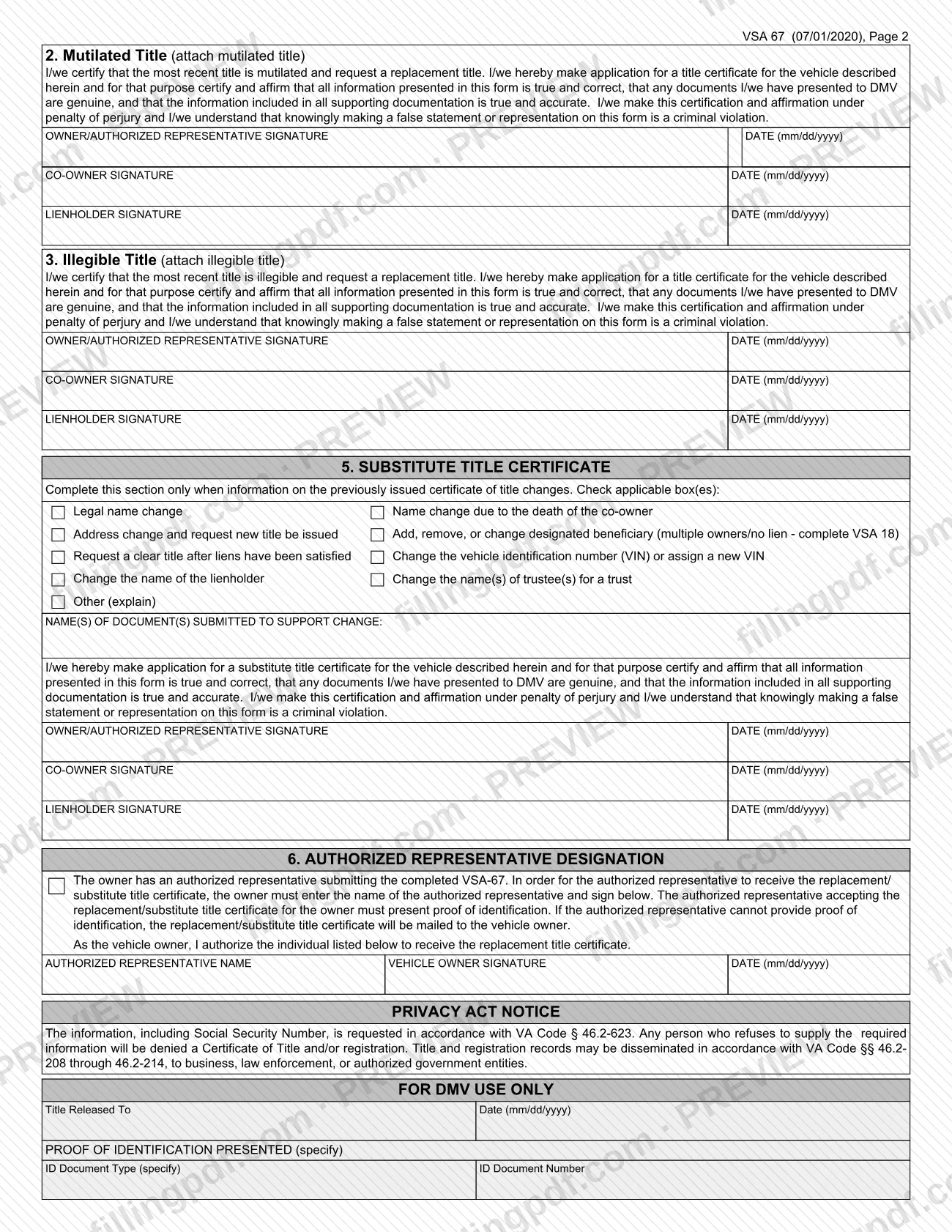
The form separates the two requests. A replacement title certificate is requested in section 4 when the most recent title certificate is lost, mutilated or illegible. A substitute title certificate is requested in section 5, which is to be completed only when information on the previously issued certificate of title changes. The reasons listed there include a legal name change, a name change due to the death of the co-owner, an address change with a request for a new title, a change of designated beneficiary, a request for a clear title after liens have been satisfied, a change of VIN, a change of lienholder name and a change of trustee names for a trust.
Sections 1 to 3 collect owner, vehicle and current lien information for every request. Section 6 lets the owner name an authorized representative to receive the title. The form carries a Privacy Act notice stating that the information, including the Social Security number, is requested under VA Code § 46.2-623. The form is not used for a first-time title application; it concerns a title that has already been issued.
Who needs to file VSA 67?
Vehicle owners in Virginia whose most recent title certificate is lost, mutilated or illegible use VSA 67 to request a replacement title. Owners whose information on an issued title has changed use it to request a substitute title.
- Owners and co-owners: both complete section 1 and sign the section that applies to the request.
- Lienholders: the form states that a lienholder may apply for a replacement title without obtaining the owner's signature.
- Authorized representatives: an owner who wants someone else to receive the title names that person in section 6 and signs. The representative must present proof of identification; if the representative cannot, the title is mailed to the vehicle owner.
- Owners with a designated beneficiary change: a change of designated beneficiary for vehicles with multiple owners and no lien is requested with the box in section 5 and form VSA 18.
Section 5 is for changes only; do not complete it when you are requesting a replacement for a lost, mutilated or illegible title.
When to file VSA 67
File VSA 67 when the most recent title certificate is lost, mutilated or illegible, or when information on the previously issued title changes. The form prints no deadline of its own, so the timing depends on when one of those events happens and when you need the new title.
If a recorded lien has not been satisfied, the form states that the title will be mailed to the lienholder. If there is no outstanding lien, the title is given to the owner or authorized representative who can provide proof of identification, or mailed to the owner when a representative cannot. A request for a clear title after liens have been satisfied is made in section 5.
Documents you need
- Printed original title certificate, if section 3 is marked as attached; check the other box instead when the original title is electronic and no paper title exists.
- The mutilated title, attached, when you sign the Mutilated Title part of section 4.
- The illegible title, attached, when you sign the Illegible Title part of section 4.
- Evidence of lien satisfaction when a recorded lien has been satisfied: the lienholder indicates satisfaction on the face of the title and signs, or you provide an original signed lien satisfaction on a lending institution's letterhead or from an individual lienholder.
- Documents supporting the change, named in the section 5 line for document(s) submitted, when you request a substitute title.
- Form VSA 18, when you add, remove or change a designated beneficiary for multiple owners with no lien.
- Proof of identification, for the owner or authorized representative who receives the title when there is no outstanding lien.
How to fill out VSA 67
Enter owner and co-owner information
In section 1, give the owner's full legal name (last, first, middle, suffix), telephone number and DMV customer number, FEIN or SSN. Repeat for any co-owner, then add the mailing address.
Answer the active military question
In section 1, mark YES or NO for whether any vehicle owner is on active military duty or service.
Describe the vehicle
In section 2, enter the VIN, title number, plate number, plate type, year, make, model, body type and weight.
Complete the current lien information
In section 3, check whether the printed original title is attached or the original is an electronic title. Enter each lienholder's name, code, lien date (mm/dd/yyyy) and mailing address, plus the title number.
Mark the outstanding lien status
Check OUTSTANDING LIEN or NO OUTSTANDING LIEN. If no lien is outstanding and a representative will receive the title, the owner completes section 6.
Request a replacement title
In section 4, sign and date one of the three parts: lost, mutilated or illegible. Add the co-owner's and lienholder's signatures where they apply, and attach the mutilated or illegible title.
Request a substitute title
In section 5, check each box that fits the change and list the documents submitted to support it. For a designated beneficiary change, complete VSA 18, then sign and date.
Designate a representative if needed
In section 6, enter the authorized representative's name, and the owner signs and dates. Skip this section if you will receive the title yourself.
Review, sign and download the PDF
Check names, VIN and signatures against your records. Leave the FOR DMV USE ONLY block blank, then download or print the completed PDF from FillingPDF and submit it as described under How to submit.
How to submit VSA 67
You can submit VSA 67 in person or by mail.
- In person: take the completed form to any DMV customer service center with the appropriate fees.
- By mail: mail the form and the fees to the Titling Work Center at the address printed at the top of the form.
A fee applies; the form does not state the amount, so check with the Virginia DMV for the current fees. Include any printed original, mutilated or illegible title, and the documents that support a change, as described under required documents. If you are submitting for the owner as an authorized representative, bring proof of identification to receive the title. FillingPDF lets you fill out and download the PDF; submission follows the DMV channels above.
Common mistakes to avoid
- Completing section 5 for a lost, mutilated or illegible title; section 5 is only for changes to information on the issued title.
- Skipping sections 1 to 3, which the form says must be completed for every request.
- Leaving section 4 unsigned or signing more than one of its three parts; sign and date one: lost, mutilated or illegible.
- Forgetting to attach the mutilated or illegible title when you choose that part of section 4.
- Not marking in section 3 whether the printed original title is attached or the title is electronic.
- Naming a representative to receive the title without completing and signing section 6, or sending a representative without proof of identification.
- Writing dates in a format other than mm/dd/yyyy on the lien date and signature date lines.
- Submitting the form without the appropriate fees.
Frequently asked questions
What is VSA 67 used for?
VSA 67 is the Virginia DMV form for applying for a replacement title certificate or a substitute title certificate. Replacement covers a lost, mutilated or illegible title; substitute covers changes to information on a title already issued, such as a name, address or lienholder.
What is the difference between a replacement and a substitute title?
A replacement title (section 4) is for a most recent title that is lost, mutilated or illegible. A substitute title (section 5) is for when information on the issued title changes, such as a legal name change, a new VIN or a clear title after liens are satisfied.
Where do I submit the VSA 67 form?
Take it to any DMV customer service center with the appropriate fees, or mail the form and fees to the Titling Work Center at the address printed at the top of the form.
Can a lienholder apply for a replacement title?
Yes. Section 4 of VSA 67 states that a lienholder may apply for a replacement title without obtaining the owner's signature. The lienholder signs on the lienholder signature line of the applicable part.
Can someone else pick up my title for me?
Yes, if you complete section 6 with the representative's name and sign it. The representative must present proof of identification; otherwise the title is mailed to you. A title goes to the lienholder instead if a recorded lien is outstanding.
Do I have to attach my old title to VSA 67?
It depends. Mark in section 3 whether a printed original title is attached or the title is electronic. For a mutilated or illegible title, attach that title. For a lost title, there is nothing to attach.
Why does VSA 67 ask for my Social Security number?
The Privacy Act notice on the form says the information, including the Social Security number, is requested under VA Code § 46.2-623, and that anyone who refuses to supply it will be denied a Certificate of Title and/or registration.
Can I fill out VSA 67 online?
You can fill out the VSA 67 PDF online on FillingPDF and download or print it. FillingPDF is independent of the Virginia DMV and does not submit the form; you deliver it through the DMV channels.
Ready to fill out VSA 67?
Fill out VSA 67 now