
Instructions: Vehicle New Account Registration is the Loudoun County Commissioner of the Revenue's screen-by-screen guide to creating a new online account and registering a vehicle at loudoun.gov/efile. It is one of the Loudoun County property tax resources for local vehicle personal property taxes, and it is written for new residents who are registering a vehicle for the first time. On this page you can fill out the form online on FillingPDF and download or print the completed PDF; the registration itself is completed on the county's website, and the PDF is published by the county.
Last updated
What is PPA7-0726?
Instructions: Vehicle New Account Registration is a short guide, titled "Instructions for Creating a New Account and Registering a Vehicle" on its cover page, that shows each screen of the Loudoun County e-file system where a new account is created and a vehicle is registered with the Commissioner of the Revenue.
The guide starts at loudoun.gov/efile and follows the process in order: accepting the legal disclaimer, logging in as a new resident, choosing Start Registering a Vehicle, entering owner information, receiving an automated email with an account number and zip code, and finishing the registration with the vehicle's details. It ends with a Registration Complete screen.
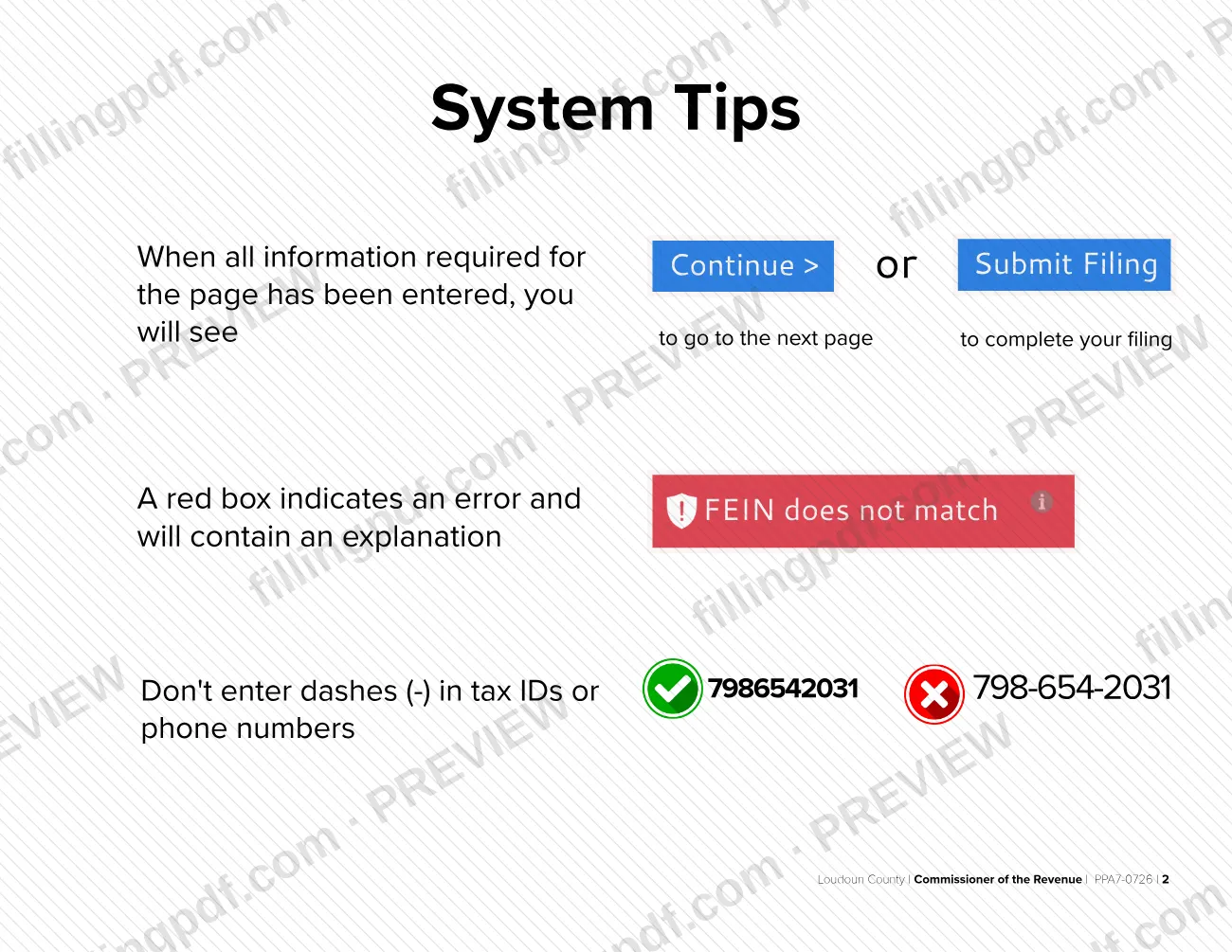
The guide is not a form with lines to complete on paper. It documents an online procedure, and its pages carry the code PPA7-0726 in the footer. It also contains system tips: do not enter dashes in tax IDs or phone numbers, press Continue > or Submit Filing when a page is complete, and expect a red box to explain any error.
Afterward, the guide points to loudoun.gov/paymybill for tax payments and to the Commissioner of the Revenue's vehicle tax contacts (703-777-0260 and [email protected]) for help with local vehicle personal property taxes.
Who needs to file PPA7-0726?
New residents of Loudoun County who need to create an account and register a vehicle with the Commissioner of the Revenue use this guide; its login step is addressed to new residents.
The guide covers both kinds of vehicle holders:
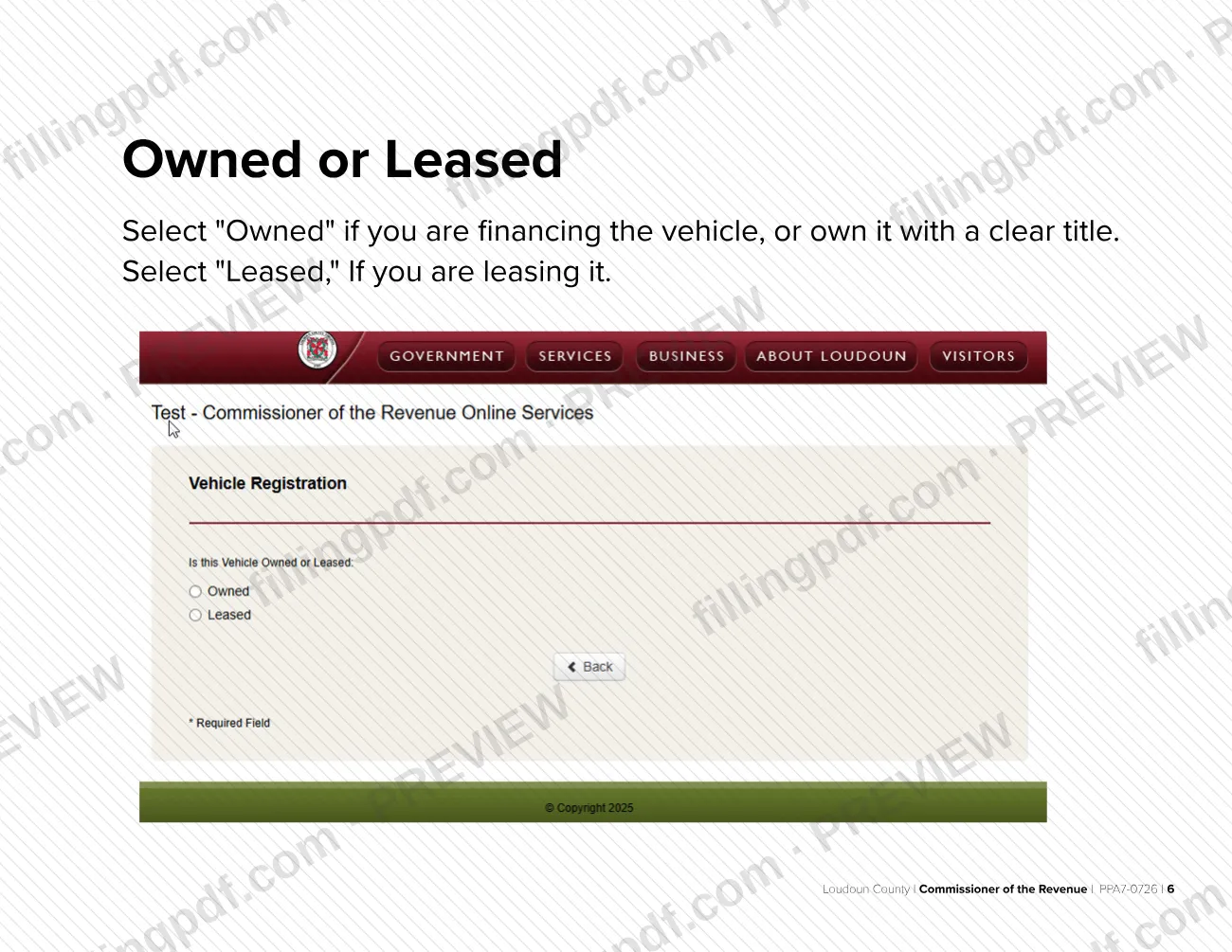
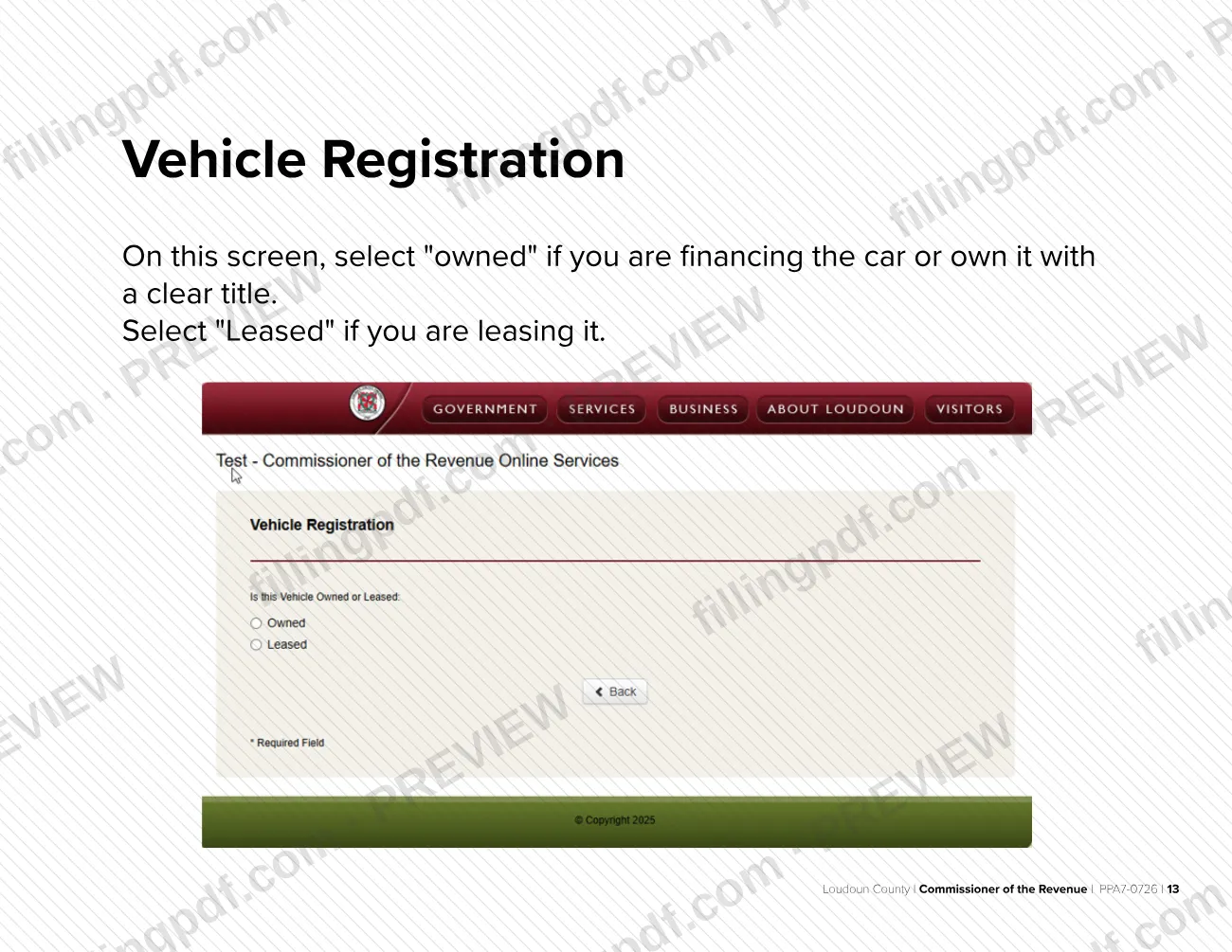
- Owned: select this if you are financing the vehicle or own it with a clear title.
- Leased: select this if you are leasing the vehicle.
It also covers both kinds of owner. You select whether the vehicle is owned or leased by a Business or an Individual. For an individual registration you enter the owner's Social Security Number, and the later account step asks for a Taxpayer Identification Number (usually the Social Security Number). The final screen refers to an SSN or FEIN.
The guide does not describe who may register on someone else's behalf, and it does not list exclusions. If you need help with your local vehicle personal property taxes, the county directs you to 703-777-0260 or [email protected].
When to file PPA7-0726
The guide is used when you are a new resident registering a vehicle with Loudoun County for the first time: the login step says new residents click the new-account option. It sets no deadline of its own, so check with the Commissioner of the Revenue at 703-777-0260 or [email protected] for any timing that applies to your vehicle.
Allow time to finish in one sitting. The guide says not to close the browser tab or leave the website while you enter your information, and the registration cannot be completed until you receive the automated email with your account number and zip code.
Documents you need
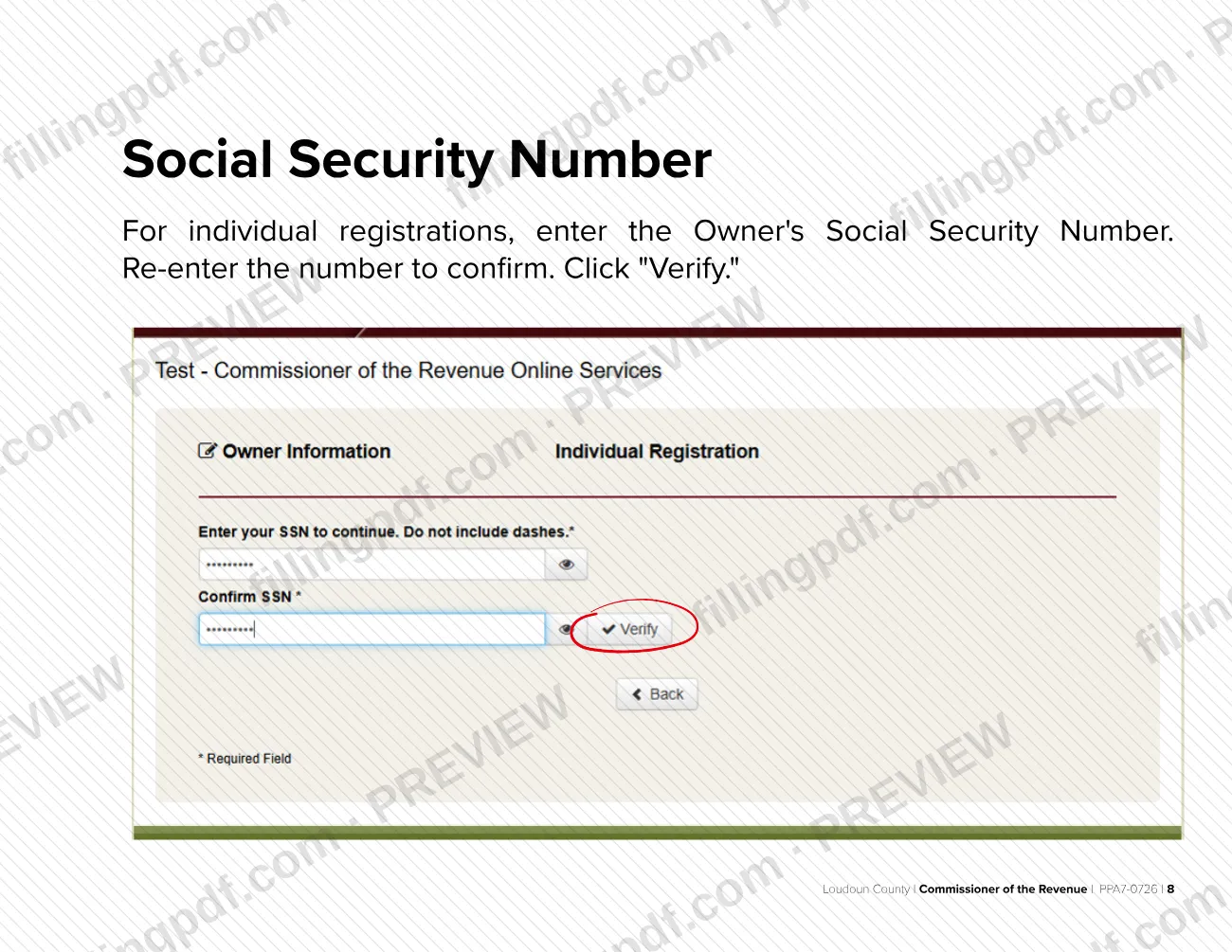
- Social Security Number of the owner, for an individual registration; you enter it twice and click Verify.
- Taxpayer Identification Number (usually your Social Security Number), entered with the account number and zip code to continue the registration; the final screen also refers to an FEIN.
- The automated email containing your account number and zip code, which you must have to complete the registration.
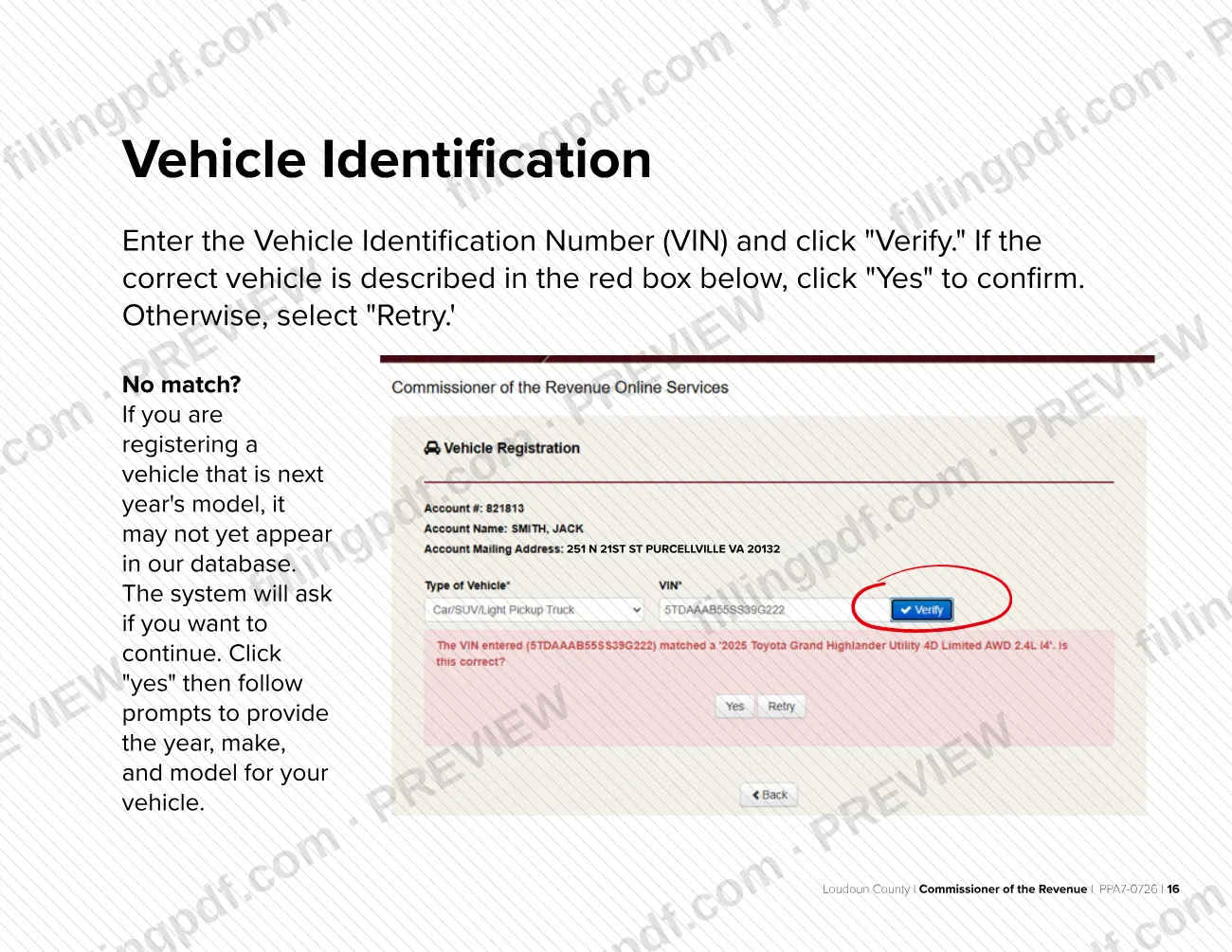
- Vehicle Identification Number (VIN), which you enter and verify to confirm the vehicle shown.
- Optional supporting document, which you may attach by clicking Add a File on the Additional Information screen.
How to fill out PPA7-0726
Start at loudoun.gov/efile
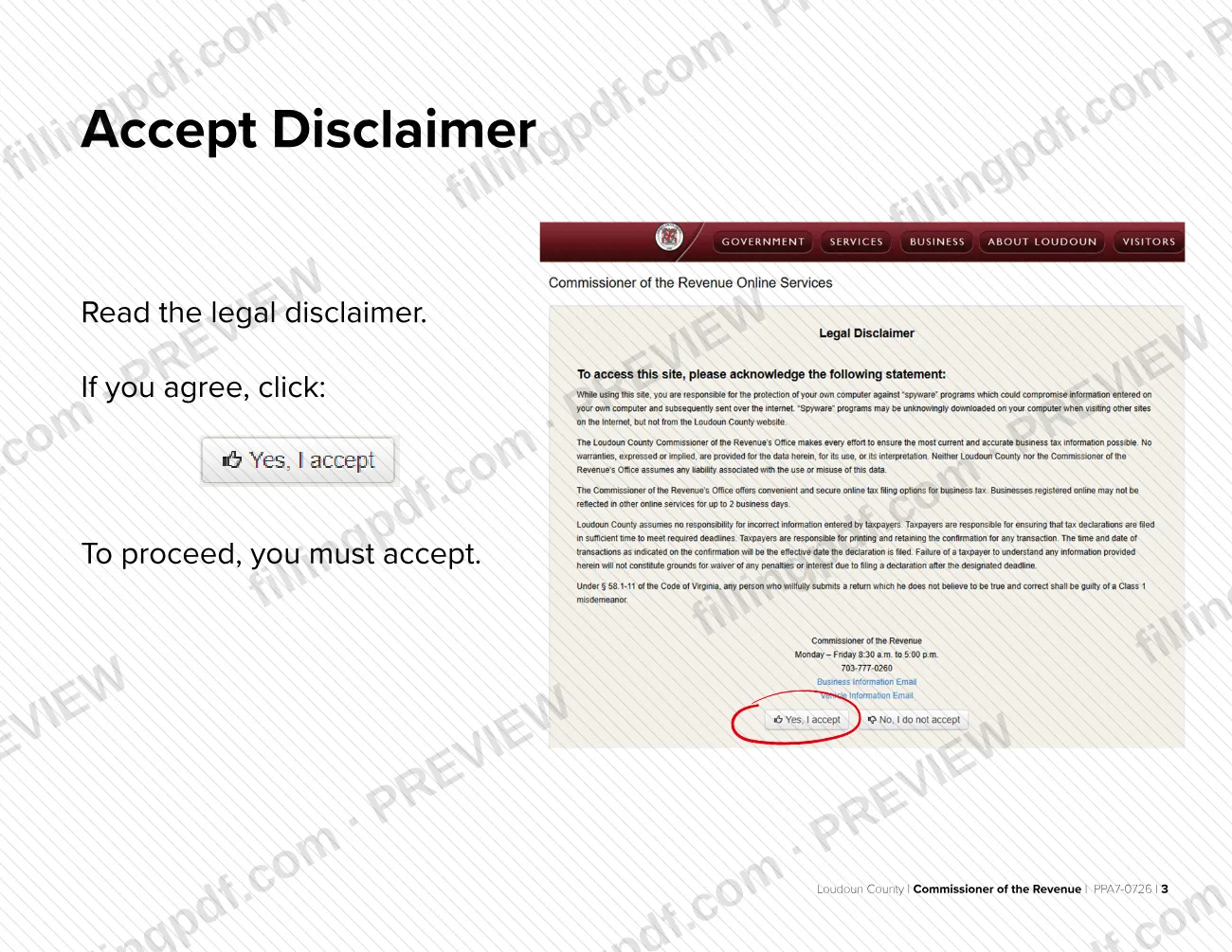
Open loudoun.gov/efile, read the legal disclaimer and accept it; you cannot proceed without accepting. Enter tax IDs and phone numbers without dashes.
Log in and start a new account
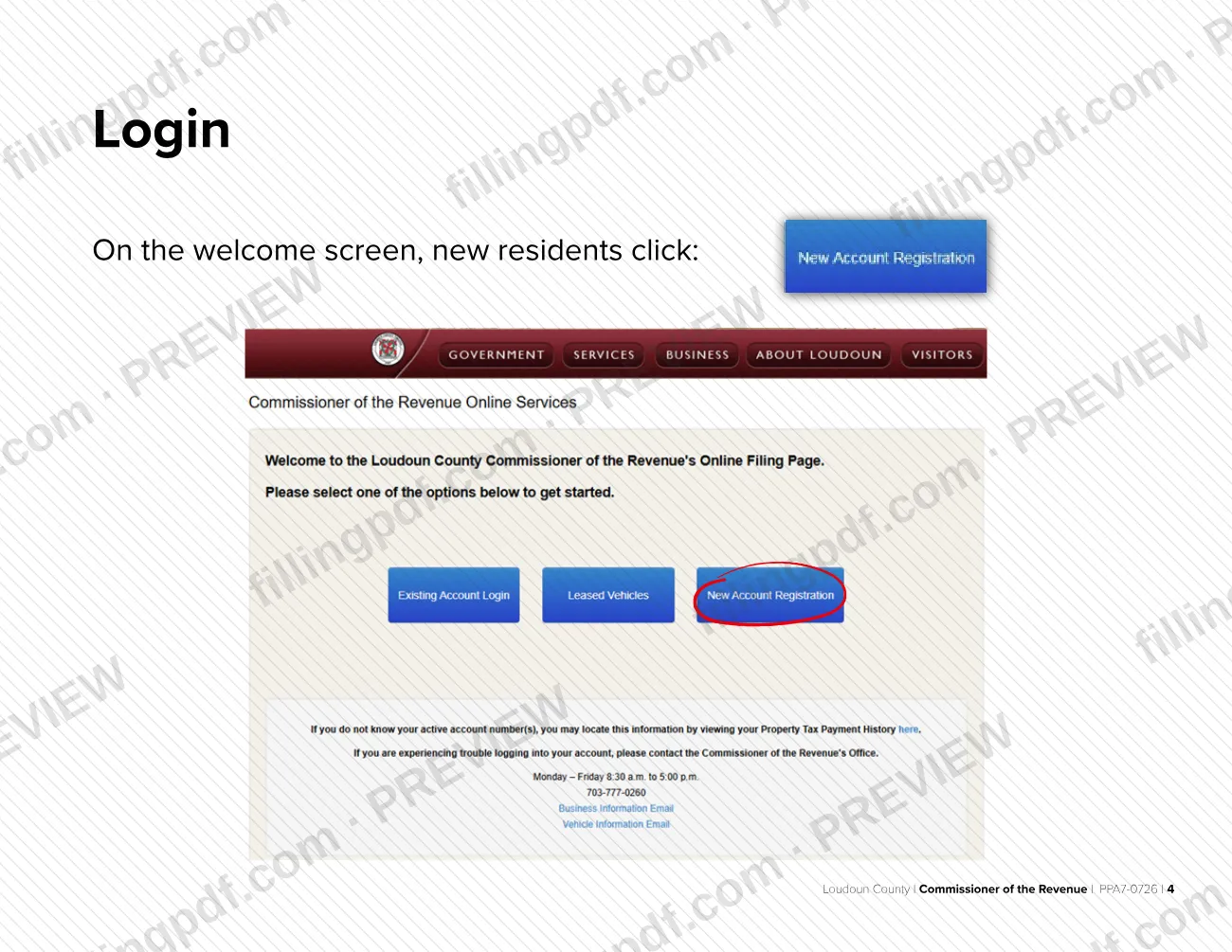
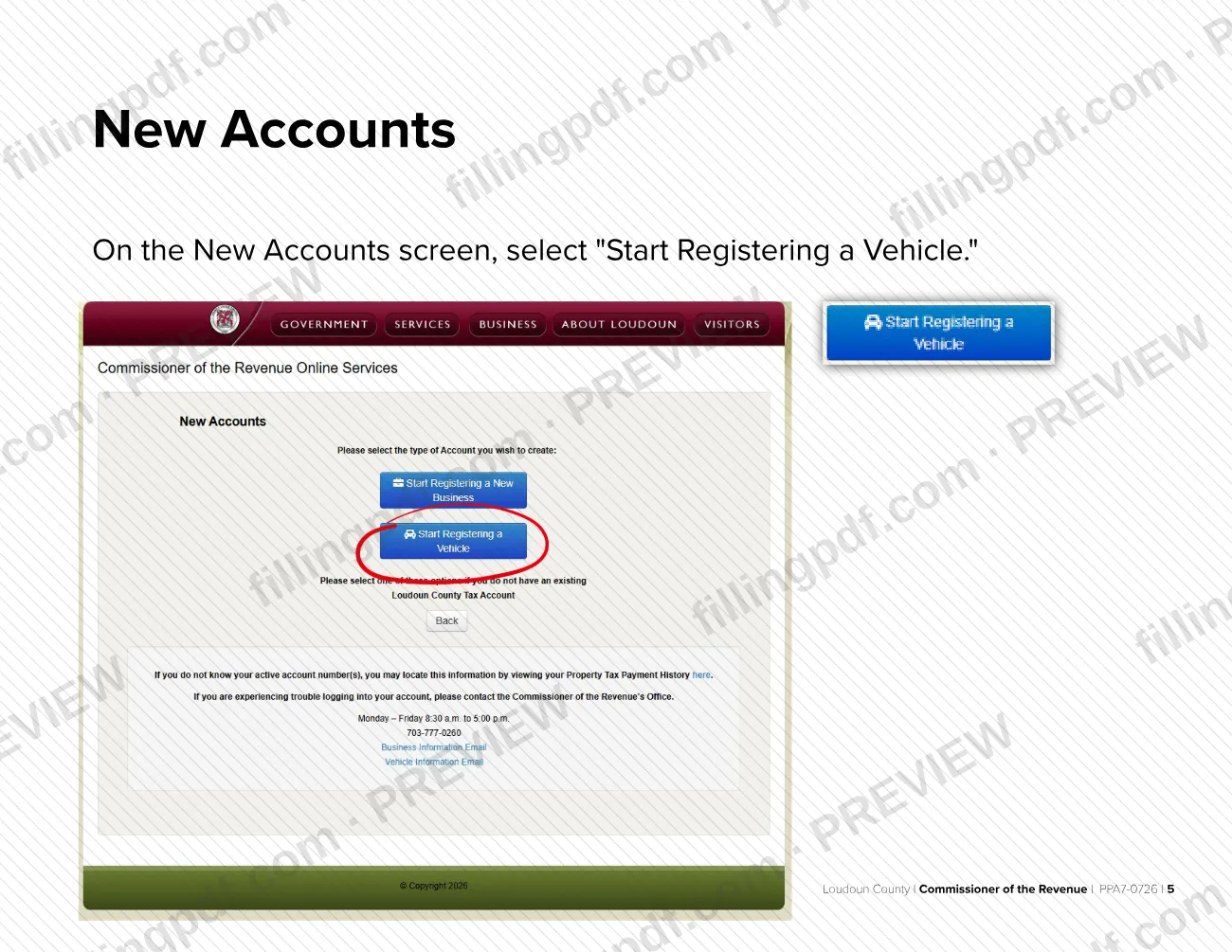
On the welcome screen, new residents click the new-account option. On the New Accounts screen, select Start Registering a Vehicle.
Choose owned or leased
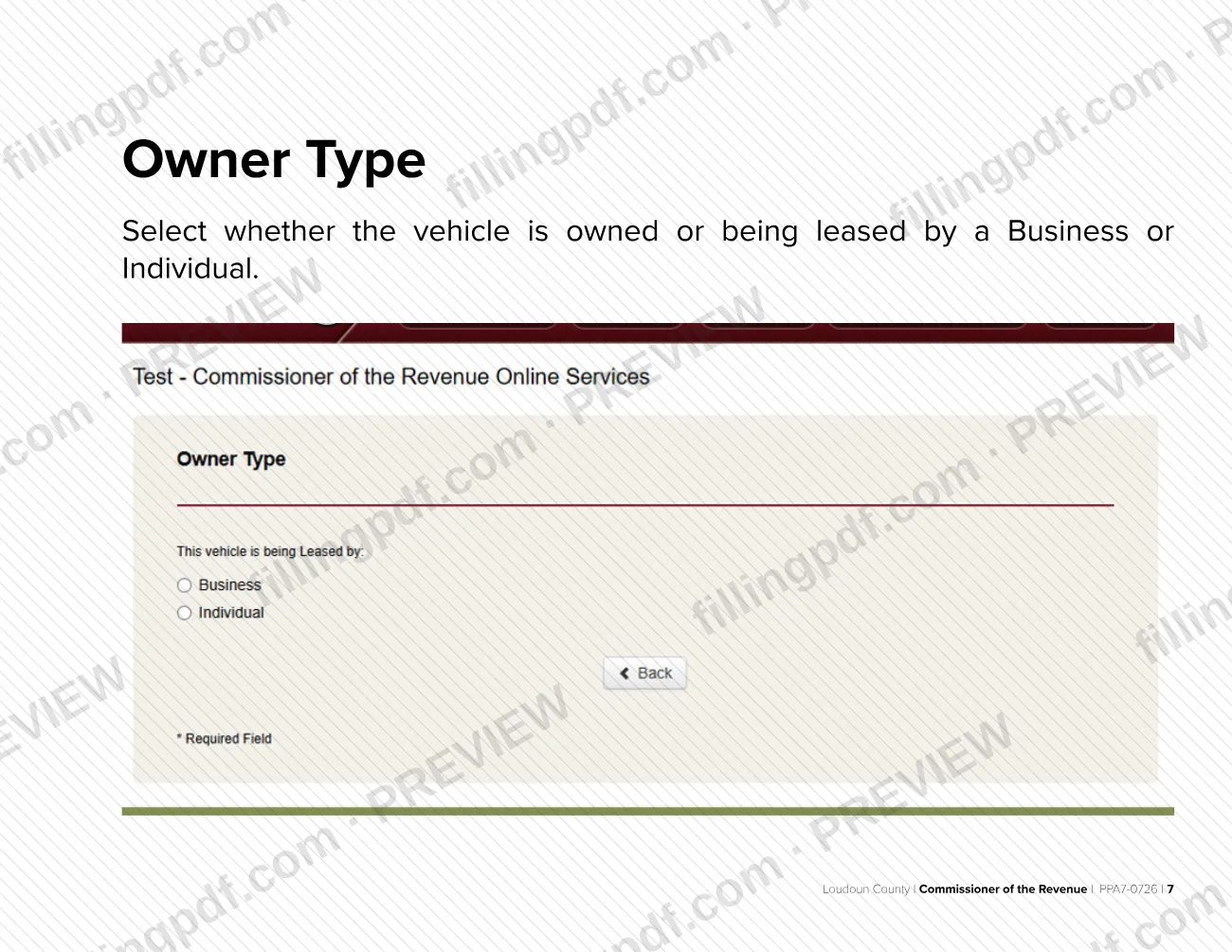
Select Owned if you are financing the vehicle or own it with a clear title, or Leased if you are leasing it. Then select whether the owner is a Business or an Individual.
Verify the owner's Social Security Number
For an individual registration, enter the owner's Social Security Number, re-enter it to confirm and click Verify.
Enter your information
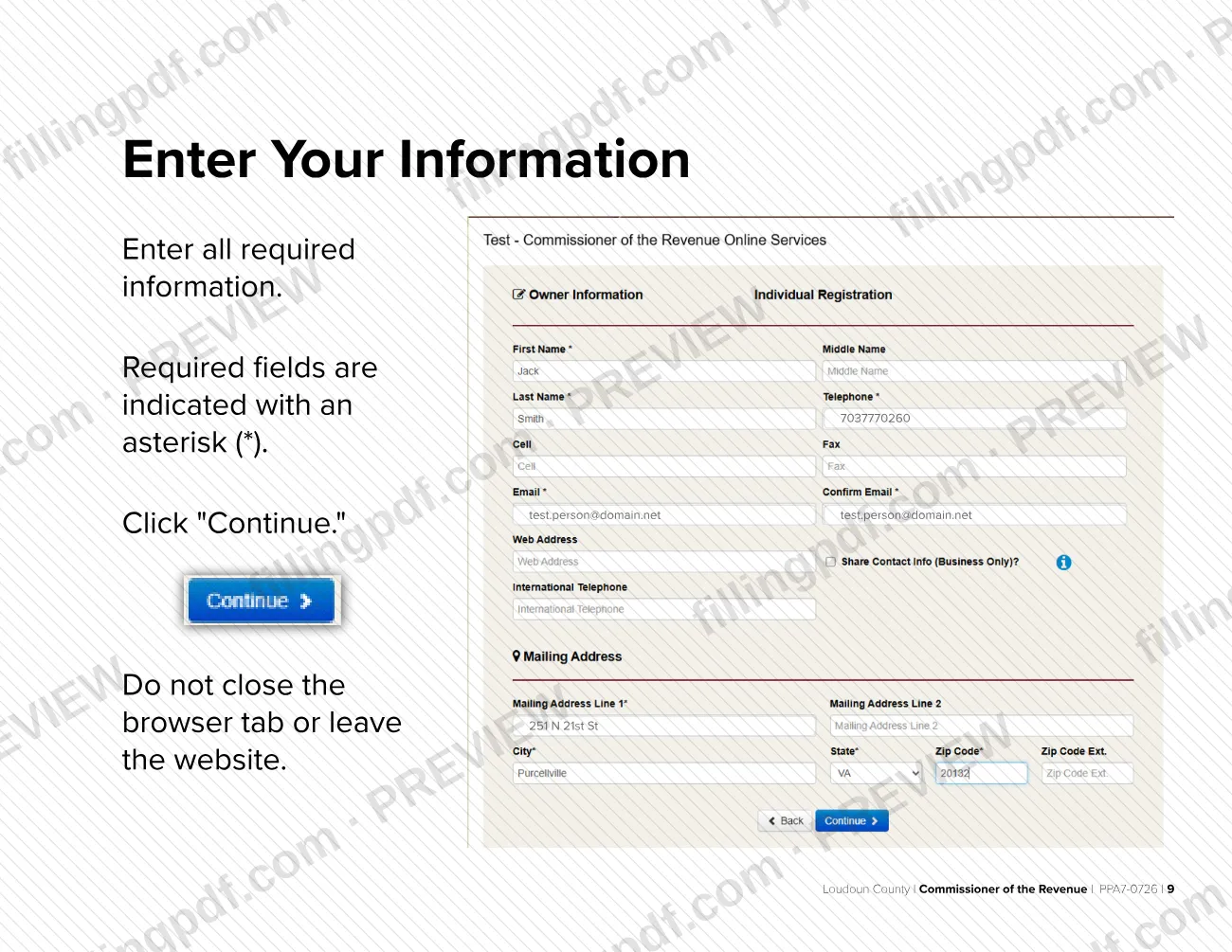
Complete every field marked with an asterisk (*) and click Continue. Do not close the browser tab or leave the website.
Save your account number
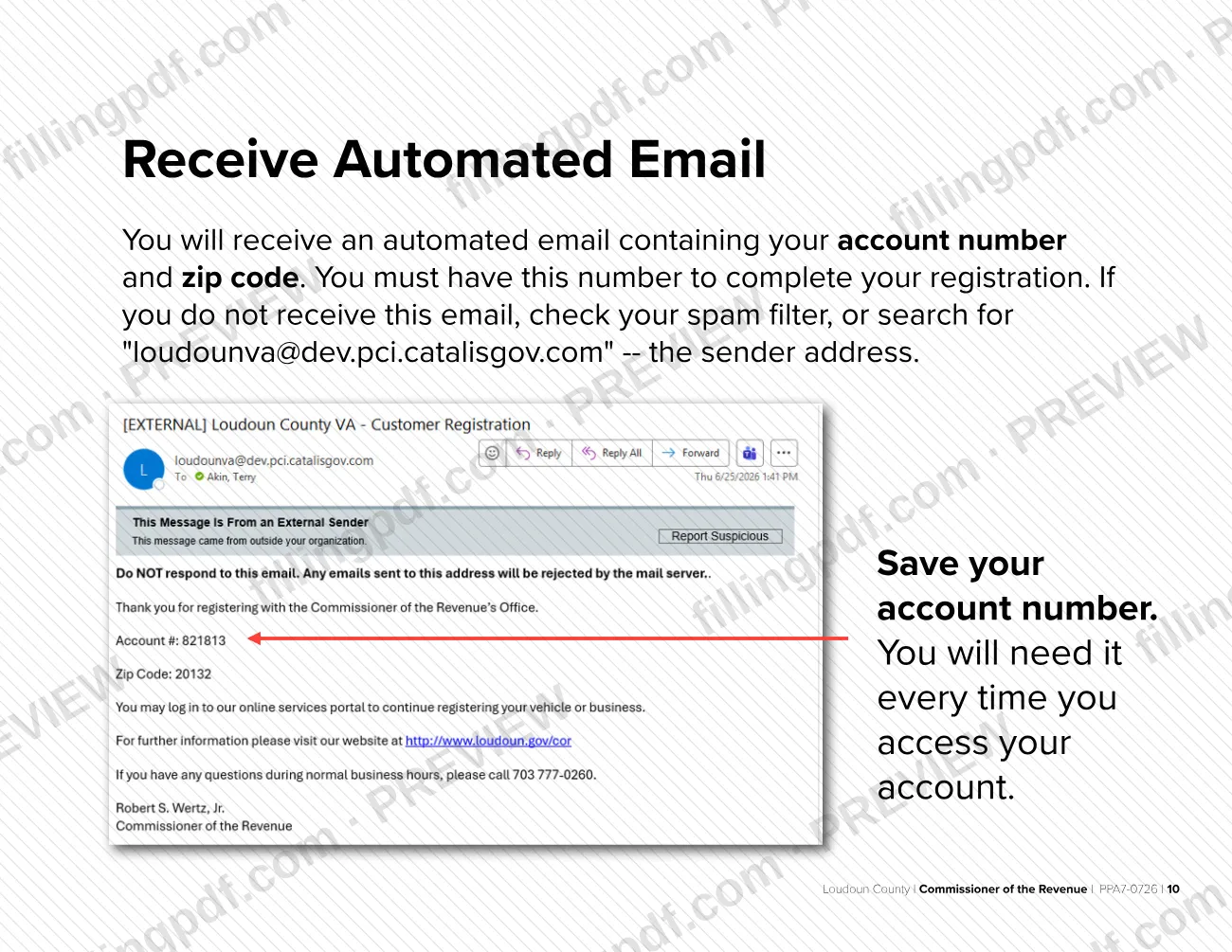
The automated email gives your account number and zip code. Check your spam filter if it does not arrive.
Continue the account registration
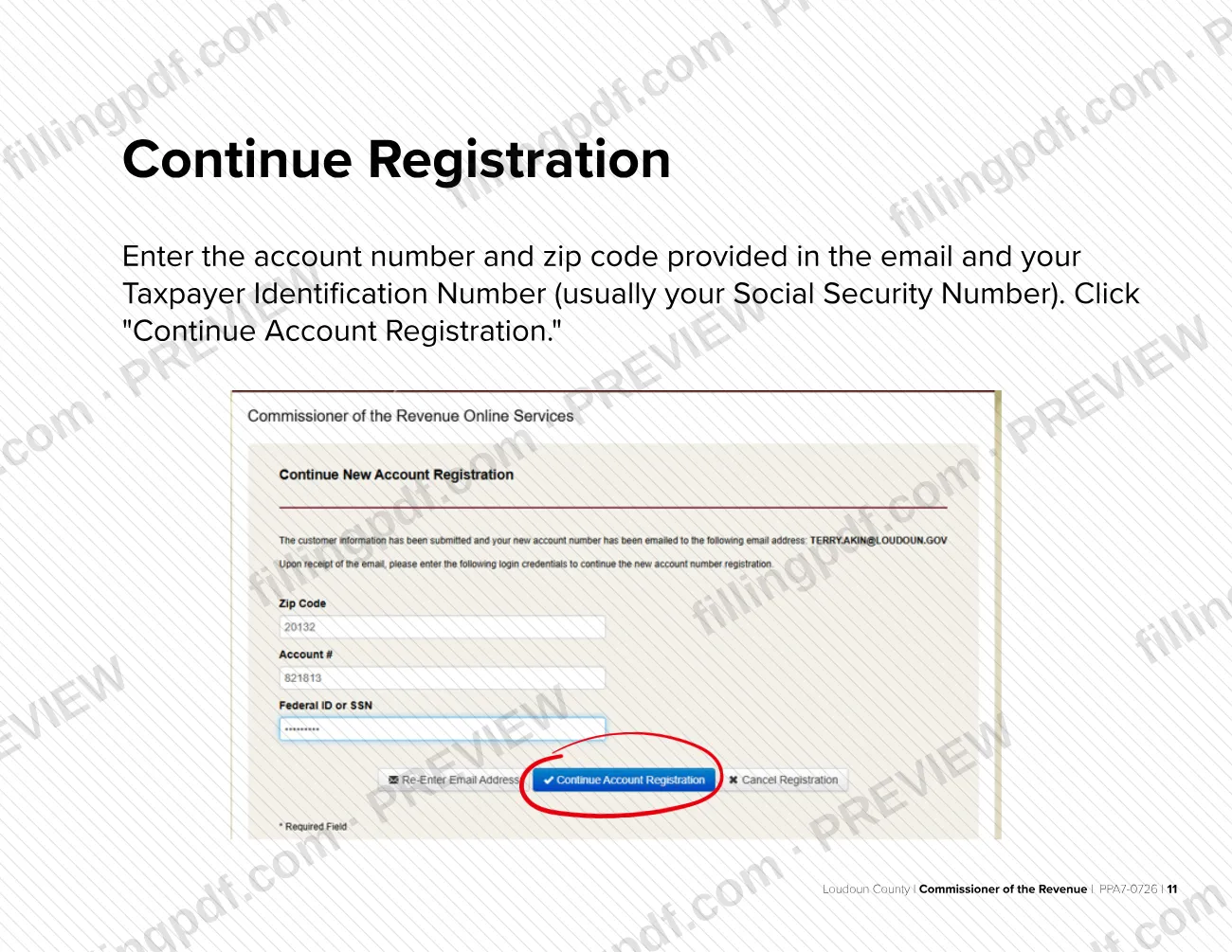
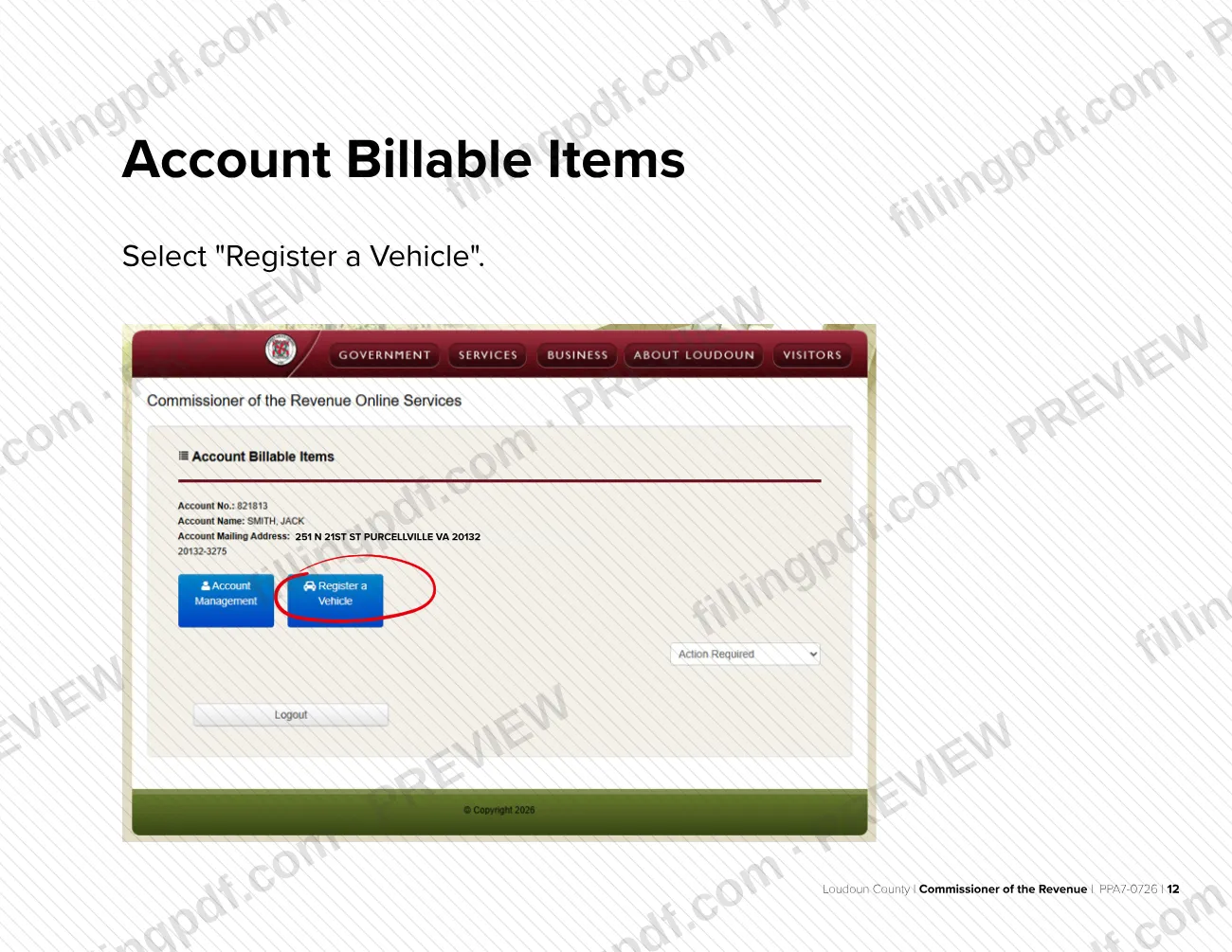
Enter the account number, the zip code from the email and your Taxpayer Identification Number, then click Continue Account Registration. On Account Billable Items, select Register a Vehicle.
Confirm ownership and vehicle type
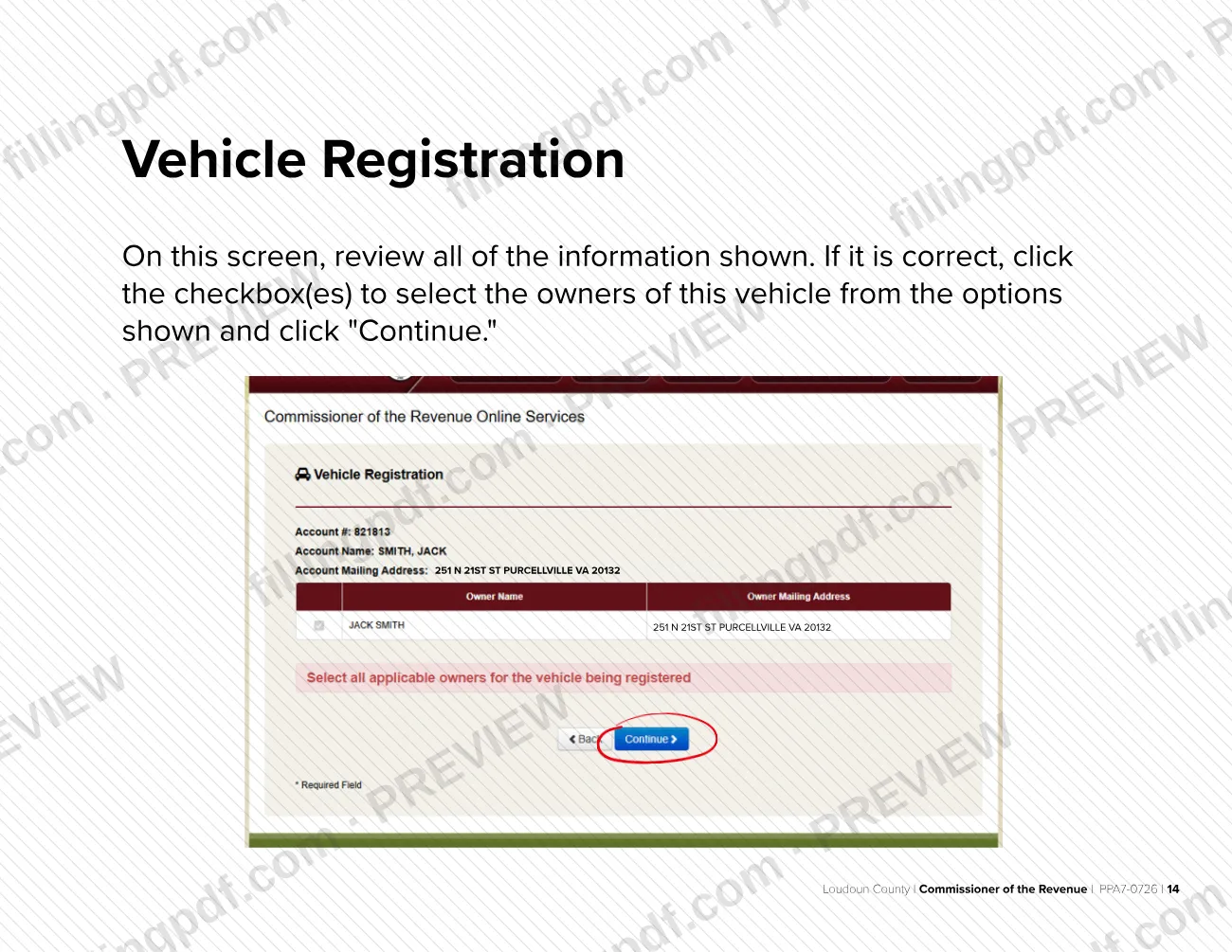
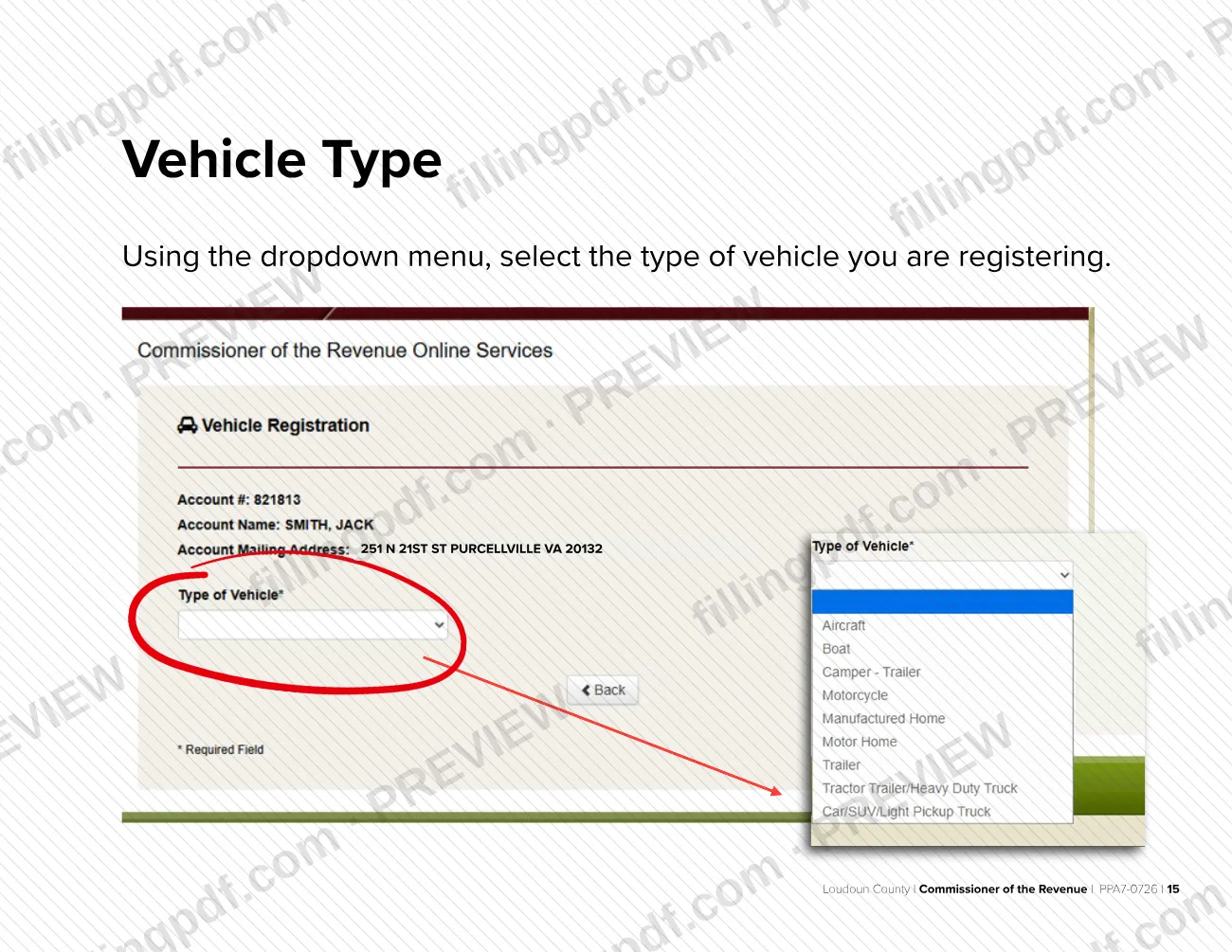
Select Owned or Leased again, review the information shown, check the owner box or boxes and click Continue. Then choose the vehicle type from the dropdown menu.
Enter and verify the VIN
Enter the Vehicle Identification Number and click Verify. If the correct vehicle appears in the red box, click Yes; otherwise select Retry.
Add vehicle details and location
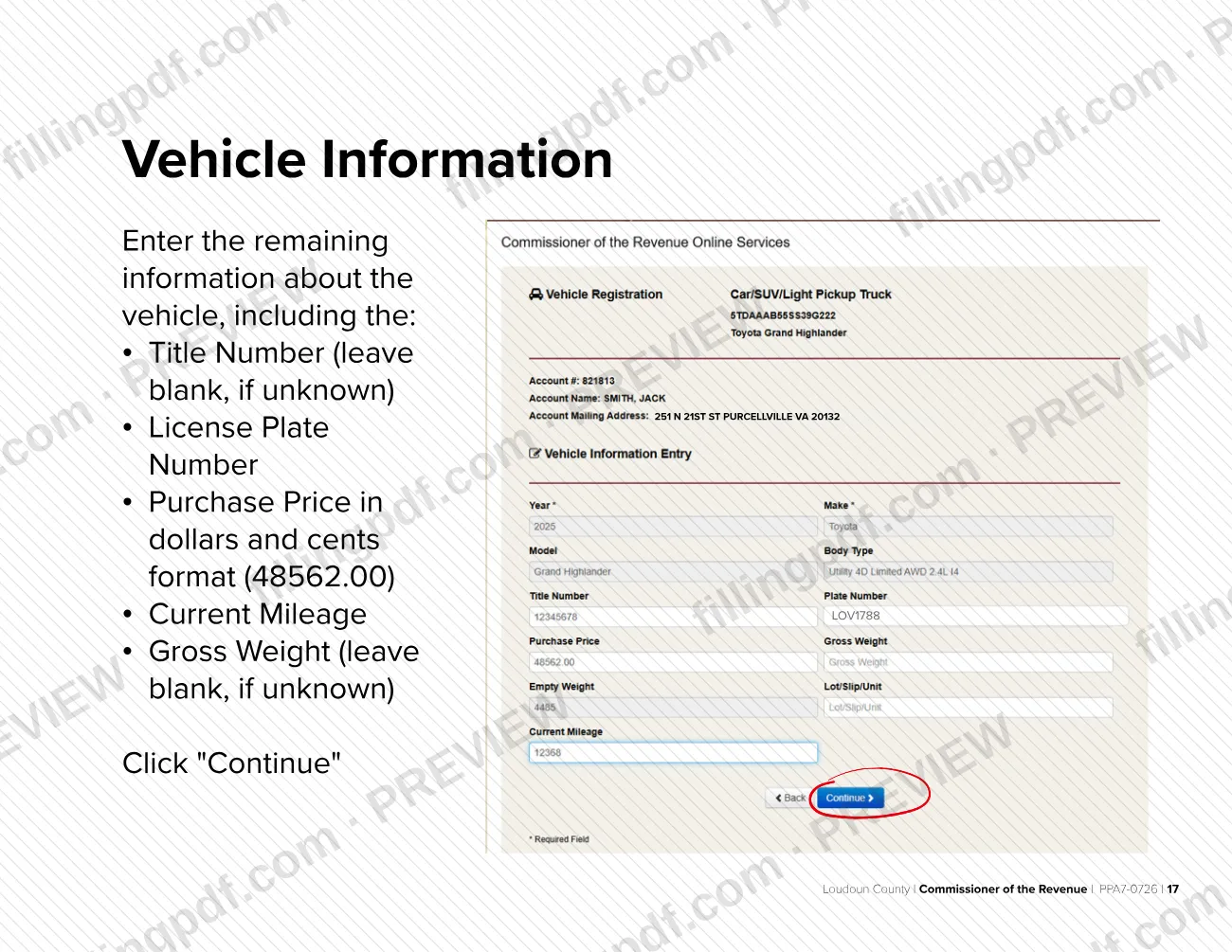
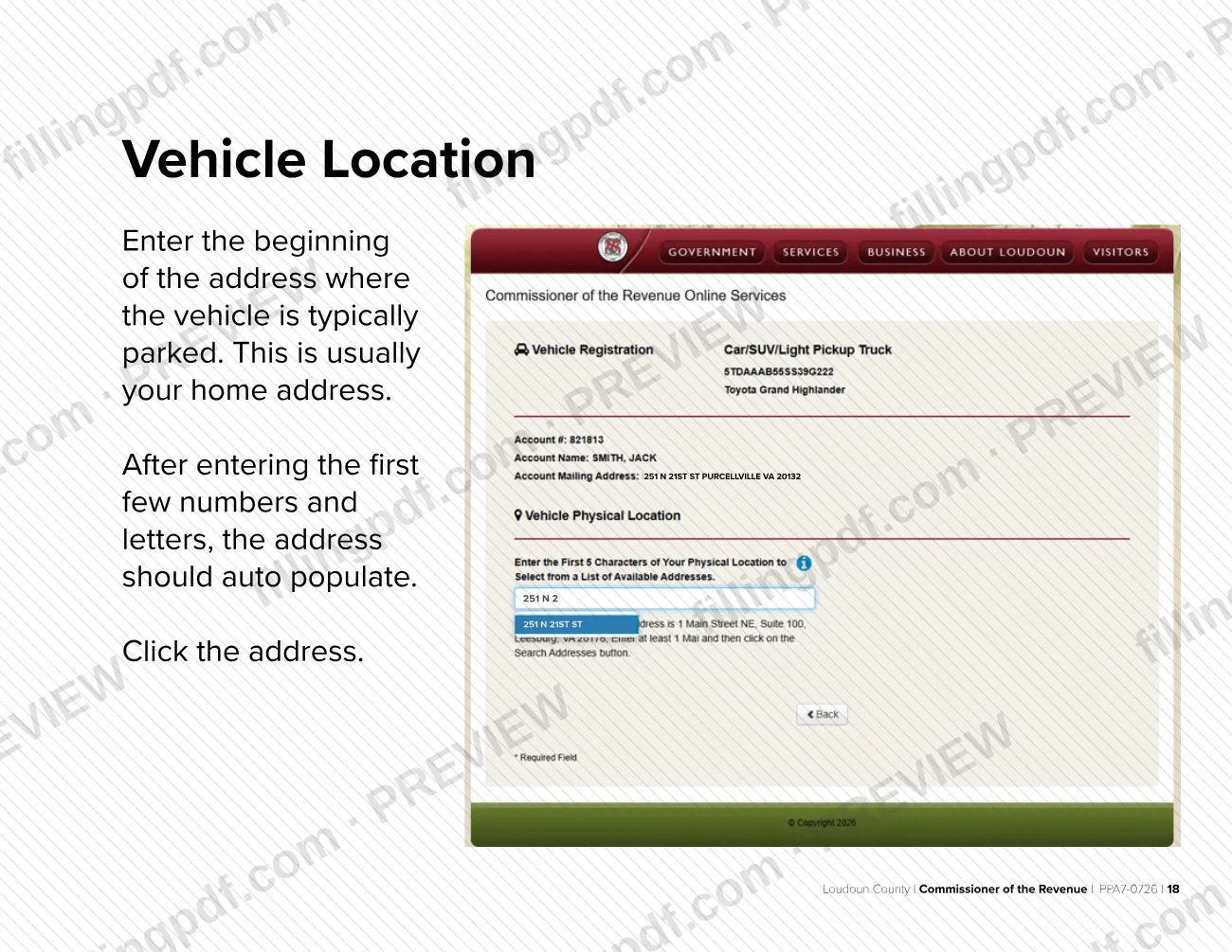
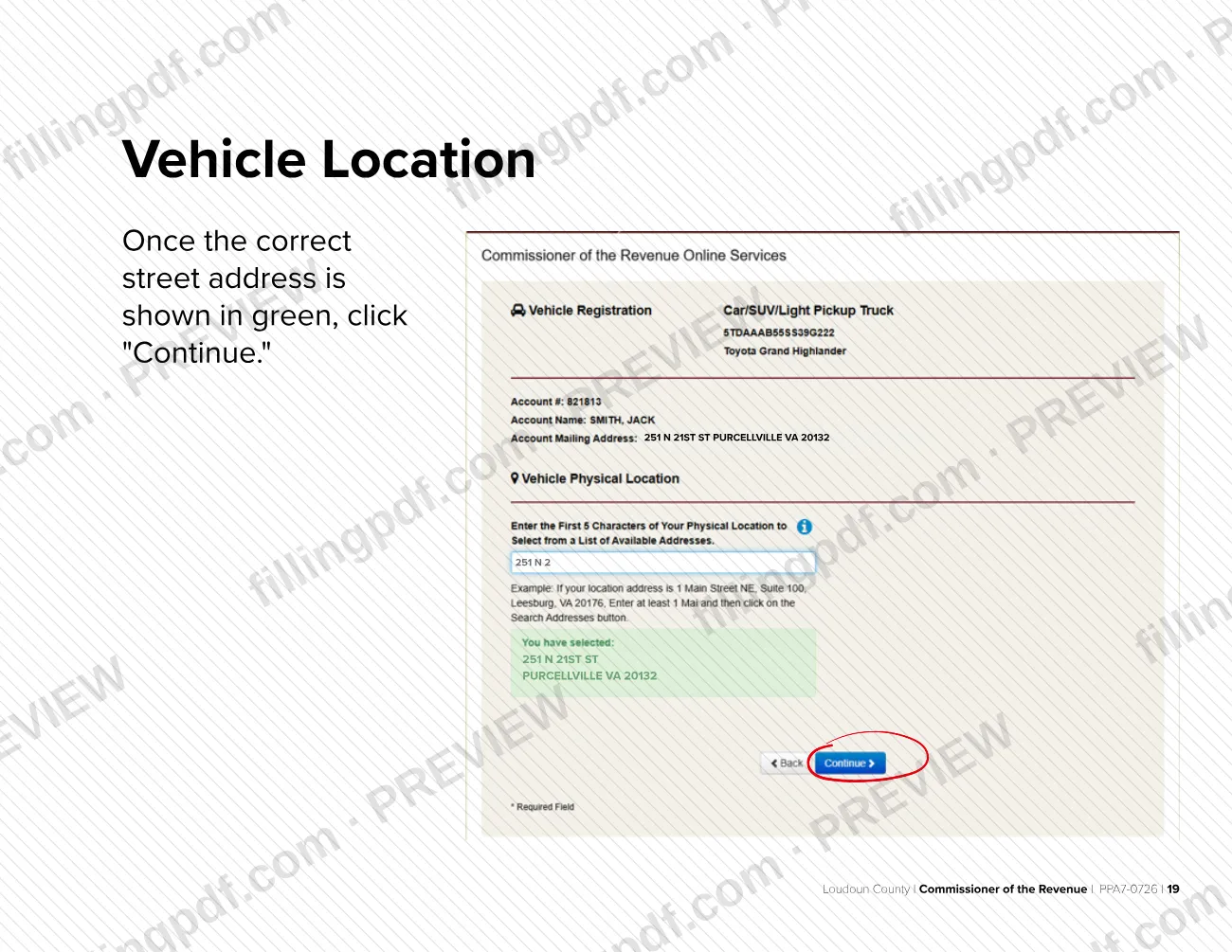
Enter title number (blank if unknown), license plate number, purchase price in dollars and cents format (48562.00), current mileage and gross weight (blank if unknown). Then enter the start of the address where the vehicle is parked, click the address that auto-populates and click Continue when it shows in green.
Finish Additional Information
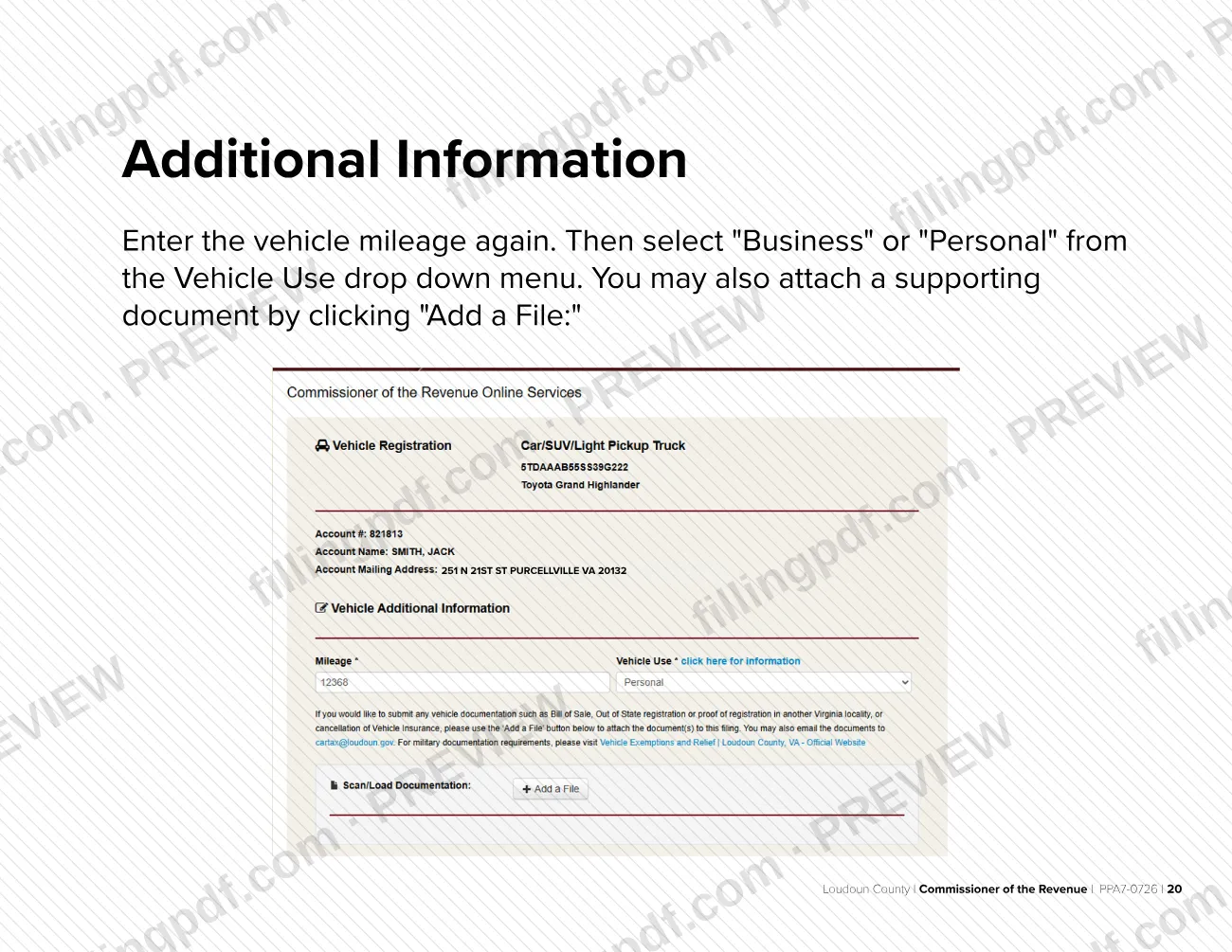
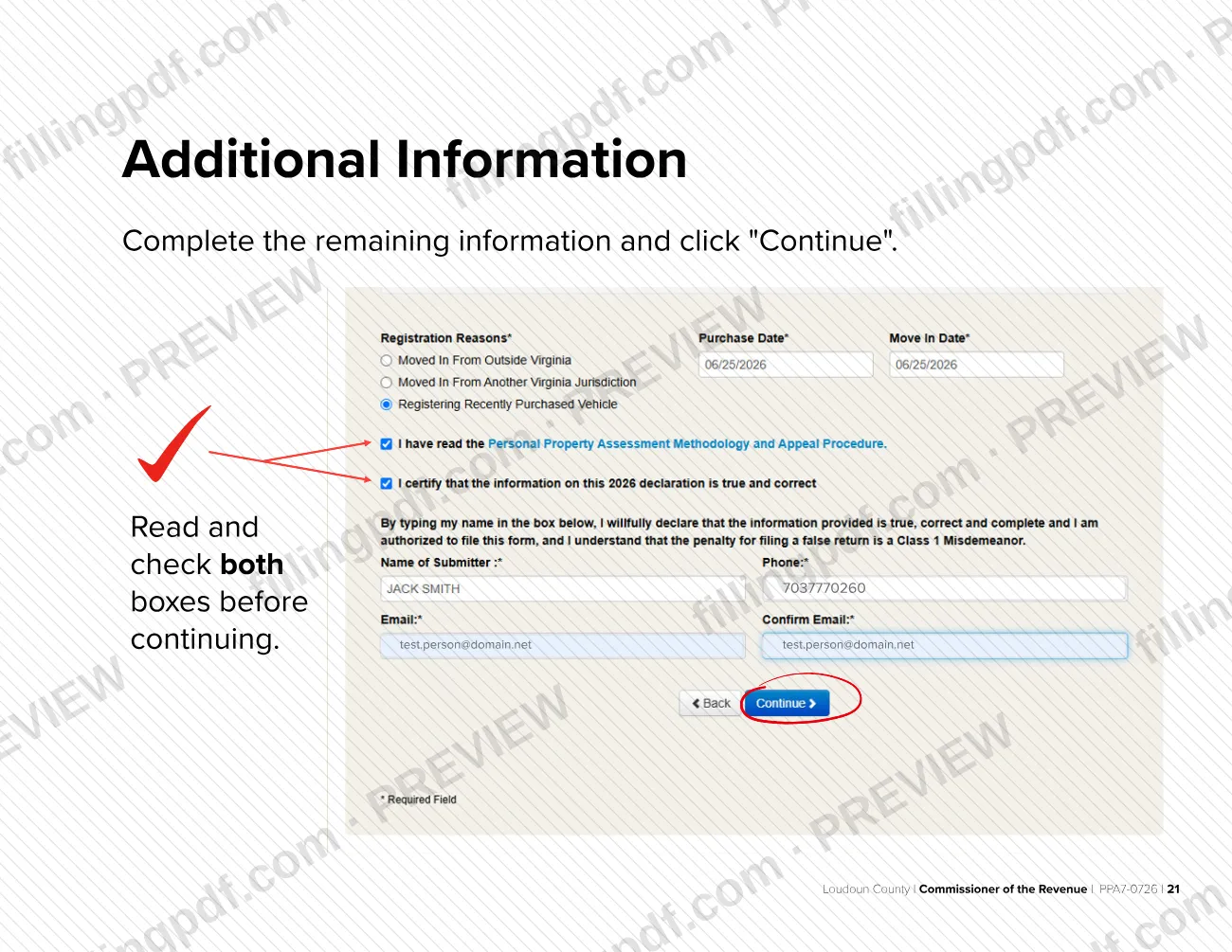
Re-enter the mileage, select Business or Personal under Vehicle Use, and optionally click Add a File. Complete the remaining information, read and check both boxes and click Continue.
Review the guide and download the PDF
Check that you have followed each screen, then use FillingPDF to download or print the PDF. The registration is completed on the county's website.
How to submit PPA7-0726
Registration is done online, not by mail or in person: you complete it on the Loudoun County e-file system at loudoun.gov/efile, the starting point printed on the guide.
- Online registration: go to loudoun.gov/efile, accept the disclaimer, choose Start Registering a Vehicle and follow the screens. Use the account number and zip code from the automated email to continue the registration.
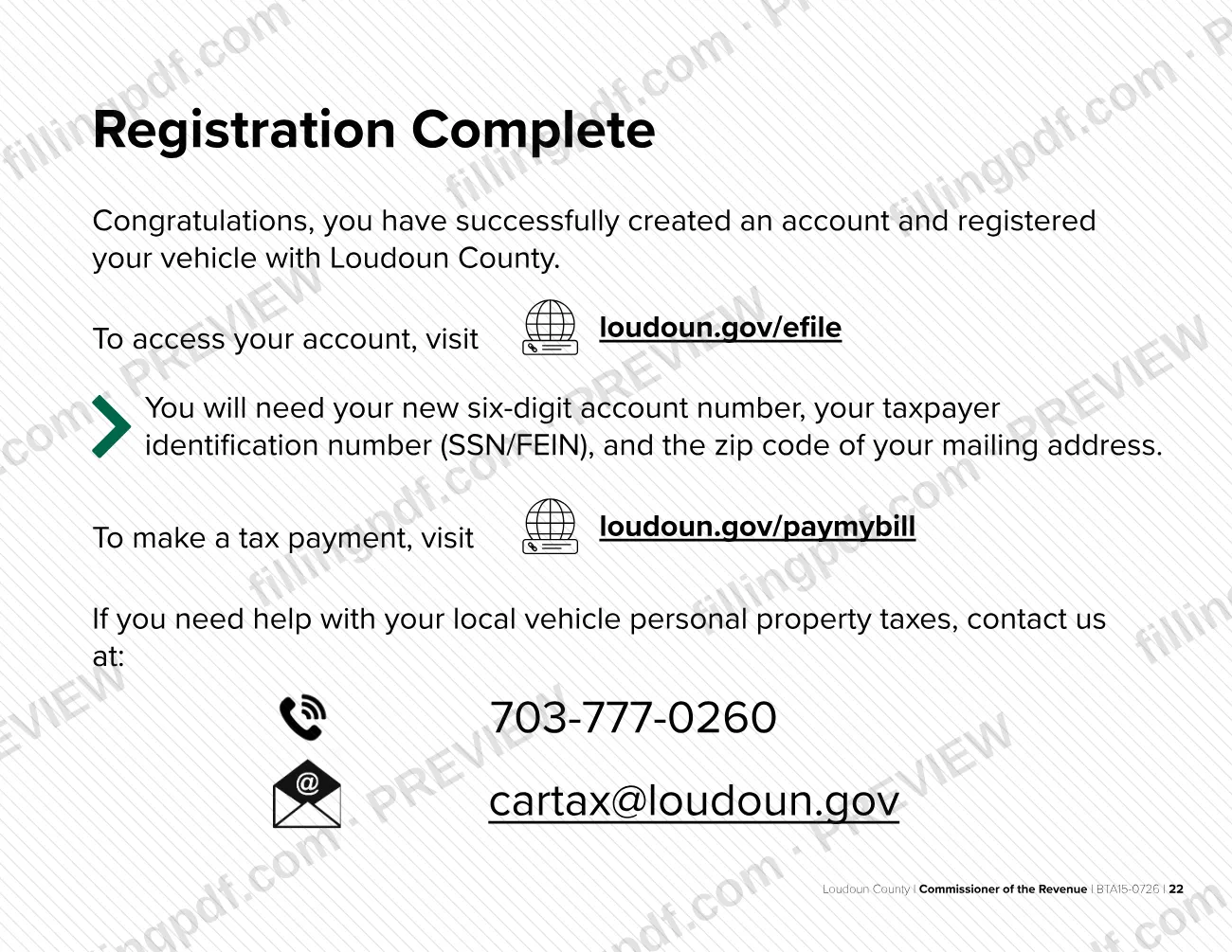
- Later access: return to loudoun.gov/efile with your new six-digit account number, your taxpayer identification number (SSN/FEIN) and the zip code of your mailing address.
- Payment: to make a tax payment, go to loudoun.gov/paymybill.
- Help: call 703-777-0260 or email [email protected] for help with local vehicle personal property taxes.
The county's Tax Assessment & Tax Relief Forms page says completed forms that contain sensitive personal identifying information should be submitted through the secure Document Upload Portal. FillingPDF lets you fill out and download the PDF; submission follows the channels above.
Common mistakes to avoid
- Typing dashes in tax IDs or phone numbers; the guide says to enter them without dashes (7986542031, not 798-654-2031).
- Closing the browser tab or leaving the website while entering your information, before the account is created.
- Not saving the account number from the automated email; the guide says you need it every time you access your account.
- Not checking spam for the automated email, or not searching for the sender address [email protected] when it does not arrive.
- Selecting Owned or Leased wrongly: choose Owned if you are financing the vehicle or own it with a clear title, and Leased if you are leasing it.
- Clicking Retry when a next-year model does not appear after VIN verification; the guide says to click Yes and then enter the year, make and model.
- Entering the purchase price without dollars and cents format; the guide's example is 48562.00.
- Continuing without reading and checking both boxes on the final Additional Information screen.
Frequently asked questions
How do I register a vehicle with Loudoun County?
Go to loudoun.gov/efile, accept the disclaimer, choose Start Registering a Vehicle and follow the screens in the Commissioner of the Revenue's instructions. You create an account first, then use the account number and zip code emailed to you to register the vehicle.
What do I need to register my vehicle in Loudoun County?
You need the owner's Social Security Number for an individual registration, your taxpayer identification number, and the vehicle's VIN. You also enter purchase price, mileage and the address where the vehicle is parked. A supporting document is optional.
What if I never received the automated email with my account number?
Check your spam filter and search for the sender address [email protected]. You must have the account number and zip code in that email to complete registration. For further help, call 703-777-0260 or email [email protected].
Should I select Owned or Leased?
Select Owned if you are financing the vehicle or own it with a clear title. Select Leased if you are leasing it. The guide shows this choice twice, at the start of the new account and again on the Vehicle Registration screen.
What if my VIN does not match the vehicle shown?
Select Retry and enter the VIN again. If you are registering next year's model, it may not yet appear in the county's database; the system asks whether to continue, so click Yes and enter the year, make and model.
How do I log in again after registering?
Go to loudoun.gov/efile. You need your new six-digit account number, your taxpayer identification number (SSN/FEIN) and the zip code of your mailing address.
Where do I pay my Loudoun County vehicle taxes?
To make a tax payment, the county directs you to loudoun.gov/paymybill. For questions about your local vehicle personal property taxes, contact the Commissioner of the Revenue at 703-777-0260 or [email protected].
Can I fill out this form on FillingPDF?
You can fill out the PDF online on FillingPDF and download or print it. FillingPDF is independent, does not register vehicles and does not submit anything to Loudoun County; registration happens on the county's e-file system at loudoun.gov/efile.
Ready to fill out PPA7-0726?
Fill out PPA7-0726 now