
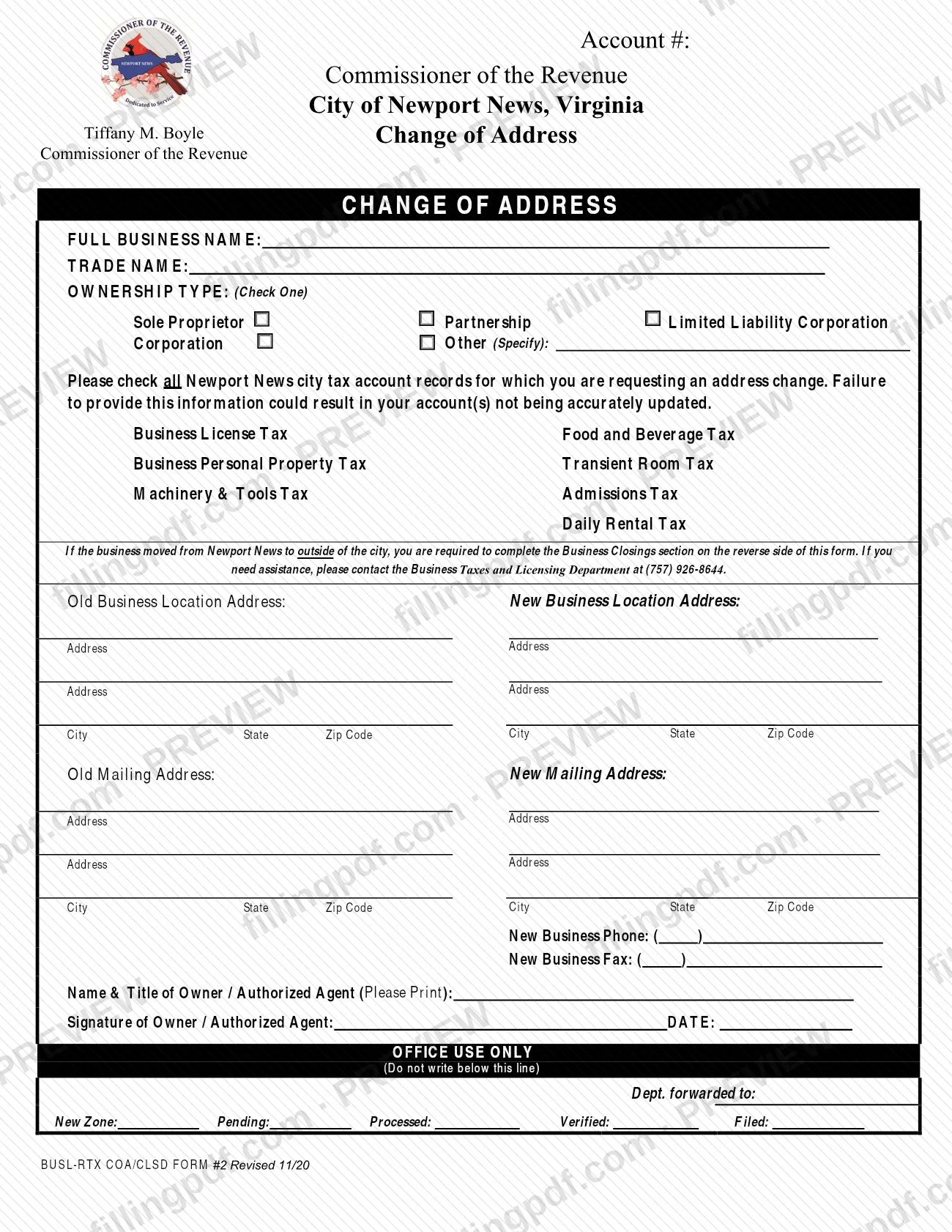
The Business Change of Address Form is the form the Newport News Commissioner of the Revenue uses to update the location and mailing addresses of a business on its city tax accounts. It is one of the Newport News property tax and business tax forms, because the accounts you can update include Business Personal Property Tax and Machinery & Tools Tax. A business owner or authorized agent completes it for each move or mailing change. On FillingPDF you can fill out the form online and download or print the completed PDF; the city publishes the original at nnva.gov.
Last updated
What is BUSL-RTX COA/CLSD FORM #2?
The Business Change of Address Form (printed as "Change of Address") is the City of Newport News, Virginia, Commissioner of the Revenue form on which a business reports a new business location address and a new mailing address for its city tax accounts.
The form identifies the business by account number, full business name, trade name and ownership type. It then asks you to check every city tax account you want updated. The listed accounts are:
- Business License Tax
- Business Personal Property Tax
- Machinery & Tools Tax
- Food and Beverage Tax
- Transient Room Tax
- Admissions Tax
- Daily Rental Tax
The form warns that failing to provide this information could result in your accounts not being updated accurately. It collects the old and new business location addresses, the old and new mailing addresses, and a new business phone and fax number. The owner or authorized agent prints a name and title, then signs and dates it.
A business that moved from Newport News to a place outside the city must also complete the Business Closings section on the reverse side of the form. The "Office Use Only" block at the bottom is for the city.
This is a business account form. It is separate from the exemption and deferral forms listed on the Commissioner of the Revenue's forms page, such as the Real Estate Tax Exemption for the Elderly or the Mobile Home Tax Deferral.
Who needs to file BUSL-RTX COA/CLSD FORM #2?
The owner of a business, or an authorized agent for the owner, completes this form when the business has one or more Newport News city tax accounts and its address changes. The form is signed by the owner or authorized agent, whose name and title are printed on it.
Use it if the business has any of these accounts and needs the address updated: Business License Tax, Business Personal Property Tax, Machinery & Tools Tax, Food and Beverage Tax, Transient Room Tax, Admissions Tax or Daily Rental Tax. Check each account you want changed, because the form states that leaving this out could mean an account is not accurately updated.
The ownership type is chosen from sole proprietor, partnership, limited liability corporation, corporation or other (specified).
If the business moved from Newport News to a location outside the city, the form requires you to complete the Business Closings section on the reverse side as well. For help, the form directs you to the Business Taxes and Licensing Department at (757) 926-8644.
When to file BUSL-RTX COA/CLSD FORM #2
Complete this form when your business's location or mailing address changes and you need your Newport News city tax accounts to show the new address. The form prints no separate due date.
If the business has moved from Newport News to a place outside the city, the form says you are required to complete the Business Closings section on the reverse side, so do that at the same time as the address change.
If you are unsure about timing for your accounts, call the Business Taxes and Licensing Department at (757) 926-8644, the number the form gives for assistance.
How to fill out BUSL-RTX COA/CLSD FORM #2
Enter the account number
Write your Newport News account number in the Account # box at the top of the form.
Enter business and trade names
Under FULL BUSINESS NAME, write the business's full name. Under TRADE NAME, add the trade name the business uses.
Check one ownership type
Under OWNERSHIP TYPE (Check One), mark Sole Proprietor, Partnership, Limited Liability Corporation, Corporation or Other. If you choose Other, write the type in the (Specify) space.
Check the tax accounts to update
Check every account the address change applies to: Business License Tax, Business Personal Property Tax, Machinery & Tools Tax, Food and Beverage Tax, Transient Room Tax, Admissions Tax or Daily Rental Tax. Accounts left unchecked may not be updated.
Complete the business location addresses
Under Old Business Location Address, enter the address, city, state and ZIP code you are leaving. Under New Business Location Address, enter the new address, city, state and ZIP code.
Complete the mailing addresses
Enter the Old Mailing Address and the New Mailing Address, each with address lines, city, state and ZIP code.
Add the new phone and fax
Enter the New Business Phone and, if the business has one, the New Business Fax, including the area code.
Complete the Business Closings section if needed
If the business moved from Newport News to a location outside the city, complete the Business Closings section on the reverse side of the form. Call (757) 926-8644 if you need help.
Print name and title, sign and date
Print the name and title of the owner or authorized agent, then sign the form and enter the DATE. Leave the Office Use Only block blank.
Review and download the completed PDF
Check the account boxes, both address blocks and the signature. Download or print the completed PDF from FillingPDF and deliver it as described under How to submit.
How to submit BUSL-RTX COA/CLSD FORM #2
The form prints no mailing address, portal or e-mail address of its own. It directs you to the Business Taxes and Licensing Department at (757) 926-8644 for assistance. The Commissioner of the Revenue's forms page lists these ways to reach the office:
- By phone: Business Taxes and Licensing, 757-926-8644.
- In person: Downtown Office, 2400 Washington Ave., Newport News, VA 23607, or the Denbigh Office, 12912 Jefferson Ave., Newport News, VA 23608. Office hours are 8:30 AM - 4:30 PM.
- Dropbox: a 24-hour dropbox is at the City Hall office, 2400 Washington Ave. (front of the building, to the left of the entry doors), at the Denbigh Satellite Office, 12912 Jefferson Ave. (side of the building), and at City Center, 700 Town Center Dr. (dropbox only).
Ask the Business Taxes and Licensing Department which channel it wants for this form. If your business moved out of the city, include the completed Business Closings section from the reverse side. FillingPDF lets you fill out and download the PDF; submission follows the agency's channels above.
Common mistakes to avoid
- Not checking every city tax account you want updated; the form warns that leaving this out could result in accounts not being accurately updated.
- Moving the business outside Newport News and skipping the Business Closings section on the reverse side, which the form says you are required to complete.
- Checking more than one ownership type; the form says to check one, and to specify if you choose Other.
- Mixing up the new business location address with the new mailing address; the form has separate blocks for each.
- Submitting the form without the signature and date of the owner or authorized agent.
- Handwriting or typing nothing in the printed name and title line; the form asks for the name and title of the owner or authorized agent, printed.
- Writing in the Office Use Only block below the line marked 'Do not write below this line'.
Frequently asked questions
What is the Newport News Business Change of Address Form?
It is the Commissioner of the Revenue's form for telling the City of Newport News that a business has a new location address or mailing address. You check each city tax account to update, such as Business License Tax or Business Personal Property Tax, and the owner or authorized agent signs it.
Does this form change my Newport News property tax account?
It updates the address on business accounts, including Business Personal Property Tax and Machinery & Tools Tax, if you check those boxes. It is not a real estate form. The Commissioner's forms page lists separate forms for real estate exemptions and mobile home tax matters.
Which tax accounts can I update on this form?
Business License Tax, Business Personal Property Tax, Machinery & Tools Tax, Food and Beverage Tax, Transient Room Tax, Admissions Tax and Daily Rental Tax. Check each one that applies, because the form warns that unchecked accounts may not be accurately updated.
What if my business moved out of Newport News?
You are required to complete the Business Closings section on the reverse side of the form. For help with that section, the form directs you to the Business Taxes and Licensing Department at (757) 926-8644.
Who can sign the business change of address form?
The owner or an authorized agent signs. The form asks for the name and title of the owner or authorized agent, printed, plus a signature and the date.
Where do I turn in the Newport News change of address form?
The form prints no address of its own. The Commissioner of the Revenue lists offices at 2400 Washington Ave. and 12912 Jefferson Ave., and 24-hour dropboxes at each office plus City Center. Call (757) 926-8644 to confirm how the department wants it delivered.
Can I fill out the business change of address form online?
You can complete the PDF online on FillingPDF and download or print it. FillingPDF is an independent service: it does not send the form to the City of Newport News, so you deliver it through the Commissioner of the Revenue's channels.
Ready to fill out BUSL-RTX COA/CLSD FORM #2?
Fill out BUSL-RTX COA/CLSD FORM #2 now