
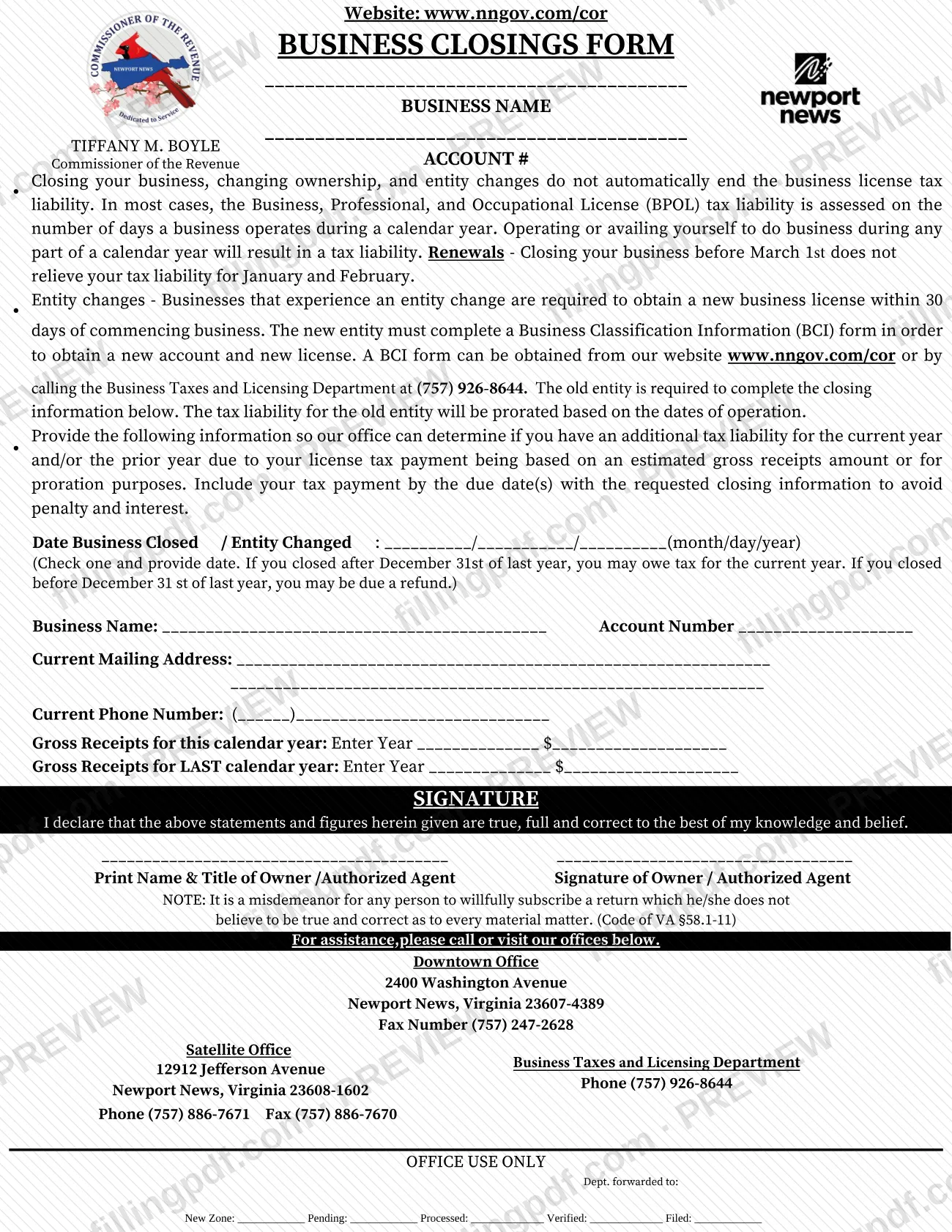
The Business Closings Form is the form the Newport News Commissioner of the Revenue uses to collect closing information from a business that has shut down or changed entity, so the office can work out any remaining Business, Professional, and Occupational License (BPOL) tax for the current or prior year. It is one of the Commissioner's forms, but it concerns business license tax, not Newport News property tax. On this page you can fill out the form online on FillingPDF and download or print the completed PDF; the original is published by the city at nnva.gov.
Last updated
What is Business Closings Form – Newport News, VA?
The Business Closings Form is the Newport News Commissioner of the Revenue form on which a business reports the date it closed or changed entity, its mailing address and phone number, and its gross receipts, so the office can determine whether additional BPOL tax is owed.
The form explains why it exists: closing a business, changing ownership and changing entity do not automatically end the business license tax liability. In most cases the Business, Professional, and Occupational License (BPOL) tax is assessed on the number of days a business operates during a calendar year, and operating or being available to do business during any part of a year creates a tax liability.
The office uses the information to decide whether there is an additional liability for the current year or the prior year, because the license tax payment was based on an estimated gross receipts amount or must be prorated. For an entity change, the old entity completes this form and its liability is prorated by the dates of operation, while the new entity completes a separate Business Classification Information (BCI) form to get a new account and license.
This is a business license tax form. The Commissioner's forms page lists real estate, mobile home and other forms separately.
Who needs to file Business Closings Form – Newport News, VA?
Owners of a Newport News business that has closed, and the old entity when a business changes ownership or entity, complete the closing information on this form. The form says the old entity is the one required to complete it.
- Closed businesses: check the closing option and give the date the business closed.
- Entity changes: the old entity gives the date the entity changed. The new entity does not use this form to get its license: it completes a Business Classification Information (BCI) form to obtain a new account and a new license.
- Signers: the form is signed by the owner or an authorized agent, who prints name and title.
The form warns that closing, changing ownership or changing entity does not by itself end the license tax liability, so a business that stopped operating part-way through a year still reports through this form. It is not a form for real estate or personal property tax matters.
When to file Business Closings Form – Newport News, VA
Complete the form when your business closes or changes entity, and include your tax payment by the due date(s) with the closing information to avoid penalty and interest. The form prints no separate calendar deadline of its own.
Timing rules printed on the form:
- Closing your business before March 1st does not relieve your tax liability for January and February.
- If you closed after December 31st of last year, you may owe tax for the current year. If you closed before December 31st of last year, you may be due a refund.
- A business that experiences an entity change must obtain a new business license within 30 days of commencing business; the new entity completes the BCI form for that.
Documents you need
- Business Classification Information (BCI) form: completed by the new entity, not the old one, when a business changes entity, to obtain a new account and license.
How to fill out Business Closings Form – Newport News, VA
Enter business name and account number
At the top, write the business name and the account number. Repeat the Business Name and Account Number in the closing section below.
Check the closing or entity change option
Under Date Business Closed / Entity Changed, check one: closed or entity changed, and provide the date.
Enter the date in month/day/year
Write the closing or entity change date as month/day/year in the spaces provided.
Give your mailing address
Under Current Mailing Address, write the address where the office can reach you after the closing.
Add your current phone number
Enter the area code and number on the Current Phone Number line.
Report this year's gross receipts
On the Gross Receipts for this calendar year line, enter the year and the gross receipts amount.
Report last year's gross receipts
On the Gross Receipts for LAST calendar year line, enter that year and its gross receipts amount.
Print name and title, then sign
Print the name and title of the owner or authorized agent, then have the owner or authorized agent sign. The signature declares the statements and figures true, full and correct.
Review, download and prepare payment
Check every line, leave the Office Use Only block blank, then download or print the completed PDF from FillingPDF. Prepare your tax payment to go with it, as described under How to submit.
How to submit Business Closings Form – Newport News, VA
The form names no mailing address or online portal of its own; it directs you to call or visit the offices of the Commissioner of the Revenue for assistance, and asks you to include your tax payment with the closing information.
- Downtown Office: 2400 Washington Avenue, Newport News, Virginia 23607-4389. Fax (757) 247-2628.
- Satellite (Denbigh) Office: 12912 Jefferson Avenue, Newport News, Virginia 23608-1602. Phone (757) 886-7671, fax (757) 886-7670.
- Business Taxes and Licensing Department: phone (757) 926-8644.
- Dropbox: the Commissioner's forms page says a 24-hour dropbox is at each office, and at 700 Town Center Dr. (dropbox only). The office hours it lists are 8:30 AM to 4:30 PM.
Call the Business Taxes and Licensing Department to confirm how to deliver the form and payment. The agency's amount for any tax due is not on the form. FillingPDF lets you fill out and download the PDF; submission follows the channels above.
Common mistakes to avoid
- Assuming that closing the business, changing ownership or changing entity ends the BPOL tax liability; the form states it does not.
- Closing before March 1st and expecting no tax for January and February; the form says that liability remains.
- Sending the closing information without the tax payment due by the due date(s), which risks penalty and interest.
- Leaving out gross receipts for either the current calendar year or the last calendar year; the office uses both to find an additional liability.
- Not entering the closing or entity change date in month/day/year format.
- Having the new entity use this form instead of a BCI form to obtain a new account and license after an entity change.
- Signing without printing the name and title of the owner or authorized agent, or not signing at all.
- Writing in the Office Use Only block at the bottom of the form.
Frequently asked questions
What is the Business Closings Form in Newport News?
It is the Newport News Commissioner of the Revenue form on which a closed or changed business reports its closing or entity change date and gross receipts. The office uses it to decide whether additional BPOL license tax is owed for the current or prior year.
Does closing my business end my BPOL tax liability?
Not automatically. The form says closing, changing ownership and entity changes do not end the liability, which is generally based on the days a business operates in a calendar year. Closing before March 1st does not relieve January and February.
Is this form for Newport News property tax?
No. It deals with Business, Professional, and Occupational License tax. Real estate, mobile home and personal property matters use other Commissioner of the Revenue forms and contacts; call (757) 926-8657 for personal property questions.
What if my business changed entity instead of closing?
The old entity completes this form, and its tax is prorated by the dates of operation. The new entity must obtain a new license within 30 days of commencing business and completes a BCI form, available at www.nngov.com/cor or by calling (757) 926-8644.
Could I get a refund after closing?
Possibly. The form says that if you closed before December 31st of last year, you may be due a refund, and if you closed after that date you may owe tax for the current year. The office decides from your reported gross receipts.
Who can sign the Business Closings Form?
The owner or an authorized agent signs, and the form asks for their printed name and title. Signing declares the statements true and correct; the form notes it is a misdemeanor to willfully subscribe a return one does not believe to be true (Code of VA §58.1-11).
Can I fill out the Business Closings Form online?
Yes. You can fill out the PDF online on FillingPDF and download or print it. FillingPDF is independent of the City of Newport News and does not file the form; you deliver it through the Commissioner of the Revenue's channels.
Ready to fill out Business Closings Form – Newport News, VA?
Fill out Business Closings Form – Newport News, VA now