
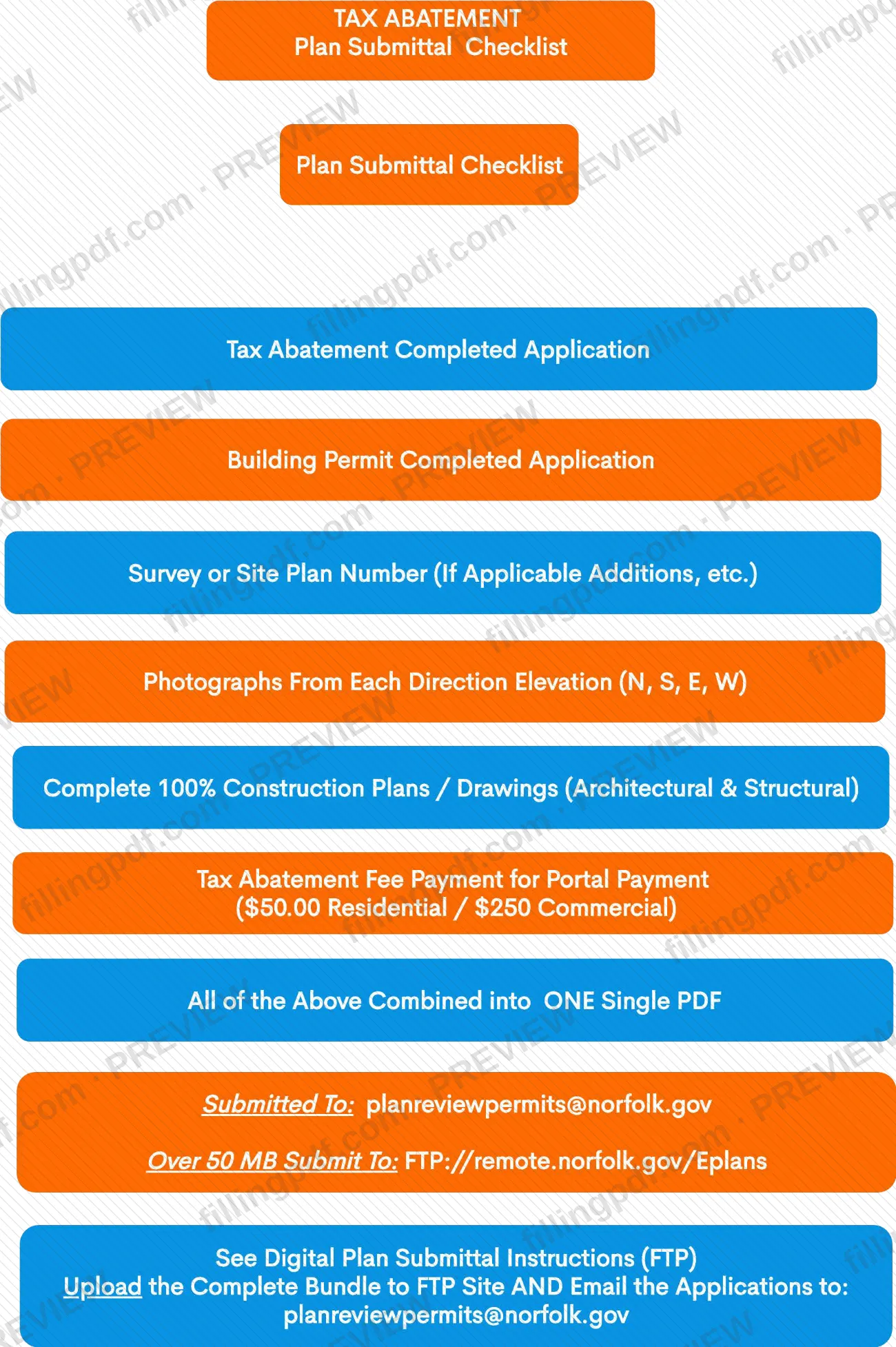
The Tax Abatement Plan Submittal Checklist is a one-page checklist from the City of Norfolk Department of City Planning that lists what must accompany a tax abatement plan submittal. It is one of the Norfolk property tax forms handled through the city's Permits & Inspections office, and it names three items: a completed building permit application, photographs from each direction, and the tax abatement fee payment. On this page you can fill out the checklist online on FillingPDF and download or print the completed PDF; the original is published by the city at norfolk.gov.
Last updated
What is Tax Abatement Plan Submittal Checklist – Norfolk, VA?
The Tax Abatement Plan Submittal Checklist is the City of Norfolk Department of City Planning checklist that sets out what a tax abatement plan submittal must contain: a completed building permit application, photographs from each direction, and payment of the tax abatement fee.
The checklist carries no form number or revision date. It is printed under the heading "Tax Abatement" and titled "Plan Submittal Checklist". It has three items to confirm and two delivery instructions: an email address for the submittal and a separate file-transfer location for files larger than 50 MB.
The city lists "Tax Abatement Plan Submittals" on its Permits & Inspections Applications & Forms page, next to the other permit documents it publishes, such as the Request for Refund form and the elevator program documents. The checklist is not a building permit application itself. The building permit application is one of the items the checklist asks you to include.
The city's page also states a general rule for permit submissions: a submission is not complete until a completed application package, including the building permit, forms and plans, is attached to the permit application on the ePermitting Portal.
Who needs to file Tax Abatement Plan Submittal Checklist – Norfolk, VA?
People who are submitting plans for a tax abatement to the City of Norfolk use this checklist to confirm that the submittal is complete. The checklist itself is addressed to anyone assembling that package: it asks for the building permit application, photographs and the fee payment, and it gives the delivery instructions.
The checklist distinguishes between residential and commercial submittals only for the fee. It prints one fee for residential and another for commercial, so you need to know which category your property falls under before you pay.
The checklist does not describe who is eligible for a tax abatement, and it does not say who may submit on someone else's behalf. For eligibility questions, contact the Department of City Planning or check the city's Permits & Inspections pages at norfolk.gov.
When to file Tax Abatement Plan Submittal Checklist – Norfolk, VA
Use the checklist when you assemble a tax abatement plan submittal, because it lists what that submittal must contain. It travels with the building permit application, which is the first item on it, so there is no separate due date printed on the checklist.
The city's Applications & Forms page says a permit submission is not complete until the full application package, including the building permit, forms and plans, is attached to the permit application on the ePermitting Portal. Have the photographs and the fee payment ready before you send the package. For any deadline tied to the abatement itself, contact the Department of City Planning.
Documents you need
- Completed building permit application, as the first item on the checklist.
- Photographs of the property from each direction elevation: north, south, east and west.
- Tax abatement fee payment, made through the portal; the checklist prints separate residential and commercial rates.
How to fill out Tax Abatement Plan Submittal Checklist – Norfolk, VA
Open the checklist
Open the Tax Abatement Plan Submittal Checklist from the City of Norfolk Department of City Planning. It has three items and two delivery instructions.
Confirm the building permit application
Check the first item, Building Permit Completed Application, once the building permit application is completed.
Gather the four photographs
Check Photographs From Each Direction Elevation (N, S, E, W) once you have photographs of the property from the north, south, east and west.
Confirm the fee payment
Check Tax Abatement Fee Payment for Portal Payment after you know whether your submittal is residential or commercial, since the checklist prints a separate fee for each.
Choose the delivery route
For a normal submittal, note [email protected]. For a submittal over 50 MB, note FTP://remote.norfolk.gov/Eplans.
Review and download the completed PDF
Check that every item matches what you are sending, then download or print the completed PDF from FillingPDF and send the package through the channels described under How to submit.
How to submit Tax Abatement Plan Submittal Checklist – Norfolk, VA
The checklist names two delivery routes: email and a file-transfer location for large files. The city's Applications & Forms page adds the ePermitting Portal.
- Email: send the submittal to [email protected].
- Large files: if the submittal is over 50 MB, send it to FTP://remote.norfolk.gov/Eplans instead.
- ePermitting Portal: the city states that a permit submission is not complete until the application package, including the building permit, forms and plans, is attached to the permit application on the portal.
- Fee: the checklist lists a tax abatement fee with separate residential and commercial rates, marked for portal payment. The amount is not repeated here; check the checklist or ask the Department of City Planning.
FillingPDF lets you fill out and download the PDF; submission follows the channels above.
Common mistakes to avoid
- Leaving out the completed building permit application, which is the first item on the checklist.
- Submitting photographs of only some sides instead of each direction elevation (N, S, E, W).
- Not paying the tax abatement fee, or paying the wrong category when the checklist prints separate residential and commercial rates.
- Emailing a submittal over 50 MB instead of sending it to FTP://remote.norfolk.gov/Eplans.
- Assuming the package is complete without attaching the application, forms and plans to the permit application on the ePermitting Portal.
Frequently asked questions
What is the Tax Abatement Plan Submittal Checklist?
It is a City of Norfolk Department of City Planning checklist listing what a tax abatement plan submittal includes: a completed building permit application, photographs from each direction (N, S, E, W) and the tax abatement fee payment.
Where do I email a Norfolk tax abatement plan submittal?
The checklist says to submit to [email protected]. If the submittal is over 50 MB, it says to use FTP://remote.norfolk.gov/Eplans instead.
What photographs does the Norfolk tax abatement checklist require?
Photographs from each direction elevation: north, south, east and west. The checklist lists them as a separate item next to the completed building permit application.
Is there a fee for a Norfolk tax abatement plan submittal?
Yes. The checklist lists a tax abatement fee for portal payment, with one rate for residential and another for commercial submittals. Check the checklist or ask the Department of City Planning for the current amount.
Is the submittal complete once I email the checklist?
Not necessarily. The city says a permit submission is not complete until the application package, including the building permit, forms and plans, is attached to the permit application on the ePermitting Portal.
Can I fill out the Norfolk tax abatement checklist online?
You can fill out the PDF online on FillingPDF and download or print it. FillingPDF is an independent service, is not connected to the City of Norfolk and does not submit the checklist or pay the fee.
Ready to fill out Tax Abatement Plan Submittal Checklist – Norfolk, VA?
Fill out Tax Abatement Plan Submittal Checklist – Norfolk, VA now