
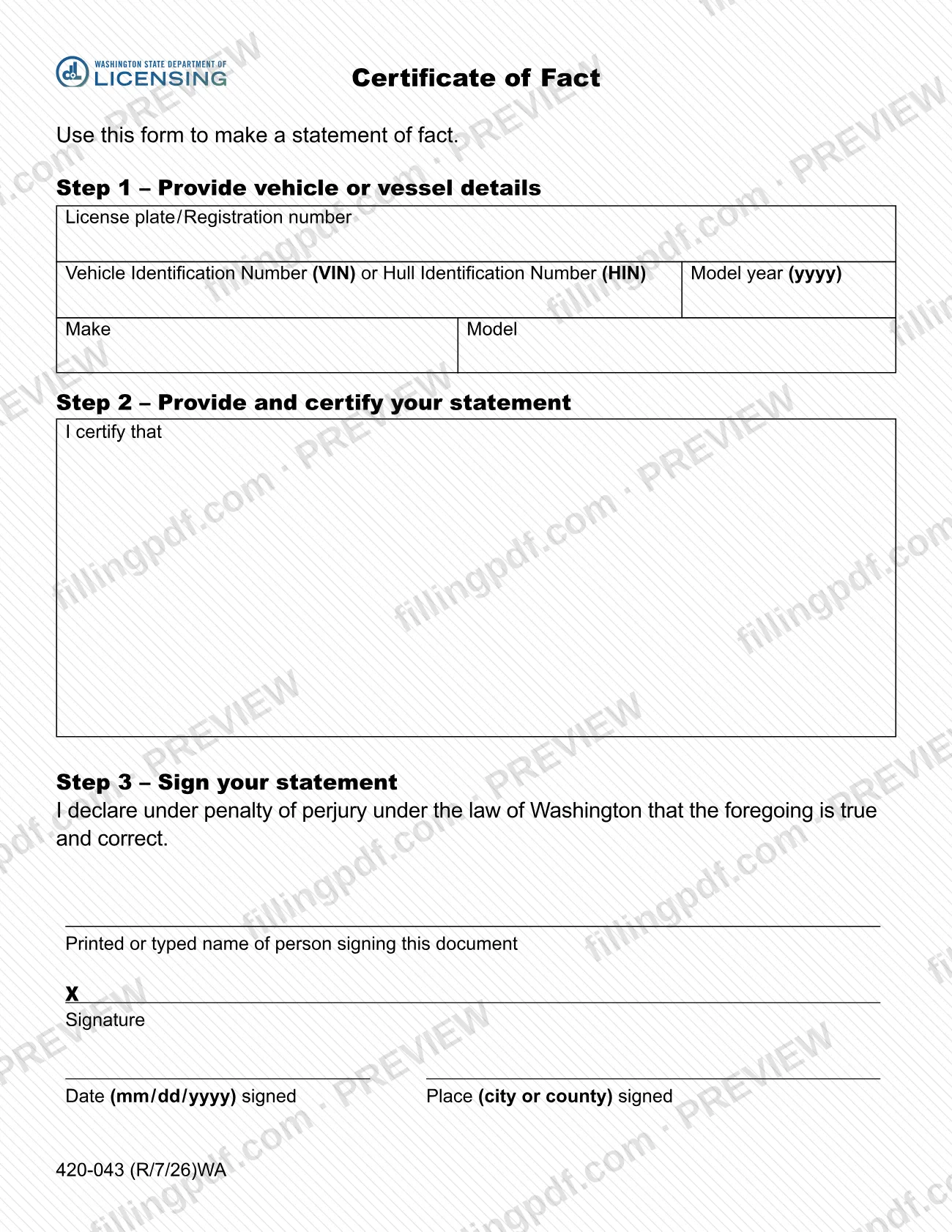
The certificate of fact is a one-page form from the Washington State Department of Licensing (DOL) that lets you put a statement of fact about a vehicle or vessel in writing and sign it under penalty of perjury. You identify the vehicle or vessel in Step 1, write and certify your statement in Step 2, and sign in Step 3. On this page you can fill out the form online on FillingPDF and download or print the completed PDF; the form itself is published by the DOL at dol.wa.gov.
Last updated
What is 420-043?
Form 420-043, Certificate of Fact (English), is the Washington State Department of Licensing (DOL) form for making a statement of fact about a vehicle or vessel and signing it under penalty of perjury.
The DOL prints a single instruction at the top of the form: use it to make a statement of fact. The form is built in three steps:
- Step 1 – Provide vehicle or vessel details: license plate or registration number, Vehicle Identification Number (VIN) or Hull Identification Number (HIN), model year (yyyy), make and model.
- Step 2 – Provide and certify your statement: a space that begins "I certify that", where you write the facts you are stating.
- Step 3 – Sign your statement: the declaration that the foregoing is true and correct under the law of Washington, the printed name of the person signing, the signature, the date signed (mm / dd / yyyy) and the place (city or county) where it was signed.
Completing the form produces a signed, dated declaration tied to a specific vehicle or vessel. The form is printed with the code 420-043 and the revision mark R/7/26. It does not set out what kind of fact it may certify; the content of the statement is whatever you write in Step 2. The DOL lists it among its Vehicles and Boats forms.
Who needs to file 420-043?
Anyone who needs to make a statement of fact about a vehicle or vessel and sign it under penalty of perjury uses this form. The DOL describes it only as the form to use to make a statement of fact, and it asks for the details of one vehicle or vessel at a time.
The person who signs is the person who makes the statement. Step 3 asks for the printed or typed name of the person signing and for that person's signature, so the name on the form should be the signer's.
The form does not list eligibility conditions, exclusions or rules for a representative signing on someone else's behalf. If another office or transaction asks you for a certificate of fact, confirm with that office what the statement must say.
When to file 420-043
Complete the form when you need to make a statement of fact about a vehicle or vessel. The form prints no due date, filing window or validity period of its own, so timing depends on the office or transaction that asks for the statement.
The signing date is part of the form: Step 3 asks for the date signed in mm / dd / yyyy format and the place, by city or county, where you signed.
How to fill out 420-043
Enter plate or registration number
In Step 1, enter the License plate / Registration number of the vehicle or vessel.
Enter the VIN or HIN
Enter the Vehicle Identification Number (VIN) for a vehicle or the Hull Identification Number (HIN) for a vessel in the single field the form provides for either.
Add model year, make and model
Enter the model year as four digits (yyyy), then the Make and the Model.
Write your statement of fact
In Step 2, complete the sentence that begins "I certify that" with the fact you are stating.
Enter the signer's printed name
In Step 3, enter the printed or typed name of the person signing the document.
Enter the date and place signed
Enter the date signed as mm / dd / yyyy and the place (city or county) where you are signing.
Review, download and sign
Check every entry against the vehicle or vessel, then download or print the completed PDF from FillingPDF and sign it by hand where it says "Print form and sign here".
How to submit 420-043
The form prints no mailing address, portal or appointment rule. It does tell you how to sign: the signature line is marked "Print form and sign here", so you print the completed form and sign it by hand. The DOL also recommends downloading its PDF forms and opening them with the latest version of Adobe Reader, because completing them in a web browser can cause formatting issues. FillingPDF lets you fill out and download the PDF; submission follows the channels of the agency or office that requests the statement.
Common mistakes to avoid
- Submitting the form without a handwritten signature; the signature line says to print the form and sign it.
- Leaving out the printed or typed name of the person signing in Step 3.
- Omitting the date signed in mm / dd / yyyy format or the place (city or county) where you signed.
- Entering the model year in a format other than four digits (yyyy).
- Leaving the VIN or HIN blank, so the statement is not tied to a specific vehicle or vessel.
- Skipping the statement under "I certify that" in Step 2, which leaves nothing to certify.
- Opening and completing the PDF in a web browser instead of a downloaded copy, which the DOL warns can cause formatting issues.
Frequently asked questions
What is a certificate of fact?
A certificate of fact is a signed statement about a vehicle or vessel. The Washington State Department of Licensing (DOL) publishes Form 420-043 for it: you identify the vehicle or vessel, state the fact after "I certify that", and sign under penalty of perjury under the law of Washington.
Can I fill out the certificate of fact online?
Yes. You can fill out the PDF online on FillingPDF and download or print it. The form still has to be signed by hand where it says "Print form and sign here". FillingPDF is independent of the DOL and does not file the form.
What information does Form 420-043 ask for?
Step 1 asks for the license plate or registration number, the VIN or HIN, the model year (yyyy), the make and the model. Step 2 is your statement, and Step 3 asks for the signer's printed name, signature, date signed and place signed.
Does the certificate of fact have to be signed?
Yes. Step 3 contains a declaration under penalty of perjury and a signature line marked "Print form and sign here". Print the completed form, sign it and enter the date (mm / dd / yyyy) and the city or county where you signed.
Can I use the certificate of fact for a boat?
Yes. The form covers a vehicle or vessel: for a boat, enter the registration number and the Hull Identification Number (HIN) in Step 1, along with the model year, make and model.
Where do I send the certificate of fact?
The form prints no address or portal. Submit it to the agency or office that asked you for the statement, following that office's instructions. The DOL's forms page is at dol.wa.gov/forms/view.
What is the revision of the certificate of fact form?
The form is printed as 420-043 with the revision mark R/7/26 and "WA". The version on this page is the DOL's English edition, titled Certificate of Fact (English).
Ready to fill out 420-043?
Fill out 420-043 now