
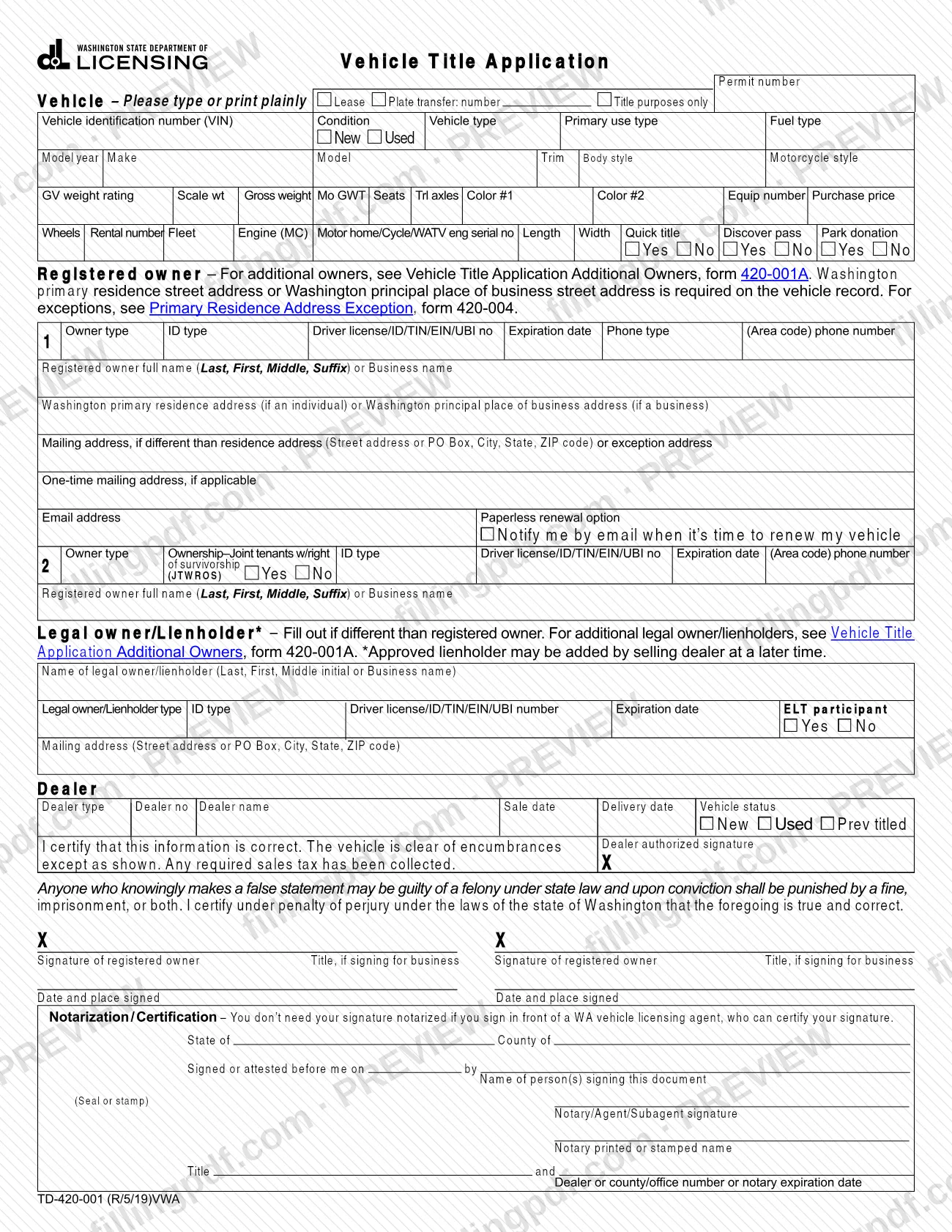
This vehicle title application is Form 420001, Vehicle Title Application (English), published by the Washington State Department of Licensing (DOL). The DOL keeps the form on its own website at https://dol.wa.gov/forms/view/420001. On this page you can fill out the form online on FillingPDF and download or print the completed PDF; the official form and the DOL's guidance on completing PDF forms stay with the agency.
Last updated
What is 420001?
Form 420001, Vehicle Title Application (English), is the Washington State Department of Licensing (DOL) form used to apply for a vehicle title in Washington. The DOL distributes it as a PDF through its forms website.
The word "English" is part of the DOL's name for this edition of the form. The DOL organizes its forms by category, such as Vehicles and Boats or Professional Licenses, and lets visitors search its forms by keyword or category. The agency states that all of its forms are free.
For PDF forms in general, the DOL gives one piece of guidance: download the form to your computer or network drive and open it with the latest version of Adobe Reader before filling it out, because completing forms in a web browser can cause formatting issues. The same advice applies to this form.
The DOL's forms page, https://dol.wa.gov/forms/view/420001, is where the agency publishes the current version of Form 420001.
Who needs to file 420001?
People who need to apply for a vehicle title with the Washington State Department of Licensing (DOL) use this form, as its name states. The DOL's general forms page does not set eligibility rules, exclusions or signature requirements for Form 420001, so confirm who may apply, and who may act for the owner, with the DOL before you submit it.
How to fill out 420001
Confirm the form on the DOL site
Open https://dol.wa.gov/forms/view/420001 and check that Form 420001, Vehicle Title Application (English), is the form you need.
Use a current PDF reader
The DOL recommends the latest version of Adobe Reader for its PDF forms, and says that filling forms in a web browser can cause formatting issues.
Open the form on FillingPDF
Open the fillable PDF on this page to fill out the form online, or download the official PDF from the DOL and complete it on your computer.
Complete each entry as printed
Enter the information every labeled field on the form asks for, in the format the form shows. Where a field does not apply to you, follow the form's own wording.
Check every entry for accuracy
Read the filled form from top to bottom, comparing names and vehicle details with the records you have, and look for blank entries or formatting problems.
Sign if required, then download
If the form has a signature block, sign it as the form directs. Download or print the completed PDF from FillingPDF and submit it through the DOL's channels.
How to submit 420001
The DOL publishes Form 420001 at https://dol.wa.gov/forms/view/420001, and the agency's own channels govern how a completed form is delivered. This page does not name a mailing address, portal or office for Form 420001, so check the DOL form page or contact the DOL for the current way to submit it. The DOL states that all of its forms are free; that statement covers the form itself, so ask the DOL about any other charge connected with a title application. FillingPDF lets you fill out and download the PDF; submission follows the DOL's channels.
Common mistakes to avoid
- Filling out the PDF inside a web browser instead of downloading it first; the DOL warns that completing forms in a browser can cause formatting issues.
- Opening the downloaded form in an old PDF viewer; the DOL recommends the latest version of Adobe Reader for filling out its PDF forms.
- Sending a completed form without checking how it looks after filling; browser filling can distort formatting, so review the finished PDF before it leaves your hands.
- Paying a third party for the blank form; the DOL states that all of its forms are free and publishes them on its own site.
Frequently asked questions
What is the vehicle title application?
It is Form 420001, Vehicle Title Application (English), a Washington State Department of Licensing (DOL) form for applying for a vehicle title in Washington. The DOL publishes the form on its forms website at https://dol.wa.gov/forms/view/420001.
Can I fill out Form 420001 online?
You can fill out the PDF online on FillingPDF and download or print the finished form. FillingPDF is an independent service, not connected to the DOL, and it does not file or send the form; you submit it through the DOL's channels.
Is the Washington vehicle title application free to download?
Yes. The DOL states that all of its forms are free. That statement covers the form itself, not any other charge connected with a title application, so ask the DOL if you need to know about other costs.
How should I open the DOL's PDF to fill it out?
Download it to your computer or network drive and open it with the latest version of Adobe Reader. The DOL warns that completing forms in a web browser can cause formatting issues, so avoid filling it out in the browser window.
Where do I find the official Form 420001?
The DOL publishes it at https://dol.wa.gov/forms/view/420001. The DOL's Find a form page lets you search all its forms by keyword or category, including the Vehicles and Boats category.
What does "(English)" mean in the form's name?
It is part of the name the DOL uses for this edition of Form 420001, Vehicle Title Application (English). Check the DOL's forms page for the editions the agency publishes.
Ready to fill out 420001?
Fill out 420001 now