
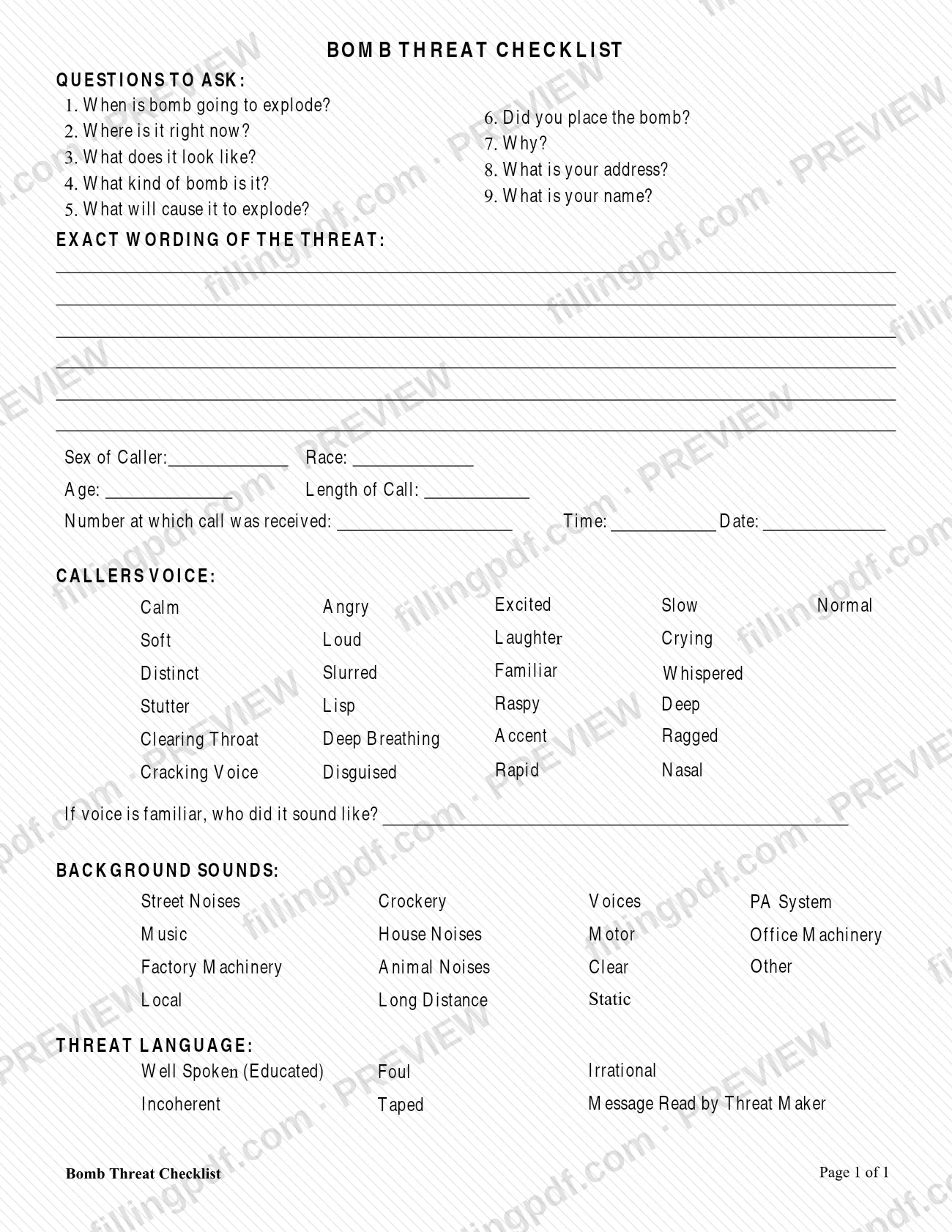
The Bomb Threat Checklist is a one-page form published by the Supreme Court of Appeals of West Virginia, which lists it among its Security forms on the court forms page. It prompts nine questions to ask a caller and gives places to record the exact wording of the threat, the caller's details, the caller's voice, background sounds and threat language. On this page you can fill out the form online on FillingPDF and download or print the completed PDF; the official PDF is published by the court at courtswv.gov.
Last updated
What is Bomb Threat Checklist – West Virginia?
The Bomb Threat Checklist is a one-page checklist from the Supreme Court of Appeals of West Virginia that lists the questions to ask a caller who reports a bomb threat and the details to record about the caller, the call and the threat.
The form has no form number or revision date printed on it. It is organized in sections:
- Questions to Ask: nine numbered questions, from "When is bomb going to explode?" and "Where is it right now?" to "Did you place the bomb?", "Why?", "What is your address?" and "What is your name?"
- Exact Wording of the Threat: a space to write down what the caller said.
- Caller details: sex, race, age, length of call, the number at which the call was received, and the time and date.
- Callers Voice: boxes such as Calm, Angry, Whispered, Disguised, Accent or Nasal, plus a line for who a familiar voice sounded like.
- Background Sounds: boxes such as Street Noises, Music, PA System, Factory Machinery, Static, Local and Long Distance.
- Threat Language: boxes such as Well Spoken (Educated), Foul, Irrational, Incoherent, Taped Message and Read by Threat Maker.
The court lists the checklist on its court forms page in the Security category, next to the Phone Threat Checklist and the Security Incident Fact Sheet. The PDF itself carries Print Form and Reset Form buttons.
Who needs to file Bomb Threat Checklist – West Virginia?
The form is written for the person who takes a bomb threat call: its first section is a list of questions to put to the caller, and the rest records what that person heard. The Supreme Court of Appeals of West Virginia places it with its Security forms, together with the Phone Threat Checklist and the Security Incident Fact Sheet, so it is a security document rather than a court filing.
The form sets no eligibility rules and has no exclusions. It has no signature block and no line for a representative or a person completing it on someone else's behalf. The only identifying details it asks for are about the caller and the call: the caller's sex, race and age, the length of the call, the number at which the call was received, and the time and date. Nothing on the form asks for the name of the person who completed it.
When to file Bomb Threat Checklist – West Virginia
The checklist applies when a bomb threat call is received. Its questions are phrased to be asked of the caller, and it asks for the number at which the call was received, the time and date, and the length of the call, so those details belong to a specific call. The form prints no due date, no reporting deadline and no renewal cycle, and it is not tied to any court case or filing period. Because its sections cover the caller's voice, background sounds and threat language, it is meant to be completed from the call itself rather than reconstructed from memory.
How to fill out Bomb Threat Checklist – West Virginia
Work through the nine questions
Under Questions to Ask, use questions 1 to 9 as the list to put to the caller, from "When is bomb going to explode?" to "What is your name?". Note the answers the caller gives.
Write the exact wording of the threat
In the Exact Wording of the Threat space, enter the caller's words as closely as you can.
Describe the caller
Enter the Sex of Caller, Race and Age, and the Length of Call.
Record the call details
Enter the Number at which call was received, the Time and the Date.
Mark the caller's voice
Under Callers Voice, check each description that fits, such as Calm, Angry, Soft, Distinct, Accent or Disguised. If you check Familiar, write who it sounded like on the line below.
Mark the background sounds
Under Background Sounds, check what you heard, such as Street Noises, Music, Voices, PA System, Static, Local or Long Distance. Use Other if none fits.
Mark the threat language
Under Threat Language, check the boxes that describe how the caller spoke: Well Spoken (Educated), Foul, Irrational, Incoherent, Taped Message or Read by Threat Maker.
Review and download the completed PDF
Check that every section is filled in, then download or print the completed PDF from FillingPDF. The form has Print Form and Reset Form buttons if you need to start over.
Common mistakes to avoid
- Leaving the Exact Wording of the Threat space empty or paraphrasing it instead of writing down what the caller actually said.
- Skipping any of the nine numbered questions, including question 8 (What is your address?) and question 9 (What is your name?).
- Omitting the call details: the number at which the call was received, the time, the date and the length of the call.
- Marking the Familiar box under Callers Voice but leaving the line "If voice is familiar, who did it sound like?" blank.
- Confusing the Deep box with Deep Breathing; both appear separately in the Callers Voice list.
- Completing only the voice section and ignoring Background Sounds and Threat Language, which are separate parts of the form.
Frequently asked questions
What is the bomb threat checklist?
The Bomb Threat Checklist is a one-page form from the Supreme Court of Appeals of West Virginia. It lists nine questions to ask a caller and sections to record the threat's exact wording, the caller, the call, the caller's voice, background sounds and threat language.
Can I fill out the bomb threat checklist online?
Yes. You can fill out the PDF online on FillingPDF and download or print it. FillingPDF is an independent service, not connected to the West Virginia courts, and it does not file or send the form to anyone.
What questions does the bomb threat checklist ask the caller?
Nine: when the bomb is going to explode, where it is right now, what it looks like, what kind of bomb it is, what will cause it to explode, whether the caller placed it, why, the caller's address and the caller's name.
What details about the call does the checklist record?
The sex, race and age of the caller, the length of the call, the number at which the call was received, and the time and date. It also records the exact wording of the threat.
What voice descriptions are on the checklist?
The Callers Voice section has boxes including Calm, Angry, Excited, Slow, Normal, Soft, Loud, Laughter, Crying, Distinct, Slurred, Familiar, Whispered, Stutter, Lisp, Raspy, Deep, Accent, Disguised, Rapid and Nasal. A line asks who a familiar voice sounded like.
Does the bomb threat checklist have a form number or deadline?
No. The court's PDF prints no form number, revision date or due date. The Supreme Court of Appeals of West Virginia lists it by name in the Security category of its court forms page.
Are there other threat forms from the West Virginia courts?
Yes. The court forms page lists the Phone Threat Checklist and the Security Incident Fact Sheet in the same Security category as the Bomb Threat Checklist.
Ready to fill out Bomb Threat Checklist – West Virginia?
Fill out Bomb Threat Checklist – West Virginia now