
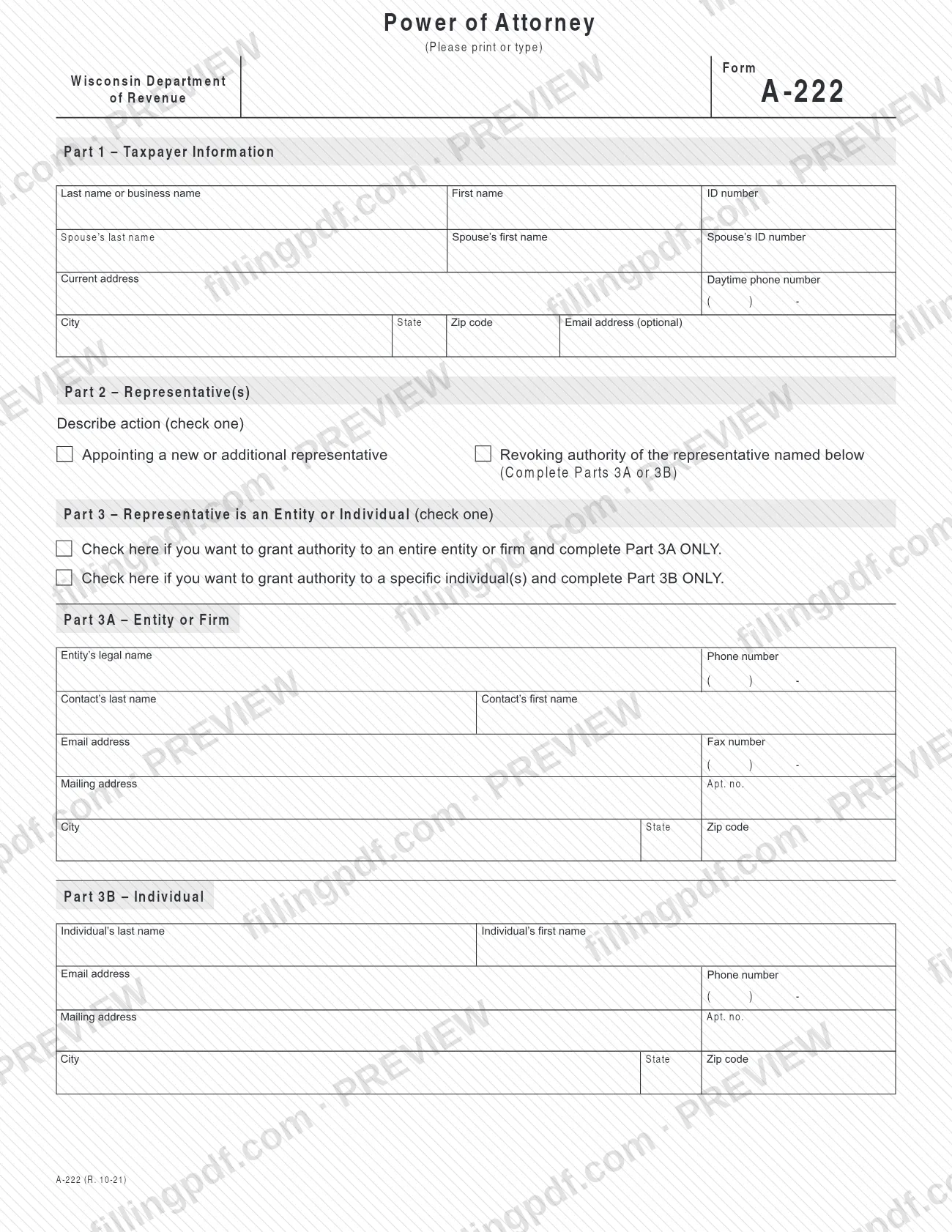
Wisconsin Form A-222, Power of Attorney, is the form a taxpayer signs to authorize a representative to act before the Wisconsin Department of Revenue, or to revoke that authority. The taxpayer can grant full authority or limited authority for chosen tax types, and the representative can be an entire firm or specific individuals. On this page you can fill out the form online on FillingPDF and download or print the completed PDF; the form and its instructions are published by the Wisconsin Department of Revenue.
Last updated
What is A-222?
Form A-222, Power of Attorney, is the Wisconsin Department of Revenue form on which a taxpayer appoints a representative to act on matters before the department, grants full or limited authority, or revokes the authority of a representative already named.
It is not a general-purpose power of attorney: the authority it grants covers matters before the Wisconsin Department of Revenue. The form is divided into five parts:
- Part 1: taxpayer information, with lines for a spouse.
- Part 2: whether you are appointing a new or additional representative or revoking the authority of the representative named.
- Parts 3, 3A and 3B: the representative, either an entire entity or firm (3A) or specific individuals (3B).
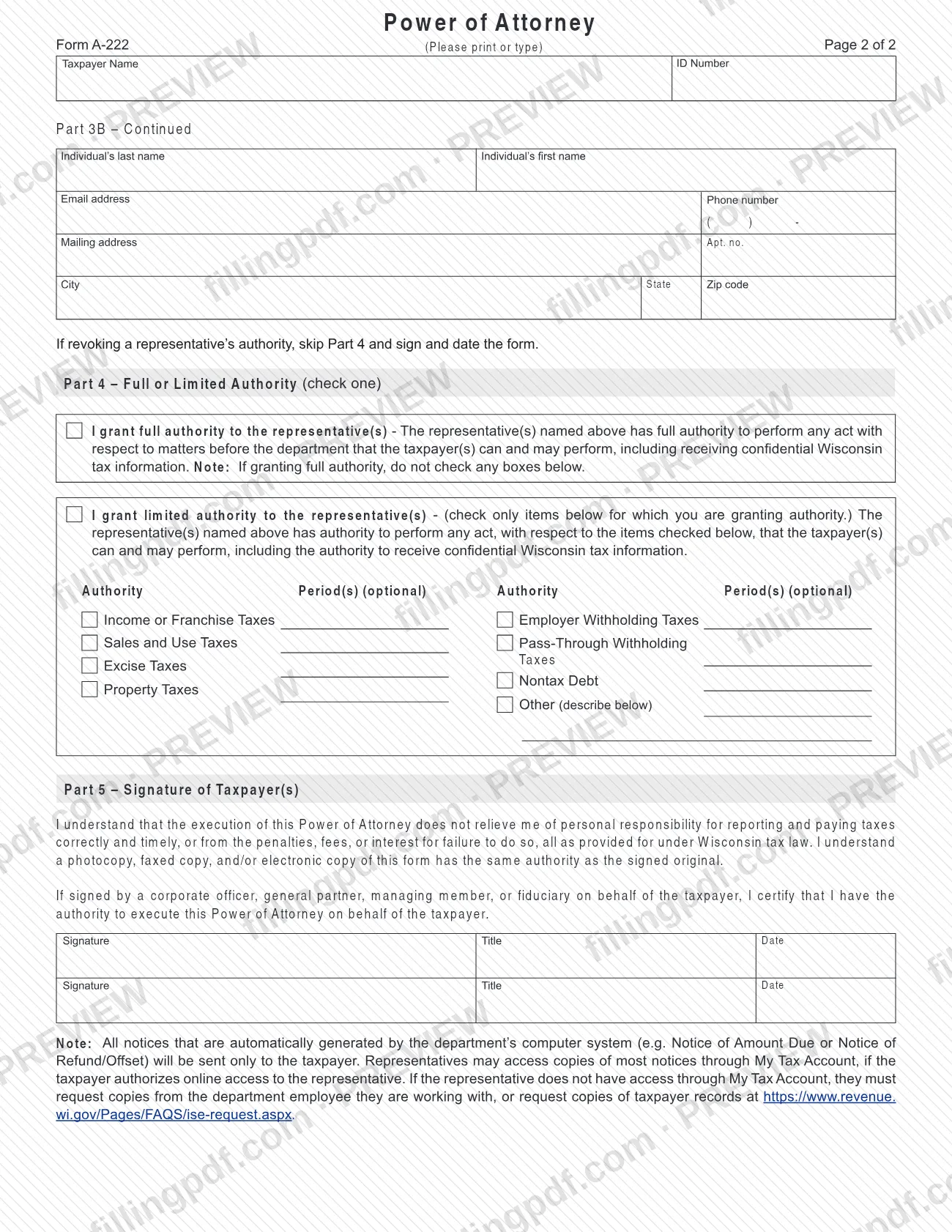
- Part 4: full or limited authority.
- Part 5: the taxpayer's signature.
Full authority lets the representative perform any act with respect to matters before the department that the taxpayer can and may perform, including receiving confidential Wisconsin tax information. Limited authority applies only to the items you check: income or franchise taxes, sales and use taxes, excise taxes, property taxes, employer withholding taxes, pass-through withholding taxes, nontax debt, or another item you describe.
Signing does not relieve the taxpayer of personal responsibility for reporting and paying taxes correctly and on time, or of penalties, fees or interest under Wisconsin tax law. The printed revision is R. 10-21. The department's forms page lists the form under Tax Return Information, next to a separate Pass-Through Entity Representative form.
Who needs to file A-222?
A taxpayer who wants someone else to deal with the Wisconsin Department of Revenue on their behalf completes and signs Form A-222. The form has spaces for an individual taxpayer, a spouse, or a business name, each with an ID number.
- Taxpayers appointing a representative: use the form to name a new or additional representative, either an entire entity or firm or one or more specific individuals.
- Taxpayers revoking authority: use the same form to revoke the authority of the representative named on it.
- Corporate officers, general partners, managing members and fiduciaries: may sign for the taxpayer, and by signing they certify that they have the authority to execute the Power of Attorney on the taxpayer's behalf.
The representative does not sign this form. The form does not take over the taxpayer's duties: the taxpayer remains personally responsible for reporting and paying taxes correctly and on time. Notices that the department's computer system generates automatically go only to the taxpayer, not to the representative.
When to file A-222
Complete Form A-222 when you want to appoint a new or additional representative before the Wisconsin Department of Revenue, or to revoke the authority of the representative already named. Part 2 is where you tell the department which of the two you are doing. The form prints no due date.
For a limited grant, Part 4 has an optional Authority Period(s) space beside each tax type, so you can state the period for which the authority applies. A revocation skips Part 4: the form says to sign and date it after Part 3.
How to fill out A-222
Save the PDF before you start
The form says to save it to your computer before completing it. Print or type every entry.
Enter taxpayer information
In Part 1, enter the last name or business name, first name and ID number. Use the spouse's last name, first name and ID number lines when they apply.
Add address and contact details
Enter your current address, city, state, zip code and daytime phone number. The email address is optional.
Choose to appoint or revoke
In Part 2, check one: appointing a new or additional representative, or revoking the authority of the representative named below. Then complete Part 3A or 3B.
Choose entity or individual
In Part 3, check one box. Check the first to grant authority to an entire entity or firm and complete Part 3A only; check the second for specific individuals and complete Part 3B only.
Complete Part 3A for a firm
Enter the entity's legal name, phone number, the contact's last and first name, email address, fax number, mailing address, apartment number, city, state and zip code.
Complete Part 3B for individuals
Enter each individual's last and first name, email address, phone number, mailing address, apartment number, city, state and zip code. Page 2 has a continuation of Part 3B for another individual.
Repeat name and ID on page 2
At the top of page 2, enter the Taxpayer Name and ID Number so the continuation page matches Part 1.
Choose full or limited authority
In Part 4, check one: full authority or limited authority. If you are revoking a representative's authority, skip Part 4. If you grant full authority, do not check any box below it.
Select limited authority items
For limited authority, check only the items you are granting: income or franchise taxes, sales and use taxes, excise taxes, property taxes, employer withholding taxes, pass-through withholding taxes, nontax debt, or Other (describe below). Add optional Authority Period(s) where you want them.
Sign and date Part 5
Sign, enter your title and date the form on the first line; a second line is provided for a second taxpayer. If you sign as a corporate officer, general partner, managing member or fiduciary, you certify that you have authority to sign for the taxpayer.
Review and download the completed PDF
Check that only one Part 3 box is used and that Part 4 matches your choice in Part 2. Download or print the completed PDF from FillingPDF and submit it through the department's channels described under How to submit.
How to submit A-222
Form A-222 prints no mailing address, fax number or online portal, so follow the submission instructions in the Wisconsin Department of Revenue's instructions for Power of Attorney, which the department lists with the form on its forms page under Tax Return Information. What the form itself says:
- Copies: in Part 5 the taxpayer acknowledges that a photocopy, faxed copy and/or electronic copy of the form has the same authority as the signed original.
- Notices: notices generated automatically by the department's system, such as a Notice of Amount Due or Notice of Refund/Offset, go only to the taxpayer. A representative can view copies of most notices through My Tax Account if the taxpayer authorizes online access. Without that access, the representative must ask the department employee they are working with, or request copies of taxpayer records at https://www.revenue.wi.gov/Pages/FAQS/ise-request.aspx.
- Fill-in option: the department's forms page says its fill-in forms option does not electronically file your form.
FillingPDF lets you fill out and download the PDF; submission follows the department's channels.
Common mistakes to avoid
- Checking boxes in the limited-authority list while also granting full authority; the form says not to check any boxes below when granting full authority.
- Completing both Part 3A and Part 3B; the form says to complete 3A ONLY for an entity or firm, or 3B ONLY for specific individuals.
- Filling in Part 4 when revoking a representative's authority; the form says to skip Part 4 and sign and date.
- Leaving Part 5 unsigned or undated, or leaving the Title line empty when an officer, partner, member or fiduciary signs for the taxpayer.
- Leaving Taxpayer Name and ID Number blank at the top of page 2, which identifies the taxpayer on the continuation page.
- Assuming the representative receives the department's automatic notices; they are sent only to the taxpayer unless the taxpayer authorizes online access through My Tax Account.
- Treating the form as a release from tax duties; Part 5 states that it does not relieve the taxpayer of personal responsibility, penalties, fees or interest.
- Filling out the PDF before saving it to your computer; the form says to save it first so it works properly.
Frequently asked questions
What is Wisconsin Form A-222, Power of Attorney?
Form A-222, Power of Attorney, is the Wisconsin Department of Revenue form a taxpayer uses to appoint a representative to act on matters before the department, or to revoke the authority of a representative already named. Authority can be full or limited to listed tax types.
Can I limit what my representative can do?
Yes. In Part 4, choose limited authority and check only the items you are granting, such as income or franchise taxes, sales and use taxes, property taxes or employer withholding taxes. Each item has an optional Authority Period(s) space. If you grant full authority, check no items.
How do I revoke a representative on Form A-222?
In Part 2, check the box for revoking the authority of the representative named, then complete Part 3A or 3B to identify that representative. Skip Part 4, and sign and date the form in Part 5, as the form directs.
Can I name a firm instead of one person?
Yes. In Part 3, check the box to grant authority to an entire entity or firm and complete Part 3A only. To name specific individuals, check the other box and complete Part 3B only; page 2 has a continuation for more individuals.
Will my representative receive the department's notices?
Not automatically. Notices generated by the department's computer system go only to the taxpayer. A representative can see copies of most notices through My Tax Account if the taxpayer authorizes online access; otherwise they must ask the department employee they are working with.
Does Form A-222 relieve me of my tax responsibilities?
No. In Part 5 the taxpayer states that signing does not relieve them of personal responsibility for reporting and paying taxes correctly and on time, or of penalties, fees or interest for failure to do so under Wisconsin tax law.
Is a photocopy or faxed copy of the signed form valid?
The form says so. In Part 5 the taxpayer acknowledges that a photocopy, faxed copy and/or electronic copy has the same authority as the signed original. It prints no address or portal, so follow the department's instructions for where to send it.
Can I fill out Form A-222 online on FillingPDF?
Yes. You can fill out the fillable PDF online on FillingPDF and download or print it. FillingPDF is an independent service and does not file the form with the Wisconsin Department of Revenue; you submit it through the department's channels.
Ready to fill out A-222?
Fill out A-222 now