
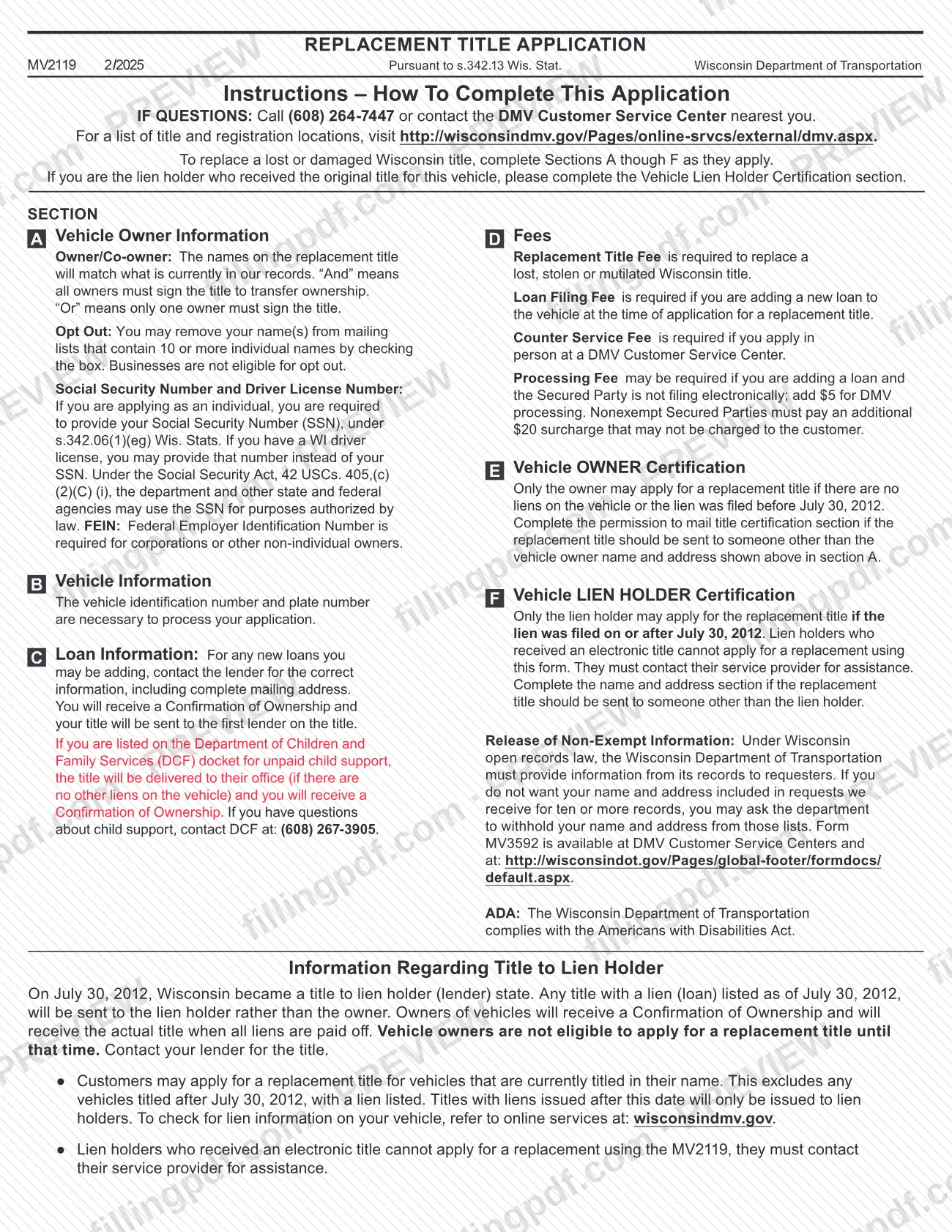
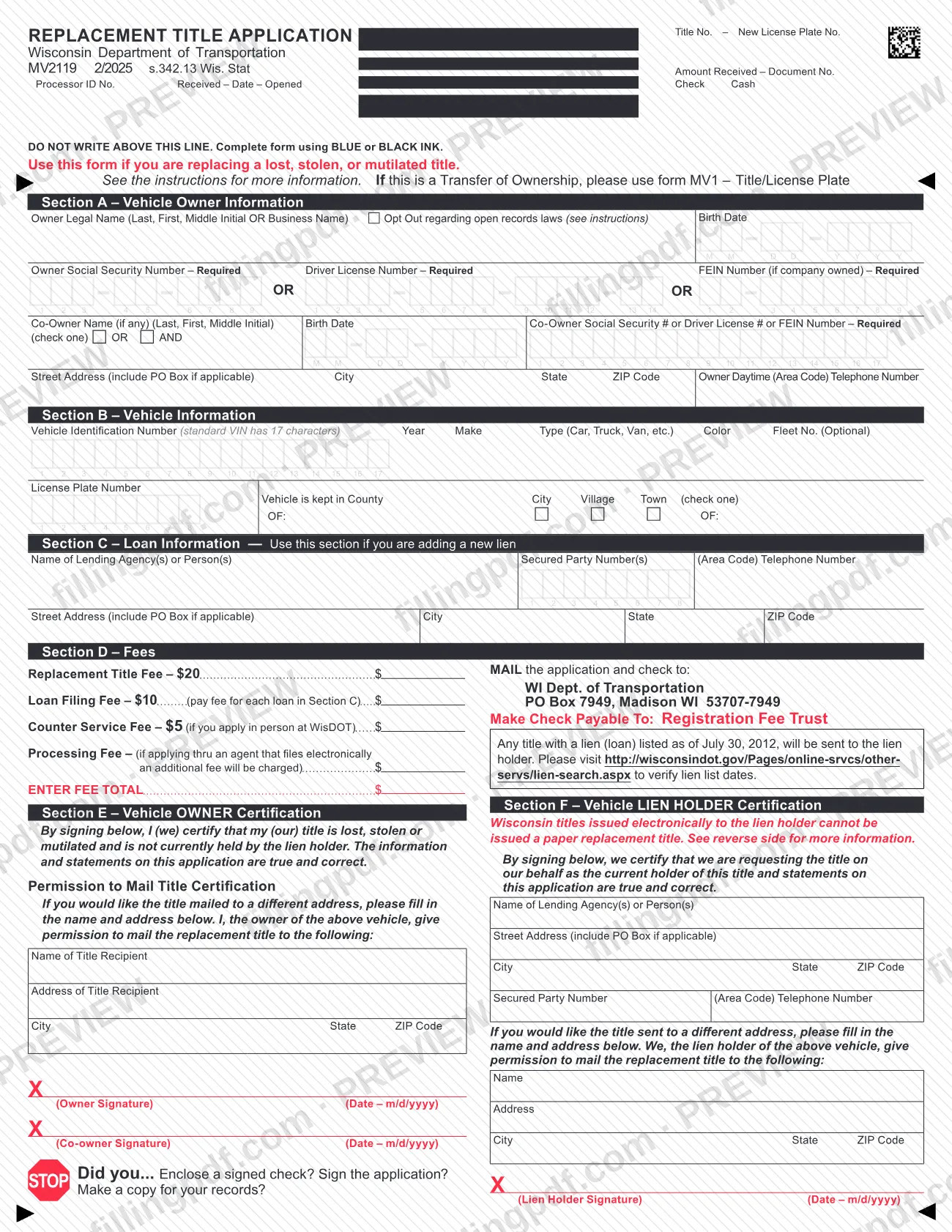
MV2119 is the Replacement Title Application that the Wisconsin Department of Transportation (WisDOT) DMV issues under s.342.13 Wis. Stat. for replacing a lost, stolen or mutilated Wisconsin title. Vehicle owners use it when no lien stands in the way, and lien holders use its Section F when the lien was filed on or after July 30, 2012. On this page you can fill out the form online on FillingPDF and download or print the completed PDF; the agency publishes the original at wisconsindot.gov.
Last updated
What is MV2119?
Form MV2119, Replacement Title Application, is the Wisconsin Department of Transportation form used to replace a lost, stolen or mutilated Wisconsin title. It is issued pursuant to s.342.13 Wis. Stat. and is completed in Sections A through F as they apply.
The form has six parts. Section A collects owner information, Section B the vehicle, Section C a new loan if one is being added, Section D the fees, Section E the owner's certification and Section F the lien holder's certification. A lien holder that received the original title completes the Vehicle Lien Holder Certification section.
Wisconsin became a title to lien holder (lender) state on July 30, 2012. A title with a lien listed as of that date goes to the lien holder, and the owner receives a Confirmation of Ownership and then the actual title when all liens are paid off. That rule decides who may use this form.
MV2119 is not for a transfer of ownership: the form says to use form MV1, Title/License Plate, for that. Lien holders who received an electronic title cannot use MV2119 and must contact their service provider.
Who needs to file MV2119?
Vehicle owners who need to replace a lost, stolen or mutilated Wisconsin title for a vehicle currently titled in their name use this form when there are no liens on the vehicle or the lien was filed before July 30, 2012. Only the owner may apply in that case.
Lien holders use it when the lien was filed on or after July 30, 2012. Only the lien holder may apply then, and the lien holder completes Section F.
Who cannot use it:
- Owners of vehicles titled after July 30, 2012 with a lien listed. The title goes only to the lien holder, and the owner gets a Confirmation of Ownership until the liens are paid off.
- Lien holders that received an electronic title. They must contact their service provider.
- Anyone transferring ownership, who should use form MV1 instead.
Individuals must provide a Social Security Number (SSN), or a Wisconsin driver license number instead if they have one. Corporations and other non-individual owners must provide a Federal Employer Identification Number (FEIN). If the title should go to someone other than the owner or lien holder, the form has a permission-to-mail section.
When to file MV2119
File Form MV2119 when your Wisconsin title is lost, stolen or mutilated and you need a replacement. The form prints no deadline of its own.
Timing depends on the lien. If the vehicle has a lien listed as of July 30, 2012 or filed after that date, the title goes to the lien holder, and an owner cannot apply until the liens are paid off. The form points to the lien search at http://wisconsindot.gov/Pages/online-srvcs/other-servs/lien-search.aspx to verify lien list dates.
If you are adding a new loan to the vehicle, complete Section C at the time you apply for the replacement title. The form states that a loan filing fee applies in that case.
Documents you need
- A signed check for the fees shown in Section D, made payable to Registration Fee Trust, when you mail the application. The form's checklist asks you to enclose it.
- For a Section C new loan: the lender's correct information, including its complete mailing address, which you get from the lender.
- Your Social Security Number or Wisconsin driver license number if you apply as an individual; a FEIN if the owner is a corporation or other non-individual.
How to fill out MV2119
Confirm which form and section apply
Use MV2119 only to replace a lost, stolen or mutilated Wisconsin title; use MV1 for a transfer of ownership. Complete Sections A through F as they apply, in blue or black ink.
Enter owner name and identifiers
In Section A, enter the Owner Legal Name (Last, First, Middle Initial, or Business Name) and birth date. Provide the Social Security Number or Wisconsin driver license number, or the FEIN if company owned; check Opt Out only if you are an eligible individual.
Add the co-owner, if any
Enter the co-owner's name, birth date and SSN, driver license number or FEIN. Check AND if all owners must sign to transfer ownership, or OR if only one owner must sign.
Enter address and phone
Write the street address (include a PO Box if applicable), city, state, ZIP Code and the owner's daytime telephone number with area code.
Describe the vehicle
In Section B, enter the Vehicle Identification Number (a standard VIN has 17 characters), year, make, type, color and, optionally, a fleet number. Add the License Plate Number; both VIN and plate number are needed to process the application.
Show where the vehicle is kept
Check County, City, Village or Town as it applies and enter its name on the "OF:" line.
Complete loan information if adding a lien
In Section C, enter the lending agency name, Secured Party Number, telephone number and complete mailing address, as the lender gives them. Skip this section if you are not adding a new loan.
Total the fees in Section D
Enter the amounts that apply: replacement title fee, a loan filing fee for each loan in Section C, a counter service fee for in-person applications, and any processing fee. Add them in ENTER FEE TOTAL.
Sign the owner certification
In Section E, the owner and any co-owner sign and date in m/d/yyyy format. Complete the permission to mail title section with the recipient's name and address only if the title should go elsewhere.
Complete Section F if you are the lien holder
Enter the lending agency name, address, Secured Party Number and phone number, then the lien holder signs, prints a name and dates the certification. Fill in the name and address area only if the title should go to someone else.
Review, download and sign the PDF
Check that required numbers, signatures and the fee total are complete. Download or print the completed PDF from FillingPDF, keep a copy, and send it with a signed check as described under How to submit.
How to submit MV2119
You can send Form MV2119 to WisDOT by mail, bring it to a DMV Customer Service Center, or apply through an agent that files electronically.
- By mail: send the signed application and your check to WI Dept. of Transportation, PO Box 7949, Madison WI 53707-7949. Make the check payable to Registration Fee Trust.
- In person: take the application to a DMV Customer Service Center. A counter service fee applies when you apply in person. The form lists locations at http://wisconsindmv.gov/Pages/online-srvcs/external/dmv.aspx.
- Through an agent: if the agent files electronically, an additional processing fee may be charged.
Fees on Section D include the replacement title fee and, for each new loan in Section C, a loan filing fee. The form states the current amounts; check them on the PDF or call (608) 264-7447.
The form's checklist asks whether you enclosed a signed check, signed the application and made a copy for your records. FillingPDF lets you fill out and download the PDF; submission follows the channels above.
Common mistakes to avoid
- Applying as the owner when a lien was filed on or after July 30, 2012. Only the lien holder may apply in that case, and the owner receives a Confirmation of Ownership.
- Using MV2119 for a transfer of ownership. The form says to use form MV1, Title/License Plate, for that.
- A lien holder with an electronic title submitting this form. Those lien holders must contact their service provider instead.
- Leaving out the SSN, driver license number or FEIN. The form marks these as required.
- A business checking the Opt Out box. Businesses are not eligible for opt out.
- Mailing the application without a signed check, or with a check not payable to Registration Fee Trust.
- Not signing Section E (owner) or Section F (lien holder), or not dating it in m/d/yyyy format.
- Filling the form in pencil or another color. The form says to use blue or black ink.
- Skipping the permission to mail title certification when the title should go to someone other than the owner shown in Section A.
Frequently asked questions
What is MV2119 used for?
MV2119 is the Wisconsin DMV Replacement Title Application. You use it to replace a lost, stolen or mutilated Wisconsin title. It is issued under s.342.13 Wis. Stat., and owners or lien holders complete the sections that apply to them.
Who can apply for a replacement title with MV2119?
The owner may apply if there are no liens or the lien was filed before July 30, 2012. Only the lien holder may apply if the lien was filed on or after July 30, 2012. Lien holders with an electronic title cannot use this form.
Why can't I apply as the owner when my vehicle has a loan?
Wisconsin is a title to lien holder state: a title with a lien listed as of July 30, 2012 goes to the lender. You receive a Confirmation of Ownership and the actual title when all liens are paid off. Contact your lender for the title.
Where do I mail the Wisconsin replacement title application?
Mail the application and your check to WI Dept. of Transportation, PO Box 7949, Madison WI 53707-7949. Make the check payable to Registration Fee Trust. You can also apply in person at a DMV Customer Service Center.
Is there a fee for a replacement title?
Yes. A replacement title fee is required, plus a loan filing fee for each new loan and a counter service fee if you apply in person. A processing fee may apply when an agent or secured party does not file electronically. Check the amounts on the form.
Can I use MV2119 to transfer ownership of a vehicle?
No. MV2119 is only for replacing a lost, stolen or mutilated title. The form says that a transfer of ownership uses form MV1, Title/License Plate.
Can I fill out MV2119 online?
Yes. You can fill out the fillable PDF online on FillingPDF and download or print it. FillingPDF is independent of the Wisconsin DMV and does not file it; you mail or deliver it through the DMV's channels.
What happens if I owe child support and a lien is on the title?
If you are on the Department of Children and Family Services (DCF) docket for unpaid child support and there are no other liens, the title is delivered to the DCF office and you receive a Confirmation of Ownership. For questions, call DCF at (608) 267-3905.
Ready to fill out MV2119?
Fill out MV2119 now