
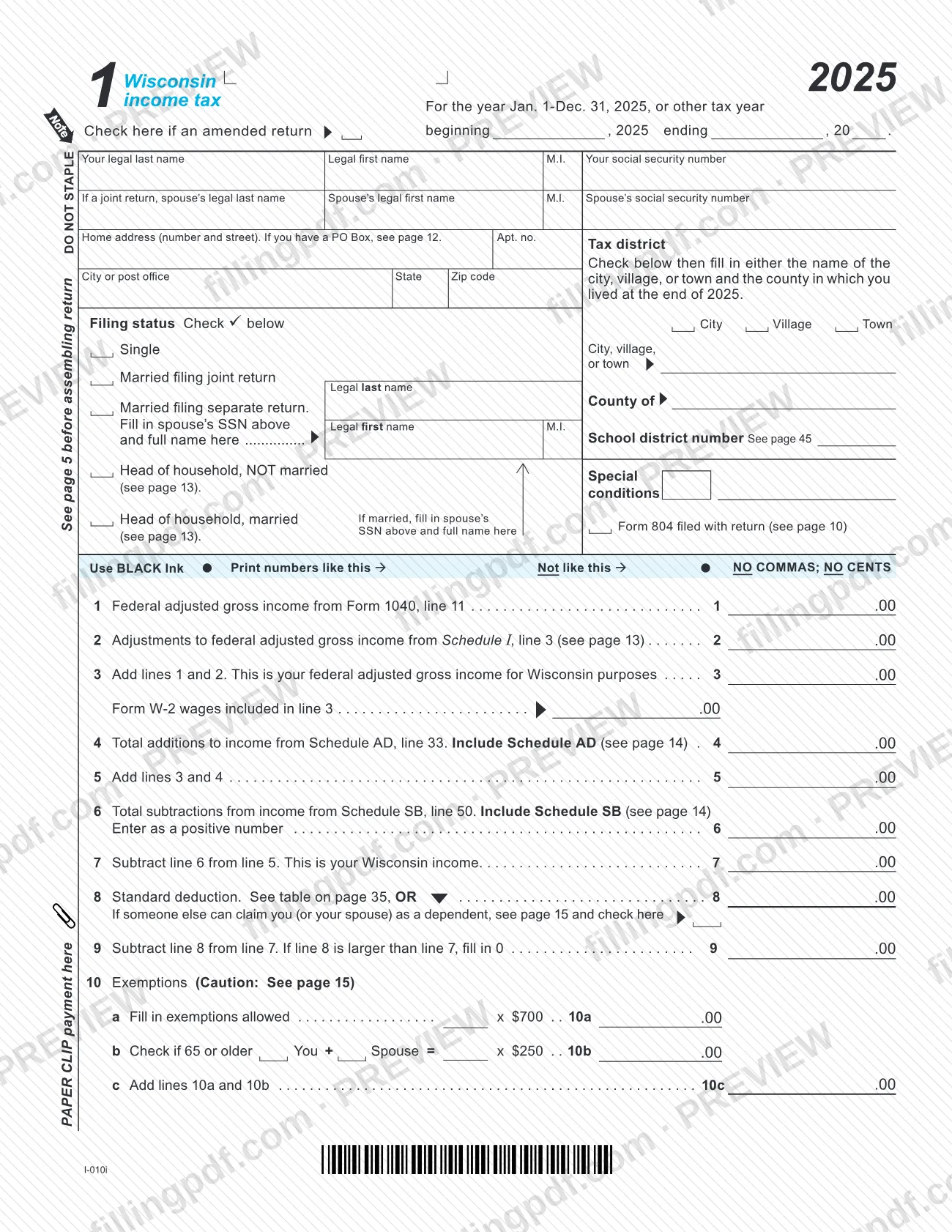
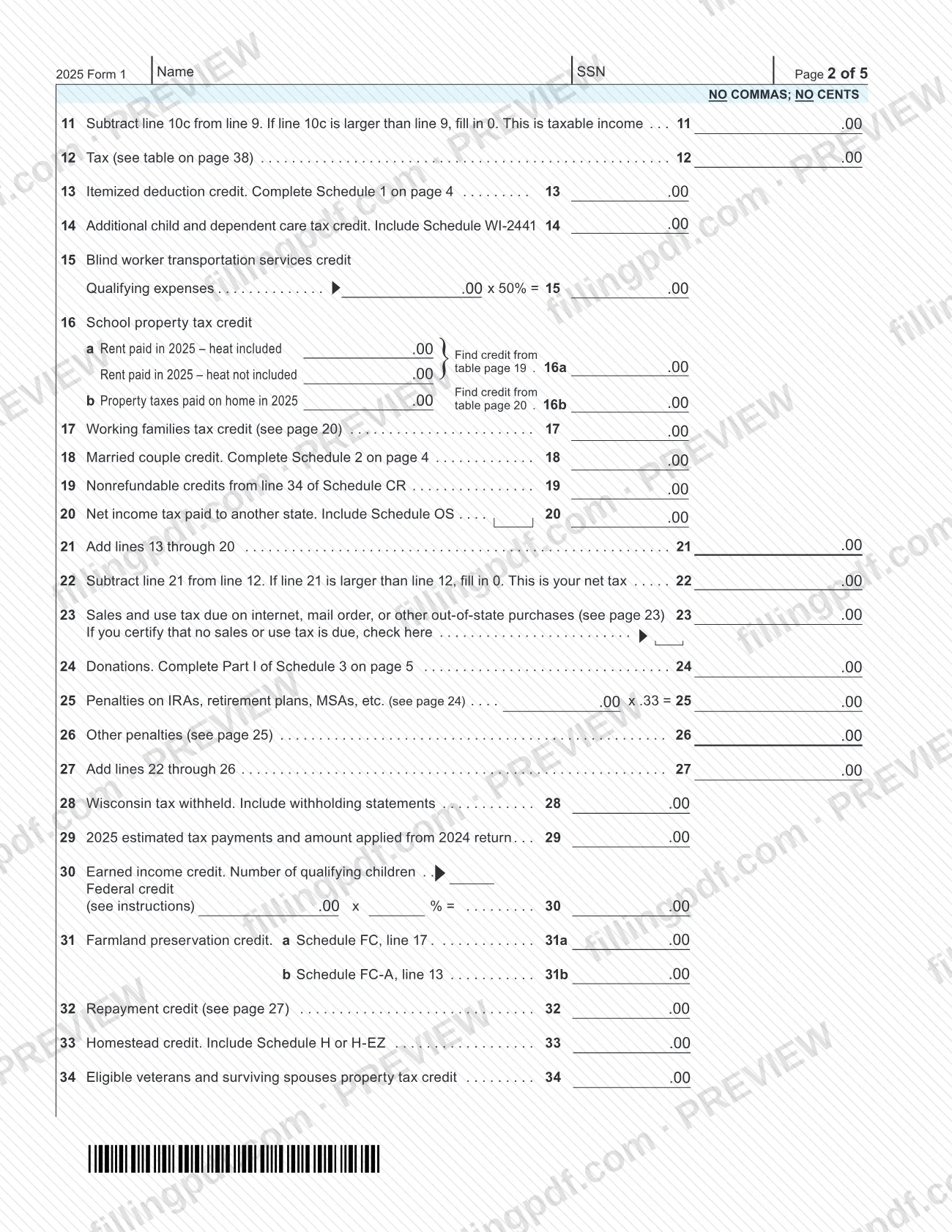
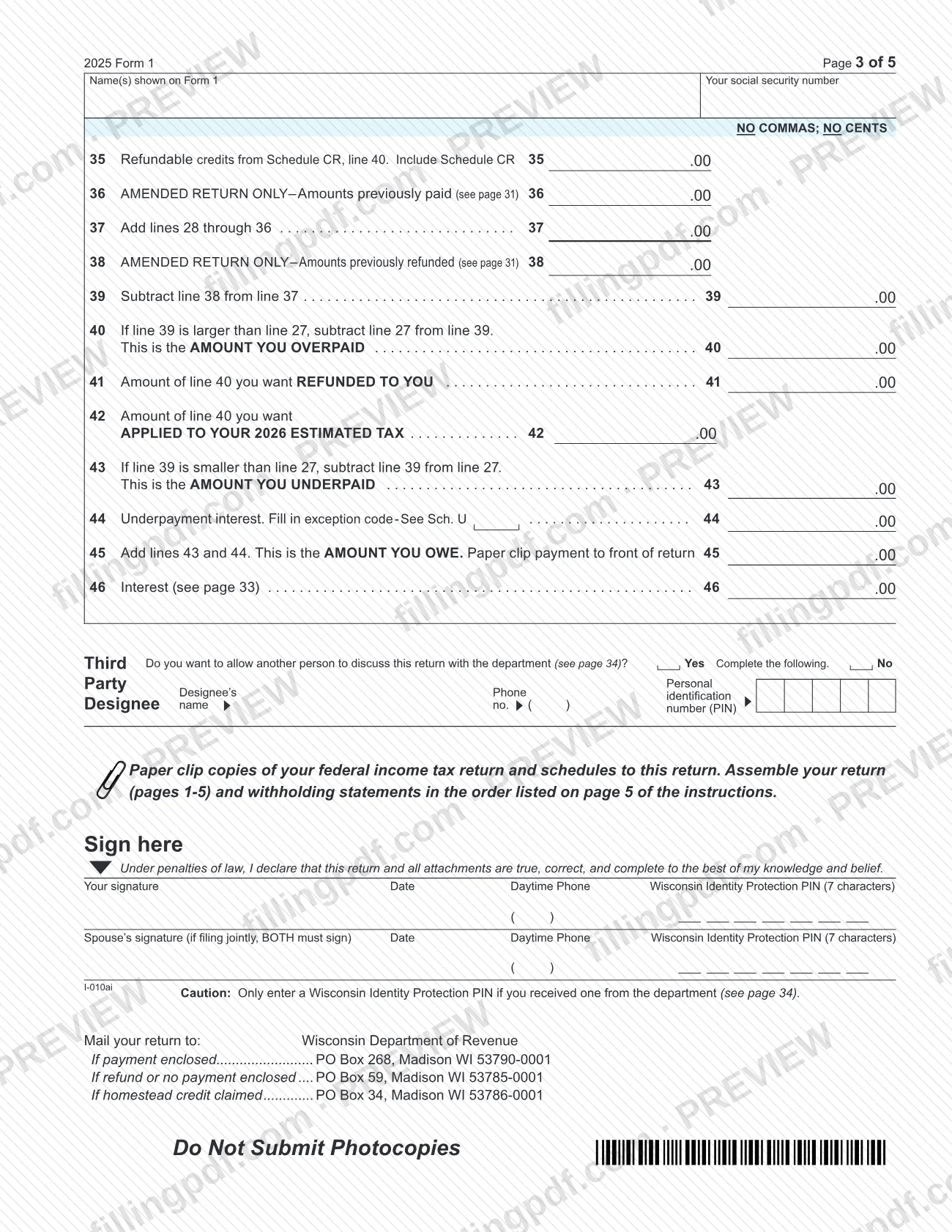
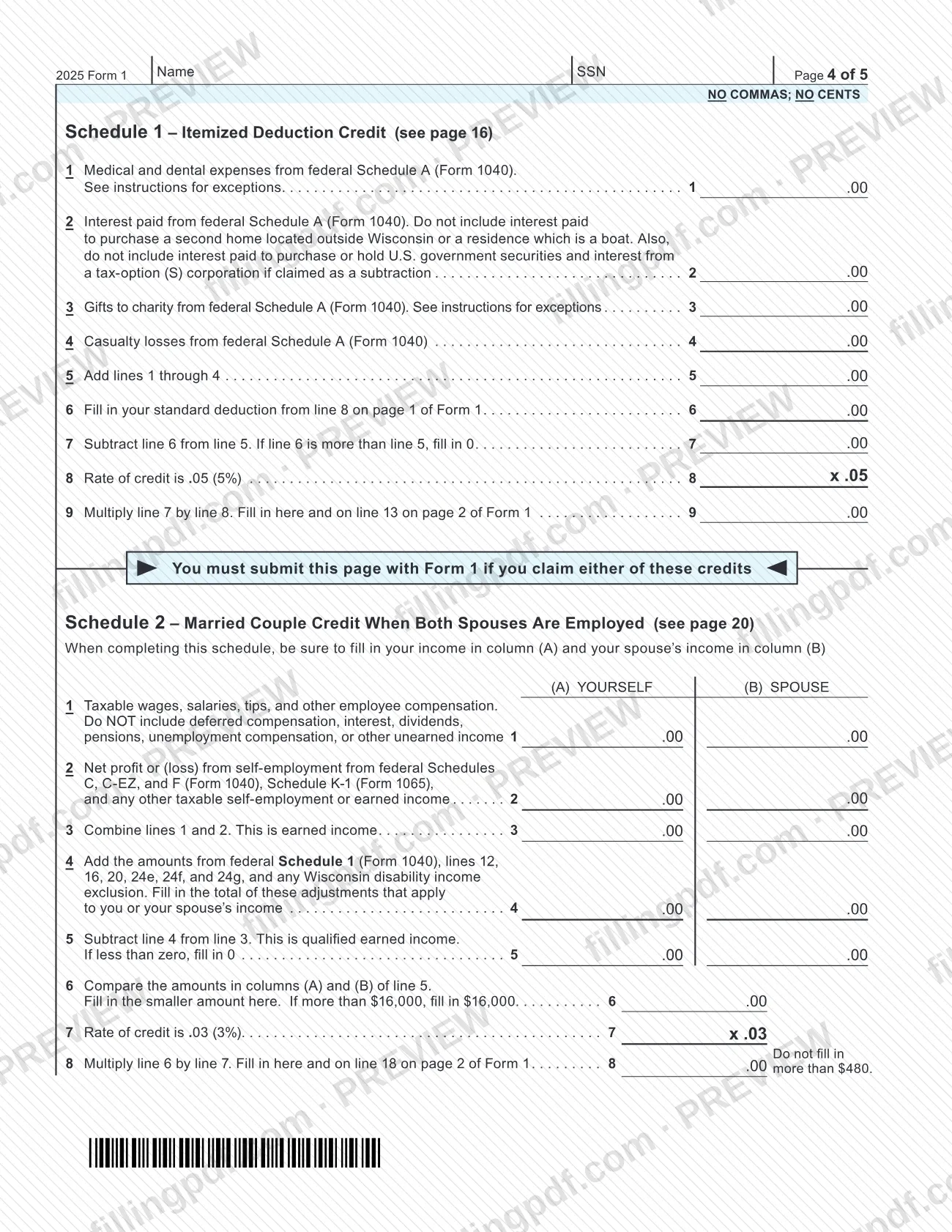
Form 1, Income Tax Return (2025), is the Wisconsin Department of Revenue's individual income tax form, and it is one of the state's 2025 individual income tax forms rather than a federal return. You use it to report your Wisconsin income, claim exemptions and credits, and figure your refund or the amount you owe. On this page you can fill out the form online on FillingPDF and download or print the completed PDF. The department publishes the original at revenue.wi.gov, and the completed return is mailed to the department.
Last updated
What is Form 1?
Form 1, Income Tax Return (2025), is the Wisconsin Department of Revenue's individual income tax form for tax year 2025, on which filers report Wisconsin income, apply deductions, exemptions and credits, and figure a refund or the amount owed.
The return starts from your federal adjusted gross income on Form 1040, line 11. It adds adjustments from Schedule I and additions from Schedule AD, subtracts the amounts on Schedule SB, and arrives at your Wisconsin income on line 7. Standard deduction, exemptions, tax, credits, payments and the refund or balance due follow on pages 1 to 3.
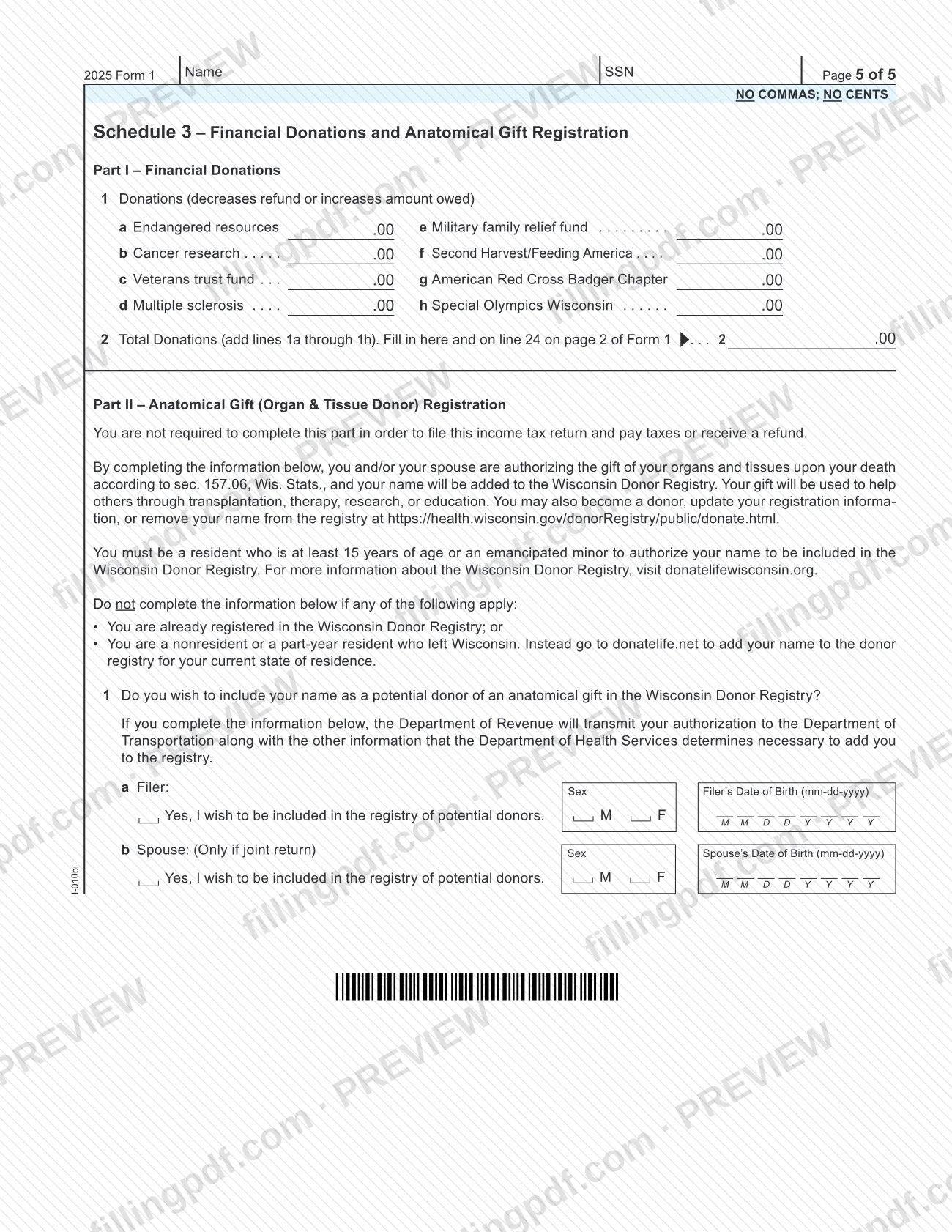
Page 4 holds two schedules that travel with the return: Schedule 1, Itemized Deduction Credit, and Schedule 2, Married Couple Credit When Both Spouses Are Employed. Page 5 holds Schedule 3, Financial Donations and Anatomical Gift Registration. The anatomical gift part is optional and is not required to file the return, pay tax or receive a refund.
The form covers the calendar year January 1 to December 31, 2025, or another tax year, and has a box to mark an amended return. The department's fill-in version does not file the form electronically.
Who needs to file Form 1?
Individuals who file a Wisconsin income tax return for tax year 2025 use Form 1. The form is built for these filing statuses, each marked in a box:
- Single
- Married filing joint return, where both spouses sign
- Married filing separate return, where you enter your spouse's SSN and full name
- Head of household, NOT married
- Head of household, married, where you also enter your spouse's SSN and full name
Filers who are amending an earlier return check the amended return box at the top of page 1 and complete lines 36 and 38.
Some situations call for extra pages. You attach Schedule 1 or Schedule 2 on page 4 if you claim either of those credits. You mark Form 804 filed with return under Special conditions if that form applies. A person whom someone else can claim as a dependent checks the box on line 8. The form itself does not state who is legally required to file, so check the department's instructions for Form 1 on that question.
When to file Form 1
Form 1 is completed for the tax year printed at the top of the return: January 1 to December 31, 2025, or another tax year, for which you enter the beginning and ending dates. The form prints no due date of its own, so check the department's Form 1 instructions for the filing deadline.
An amended return uses the same form. Check the box marked Check here if an amended return and complete line 36, amounts previously paid, and line 38, amounts previously refunded.
Returns for other years are on the department's Prior Year Income Tax Forms webpage.
Documents you need
- Copies of your federal income tax return and schedules, paper clipped to the return.
- Withholding statements, included with the return and assembled in the order listed on page 5 of the instructions.
- Schedule AD if you report additions to income on line 4, and Schedule SB if you report subtractions from income on line 6.
- Schedule WI-2441 if you claim the additional child and dependent care tax credit on line 14.
- Schedule OS if you claim net income tax paid to another state on line 20.
- Schedule CR if you claim credits on line 19 or line 35.
- Schedule H or H-EZ if you claim the homestead credit on line 33.
- Schedule FC (line 31a) or Schedule FC-A (line 31b) if you claim the farmland preservation credit.
- Page 4 of Form 1 (Schedule 1 or Schedule 2) if you claim the itemized deduction credit or the married couple credit; the form says you must submit that page with Form 1.
- Form 804 if you check the Form 804 filed with return box under Special conditions.
- Your payment, paper clipped to the front of the return, if you owe tax.
How to fill out Form 1
Enter tax year and amended box
At the top of page 1, check the box if this is an amended return. Use the calendar year 2025, or fill in the beginning and ending dates of another tax year.
Enter names, SSNs and address
Fill in your legal last name, legal first name, M.I. and Social Security number, plus the same details for your spouse on a joint return. Add your home address, city or post office, state and ZIP code. Fill in the tax district and school district number where requested.
Check your filing status
Check one box: Single, Married filing joint return, Married filing separate return, Head of household NOT married, or Head of household married. For married filing separate and head of household married, enter your spouse's SSN and full name where the form asks. Check Form 804 filed with return if it applies.
Report federal income and adjustments
Line 1: federal adjusted gross income from Form 1040, line 11. Line 2: adjustments from Schedule I, line 3. Line 3: add lines 1 and 2, and enter any Form W-2 wages included in line 3.
Add and subtract to find Wisconsin income
Line 4: total additions from Schedule AD, line 33. Line 5: add lines 3 and 4. Line 6: total subtractions from Schedule SB, line 50, as a positive number. Line 7: subtract line 6 from line 5.
Enter deduction and exemptions
Line 8: the standard deduction from the table on page 35. Check the box if someone else can claim you or your spouse as a dependent. Line 9: subtract line 8 from line 7. On line 10, fill in the exemptions allowed (10a), check 65 or older for you and your spouse (10b), and add them on 10c.
Figure taxable income and tax
Line 11: subtract line 10c from line 9, filling in 0 if line 10c is larger. This is taxable income. Line 12: find the tax in the table on page 38.
Claim credits and compute net tax
Enter any credits on lines 13 through 20, including the itemized deduction credit (Schedule 1), the married couple credit (Schedule 2), the school property tax credit and net income tax paid to another state. Add lines 13 through 20 on line 21, then subtract line 21 from line 12 on line 22 for your net tax.
Add other taxes, donations and penalties
Line 23: sales and use tax due on out-of-state purchases, or check the box to certify that none is due. Line 24: donations from Part I of Schedule 3. Lines 25 and 26: penalties. Line 27: add lines 22 through 26.
Enter payments and refundable credits
Lines 28 and 29: Wisconsin tax withheld and estimated tax payments. Lines 30 through 35: earned income credit, farmland preservation credit, repayment credit, homestead credit, eligible veterans and surviving spouses property tax credit, and refundable credits from Schedule CR. On an amended return only, complete lines 36 and 38. Add lines 28 through 36 on line 37 and subtract line 38 on line 39.
Find your refund or amount owed
If line 39 is larger than line 27, line 40 is the amount you overpaid. Split it between line 41 (refunded to you) and line 42 (applied to 2026 estimated tax). If line 39 is smaller, line 43 is the amount you underpaid; add underpayment interest on line 44 and enter the total on line 45, and enter interest on line 46.
Complete the schedules on pages 4 and 5
Schedule 1 (itemized deduction credit) and Schedule 2 (married couple credit) are on page 4, and you submit that page if you claim either credit. Schedule 3 on page 5 lists the financial donations whose total goes on line 24 and the optional anatomical gift registration.
Add third-party designee and sign
Mark Yes or No for the third party designee and complete the name, phone number and PIN if Yes. Sign and date, with your daytime phone. On a joint return both spouses sign. Enter a Wisconsin Identity Protection PIN only if the department issued one to you.
Review and download the completed PDF
Check each line, the schedules and your signatures. Download or print the completed PDF from FillingPDF, then assemble the package as described under How to submit.
How to submit Form 1
Form 1 is submitted by mail to the Wisconsin Department of Revenue. The department's fill-in version of the form will not electronically file your return.
Choose the address by what you are sending:
- Payment enclosed: Wisconsin Department of Revenue, PO Box 268, Madison WI 53790-0001
- Refund or no payment enclosed: Wisconsin Department of Revenue, PO Box 59, Madison WI 53785-0001
- Homestead credit claimed: Wisconsin Department of Revenue, PO Box 34, Madison WI 53786-0001
Do not staple the return. Paper clip your payment to the front of the return, and paper clip copies of your federal income tax return and schedules to it. Assemble pages 1 to 5 and your withholding statements in the order listed on page 5 of the instructions. Do not submit photocopies. If you have a PO Box as your home address, the form refers you to page 12 of the instructions.
FillingPDF lets you fill out and download the PDF; submission follows the channels above.
Common mistakes to avoid
- Stapling the return. The form says DO NOT STAPLE; paper clip your payment and federal copies instead.
- Entering commas or cents. The form says NO COMMAS; NO CENTS and asks for black ink.
- Submitting photocopies of the return; the form says Do Not Submit Photocopies.
- Mailing the return to the wrong PO box. The address depends on whether a payment is enclosed, a refund is expected or no payment is due, or the homestead credit is claimed.
- Filing a joint return with only one signature. The form says that if filing jointly, BOTH must sign.
- Entering a Wisconsin Identity Protection PIN you did not receive from the department; the form says to enter one only if you received it.
- Entering a negative number on line 6. The form says to enter subtractions from income as a positive number.
- Completing lines 36 and 38 on an original return; they are marked AMENDED RETURN ONLY.
- Leaving out Schedule AD, Schedule SB, Schedule OS or Schedule CR when the matching line has an amount. The form says to include each schedule.
Frequently asked questions
What is the Wisconsin income tax return, Form 1?
Form 1, Income Tax Return (2025), is the Wisconsin Department of Revenue's individual income tax form for tax year 2025. It starts from your federal adjusted gross income, adjusts it to Wisconsin income, applies deductions, exemptions and credits, and shows your refund or the amount you owe.
Can I file Wisconsin Form 1 electronically?
Not through the fill-in PDF. The department's page says its fill-in forms will not electronically file your form. The PDF is completed, printed and mailed to the Wisconsin Department of Revenue at the PO box that matches your return.
Where do I mail Wisconsin Form 1?
It depends on the return. With a payment enclosed, mail it to PO Box 268, Madison WI 53790-0001. For a refund or no payment, use PO Box 59, Madison WI 53785-0001. If you claim the homestead credit, use PO Box 34, Madison WI 53786-0001.
Should I staple my Wisconsin tax return?
No. The form says DO NOT STAPLE. Paper clip your payment to the front of the return, and paper clip copies of your federal income tax return and schedules to it. Assemble the pages and withholding statements in the order on page 5 of the instructions.
How do I amend a Wisconsin income tax return?
Use Form 1 again and check the box marked Check here if an amended return. Then complete line 36, amounts previously paid, and line 38, amounts previously refunded. Both lines are marked AMENDED RETURN ONLY, and the form refers you to page 31 of the instructions.
Do both spouses have to sign a joint Wisconsin return?
Yes. The signature block says that if you file jointly, BOTH spouses must sign. Each spouse also has a date line, a daytime phone line and a line for a Wisconsin Identity Protection PIN, which you fill in only if the department issued you one.
Can I fill out Wisconsin Form 1 online on FillingPDF?
Yes. You can fill out the PDF online on FillingPDF and download or print it. FillingPDF is an independent service and does not file the return; you mail it to the Wisconsin Department of Revenue yourself.
Is the organ donor section of Form 1 required?
No. Part II of Schedule 3 states that you are not required to complete it to file the return, pay taxes or receive a refund. Skip it if you are already in the Wisconsin Donor Registry or are a nonresident or part-year resident who left Wisconsin.
Ready to fill out Form 1?
Fill out Form 1 now