
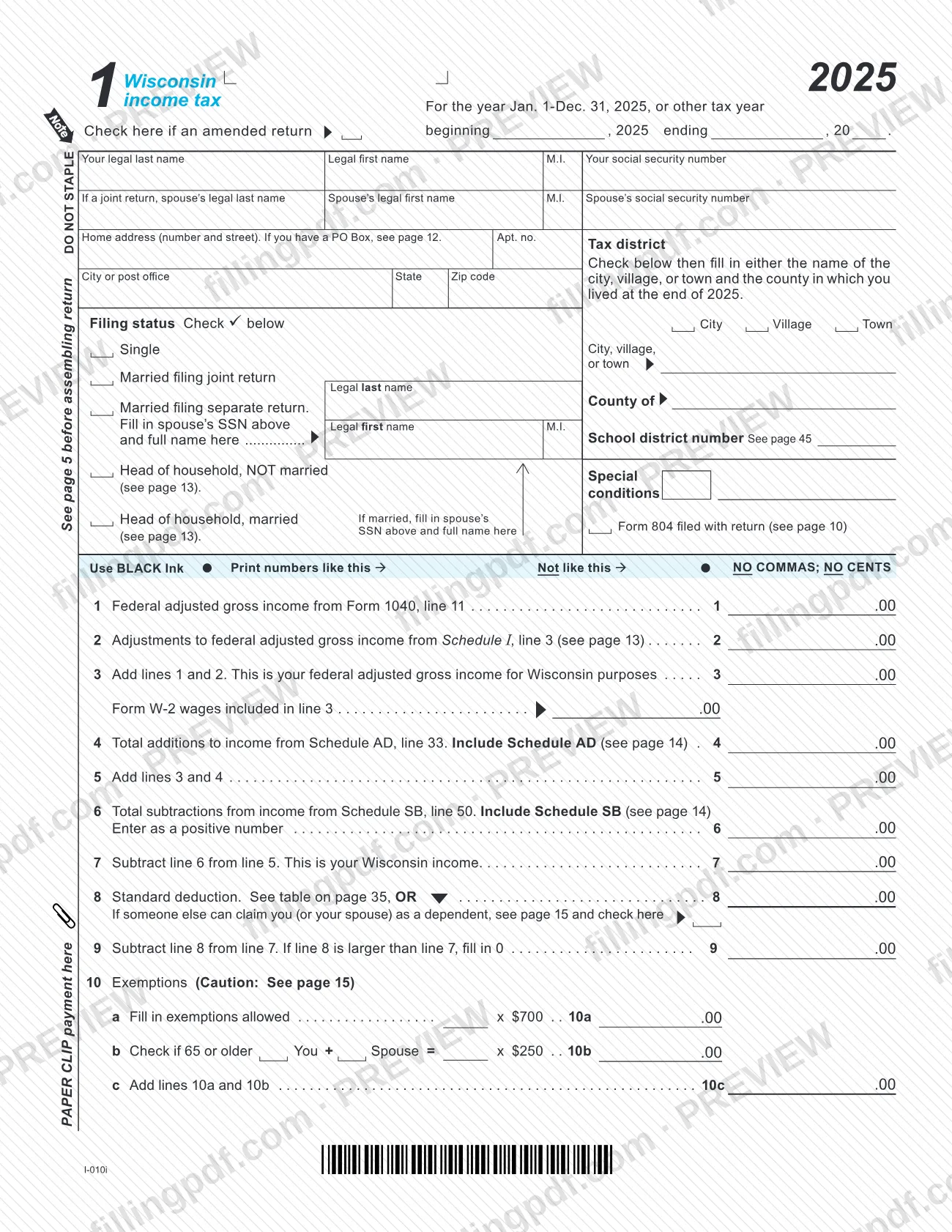
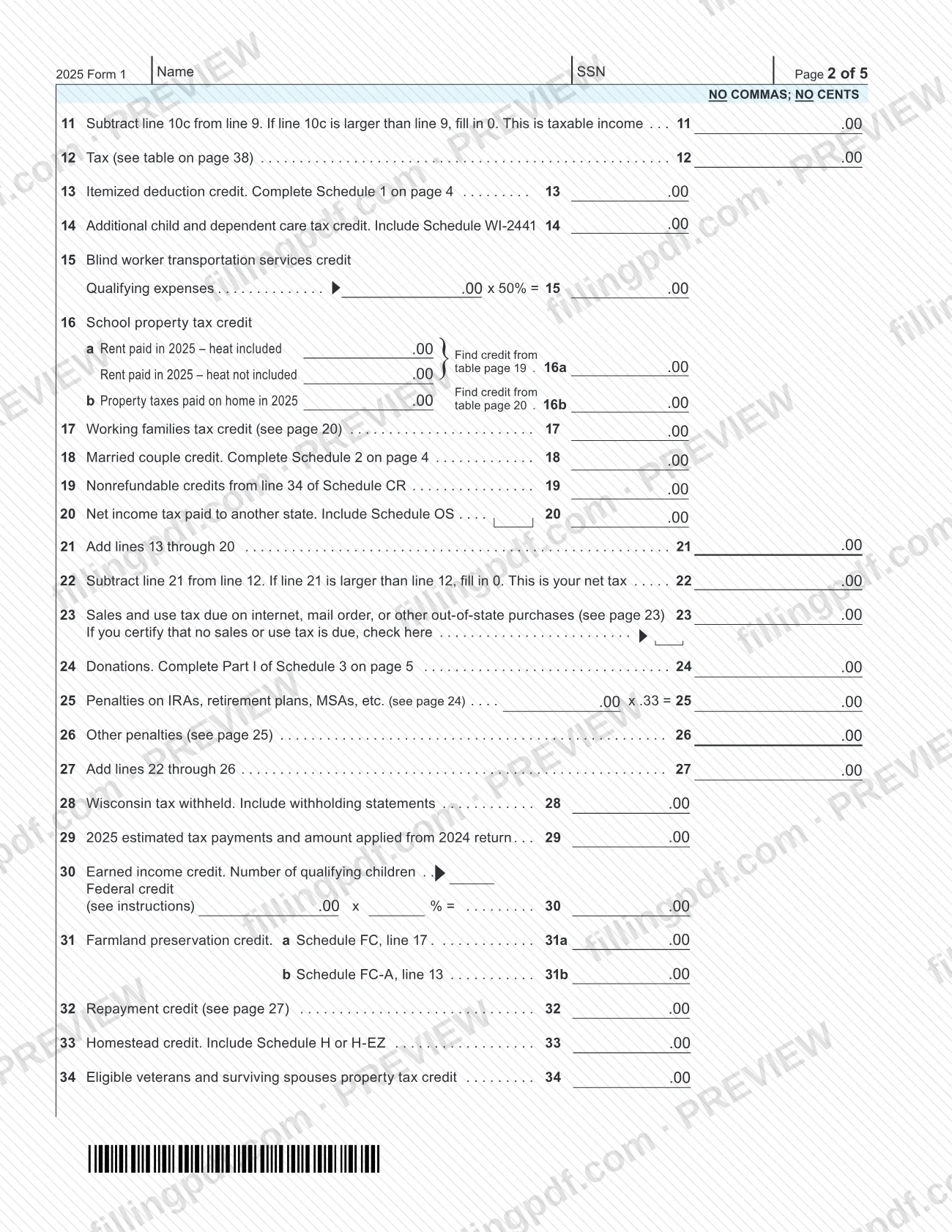
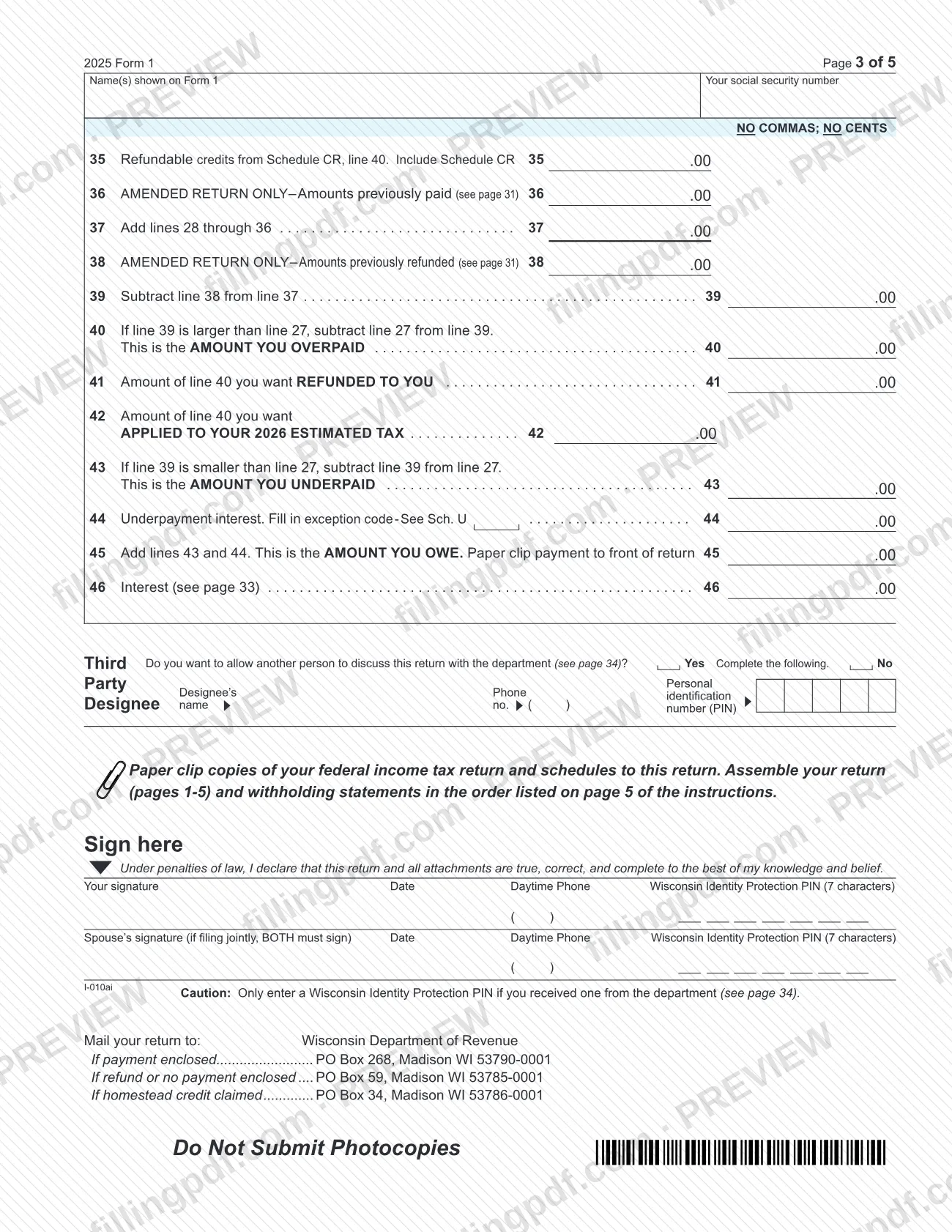
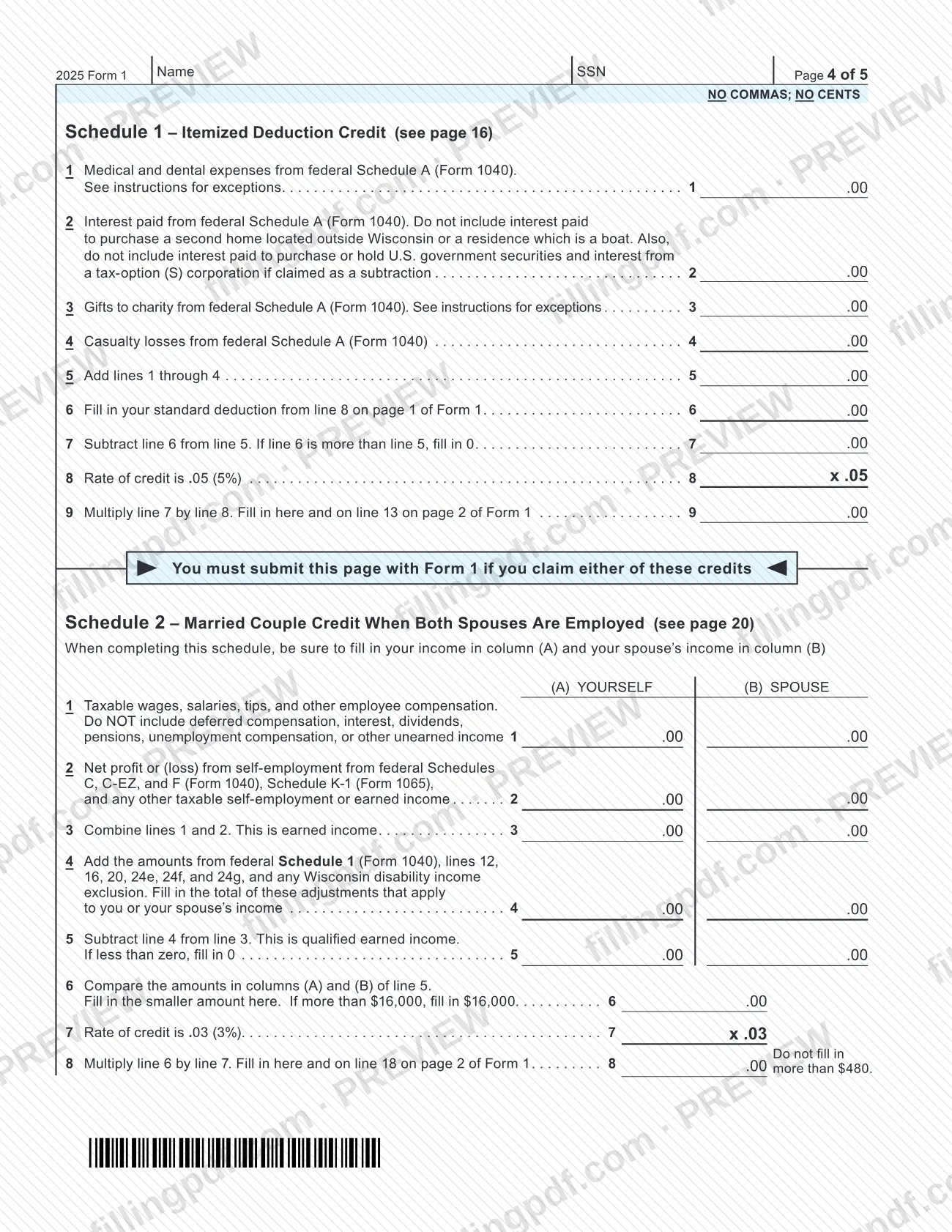
Form 1, Income Tax Return (2025), is the Wisconsin individual income tax return issued by the Wisconsin Department of Revenue for tax year 2025. If you are looking for an income tax return for Wisconsin, this is the form for people who were full-year Wisconsin residents; it starts from your federal adjusted gross income and ends in a refund or an amount owed. On this page you can fill out the form online on FillingPDF and download or print the completed PDF. The original PDF and the Form 1 instructions are published by the Department of Revenue at revenue.wi.gov.
Last updated
What is Form 1?
Form 1, Income Tax Return (2025) is the five-page Wisconsin Department of Revenue return on which a full-year Wisconsin resident reports income for calendar year 2025 (or a fiscal year beginning in 2025), figures Wisconsin tax and credits, and shows a refund or the amount owed.
The return starts from line 1, federal adjusted gross income from Form 1040 or 1040-SR, then applies Wisconsin adjustments (Schedule I), additions (Schedule AD) and subtractions (Schedule SB) to reach Wisconsin income. It then subtracts the standard deduction and exemptions, applies the tax table, credits, other taxes and penalties, and compares the result with Wisconsin tax withheld, estimated payments and refundable credits.
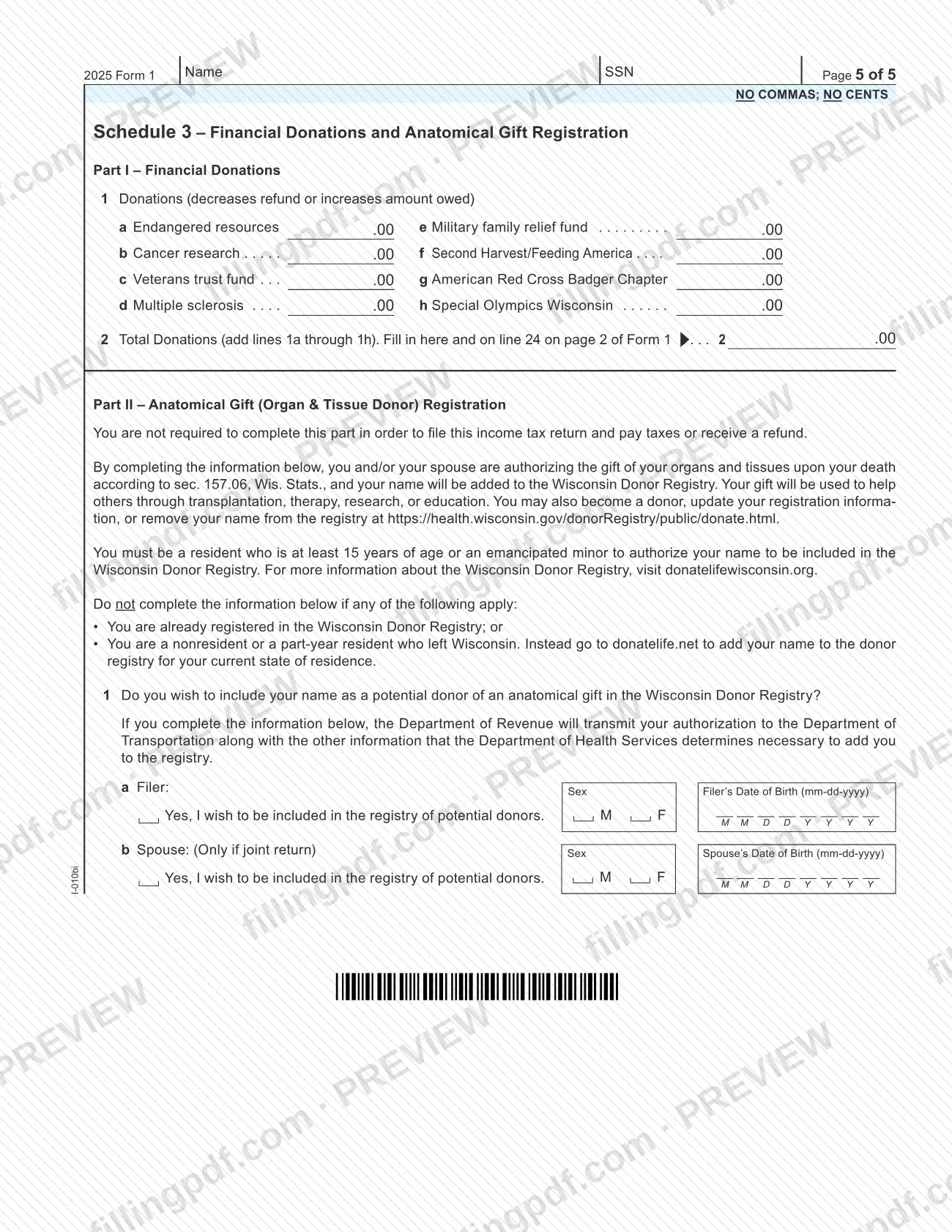
Pages 4 and 5 of the form carry three schedules: Schedule 1 (itemized deduction credit), Schedule 2 (married couple credit when both spouses are employed) and Schedule 3 (financial donations and the anatomical gift registration, which is optional).
Form 1 is for full-year residents. The Department's instructions send anyone who was domiciled in another state or country at any time during the year, including a joint filer whose spouse was, to Form 1NPR instead. The same form, with the amended return box checked, is also used to amend a return originally filed on Form 1. Wisconsin Form 1 is separate from the federal return: you complete the federal return first and attach a copy.
Who needs to file Form 1?
Full-year Wisconsin residents use Form 1. You must file if your gross income for 2025 reached the amount shown for your filing status and age in the "Who Must File" table of the Department's instructions (single, married filing joint, married filing separate or head of household; under 65 or 65 or older).
You may also have to file below those amounts if:
- you could be claimed as a dependent on someone else's return and your income exceeds the dependent limits in the instructions;
- you owe a penalty on an IRA, retirement plan, Coverdell education savings account (excess contribution), ABLE account, health savings account or Archer medical savings account.
Even if you do not have to file, the instructions say you should file to get a refund if Wisconsin income tax was withheld from your wages, you paid 2025 estimated taxes, or you claim the earned income credit or the veterans and surviving spouses property tax credit.
Do not use Form 1 if you were domiciled in another state or country at any time during the year, or if you file jointly and your spouse was; use Form 1NPR. Married couples filing jointly must both be full-year Wisconsin residents or elect Wisconsin residency.
For a taxpayer who died in 2025, file the same form that would have been used in life. A surviving heir may file when there is no estate to probate; if there is an estate, the personal representative files and signs, noting the relationship.
When to file Form 1
Your 2025 Form 1 is due April 15, 2026. Farmers and fishers who earn at least two-thirds of gross income from farming or fishing and did not make estimated tax payments must file and pay by March 2, 2026 to avoid underpayment interest.
If you cannot file on time, you may use any federal extension provision for Wisconsin; you do not ask the Department first. Include a copy of your federal extension application (for example, Form 4868) or a statement naming the federal provision when you file. An extension does not extend the time to pay: interest runs on tax unpaid after April 15, 2026, and the instructions say to pay with Form 1-ES.
An amended return can be filed only after the original. A refund claim generally must be filed within 4 years after the unextended due date (April 15, 2030 for 2025 calendar-year returns). If you amend your federal or another state's return, you generally must file an amended Wisconsin return within 180 days.
Refund questions: wait at least 12 weeks after filing before contacting the Department. A refund generally is not issued before March 1 unless the individual and employer have filed all required returns and forms.
Documents you need
- A complete copy of your federal return (Form 1040 or 1040-SR) and its supporting schedules and forms, attached to the paper return; if you are not required to file a federal return, a separate sheet listing sources and amounts of income and deductions.
- Readable copies of your withholding statements (Forms W-2, W-2G, 1099-G, 1099-R, 1099-MISC, 1099-NEC), to support the Wisconsin tax withheld on line 28.
- Wisconsin schedules your return needs, such as Schedule H or H-EZ (homestead credit), Schedule FC or FC-A (farmland preservation credit), Schedule CR, Schedule I, AD, SB or OS, each only if you claim the item.
- Schedule WI-2441, and Worksheet A if you have an amount on line 13 of that schedule, when you claim the additional child and dependent care tax credit on line 14.
- A copy of federal Schedule EIC, and federal Form 8867 if a paid preparer completed your federal return, when you claim the earned income credit on line 30.
- Schedule AR, Explanation of Amended Return, with the supporting forms and schedules for changed items, for an amended return; do not send a copy of the original return.
- A copy of your federal extension application (for example, Form 4868) or a statement naming the federal extension provision, if you file under an extension.
- A copy of the divorce decree, or the part dealing with the tax refund, if it apportions a tax liability or refund and you enter code 04; federal Form 8379 if you enter code 05 as an injured spouse.
- Form 804, Claim for Decedent's Wisconsin Income Tax Refund, when filing for a decedent to claim a refund; place it on top of Form 1.
- A copy of federal Form 5329 and/or 5330 if you were required to file one, in connection with the penalty on line 25.
- A copy of Schedule OS and the other states' returns when you claim credit for tax paid to another state on line 20.
How to fill out Form 1
Gather records and finish your federal return
Complete your federal return first, plus any Wisconsin schedules you need. If you do not have to file a federal return, list your income and deductions on a separate sheet to include with Form 1.
Enter the tax year and amended status
Check the amended return box only if you already filed an original. Use the beginning and ending dates only for a fiscal or short-period return, and then enter code 11 in the Special Conditions box.
Enter names, SSNs and address
Fill in your legal name and social security number, and your spouse's if filing jointly or married filing separately. Enter a PO Box only if your post office does not deliver to your home.
Choose your filing status and tax district
Check one filing status; if more than one applies, choose the one giving the lowest tax. Check City, Village or Town, then enter its name, your county and your school district number (page 45 of the instructions).
Enter any Special Conditions code
Use the codes listed in the instructions, such as 02, 03, 04, 05, 06, 07, 08, 11 or 18. If more than one applies, enter 99 and list the codes on the line next to the box.
Figure Wisconsin income, lines 1 to 7
Enter federal adjusted gross income on line 1 and the Schedule I, line 3 adjustment on line 2; line 3 is their sum. Add Schedule AD, line 33 on line 4, subtract Schedule SB, line 50 (entered as a positive number) on line 6, and finish line 7.
Enter standard deduction and exemptions
Line 8: find your standard deduction in the table on page 35, unless someone can claim you as a dependent or another exception applies. Complete lines 10a, 10b and 10c as the instructions explain, then figure taxable income on line 11.
Find your tax on line 12
Use the Tax Table with your line 11 amount and filing status. If line 11 is $100,000 or more, use the Tax Computation Worksheet on page 44.
Claim credits on lines 13 to 20
Complete Schedule 1 for line 13 and Schedule 2 for line 18 if you qualify, and enter the schedule amounts for lines 14, 19 and 20. Use the credit tables for line 16; leave line 17 blank. Add lines 13 through 20 on line 21 and figure net tax on line 22.
Report other taxes, penalties and donations
Enter sales and use tax on line 23 or check the box if none is due. Enter donations from Schedule 3, Part I on line 24, and any penalties on lines 25 and 26; line 27 totals lines 22 through 26.
Enter payments and refundable credits
Lines 28 and 29: Wisconsin tax withheld and estimated payments, which you can check at tap.revenue.wi.gov/eslookup. Complete lines 30 to 35 for credits you claim; lines 36 and 38 are for amended returns only. Add lines 28 through 36 on line 37.
Figure refund or amount owed
Lines 39 to 42 show an overpayment, the part refunded and the part applied to 2026 estimated tax. If you underpaid, complete lines 43 to 46, including the underpayment interest exception code on line 44.
Add designee, sign, review and download
Complete the Third Party Designee section if you want it, then sign and date; both spouses must sign a joint return. Enter a Wisconsin Identity Protection PIN only if the Department issued you one. Review every line, then download or print the completed PDF from FillingPDF and assemble the package described under How to submit.
How to submit Form 1
You can file Form 1 electronically or by mail.
- Electronic filing: the Department's free application WisTax, through My Tax Account, is open to filers who meet the requirements in the instructions (full-year resident, valid Wisconsin driver's license or ID, a return or homestead claim filed in the past five years, and limited additions, subtractions and credits). A tax professional or tax preparation software also works. Details are at revenue.wi.gov/Pages/WisTax/home.aspx.
- By mail: send the original return, not a photocopy, with all five pages, to the Wisconsin Department of Revenue at the P.O. box that fits your case: PO Box 268, Madison WI 53790-0001 (payment enclosed); PO Box 59, Madison WI 53785-0001 (refund or no payment enclosed); PO Box 34, Madison WI 53786-0001 (homestead credit claimed). Use enough postage and include your return address.
- Private delivery services: certain IRS-approved services count for timely filing. Deliver to Wisconsin Department of Revenue, 2135 Rimrock Rd., Madison WI 53713; they cannot deliver to P.O. boxes.
Do not staple. Paper clip a payment to the front of the form unless you pay by credit card or online. Keep a copy for your records. For refund status, call (608) 266-8100 (Madison), (414) 227-4907 (Milwaukee) or 1-866-WIS-RFND (1-866-947-7363), or use revenue.wi.gov. FillingPDF lets you fill out and download the PDF; submission follows the channels above.
Common mistakes to avoid
- Stapling the return; the instructions say stapling delays processing and any refund, so use a paper clip.
- Sending a photocopy or fewer than all five pages of Form 1; the Department wants the original return with all pages.
- Using commas, dollar signs or cents in entry fields, or writing a negative number in parentheses instead of with a minus sign (for example, -8300).
- Completing the submitted copy in pencil or red ink, or crossing out errors instead of erasing or starting over; use black ink.
- Entering an amount on line 17, Working families tax credit; the instructions say not to enter anything there.
- Filing a joint return with only one signature; both spouses must sign.
- Using Form 1 when you were domiciled in another state or country at any time in 2025, instead of Form 1NPR.
- Claiming federal tax, Social Security or Medicare tax, or tax withheld for other states on line 28; only Wisconsin withholding shown on statements counts.
- Leaving out the federal return copy, or mailing to the wrong P.O. box for a payment enclosed, refund or homestead credit return.
- Omitting Schedule AR from an amended return, or sending a copy of the original return with it.
Frequently asked questions
What is Wisconsin Form 1?
Form 1, Income Tax Return (2025), is the Wisconsin Department of Revenue's individual income tax return for full-year residents for tax year 2025. It starts from your federal adjusted gross income and produces your Wisconsin tax, credits, and a refund or amount owed.
Who has to file a Wisconsin income tax return on Form 1?
Full-year Wisconsin residents whose 2025 gross income reached the amount in the instructions' "Who Must File" table for their filing status and age, plus others in the listed cases, such as dependents above the stated limits or people owing an IRA or retirement plan penalty.
When is Form 1 due for 2025?
April 15, 2026. You may use any federal extension for Wisconsin by including a copy of the federal application or a statement with your return, but interest still runs on tax unpaid after April 15, 2026. Farmers and fishers without estimated payments have March 2, 2026.
Where do I mail Wisconsin Form 1?
To the Wisconsin Department of Revenue, in Madison: PO Box 268 (53790-0001) if you enclose payment, PO Box 59 (53785-0001) for a refund or no payment, or PO Box 34 (53786-0001) if you claim homestead credit. Private delivery services use 2135 Rimrock Rd., Madison WI 53713.
Can I file Form 1 electronically instead?
Yes. The Department's free WisTax application through My Tax Account is available to filers who meet its requirements, and tax professionals or tax software can e-file too. The instructions call e-filing the fastest way to get your federal and state refunds.
What do I attach to a paper Form 1?
A complete copy of your federal return, your withholding statements, any needed Wisconsin schedules, and payment if you owe unless you pay by card or online. Other items depend on your situation, such as Schedule AR for an amended return or an extension copy.
Should I use Form 1 or Form 1NPR?
Use Form 1 if you were a full-year Wisconsin resident. Use Form 1NPR if you were domiciled in another state or country at any time during the year, or if you file jointly and your spouse was. Both spouses on a joint Form 1 must be full-year residents or elect Wisconsin.
How do I amend a Wisconsin return filed on Form 1?
File a new Form 1 with the amended return box checked, and include Schedule AR to explain every change. File only after the original, generally within 4 years of the unextended due date to claim a refund. Do not send a copy of the original return.
Can I fill out Form 1 online on FillingPDF?
Yes. You can fill out the fillable PDF online on FillingPDF and download or print it. FillingPDF is an independent service and does not file the return with the Department of Revenue; you submit it electronically or by mail through the Department's channels.
Ready to fill out Form 1?
Fill out Form 1 now