
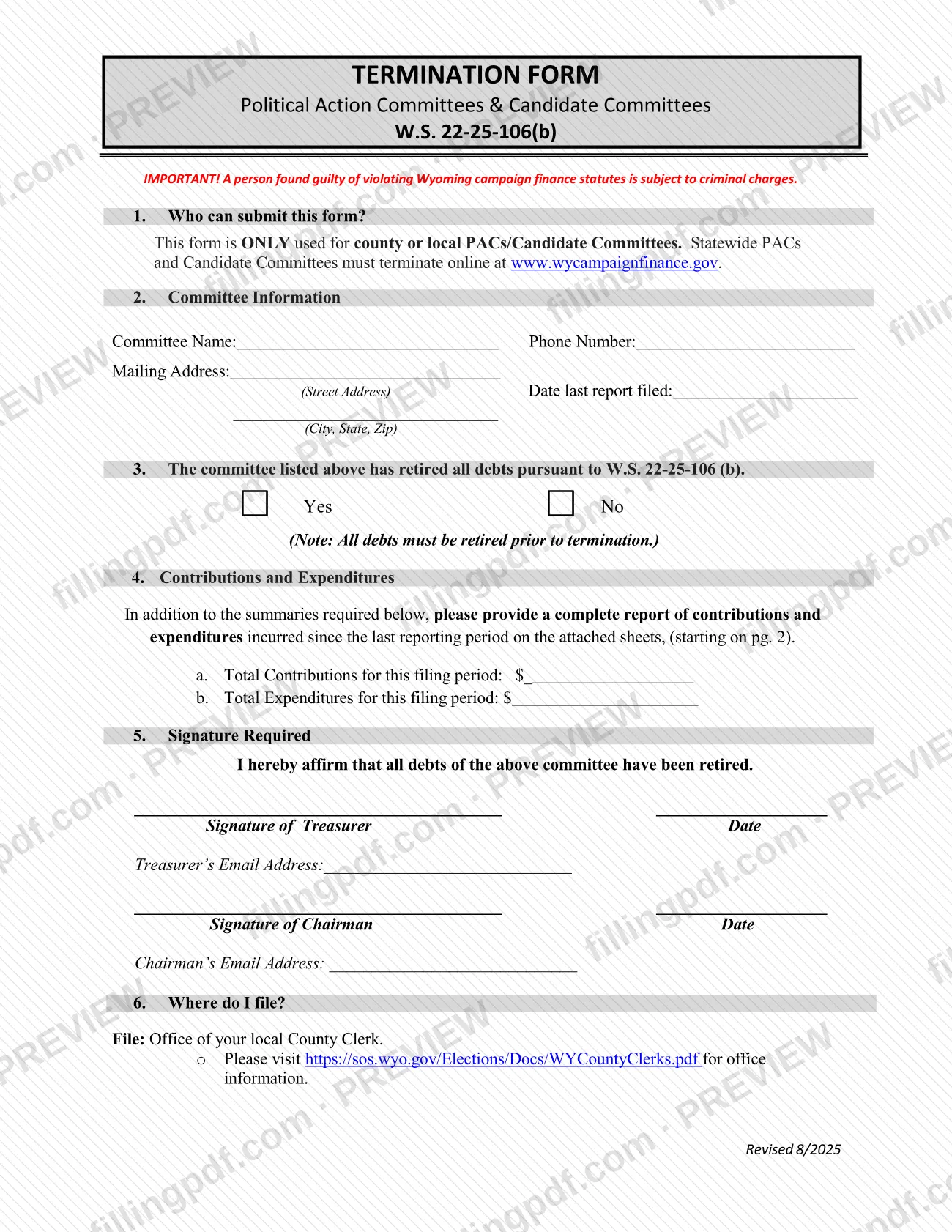
The Termination Form is the Wyoming Secretary of State form that county or local political action committees (PACs) and candidate committees use to terminate under W.S. 22-25-106(b). It confirms that the committee has retired all of its debts and summarizes the contributions and expenditures for the final filing period. Statewide committees do not use it: they terminate online at www.wycampaignfinance.gov. On FillingPDF you can fill out the form online and download or print the completed PDF; the form is filed with your local County Clerk.
Last updated
What is Termination Form – Wyoming?
The Termination Form for Political Action Committees & Candidate Committees is the Wyoming Secretary of State form, issued under W.S. 22-25-106(b), that a county or local PAC or candidate committee signs to affirm that all of its debts have been retired and that it is ending its activity.
The form has six numbered parts. It asks who may submit it, the committee's name, phone number, mailing address and the date its last report was filed, and whether the committee has retired all debts. It then asks for the total contributions and the total expenditures for the filing period, and for the signatures of the treasurer and the chairman, each with an email address. The last part says where to file.
The form states that all debts must be retired before termination. It also requires a complete report of contributions and expenditures incurred since the last reporting period, written on attached sheets that start on page 2.
This form is only for county or local committees. Statewide PACs and candidate committees do not use it and must terminate online at www.wycampaignfinance.gov. The form warns that a person found guilty of violating Wyoming campaign finance statutes is subject to criminal charges.
Who needs to file Termination Form – Wyoming?
County or local political action committees and county or local candidate committees in Wyoming use this form when they want to terminate. The form says it is ONLY used for those committees.
Do not use it if your committee is a statewide PAC or a statewide candidate committee. Those committees must terminate online at www.wycampaignfinance.gov.
Before you use the form, the committee must have retired all of its debts under W.S. 22-25-106(b); the form notes that all debts must be retired prior to termination. Two people sign: the committee's treasurer and its chairman, and each gives an email address.
When to file Termination Form – Wyoming
File the Termination Form once the committee has retired all of its debts, because the form states that all debts must be retired prior to termination. The treasurer and chairman sign it to affirm that this is the case.
No separate due date is printed on the form. It asks for the date the committee last filed a report and for a report of contributions and expenditures since the last reporting period, so have that information ready before you complete it. For any timing rule beyond the form, check W.S. 22-25-106 or ask your County Clerk.
Documents you need
- Report of contributions and expenditures incurred since the last reporting period, written on the attached sheets starting on page 2 of the form; it is required in addition to the totals in part 4.
How to fill out Termination Form – Wyoming
Confirm the committee is county or local
Part 1 says the form is ONLY for county or local PACs and candidate committees. A statewide committee must terminate online at www.wycampaignfinance.gov instead.
Enter the committee information
In part 2, write the committee name, phone number, mailing address (street address; city, state, ZIP) and the date the last report was filed.
Answer the debts question
In part 3, check Yes or No to whether the committee has retired all debts under W.S. 22-25-106(b). All debts must be retired before termination.
Enter total contributions and expenditures
In part 4, enter the total contributions on line a and the total expenditures on line b for this filing period.
Complete the attached report sheets
Provide a complete report of contributions and expenditures incurred since the last reporting period on the attached sheets starting on page 2.
Add the treasurer's signature
In part 5, the treasurer signs, dates the form and enters the treasurer's email address, affirming that all debts of the committee have been retired.
Add the chairman's signature
The chairman also signs, dates the form and enters the chairman's email address in part 5.
Review and download the completed PDF
Check every part and that the totals match the attached sheets. Download or print the completed PDF from FillingPDF and file it with your local County Clerk as described under How to submit.
How to submit Termination Form – Wyoming
A county or local committee files the Termination Form with the office of its local County Clerk. The form directs you to https://sos.wyo.gov/Elections/Docs/WYCountyClerks.pdf for County Clerk office information.
- County Clerk: file the signed form, with the attached sheets reporting contributions and expenditures since the last reporting period, at the office of your local County Clerk. The form prints no street address, so use the office list at the link above.
- Statewide committees: do not use this form. Terminate online at www.wycampaignfinance.gov.
The form names no other channel and mentions no fee. FillingPDF lets you fill out and download the PDF; submission follows the channels above.
Common mistakes to avoid
- Using this form for a statewide PAC or candidate committee; statewide committees must terminate online at www.wycampaignfinance.gov.
- Submitting the form before all debts are retired; the form says all debts must be retired prior to termination.
- Giving only the totals in part 4 and leaving out the complete report of contributions and expenditures on the attached sheets starting on page 2.
- Leaving out the date the last report was filed or the committee's mailing address in part 2.
- Sending the form without both the treasurer's and the chairman's signatures, dates and email addresses.
- Filing with the Secretary of State instead of the office of your local County Clerk, as part 6 directs.
Frequently asked questions
What is the Termination Form for Wyoming PACs and candidate committees?
The Termination Form is the Wyoming Secretary of State form that county or local PACs and candidate committees use to terminate under W.S. 22-25-106(b). The treasurer and chairman affirm that all debts have been retired and report contributions and expenditures for the final period.
Who can use the Wyoming Termination Form?
Only county or local PACs and candidate committees. The form says statewide PACs and candidate committees cannot use it; they must terminate online at www.wycampaignfinance.gov.
Where do I file the Termination Form?
File it with the office of your local County Clerk. The form refers you to https://sos.wyo.gov/Elections/Docs/WYCountyClerks.pdf for County Clerk office information. It names no other filing channel.
Can my committee terminate if it still has debts?
No. The form states that all debts must be retired prior to termination, and the treasurer and chairman sign an affirmation that all of the committee's debts have been retired.
What do I have to attach to the Termination Form?
A complete report of contributions and expenditures incurred since the last reporting period, written on the attached sheets starting on page 2. This is in addition to the contribution and expenditure totals you enter in part 4.
Who has to sign the Termination Form?
Both the committee's treasurer and its chairman sign and date the form, and each gives an email address. The signatures affirm that all debts of the committee have been retired.
Can I fill out the Termination Form online?
You can fill out the PDF online on FillingPDF and download or print it. FillingPDF is an independent service and does not file the form; you file it with your local County Clerk.
Ready to fill out Termination Form – Wyoming?
Fill out Termination Form – Wyoming now