
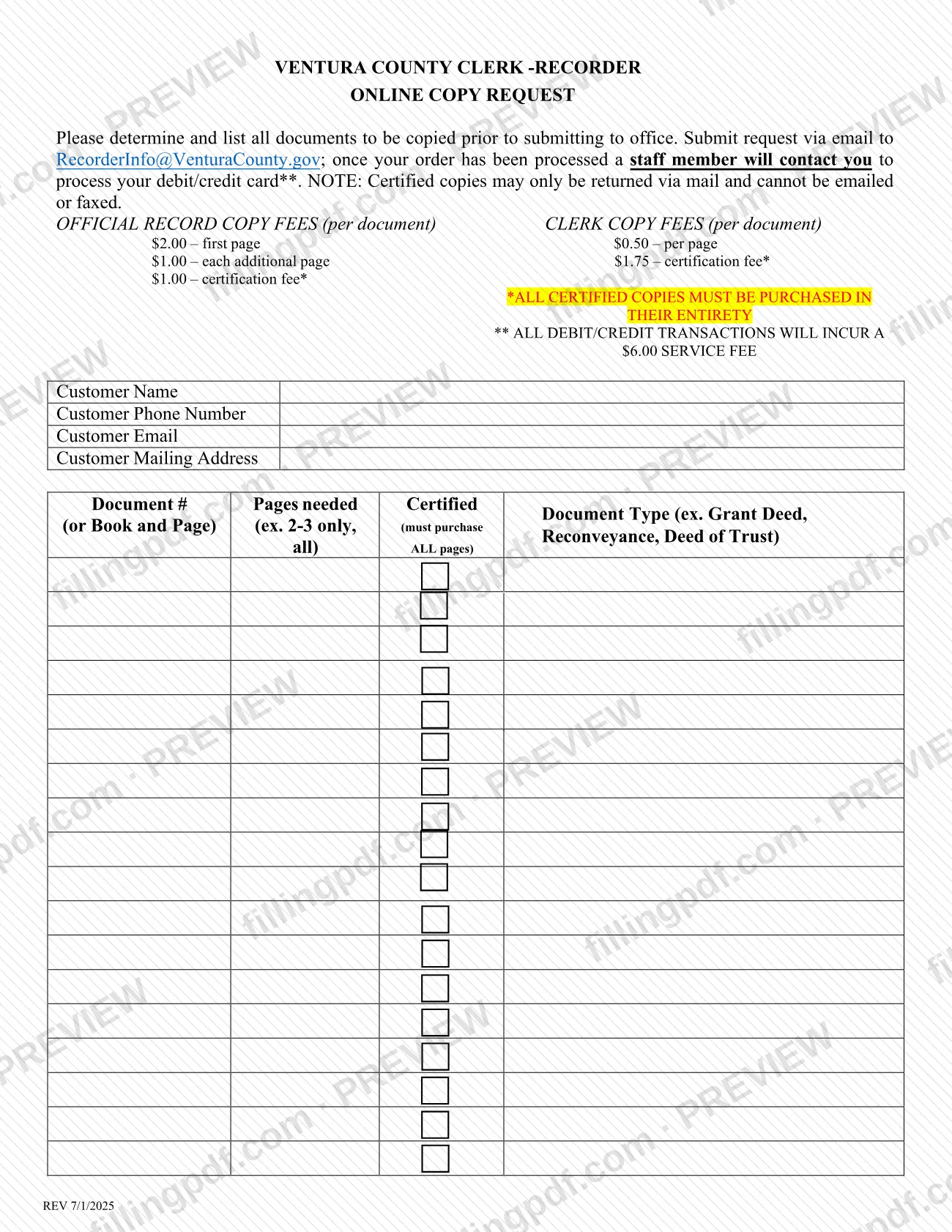
The Online Copy Request is the form the Ventura County Clerk-Recorder uses to take orders for copies of documents it holds, either official record copies or clerk copies, certified or not. You list each document by number or by book and page, say which pages you need and mark whether you want a certified copy. On this page you can fill out the form online on FillingPDF and download or print the completed PDF; the Clerk-Recorder publishes the original at its website and receives the request by email.
Last updated
What is Online Copy Request – Ventura County, CA?
Online Copy Request is the Ventura County Clerk-Recorder form for ordering copies of documents the office holds. You list every document you want, submit the request by email, and a staff member contacts you to take payment by debit or credit card.
The form separates two kinds of copies, each with its own fee schedule printed on it: Official Record Copy fees, charged per document, with a charge for the first page, a charge for each additional page and a certification fee; and Clerk Copy fees, charged per page plus a certification fee. The form states that all certified copies must be purchased in their entirety, so a certified copy always covers all pages of the document.
Each request lists the customer's name, phone number, email and mailing address, and then one row per document: the document type (for example Grant Deed, Reconveyance or Deed of Trust), the document number or the book and page, the pages needed, and whether the copy is certified. Certified copies are returned only by mail; they cannot be emailed or faxed.
The form is a request for copies. It does not record a document and does not conform copies: the Clerk-Recorder's forms page says Ventura County does not conform copies and returns any extra copies sent for that purpose. That page also links the list of fees for the County Clerk, Registrar of Voters, County Recorder and non-statutory fees.
Who needs to file Online Copy Request – Ventura County, CA?
Anyone who wants a copy of a document held by the Ventura County Clerk-Recorder can use the Online Copy Request, as the customer named at the top of the form. It suits people who know what they need: the form asks you to determine and list every document to be copied before you submit it.
Use it in these situations:
- You want an uncertified copy of a document, and may need only certain pages (for example "2-3 only").
- You want a certified copy, in which case you must buy all pages of the document.
- You want to order by email and pay by debit or credit card with a staff member, rather than visit the office.
Certified copies come back by mail only, so you need a mailing address the Clerk-Recorder can use. Do not use this form to ask the office to conform copies; the County does not conform them and returns any copies sent for that purpose. The form does not say who may order on behalf of another person.
When to file Online Copy Request – Ventura County, CA
Submit the Online Copy Request whenever you need copies of documents on file with the Ventura County Clerk-Recorder; the form prints no deadline or expiration date. Before you send it, identify and list all the documents you want copied, because the form asks you to do this first. After the office processes your order, a staff member contacts you to take your debit or credit card payment. Certified copies are then returned by mail, so allow for mailing time. The form gives no processing time.
How to fill out Online Copy Request – Ventura County, CA
Enter your customer name
In Customer Name, type the name of the person placing the order.
Add your phone number and email
Fill in Customer Phone Number and Customer Email. A staff member contacts you after the order is processed to take your card payment.
Enter your mailing address
Fill in Customer Mailing Address. Certified copies are returned only by mail, so use an address where you can receive them.
List the document type
In the Document Type column, write each document you want, such as Grant Deed, Reconveyance or Deed of Trust, one document per row.
Give the document number
In the Document # (or Book and Page) column, enter the recording number or the book and page for each document.
State the pages needed
In Pages needed, write which pages you want (for example 2-3 only) or all.
Mark certified copies
In the Certified column, mark each document you want certified. A certified copy must cover all pages, so write ALL pages for those rows.
Review and download the completed PDF
Check that every document is listed with its number and page choice. Download or print the completed PDF from FillingPDF and email it as described under How to submit.
How to submit Online Copy Request – Ventura County, CA
You submit the Online Copy Request by email to the Ventura County Clerk-Recorder; the form names no other channel.
- Email: send the completed form to [email protected]. The form has an Email Request Here button for this purpose.
- Payment: once your order has been processed, a staff member contacts you to process your debit or credit card. All debit and credit card transactions incur a service fee. Copy fees apply per document, and the amounts are printed on the form; the full fee list is linked from the County Recorder forms page.
- Delivery: certified copies are returned only by mail and cannot be emailed or faxed.
Do not send additional copies to be conformed; the County does not conform copies and returns them. FillingPDF lets you fill out and download the PDF; submission follows the channels above.
Common mistakes to avoid
- Submitting the request before determining and listing all the documents to be copied; the form asks for the full list up front.
- Ordering a certified copy of only some pages; the form says all certified copies must be purchased in their entirety, and the Certified column requires ALL pages.
- Expecting a certified copy by email or fax; certified copies are returned only by mail.
- Leaving the document number (or book and page) blank, so the office cannot identify the document; only the document type is not enough.
- Overlooking the service fee that applies to every debit or credit card transaction when you pay with a staff member.
- Sending extra copies to be conformed; Ventura County does not conform copies and returns them to you.
- Omitting a mailing address, which certified copies need because they can only be returned by mail.
Frequently asked questions
What is the Ventura County Online Copy Request used for?
It is the Ventura County Clerk-Recorder form for ordering copies of documents the office holds. You list each document, choose the pages and mark certified copies, then email the form; staff contact you to take your card payment.
Is the Online Copy Request a Ventura County property tax form?
No. It requests copies of documents held by the Clerk-Recorder, and it contains no tax calculation or tax payment. Its fees are copy, certification and card service fees. For tax matters, check the county's own pages for the right form.
Where do I send the Ventura County Online Copy Request?
Email the completed form to [email protected]. The form has an Email Request Here button and names no other submission channel. After processing, a staff member contacts you to take payment.
Can I get a certified copy by email?
No. The form states that certified copies may only be returned via mail and cannot be emailed or faxed. Provide a mailing address in the Customer Mailing Address field.
Can I order certified copies of only some pages?
No. The form says all certified copies must be purchased in their entirety, so for a certified copy you must purchase all pages of the document. Choose specific pages only for copies that are not certified.
How do I pay for the copies?
You pay by debit or credit card with a staff member, who contacts you after your order is processed. The form states a service fee applies to every card transaction; copy and certification fees are listed on the form.
Will the Clerk-Recorder conform copies for me?
No. The County Recorder forms page says Ventura County does not conform copies and asks you not to send additional copies for conforming, because they will be returned to you.
Can I fill out the Online Copy Request on FillingPDF?
Yes. You can fill out the PDF online on FillingPDF and download or print it. FillingPDF is an independent service and does not send the request or take payment; you email it to the Clerk-Recorder yourself.
Ready to fill out Online Copy Request – Ventura County, CA?
Fill out Online Copy Request – Ventura County, CA now